You don’t need a framework for everything, but if you use one, this article will help you use it in the most performant way.
When it comes to performance, you shouldn’t be stingy. There are millions of sites, and you are in close competition with every one of those Google search query results. Research shows that users will abandon sites that take longer than three seconds to load. Three seconds is a very short amount of time. While many sites nowadays load in less than one second, there is no one size fits all solution, and the first request can either be the do or die of your application.
Modern frontend applications are getting bigger and bigger. It is no wonder that the industry is getting more concerned with optimizations. Frameworks create unreasonable build sizes for applications that can either make or break your application. Every unnecessary bit of JavaScript code you bundle and serve will be more code the client has to load and process. The rule of thumb is the less, the better.
Data loading patterns are an essential part of your application as they will determine which parts of your application are directly usable by visitors. Don’t be the site that slows their entire site because they chose to load a 5MB image on the application’s homepage and understand the issue better. You need to know about the resource loading waterfall.
Loading Spinner Hell And The Resource Loading Waterfall
The resource loading waterfall is a cascade of files downloaded from the network server to the client to load your website from start to finish. It essentially describes the lifetime of each file you download to load your page from the network.
You can see this by opening your browser and looking in the Networking tab.
What do you see there? There are two essential components that you should see:
- The chart shows the timeline for each file requested and loaded. You can see which files go first and follow each consecutive request until a particular file takes a long time to load. You can inspect it and see whether or not you can optimize it.
- At the bottom of the page, you can check how many kB of resources your client consumes. It is important to note how much data the client needs to download. On your first try, you can use it as a benchmark for optimizations later.
No one likes a white blank screen, especially your users. Lagging resource loading waterfalls need a basic placeholder before you can start building the layout on the client side. Usually, you would use either a spinner or a skeleton loader. As the data loads one by one, the page will show a loader until all the components are ready.
While adding loaders as placeholders is an improvement, having it on too long can cause a “spinner hell.” Essentially, your app is stuck on loading, and while it is better than a blank HTML page, it could get annoying, and visitors would choose to exit your site.
But isn’t waiting for the data the point?
Well, yes, but you can load it faster.
Assuming you want to load a social media layout, you might add a loading spinner or a skeleton loader to ensure that you don’t load an incomplete site. The skeleton loader will usually wait for:
- The data from the backend API;
- The build layout according to the data.
You make an asynchronous call to an API, after which you get the URL for the asset on the CDN. Only then can you start building the layout on the client side. That’s a lot of work to show your face, name, status, and Instagram posts on the first try.
The Five Data-Loading Patterns You Need to Know
Developing software is becoming easier as frameworks like React, Vue, or Angular become the go-to solution for creating even the simplest applications. But using these bulky frameworks filled with a ton of magical functions you don’t even use isn’t what you should be going for.
You’re here to optimize. Remember, the less, the better.
But what if you can’t do less? How will you serve blazingly fast code, then? Well, it’s good that you’re about to learn five data-loading patterns that you can use to get your site to load quickly or, as you would say, blazingly fast.
Client Side Rendering, Server Side Rendering And JamstackModern JavaScript frameworks often use client-side rendering (CSR) to render webpages. The browser receives a JavaScript bundle and static HTML in a payload, then it will render the DOM and add the listeners and events triggers for reactiveness. When a CSR app is rendered inside the DOM, the page will be blocked until all components are rendered successfully. Rendering makes the app reactive. To run it, you have to make another API call to the server and retrieve any data you want to load.
Server-side rendering (SSR) is when an application serves plain HTML to the client. SSR can be divided into two types: SSR with hydration and SSR without hydration. SSR is an old technique used by older frameworks such as WordPress, Ruby on Rails, and ASP.NET. The main goal of SSR is to give the user a static HTML with the prerequisite data. Unlike CSR, SSR doesn’t need to make another API call to the backend because the server generates an HTML template and loads any data within it.
Newer solutions like Next.js uses hydration, where the static HTML will be hydrated on the client side using JavaScript. Think of it like instant coffee, the coffee powder is the HTML, and the water is the JavaScript. What happens when you mix instant coffee powder with water? You get — wait for it — coffee.
But what is a Jamstack? Jamstack is similar to SSR because the client retrieves plain HTML. But during SSR, the client retrieves the HTML from the server. However, Jamstack apps serve pre-generated HTML directly from the CDN. Because of this, Jamstack apps usually load faster, but it’s harder for developers to make dynamic content. Jamstack apps are good with pre-generating HTML for the client, but when you use heavy amounts of JavaScript on the client side, it becomes increasingly harder to justify using Jamstack compared to Client Side Rendering (CSR).
Both SSR and Jamstack have their own differences. What they do have in common is they don’t burden the client with rendering the entire page from scratch using JavaScript.
When you optimize your site’s SEO, using SSR and Jamstack are recommended because, compared to CSR, both return HTML files that search bots can easily traverse. But search bots can still traverse and compile JavaScript files for CSR. However, rendering every JavaScript file in a CSR app can be time-consuming and make your site’s SEO less effective.
SSR and Jamstack are very popular, and more projects are moving to SSR frameworks like Next.js and Nuxt.js compared to their vanilla CSR counterparts, React and Vue, mainly because SSR frameworks provide better flexibility when it comes to SEO. Next.js has a whole section talking about SEO optimizations on their framework.
An SSR application will generally have templating engines that inject the variables into an HTML when given to the client. For example, in Next.js, you can load a student list writing:
Jamstack is popular with documentation sites that usually compile code to HTML files and host them on the CDN. Jamstack files usually use Markdown before being compiled to HTML, for example:
Active Memory Caching
When you want to get data that you already had quickly, you need to do caching — caching stores data that a user recently retrieved. You can implement caching in two ways: using a super-fast key-value store like Redis to save data keys and values for you and using a simple browser cache to store your data locally.
Caching partially stores your data and is not used as permanent storage. Using the cache as permanent storage is an anti-pattern. Caching is highly recommended for production applications; new applications will start using caches as they gradually mature.
But when should you choose between a Redis cache (server cache) and a browser cache (local cache)? Both can be used simultaneously but will ultimately serve a different purpose.
Server caches help lower the latency between a Frontend and Backend; since key-value databases are faster than traditional relational SQL databases, it will significantly increase an API’s response time. However, a local cache helps improve app state management, enabling the app to persist state after a page refresh, and helps future visits.
In summary, if you want to increase the performance of your application, you can use server caches to speed up your APIs, but if you want to persist your app state, you should use the local storage cache. While local caches might not seem helpful at all, it does help reduce the number of API calls to the backend by persisting state that doesn’t frequently change. However, local caches will be better when combined with live data.
Data Event Sourcing
You can make a real-time live connection between the Front-end and Backend via WebSockets. WebSockets are a two-way communication mechanism that relies on events.
In a common WebSocket architecture, the Front-end application will connect to a WebSocket API, an event bus, or a database. Most WebSocket architectures utilize it as a substitute to REST, especially in use cases like chat applications; polling your Backend service every few seconds becomes a very inefficient solution. WebSockets allow you to receive updates from the other end without needing to create a new request via the two-way connection.
WebSockets make a tiny, keep-alive connection compared to normal HTTP requests. Combining WebSockets with local browser cache creates a real-time application. You can update the app’s state based on the events received from the WebSocket. However, some caveats regarding performance, scalability, and potential data conflicts exist.
A pure WebSocket implementation still has a lot of faults. Using WebSockets instead of regular HTTP calls changes how your entire application behaves. Just a slight connection issue can affect your overall UX. For example, a WebSocket cannot have real-time performance when it needs to query the database every time there is a get request. There are bottlenecks in the backend that needs to be optimized for better real-time results to make WebSockets feasible and a more reasonable answer.
There needs to be an underlying architectural pattern that can support it. Event sourcing is a popular data pattern you can use to create reliable real-time applications. While it doesn’t guarantee overall app performance, it will give your customers better UX by having a real-time UI.
Modern JavaScript has WebSocket providers that you can use. The WebSocket
class opens a connection to a remote server and enables you to listen
when the WebSocket opens a connection, closes a connection, returns an
error, or returns an event:
Do you want to react to server events? Add an addEventListener function and insert a callback that it will use:
Want to send a message? WebSockets got you. Use the send function to get a message out to the server. It’s as easy as printing “Hello World.” The examples are from the MDN Docs.
Prefetching And Lazy Loading
Prefetching and lazy loading has become common knowledge among frontend developers. Efficient use of a client’s resources and bandwidth can greatly improve your application’s performance.
Prefetching
Prefetching gives developers more granular control over the client’s idle bandwidth, loading resources, and pages that the client might need next. When a website has a prefetch link, the browser will silently download the content and store it within its cache. Prefetched links can have significantly faster loading times when the user clicks them.
You specify prefetch URLs within the link HTML element, more specifically, the rel attribute. Prefetching has a few pros and cons:
- Pros: Prefetching waits until the browser’s network is idle and is no longer in use and will stop when you trigger usage by clicking a link or triggering a lazy loading function.
- Pros: Prefetching caches data within the browser, making page transitions faster when redirecting to a link.
- Cons: It can be used to download trackers, compromising user privacy.
Lazy Loading #
Lazy loading is a common data-loading pattern that makes the client load à la carte results, not loading everything until the client needs it. Lazy loading will make the client fetch the latter parts of a website after they’ve scrolled into view.
Lazy loading makes your site load faster by allowing the browser to concentrate on more important, on-screen resources. You won’t need to load all the images/text on a given site when you can’t see it. But lazy loading can only help you delay downloading resources and doesn’t make your resources smaller and more cost-efficient.
However, if you are looking to make a more cost-efficient solution that is similar to lazy loading, try looking for Resumability.
Resumability
Many developers have never heard of the Resumability concept before. Resumability renders JavaScript partially in the server, the final state of the render will be serialized and sent to the client with the corresponding HTML payload. Then the client will finish the rendering, saving time and resources on the client side. Essentially, Resumability uses the server to do the heavy lifting and then gives the client a minimal amount of JavaScript to execute via serialization.
The main idea of Resumability is to serialize the application state from the server to the client. Instead of loading everything (HTML, JS) and hydrating them on the Front-end, Resumability serializes the JavaScript parsing in stages and sends them to the client in HTML.
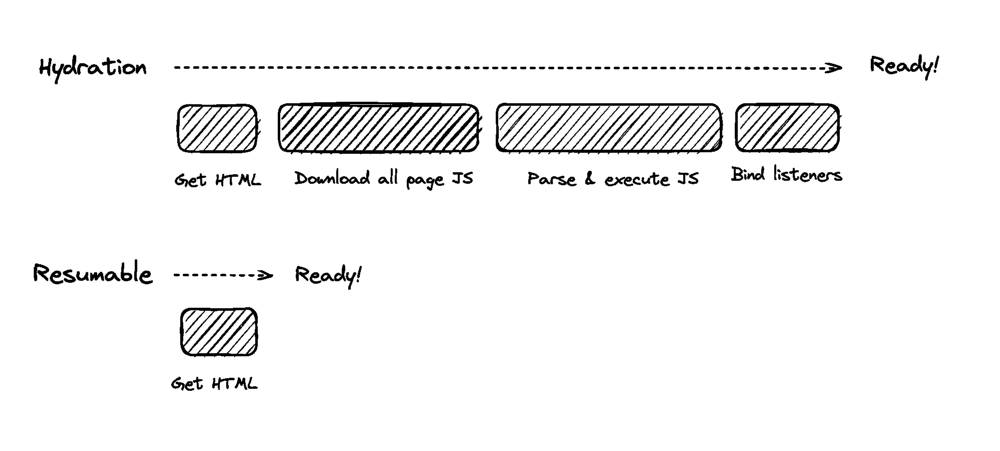
Page startups will be instantaneous because the client doesn’t have to reload anything and can deserialize the state injected into the HTML. Resumability is a very foreign concept and is not common in many projects. It was coined by the founder of Qwik, Misko Hevery.
Qwik is a JavaScript framework that relies on Resumability under the hood. Unlike other frameworks, Qwik is built from the ground up with Resumability in mind. Frameworks like React and Vue can never utilize Resumability without sacrificing backward compatibility. It is because the lazy loading component of Qwik uses asynchronous lazy loading compared to the synchronous nature of most JavaScript frameworks.
The goal of Qwik is to load as minimal JavaScript as possible. Lazy loading JavaScript is hard and, in some instances, impossible. The less you need it, the better. Resumability allows developers to have fine-grained lazy loading and decreased memory usage for mobile applications optimizing your site for the mobile web.
Using Qwik is similar in some ways to React, specifically, its syntax. Here is a code snippet example of how Qwik works in code. The root of the application will be in the form of HTML:
The root has a dependency on App. It will be the lazy loaded Qwik component:
Qwik and React have similarities at the component level. But it differentiates when you get into the server side of things.
The code snippet above shows you how the server-side of Qwik serializes the root component using the renderToString method. The client will then only need to parse pure HTML and deserialize the JavaScript state without needing to reload them.
Summary #
Application performance is essential for the client. The more resources you have to load on startup, the more time your app will need to bootstrap. Loading times expectations are getting lower and lower. The less time you need to load a site, the better.
But if you are working on large enterprise applications, how you can optimize your apps are not obvious. Data-loading patterns are one way you can optimize your applications’ speed. In this article, you reviewed five data-loading patterns that may be of use:
- Server Side Rendering (SSR) and Jamstack;
- Active Memory Caching;
- Data Event Sourcing;
- Prefetching and Lazy Loading;
- Resumability.
All five of which are useful in their own circumstances.
SSR and Jamstack are generally good choices for applications that require less client-side state management. With the advent of modern JavaScript frameworks like React, more people have tried Client Side Rendering (CSR), and it seems that the community has come full circle back to SSR. SSR is the technique used by old MVC web frameworks to use template engines to generate HTML based on the data on the backend. Jamstack is an even older depiction of the original web, where everything was using just HTML.
Active memory caching helps users load data from APIs faster. Active memory caching solves the important issues around data loading by either caching the results on a remote cache server (Redis) or your local browser cache. Another data-loading pattern even uses it, prefetching.
Next, event sourcing is an architectural pattern that supplements the real-time event-based WebSocket APIs. Plain old WebSockets are not enough to become completely efficient because even though the WebSocket itself is real-time, the recurring API call to the database can cause a bottleneck. Event sourcing removes this problem by creating a separate database for retrieving data.
Prefetching and lazy loading are the easiest solutions to implement. The goal of prefetching is to load data silently during network idle times. Clients will save the prefetched link inside their browser caches, making it instantaneous on contact.
Lazy loading reduces the number of resources you need to load on the first click. You only need the resources that you see directly after the page loads. However, Resumability takes lazy loading to the extreme. Resumability is a method of lazy loading JavaScript components by rendering them in the server and then serializing the state to continue the render on the client via HTML.
Where To Go From Here? #
Learning to optimize your Frontend applications is an ongoing process; you need to be proactive about what you implement daily. Data-loading patterns are only one of a few ways you can use to improve your application performance.
But it is best to consider the common pitfalls before making any drastic changes to how your application is structured and consumes and loads data.
If you’re interested in exploring the references, you can check out:
- Qwik overview
- “Frontend Optimization: 8 Tips to Improve Web Performance”, inVerita
- “Event Sourcing Pattern for Real-Time Frontends”, Pasan Missaka
- “12 Front End Performance Patterns You Need to Know”, Chris Staudinger
- “23 Web Performance Mistakes to Avoid in 2022”, Kashish Kumawat
I hope you found this article helpful. Please join the forum discussion below if you have any questions or comments.