Payment of ₹ requested by HONEY VIG. Click the link to pay securely via Razorpay: Make 5000 payment Payment of ₹ requested by HONEY VIG. Click the link to pay securely via Razorpay: Make 5000 payment ⭐ If you would like to buy me a coffee, well thank you very much that is mega kind! : https://www.buymeacoffee.com/honeyvig
Hire a web Developer and Designer to upgrade and boost your online presence with cutting edge Technologies

Friday, October 15, 2010

25 Mind-Blowing Gadgets


Few weeks ago we’ve presented a number of innovative gadgets, devices, designs and concepts. Unless explicitly specified, none of them has been officially released or produced yet, and none of them is currently available for end-users. But what about existing products? What about innovative designs which are already available in stores and can be bought straight away?

Few weeks ago we’ve presented a number of innovative gadgets, devices, designs and concepts. Unless explicitly specified, none of them has been officially released or produced yet, and none of them is currently available for end-users. But what about existing products? What about innovative designs which are already available in stores and can be bought straight away?

As part of our Monday Inspiration series we present 25 mind-blowing gadgets and devices which are already available today. Among them, you’ll find loudspeakers, turntables, TV sets, furniture, laptop sleeves and extra accessories. Please notice: most of them aren’t cheap at all, and many of them cost over $10,000. 


BeoLab 4 PC 

BeoLab 4 PC is a no-fuss version of the popular BeoLab 4, optimised to bring outstanding stereo sound to the desktop. All it takes is a mini-jack cable from your computer, portable music player or any other source with a headphone jack. Price: $990.
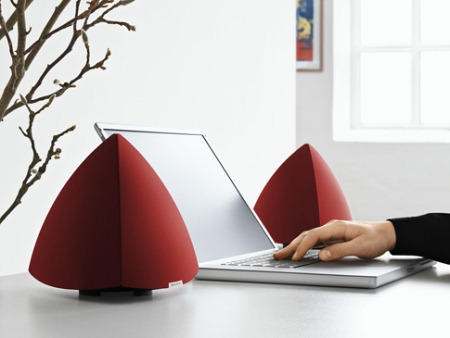
 

Beo Lab 4

Bowers & Wilkins Zeppelin iPod Speakers

Zeppelin is an integrated iPod speaker system from Bowers & Wilkins. Zeppelin fills a room with stereo sound and deliver a pretty unique musical performance. Simple yet effective design. Detailed CNET review. Price: $599.
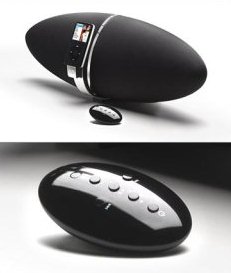
Zeppelin
Zeppelin

Retro Sixties Radio 

A sexy green “Sixties” AM/FM-radio, with a nostalgic style, power LED indicator and adaptor jack (3 x AA batteries not included) which is also available in pink.
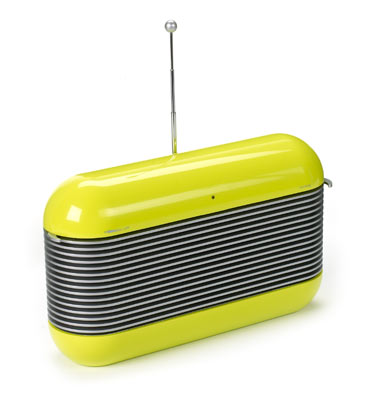
Screenshot

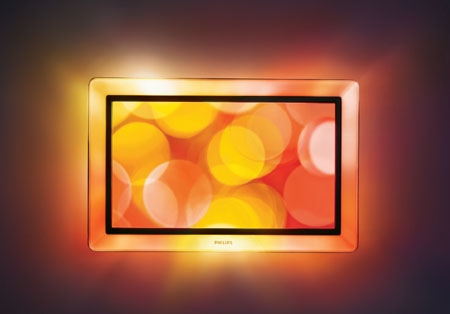
Philips Aurea

Philips Aurea is a 42” Flat TV with Pixel HD and Ambilight Spectra. The sensorial halo of Ambilight Spectra creates a new dimension to the viewing experience. The Active Frame extends the light and atmosphere of the image outside the screen in a kaleidoscope of colours. Philips promises: “you feel fully immersed in the images, viewing becomes a more intensive experience than you could ever imagine.” Price: £3000.
Screenshot

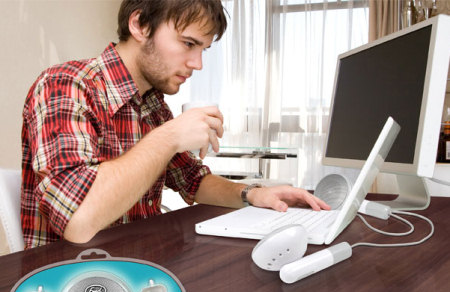
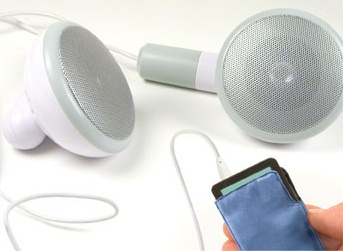
Sound Speaker System 500 XL

500 XL is a pretty unusual loud speaker system. “Sometimes bigger IS really better, especially when it comes to sound. That’s why we took a puny pair of earbuds, put them in Fred’s highly technical Way Big machine, and created 500XL - it’s 500 times the size of the original! How great will these look on your desktop alongside your mp3 player or PC?” Price: unknown.
Screenshot
Screenshot

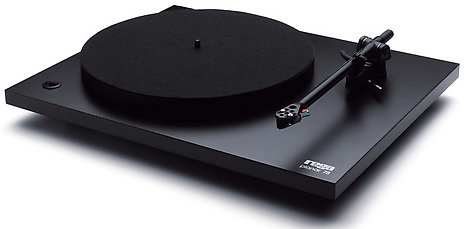
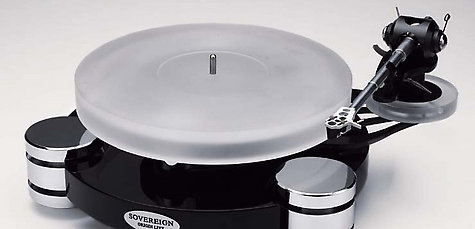
Turntable Rega Planar 78 

Known for its tonearms, Rega makes a fine range of turntables including the Planar 78 — a mono turntable that only plays old-old-old-school 78s. The highest care has gone into the design, which uses Rega’s ultra-low-vibration state-of-the-art rigid-mounted motor assembly. The platter is metallised, giving good mass and accuracy. Price: £224 - £3,850 excluding arm.
Screenshot
Screenshot

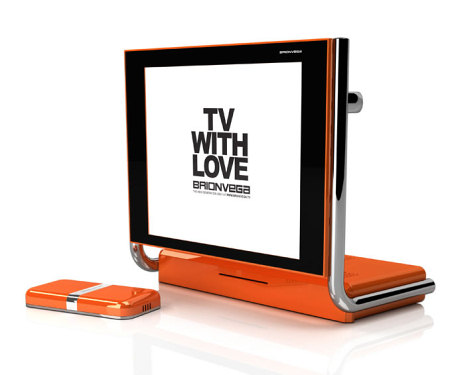
Alpha TV Love 

Alpha is a TV set composed of two slender elements joint by a frame in chrome tube within which the special wirings are pulsing. A choice which comes from the rejection of the assumed bidimensionality of common LCD screens, always supported by a cumbersome pedestal, and which focuses on a new layout with the capability of containing the space required by electronics and DVD player. Price: unknown.
Screenshot

Lunch Bags 

The same oilcloth that covers your kitchen table can transport your children’s lunches — or your own — in leak-free style. These reusable lunch bags will cut back on waste since they can simply be washed with a damp sponge (oilcloth is not washing-machine safe). Use a single pattern for the whole bag, or cut out complementary patterns or solid colors for side panels. You can attach small Velcro tabs to hold the bags closed, or clip the tops with colorful wooden clothespins.

Screenshot

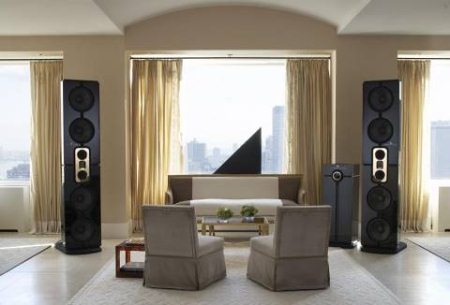
KEF Muon Loudspeaker System 

KEF Muon loudspeaker is fabricated from super-formed aluminium, which uses a similar moulding process to vacuum forming. It uses malleable sheets of heated alluminium to achieve otherwise impossible shapes. Price: $150,000.

Beo Lab 4
Beo Lab 4

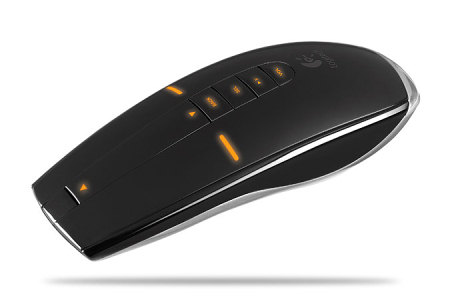
MX Air: Rechargeable Air Mouse 

MX Air: on your desk, advanced laser technology is supposed to provide you with precise tracking and instant response. In the air, innovative Freespace motion sensing transforms hand motions into responsive cursor controls.
Logitech Mouse

Deco Lounger 

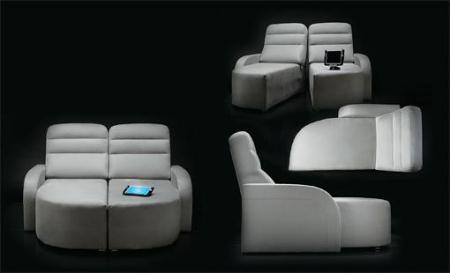
Fortress Seating’s stylish Deco Lounger loveseat splits in two. Supersized at 72 inches wide and 60 inches deep, the Deco Lounger can be pushed together to accommodate one loving couple or one sprawling TV viewer—or split into two parts for those times when you want a little more personal space.
Screenshot

Proclaim Speaker DMT-100 

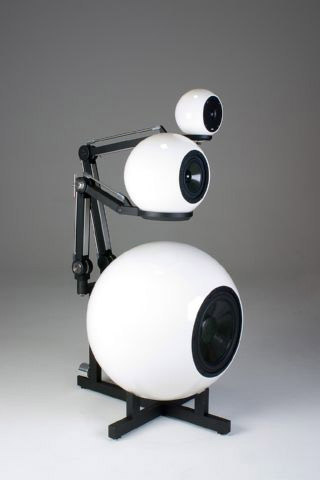
Fortress Seating’s stylish Proclaim Speaker DMT-100 has pivoting arms which allow the DMT-100’s midrange and tweeter enclosures to be moved up, down, forward, backward, and side-to-side. They’ve done away with rectilinear speaker cabinets altogether. Price: $25,999.
Screenshot
Credits: Techgadgets.in, Hemagazine]

Nokia Prism 

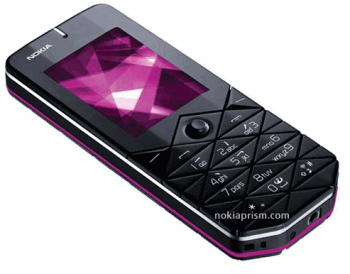
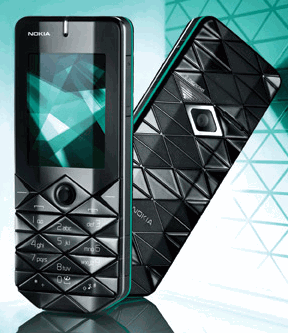
Nokia Prism is a mobile phone adorned with bold geometric patterns, beveled surfaces and vibrant color accents. Price: $250.
Nokia
Nokia

On/Off Mug

“At plain sight On/Off Mug is a standard black mug as they come a dime a dozen and in big white letters it say OFF. Nothing fancy, but once you add the hot beverage of your choice, the mug changes color and is turning white and in big black letters it states: ON. Dishwasher safe of course!” Price: $25.

Screenshot

Drink Selector Mug 

Drink Selector Mug allows you to define your preferences just on your mug. Twist rings to reveal your choice of drink and your milk and sugar preferences. Among available options: Decaf, Mocha, Tea, Latte, Cappuccino, Herb Tea, Hot Chocolate, plus various further options to get your morning drink just the way you like it. Price: $23.99.

Screenshot

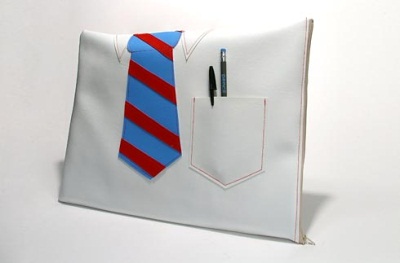
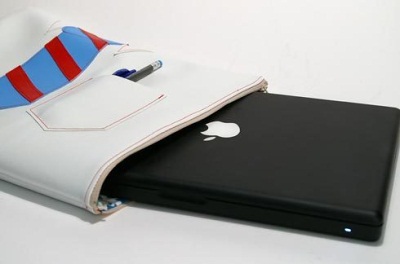
9 to 5 Laptop Sleeve 

At last! 9 to 5 Laptop Sleeve is a laptop sleeve that you can bring with you to corporate America. Designed with a heavy duty vinyl and padded with 1⁄4 fabric backed foam. Flannel lining may vary depending on availability. Price: $40.
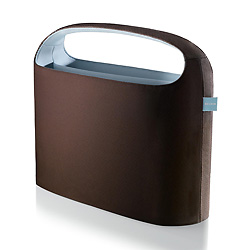
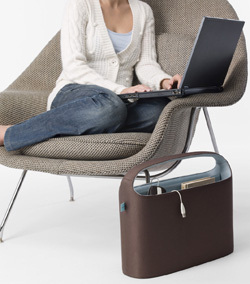
Laptop Hideaway

Laptop Hideaway is made to sit on the floor next to your couch (or bed, chair, or desk). It keeps your laptop protected, easy to reach, and hidden away from view. Works with 15.4-inch laptops-both widescreen and standard. $49.99.
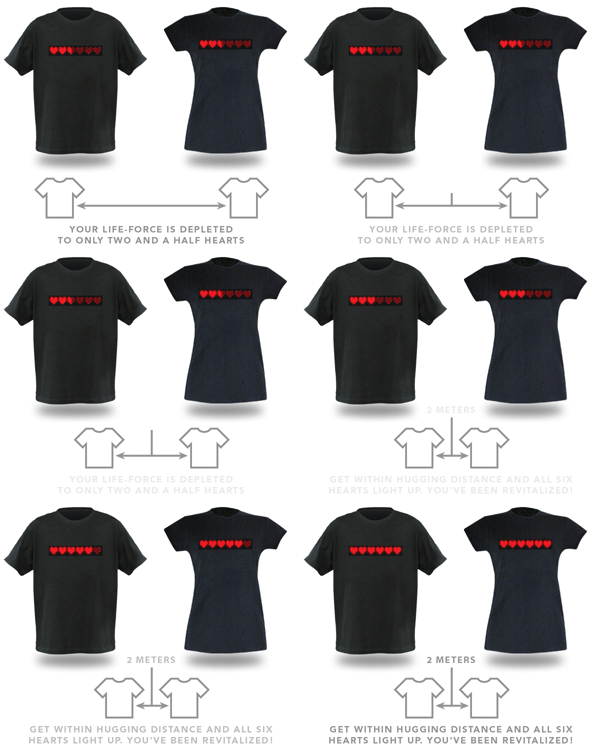
Dynamic Life Shirts: Proximity Effect 

You both wear these 8-Bit Dynamic Life shirts, and the closer you get to each other, the more hearts light up on your chest. Its default state has two hearts a-glowing, displaying that special place she has in your heart even when you’re far away. Get within hugging distance, and the removable animated decals go nuts with all six hearts a-blazin’. Price: $25.
Screenshot

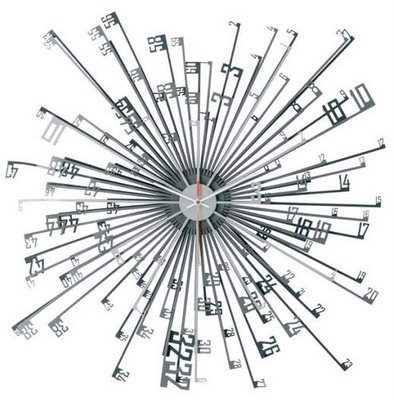
Tik-Tak Clock 

Tik-Tak Clock: “I wanted to express time differently – with a decorative impact as well as a practical function. The powder coated shades of grey give depth to the piece, whilst the red second hand emphasises time’s continual movement.” Price: £89.00
Screenshot

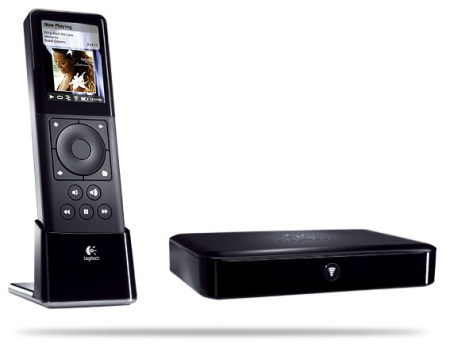
Squeezebox Duet 

Squeezebox Duet is a network music system. It allows you to play songs stored on your PC, tune in to Web radio stations, or connect to online services such as Pandora and Rhapsody. Plus, the multi-room controller with 2.4-inch color display and scroll-wheel navigation enables you to browse, select, and play music from the palm of your hand. $399.99.
Screenshot

BTC Dual Monitor 150 DS 

BTC 150 DS is a dual monitor both of which is flexible enough to change its position according to your needs. Price: unknown.

Screenshot

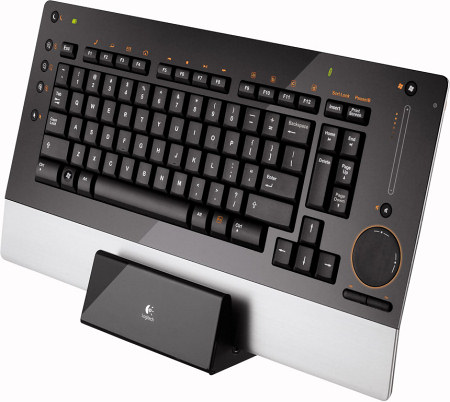
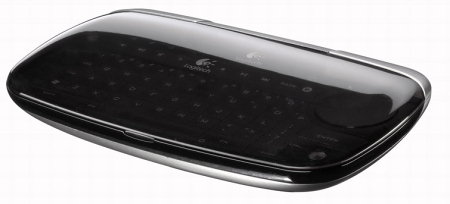
Logitech Di-Novo Mini & Di-Novo Edge 

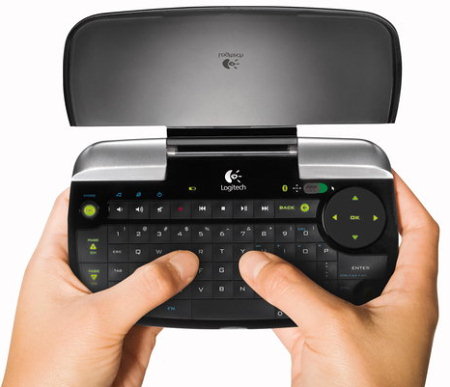
“All you long-time diNovo loving fans can take heart — Logitech’s finally given a major overhaul to our favorite ultraslim, tactile, stylie keyboard and mouse. The new diNovo Edge (which runs on Bluetooth, of course) finally fixes some of the long standing issues we’ve had with the keyboard, including having an integrated battery (plus dock / charging cradle, much like Logitech’s mice have long since had – a single charge should supposedly last two months), light-up function keys that show which key mode you’re in.”
Keyboard
Keyboard
Keyboard

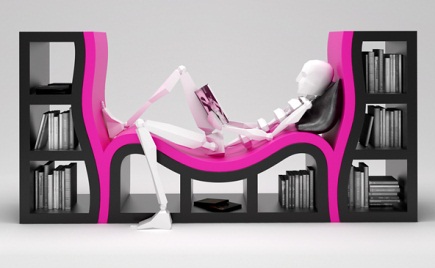
PieLamp + Bookshelf 

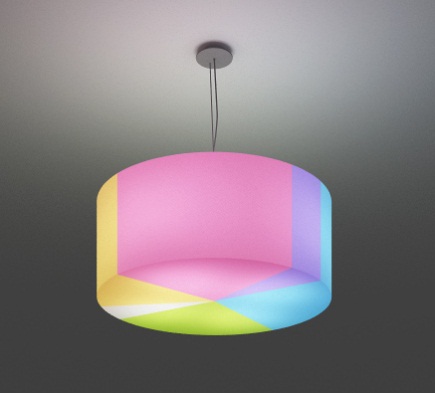
Pretty colorful and unusual design solution — for a lamp and a bookshelf. Price: unknown.
Screenshot
Screenshot

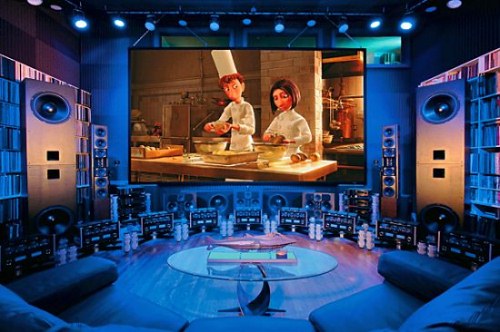
Bonus: Home Theater 

No, it’s not for sale, but it should be! The music engineer Jeremy Kipnis sure knows his entertainment. His gigantic home entertainment system is not only filthy posh, it’s actually quite a bargain for US $6 million. The picture elements alone are composed of a Sony SRX-S110 Professional Video Projector with a 4,096-by-2,160 resolution and the Stewart Snowmatte 1.0 Gain Laboratory-Grade Motion Picture Screen stands at a mammoth 18 x 10-foot which is nearly equivalent to an actual theater screen viewed from the balcony!”
Screenshot

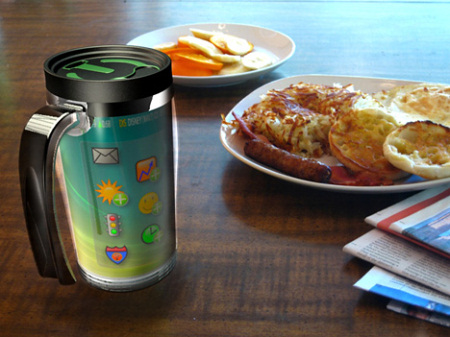
Bonus: Computer and Coffee On The Go 

The Yuno PC is a new personal computer concept designed to help you get the most out of your morning without holding you back or constraining you to a desktop PC. Everyone has their routine, what they read, watch, listen to, and of course drink. The Yuno PC mug incorporates all the important morning alerts such as weather, time, traffic, stocks, and more on its touchscreen display. You can also display your images as a screensaver if you just want to relax. It lets you enjoy the morning the way you deserve to, stress-free and highly caffeinated.
Screenshot

Wednesday, October 6, 2010

Flash vs. Silverlight: What Suits Your Needs Best?


With the release of Silverlight 1.0 and its subsequent versions, a debate started among designers and developers regarding choosing between Flash and Silverlight. Silverlight faces difficulties in capturing the market because of the maturity of Flash. However, Silverlight has managed to keep up by including certain features that designers and developers have always wanted to see in Flash, such as search engine optimization.

In this article, we will discuss some of the technical differences between Flash and Silverlight to help you choose the technology that best suits your needs.

Animation

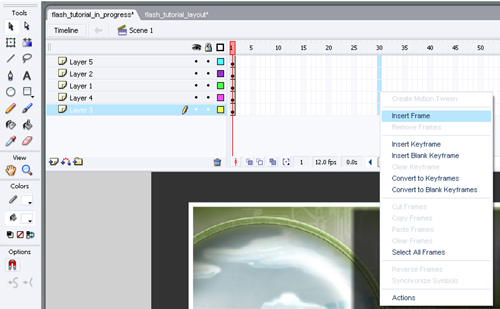
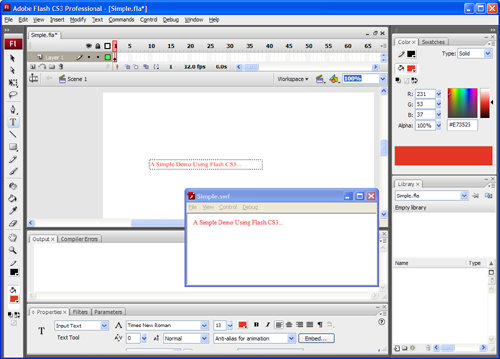
Flash uses the frame-based animation model. In frame-by-frame animation, we create an object for each frame to produce an animation sequence. For example, if you want to move something across the screen in 3 seconds, calculate how many frames 3 seconds will take, then calculate the matrices required for each frame along the way. Keep in mind that the player won’t actually maintain a frame rate unless you embed a blank audio track; otherwise, 3 seconds might turn out to be 2 or 6 or 5.

Adobe Flash Animation

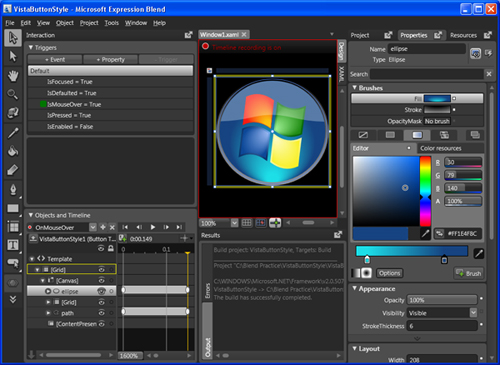
Silverlight is based on the WPF animation model, which is time-based instead of frame-based, so you define the start and end conditions, and it figures out how to do it. No need to deal with matrices like with Flash. Also, no need to calculate the positions of objects in various frames.

Microsoft Silverlight Animation

File Size

Flash uses a compressed format, and text and images are embedded in the movie, hence the file size of a Flash component is relatively small.

Text representation in Adobe Flash

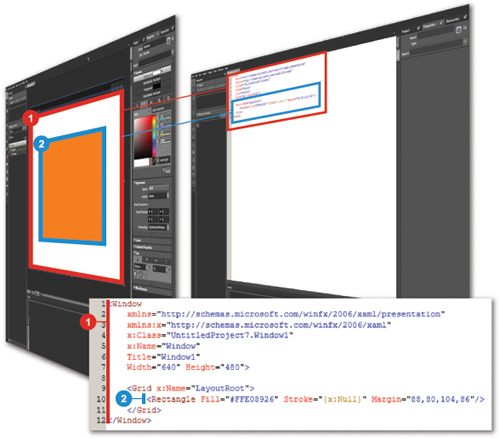
Silverlight uses XAML for its description language, and it is non-compressed, so the size of a Silverlight component is usually larger.

Text representation in Microsoft Silverlight

Scripting

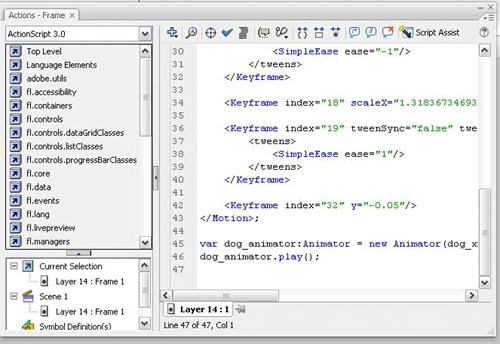
ActionScript is used to program Flash objects. ActionScript is an object-oriented language with a full range of controls for designing user interfaces. And it can be integrated with back-end technologies that use other languages and frameworks, such as PHP, ASP and Ruby On Rails. It comes with a huge, powerful class library for developing online browser-hosted applications and stand-alone desktop applications.

Action Script

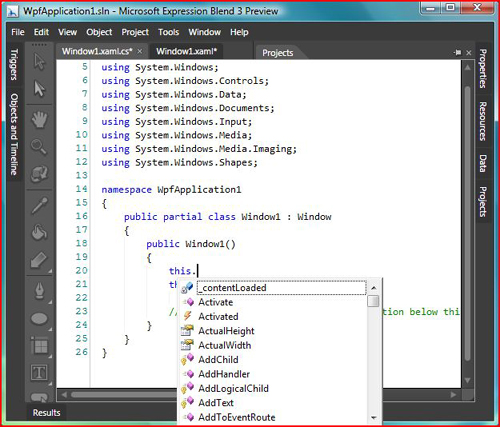
For Silverlight scripting, you can choose from among a number of programming languages such as Visual C#.Net and Visual Basic.Net, including client-side scripting with JavaScript. C# and VB.NET can be used to write managed code that runs on and uses all of the enhancements and capabilities of Microsoft’s .NET framework.

Visual Basic

Video And Audio

Flash supports multiple video formats. The latest codec is very high quality, and the bandwidth usage is nice. There is one problem, though: if you create a tool that outputs Flash content, the formats it supports aren’t really used by anyone else. The original video codec, Sorenson’s proprietary H.263 implementation, is a mutant version of H.263. The compression follows the spec fairly closely, but a bunch of features were left out, and you can’t exactly just go find complete specs on how to build your own encoder.

Video Codec

Silverlight implements the industry-standard VC-1 codec for video, and supports WMV and WMA. Just about everyone already has Windows Movie Maker, but if someone doesn’t, it’s not a big deal because Microsoft makes available a free SDK encoder for producing WMA and WMV. So, not only would you be using formats that people would more likely be able to encode themselves, but Microsoft provides your product with SDKs if you want to do the encoding yourself.

Sound Processing 

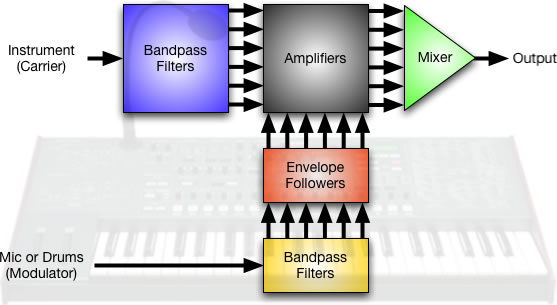
ActionScript offers a set of sound classes that can be used to generate and control sound in a movie. You can add sounds from the library while the movie clip is playing and control those sounds. If you do not specify a target when you create a new sound object, there are methods to control sound for the whole movie.

Sound Processing

Silverlight doesn’t have the low-level audio APIs you would need to write an audio application in the browser. It doesn’t even support playback of WAV files because .NET has very little audio playback support.

Accessibility

Flash provides rich accessibility features for those who have hearing and vision problems or who rely on keyboard shortcuts. Providing captions for video solves accessibility challenges for people who are deaf and hard of hearing, but people who are blind or have low vision or other physical disabilities need the video playback controls to be keyboard-accessible and to function properly with assistive technologies such as screen readers and screen magnifiers. Users who rely on keyboard access can use a variety of familiar shortcuts to control video. Buttons such as “Play/Pause,” “Stop,” “Rewind,” “Mute” and “Closed Captions” can be tabbed to and activated with the spacebar. Slider controls such as for volume and playhead position controls can be accessed via the arrow keys, and the “Home” and “End” keys can be used to skip directly to the beginning or end of a range. The volume slider also accepts numeric keys to set playback audio levels in one quick step.

Accessibility

Accessibility

Accessibility

Silverlight 3 is the first browser plug-in to provide access to all system colors, allowing people with partial vision to use familiar operating system controls to make changes, such as switching to high-contrast color schemes for ease of readability. These features are far fewer than those provided by Flash.

Platform Compatibility 

Flash supports Windows Vista/XP/2000, Windows Server 2003⁄2008, Mac OS 10.1⁄10.5 (PowerPC), Mac OS 10.1⁄10.5 (Intel), Linux 5, openSUSE 11, Ubuntu 7.10 or later and Solaris 10.

Silverlight supports only Windows Vista/XP/2000, Windows Server 2003⁄2008, Windows Mobile 6, Mac OS 10.1⁄10.5 (PowerPC) and Mac OS 10.1⁄10.5 (Intel). Because Linux and Solaris support is missing, users of those operating systems won’t be able to experience Silverlight on their machines.

Text Representation/SEO

Flash stores fonts using shape definitions and the player doesn’t understand TTF, hence we cannot separate the text layer from the movie. Typically the text written on a flash component was not SEO friendly however Adobe has made the modifications to Flash so that it will be indexable, and the search engines have begun to index Flash.

Currently Google is the only search engine that is noticeably reading Flash files. They have worked closely with Adobe to develop the right toolset for the Googlebot in order to read the files for indexing. Yahoo is working on it and MSN is working with their own format, Silverlight, so they probably won’t be developing the toolset necessary to read Flash files.

To read more about how to make Flash SEO friendly, please read the following articles:

In Silverlight applications, user interfaces are declared in XAML and programmed using a subset of the .NET Framework. XAML can be used for marking up the vector graphics and animations. Text is deployed on web server as separate entity and can be read and accessed separately. Textual content created with Silverlight is searchable and indexable by search engines as it is not compiled, but represented as text (XAML).

Supported Image Formats 

Flash supports almost all image formats.

Silverlight supports only PNG and JPEG file formats. Some other file formats are supported by Silverlight but in a limited way. A full list can be found here.

Socket Programming

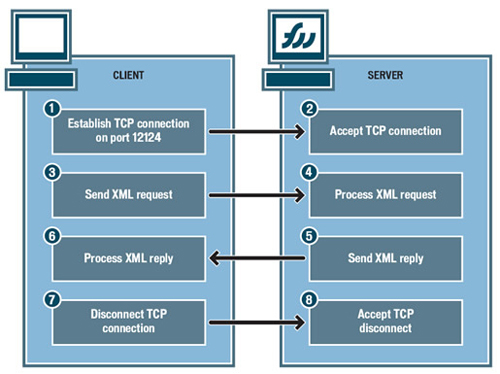
The XMLSocket object implements client sockets that allow computers running the Flash player to communicate with a server computer identified by an IP address or domain name.

To use the XMLSocket object, the server computer must run a daemon that understands the protocol used by the XMLSocket object. The protocol is as follows:

  • XML messages are sent over a full-duplex TCP/IP stream socket connection.
  • Each XML message is a complete XML document, terminated by a zero byte.
  • An unlimited number of XML messages can be sent and received over a single XMLSocket connection.

Socket Programming with Flash

Silverlight doesn’t support socket programming. Silverlight supports sockets programming through the System.Net.Sockets namespace. Silverlight supports asynchronously sending data back and forth across a socket over ports ranging from 4502 to 4534. Silverlight supports cross-domain socket communications between a Silverlight application and any server, provided that a special security policy file is in place on the server.

Webcam Support

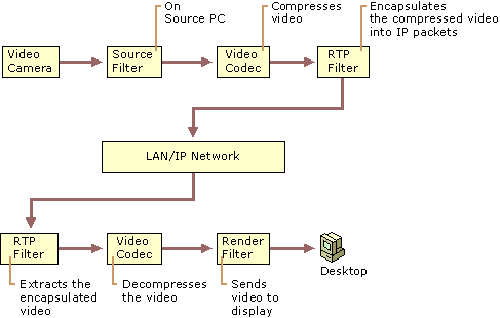
Flash has webcam and microphone support for live video and audio transmission, and using them is really easy in Flash. It takes only a few lines of ActionScript code to invoke the camera object.


Camera.getReturns a default or specified camera object, or null if the camera is not available.
Camera.setModeSets aspects of the camera capture mode, including height, width and frames per second.
Camera.setMotionLevelSpecifies how much motion is required to invoke Camera.onActivity(true) and how much time should elapse without motion before Camera.onActivity(false) is invoked.

Silverlight doesn’t support webcam or microphone.

Deployment

The Flash deployment package contains only a single Shockwave (SWF) file, and all images, text and animations are incorporated in this file. Because of the compressed nature of a Flash component, its images and text are not indexed by search engines, and thus not searchable.

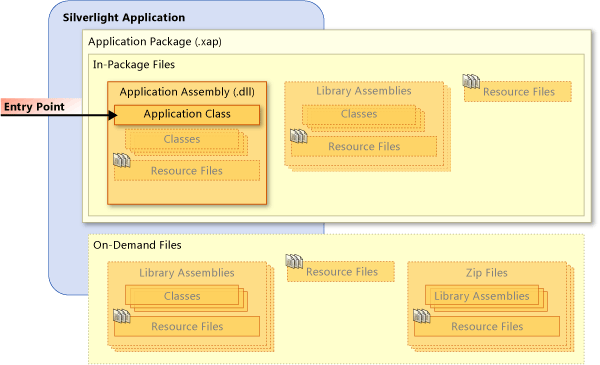
The deployment process of Silverlight is far more complex; all individual components need to be deployed separately. The following components typically get sent to the client for each Web request of Silverlight:

  • XML files,
  • DLL files (if necessary),
  • Silverlight.js file,
  • Any other JavaScript file,
  • Resources (images, audio, video).

Silverlight Deployment

Read the full documentation on Silverlight deployment.

Windows Application

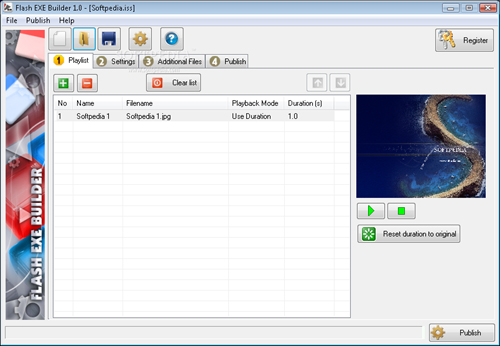
A Flash movie can be compiled into a Windows application and run as a standalone EXE file. It can also be played on a desktop that has an appropriate Flash player.

Flash EXE Builder

Silverlight doesn’t support playing the movie as a Windows application.

Media Streaming

Flash provides no such service to host the content and application with them. Thus, building a video website with Flash is not as cost-effective as building one with Silverlight.

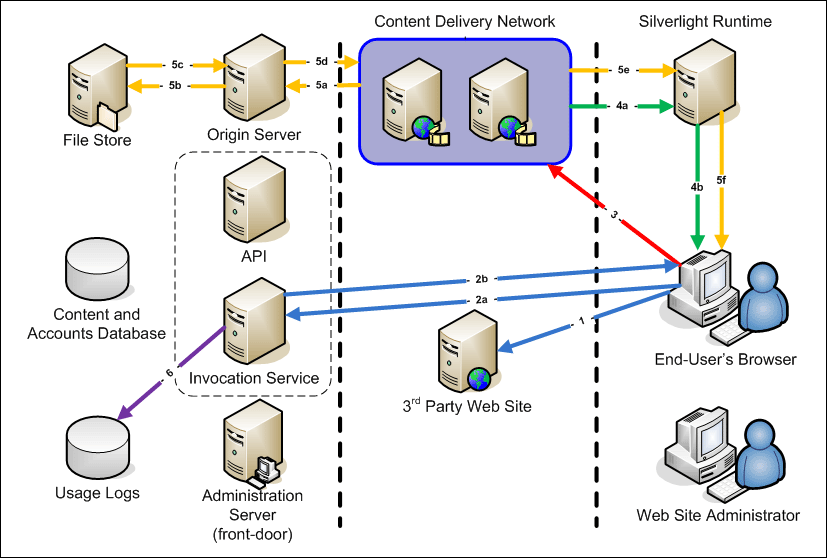
Microsoft Silverlight Streaming by Windows Live is a companion service for Silverlight that makes it easy for developers and designers to deliver rich media as part of their Silverlight applications. The service allows Web designers and developers to host and stream cross-browser media and interactive applications that run on both Windows and Mac. This service can be combined with Microsoft Expression Studio and other third-party tools to create and develop interactive contents.

Silverlight Streaming by Windows Live is currently in beta testing and offers 10 GB of free hosting for rich-media applications.

Microsoft Silverlight Streaming

Conclusion

Selecting the right technology for rich Internet applications is often critical, and choosing between Flash and Silverlight depends entirely on your requirements. If you expect that some of your users will be on Linux or Solaris, then you should go with Flash. If you want your website to be indexed by search engines, then Silverlight may be better.

Besides, as Doug S. is points out in the comments, it’s worth noticing that a minority of web users actually have a Silverlight plugin installed on their machine, while most users do have Flash-support. The Flash Player 9 and higher support streaming of the H.264 video codec which means anyone with a video program that can output an MP4 can stream to Flash. There are literally hundreds of free apps on Mac, PC and Linux that can do this. It’s also important to mention that the latest version of Flash Player supports 3D rendering while Silverlight does not and that SWF, FLA, FLV, and AS are all open-standard formats, while Silverlight is 100% proprietary.

The following table summarizes the features discussed above. Rather than including arrows to indicate whether each platform has a particular feature, we’ve simply marked “better” to show the areas in which each technology beats out the other.

FeaturesFlashSilverlight
Animation
better
File sizebetter
Scripting
better
Video/Audio
better
Sound processingbetter
Accessibilitybetter
Platform compatibilitybetter
Text representation/SEO
better
Supported image formatsbetter
Socket programmingbetter
Webcam supportbetter
Deploymentbetter
Windows applicationbetter
Media streaming
better