⭐ If you would like to buy me a coffee, well thank you very much that is mega kind! : https://www.buymeacoffee.com/honeyvig
Hire a web Developer and Designer to upgrade and boost your online presence with cutting edge Technologies
Showing posts with label Workflow. Show all posts

Monday, June 1, 2026

The “Bug-Free” Workforce: How AI Efficiency Is Subtly Disrupting The Interactions That Build Strong Teams

 AI tools are eliminating the need to “bug” colleagues for help, but the informal interactions they replace are the very scaffolding that builds team trust, belonging, and innovation. Here explore the research and potential impacts behind that risk and offer practical strategies for maintaining human connection while leveraging AI’s strengths.

Through many discussions with industry colleagues, we’ve started hearing a phrase more often when swapping stories about AI adoption:

“Now I don’t have to bug [someone].”

Product designers don’t need to bug researchers anymore — retrieval-augment generation (RAG) tools surface insights instantly. Product Managers don’t need to bug designers for mockups — AI generates acceptable options. Engineers don’t need to bug accessibility teams — automated scanners flag issues in real-time.

It’s framed as liberation, and in many ways, it is. There’s genuine relief in being unblocked, in not having to wait, in solving problems independently.

With AI, we’re building a “bug-free workforce”.

But what if the bugs that AI is automating away, such as the quick questions, the small talk, the organic connections, are actually an important part of the scaffolding that builds and sustains healthy teams?

The Vanishing Scaffolding

Consider what actually disappears when we turn to AI assistance before engaging with a colleague directly. For instance:

  • The 2-minute Slack exchange that turns into a 20-minute whiteboarding session.
  • The “quick question” that reveals a fundamental misalignment.
  • The accessibility review that becomes mentorship.
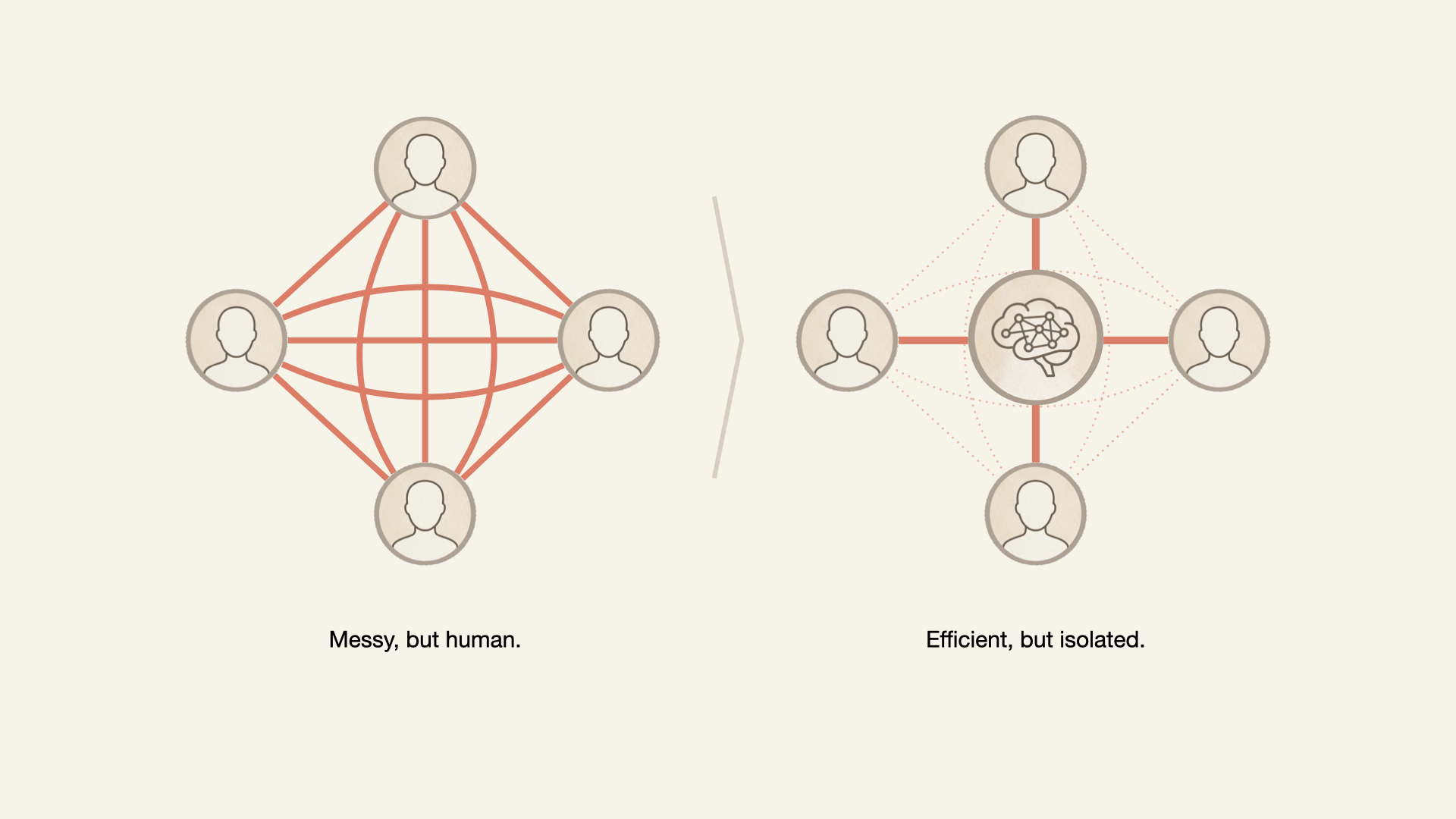
Two diagrams comparing teamwork: a dense, interconnected human network vs a centralized AI-driven network that is efficient but isolates individuals
AI-driven efficiency can weaken team cohesion. (Large preview)

Although these interactions are primarily intended to exchange information and unblock individuals’ tasks, many are the building blocks for the intangible but crucial sense of belonging and connection in the workplace.

The inefficiencies of interpersonal communication and daily interaction build the larger organism known as work culture. When AI disrupts these interactions, what is lost?

What The Research Actually Shows

There is ample psychological research to support our hypothesis: If the trust built through organic and informal connections is threatened, teams will be negatively impacted. Let’s examine a few:

In 2012, MIT’s Human Dynamics Lab (Pentland, 2012) discovered that the best predictor of team productivity wasn’t formal meetings but “energy” from informal communication: the hallway conversations, coffee chats, and quick questions. Teams with the most informal interaction had 35% more successful outcomes. With AI, what energy is not generated, leading to fewer successful outcomes?

In 2015, Google’s Project Aristotle studied over 180 teams to find out why some thrived, and others underperformed. They found that psychological safety, the shared belief among team members that the environment is safe for interpersonal risk-taking, built through frequent, low-stakes interactions, was the number one predictor of high performance. Not intelligence. Not resources. Trust built through micro-moments. The exact micro-moments we see vanishing when we overuse AI.

In 2025, researchers from Harvard, Columbia, and Yeshiva University published a study focused on the impact of AI on performance and team coordination. The authors concluded that AI-driven automation decreased overall team performance and increased coordination failures. These effects were especially large in the short-term and in low- and medium-skilled teams. Automation also decreased team trust.

Why This Matters

When AI disrupts the team’s energy and psychological safety, a sense of disconnection sets in, which, in turn, hurts the company’s bottom line.
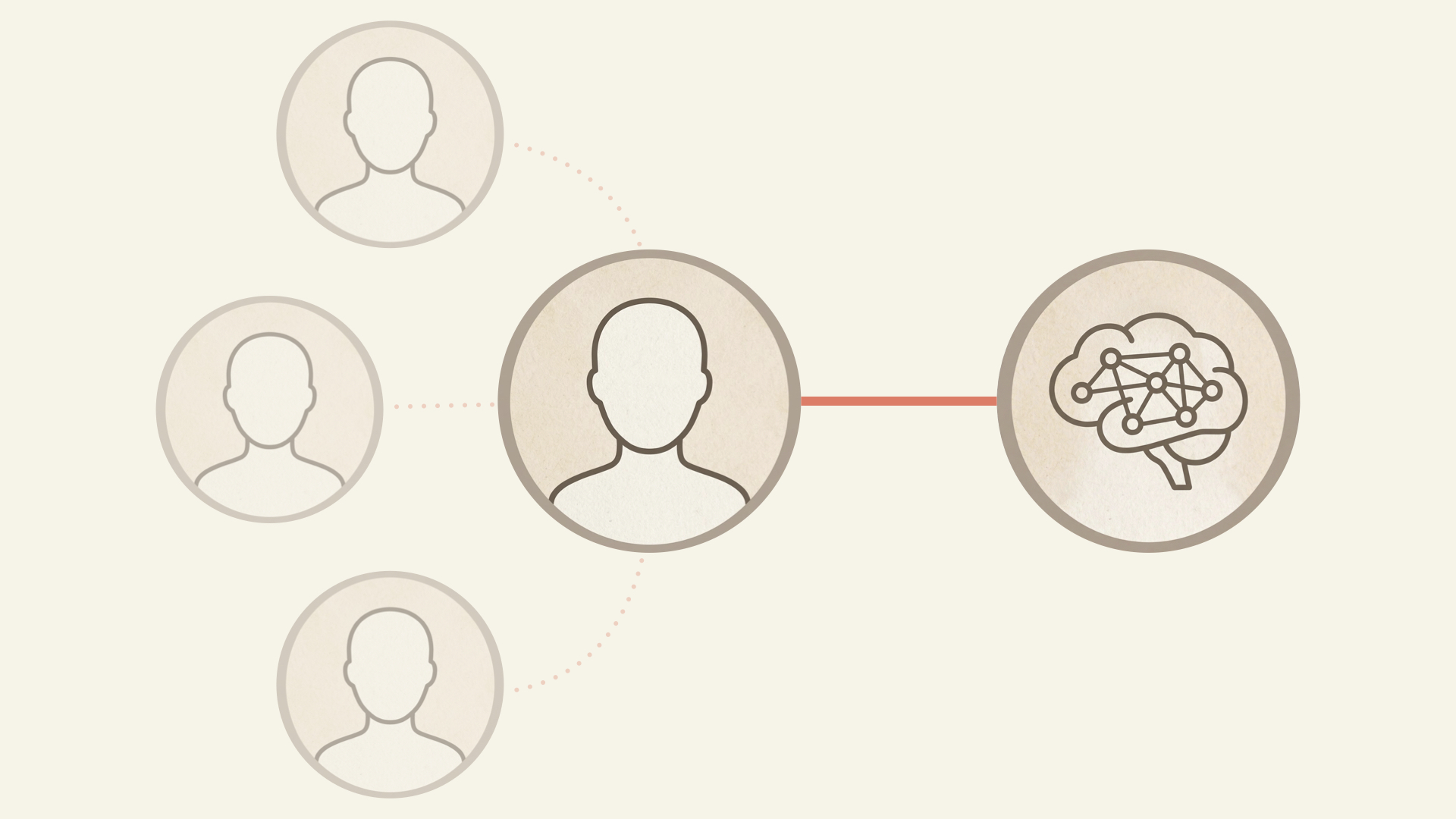
Central worker connected to an AI system, with weaker, fading links to other people
Adding AI to the team increases efficiency, but also risks displacing the human-to-human connections that establish psychological safety. (Large preview)

DISCONNECTED EMPLOYEES LEAVE

People don’t stay at companies because of the work. They stay because of the people. And if connections to colleagues decrease due to AI’s presence, how might that expedite one’s departure?

Consider this question in dollar terms. McKinsey’s Great Attrition research found that not feeling a sense of belonging was one of the most frequently cited reasons employees left. When informal micro-interactions disappear, belonging erodes, and people walk.

“Employee disengagement and attrition could cost a median-size S&P 500 company between $228 million and $355 million a year in lost productivity.”

— McKinsey
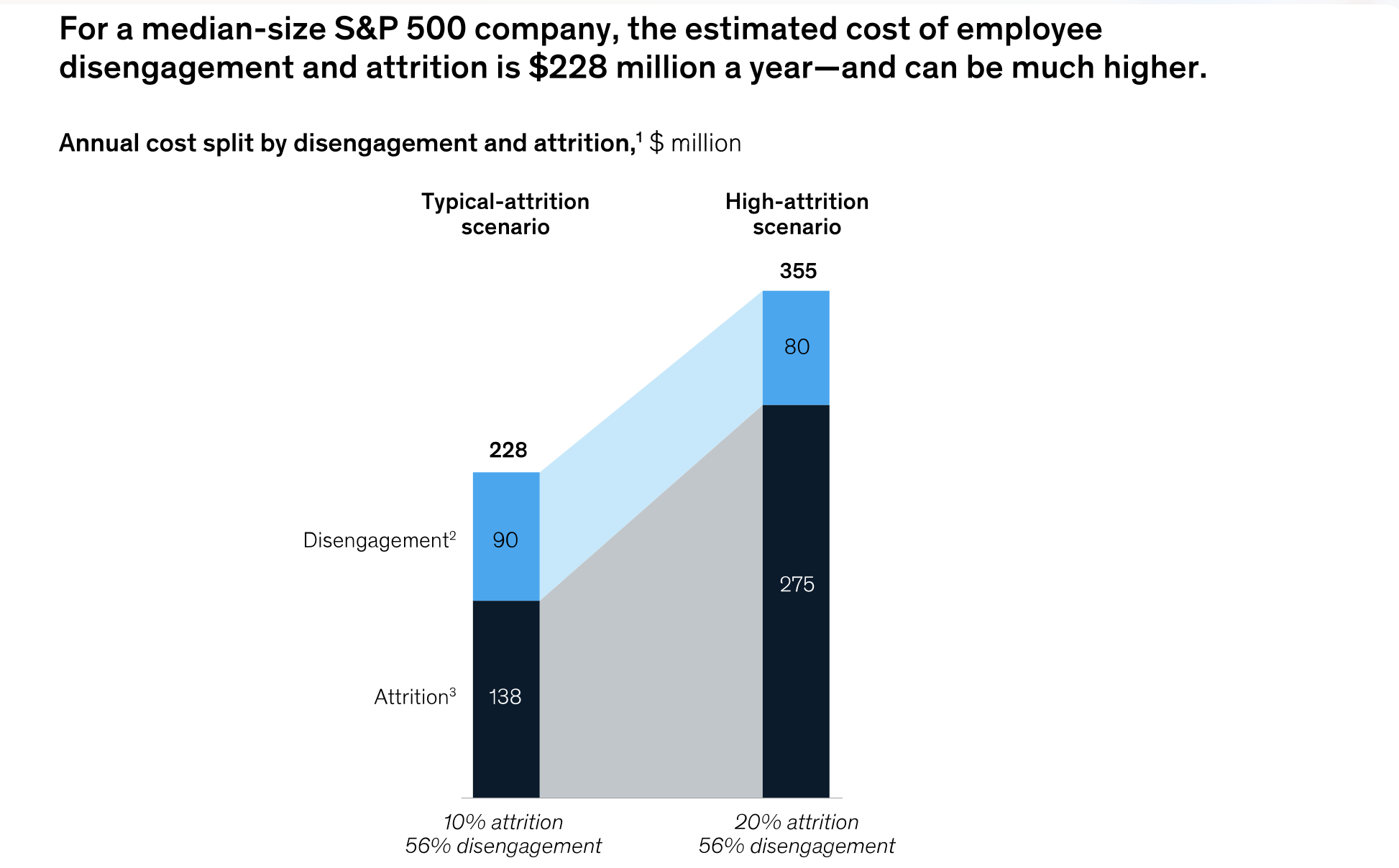
Chart showing employee disengagement and attrition costs rising from $228M to $355M annually in a higher-attrition scenario
The hidden but real cost of employee disengagement and attrition from McKinsey. (Large preview)

Leaders must ask themselves if the potential gains from AI rollouts and promised productivity gains outweigh the costs of a disengaged and attrition-prone workforce. The evidence suggests otherwise.

DISCONNECTED TEAMS ARE LESS INNOVATIVE

Korean researchers in 2024 analyzed innovation in the private sector and concluded that weak ties — the bridging conversations with people you interact with occasionally — sustained innovative performance in companies characterized by active technological innovation.
Simply put, breakthroughs do not necessarily emerge from your core team but from interactions with the people you would have “bugged” in the past. Eliminating these interactions in favor of AI could not only negatively impact team health, but it could also hurt the business through decreased depth and breadth of innovation in design, coding, content, and beyond.

AI’s seduction is that it feels like pure gain until the team realizes they’ve become strangers who happen to work on the same project.

If a shared sense of purpose and belonging disappears, employers have a workforce less engaged and less innovative, with a higher chance of attrition.

If AI helps us need each other less, how can a company hope to nurture a connected, supported, and effective workforce?

The answer requires a balanced and multi-pronged approach. Use AI tools for dull, repetitive, and high-volume tasks while reserving the human brain for higher-level problem solving. Design physical workspaces and online team interactions that will maintain or increase human connection.

Maintaining The Best Of Both

In short, leverage the best of AI tools and human abilities.

1. USE AI TO ELIMINATE THE TOIL

In the March 2026 article “When Using AI Leads to ‘Brain Fry’,” the authors outline their study of 1,488 full-time U.S.-based workers to understand the impact of AI use on professionals. The result was a concept they call “AI Brain Fry,” a form of acute mental fatigue and cognitive exhaustion resulting from excessive use, interaction, or oversight of AI tools beyond an individual’s cognitive capacity.

Further, the study reveals that the cognitive strain created by intensive AI use carries business costs, including decision fatigue and error-prone work. Perhaps the most troubling finding is that 34% of workers who reported experiencing brain fry intended to quit their jobs. The loss of institutional knowledge caused by turnover is well documented.

One conclusion is that AI is not inherently bad or cognitively taxing. Rather, as with any tool, what matters is how it’s used.

Focusing our energy on identifying the repetitive, unenjoyable parts of our jobs (or “toil”) and using AI to remove them is a way to improve cognitive and team health.

“

Indeed, the Harvard Business Review authors explain that participants in their study who used AI to eliminate toil only had 15% lower rates of burnout but also reported “a higher degree of social connection with peers…because they had more time to spend ‘off keyboard.’” In this toil-elimination scenario, AI did not disrupt team connections; it removed what we consider busy work that prevented the team from solving problems with colleagues.

2. INSTITUTIONALIZE PRODUCTIVE FRICTION #

Steve Jobs famously designed the Pixar studios so employees would have to bump into each other. “Steve realized that when people run into each other, when they make eye contact, things happen,” reflected Brad Bird, the director of The Incrediblesand Ratatouille movies. John Lasseter, responsible for some of Pixar’s most beloved films, shared that he’d “never seen a building that promoted collaboration and creativity as well as this one.” Jobs understood that serendipitous collision drives creative work, and Pixar’s oeuvre reveals the genius.

Pixar Studio’s floor plans, which facilitate face-to-face interaction
Pixar Studio’s floor plans facilitated face-to-face interaction. (Large preview)

What is the equivalent of creating this type of organizational design in the age of AI?

  • Build AI tools that connect the team.
    We’ve found that when building internal agents, it’s best to attach the names of the original creators to the work and to direct seekers to these creators. This way, any seeker not only finds the answer but is connected to others with more institutional knowledge to help.
  • Publicly spotlight successful team uses of AI.
    By finding examples of how teams have used AI to work more effectively and efficiently together and highlighting them in public forums and townhalls, it helps establish the narrative that AI can be something that brings us together rather than pushes us apart.
  • Establish rotation programs.
    If AI means product managers can prototype, have them shadow designers anyway. Having a more holistic understanding of each other’s craft through direct dialogues benefits both sides beyond simple AI outputs.
  • Hold panel discussions on the evolution of work.
    Gather cross-functional partners to regularly discuss and debate how our work is currently changing or could in the near future. It keeps intentionalchange top of mind and in the open.

3. BUILD TEAM COHESION THROUGH AI-INSPIRED LAUGHTER #

Positive humor in the workplace has been studied extensively as a way for teams to bond. We see how AI can improve team connections through a good, absurd laugh.

  • Bad UX Vibecoding Competitions
    Give your team a silly prompt (“Design the worst volume control”) and 30 minutes to vibe-code a horrible solution. The process of building these outputs helps the team: learn new AI tools, get the creative juices flowing, and, most importantly, laugh together.
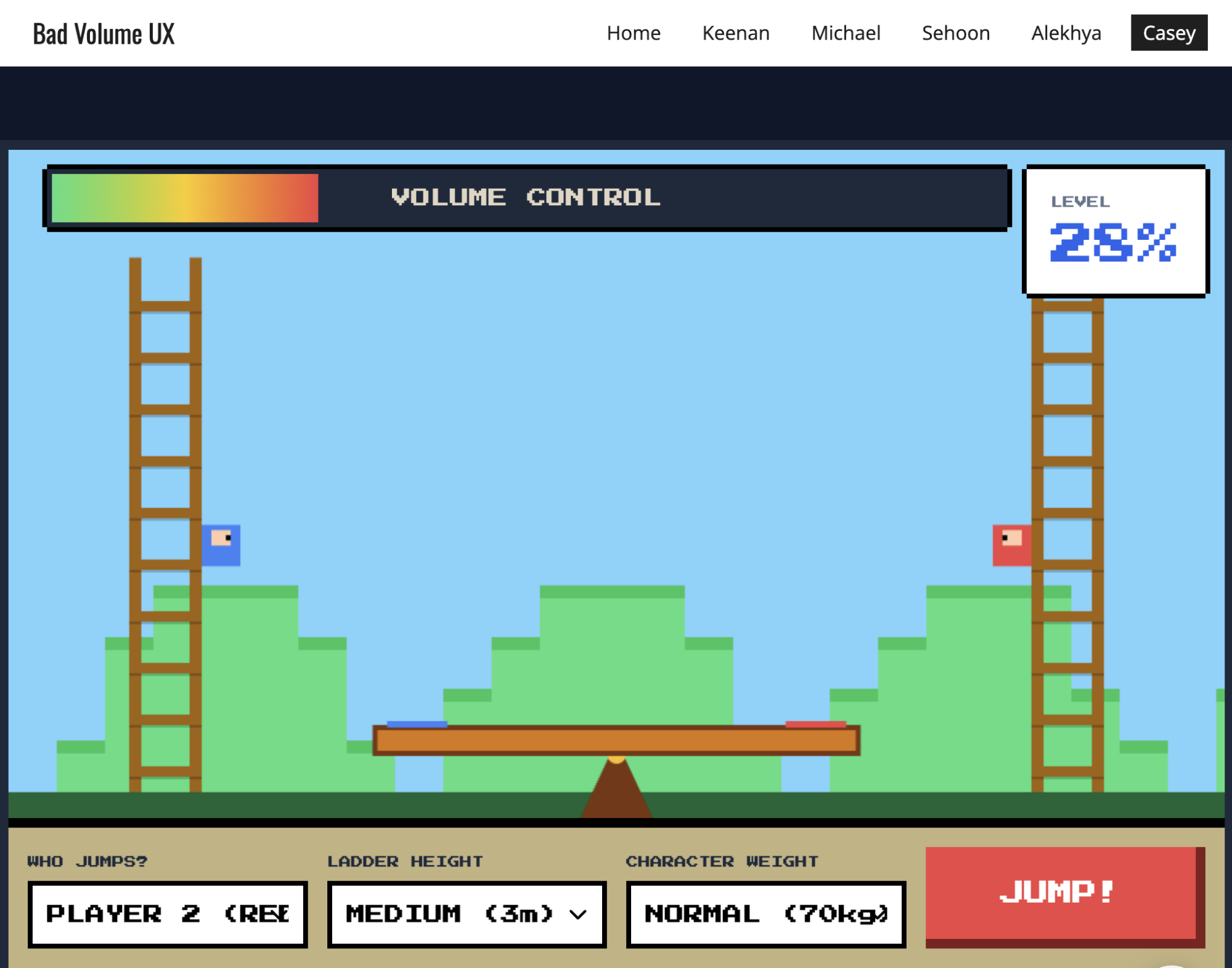
The results of a silly vibe-coding activity the team used to learn and stay connected
The results of a silly vibe-coding activity our team used to learn and stay connected (built with Google Gemini). (Large preview)
  • Hyper-specific AI Creations
    Would a certain image make people smile in this workshop? Is there a funny idea at work that would be even weirder as an AI-generated song? Using them for absurd work moments is a fun way to get people laughing.
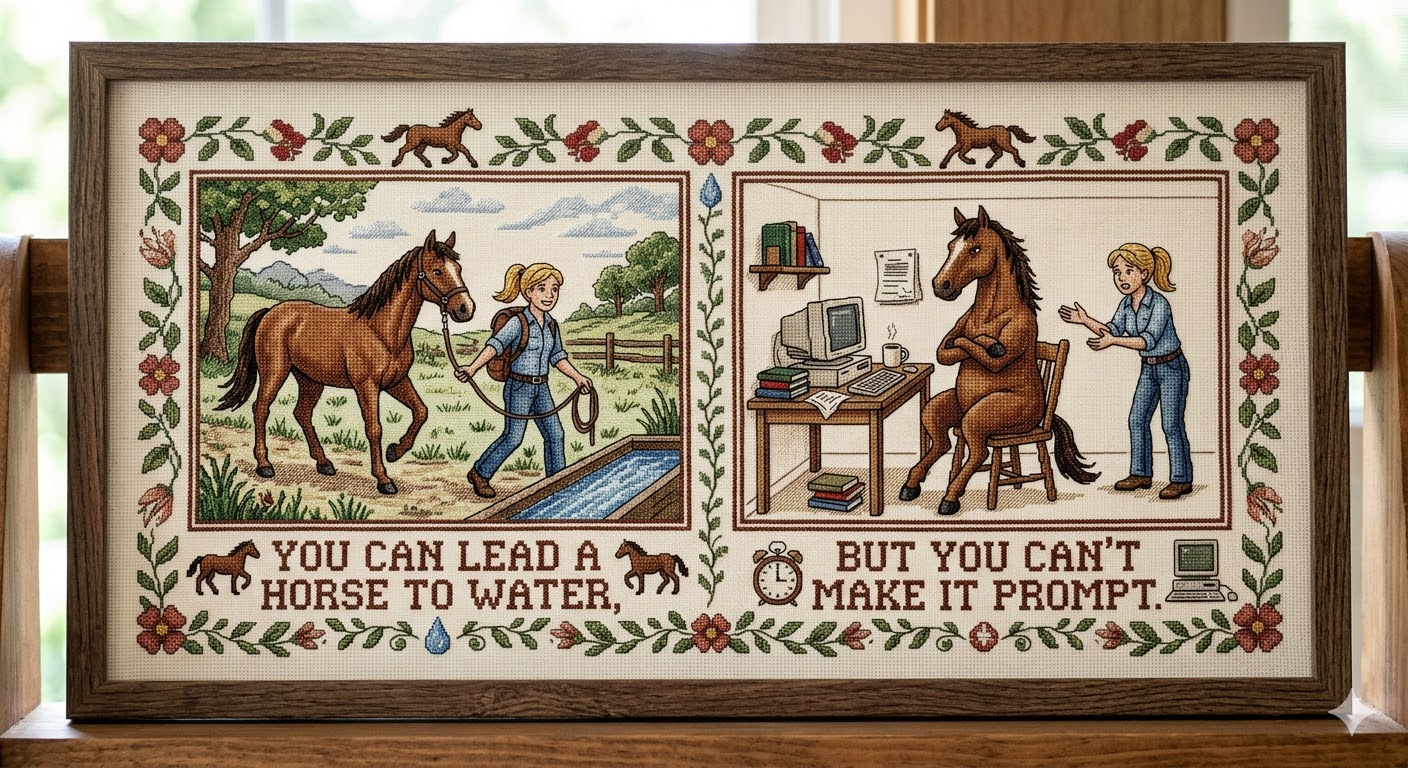
AI-created spin on a cliche: you can lead a horse to water, but you can't make it prompt
Use AI to create a spin on a cliche for a laugh or icebreaker for a workshop or team meeting (made with Google Gemini). (Large preview)

Eliminating toil, institutionalizing productive friction, and building team cohesion through humor show the power of integrating the best of the human brain and AI algorithms.
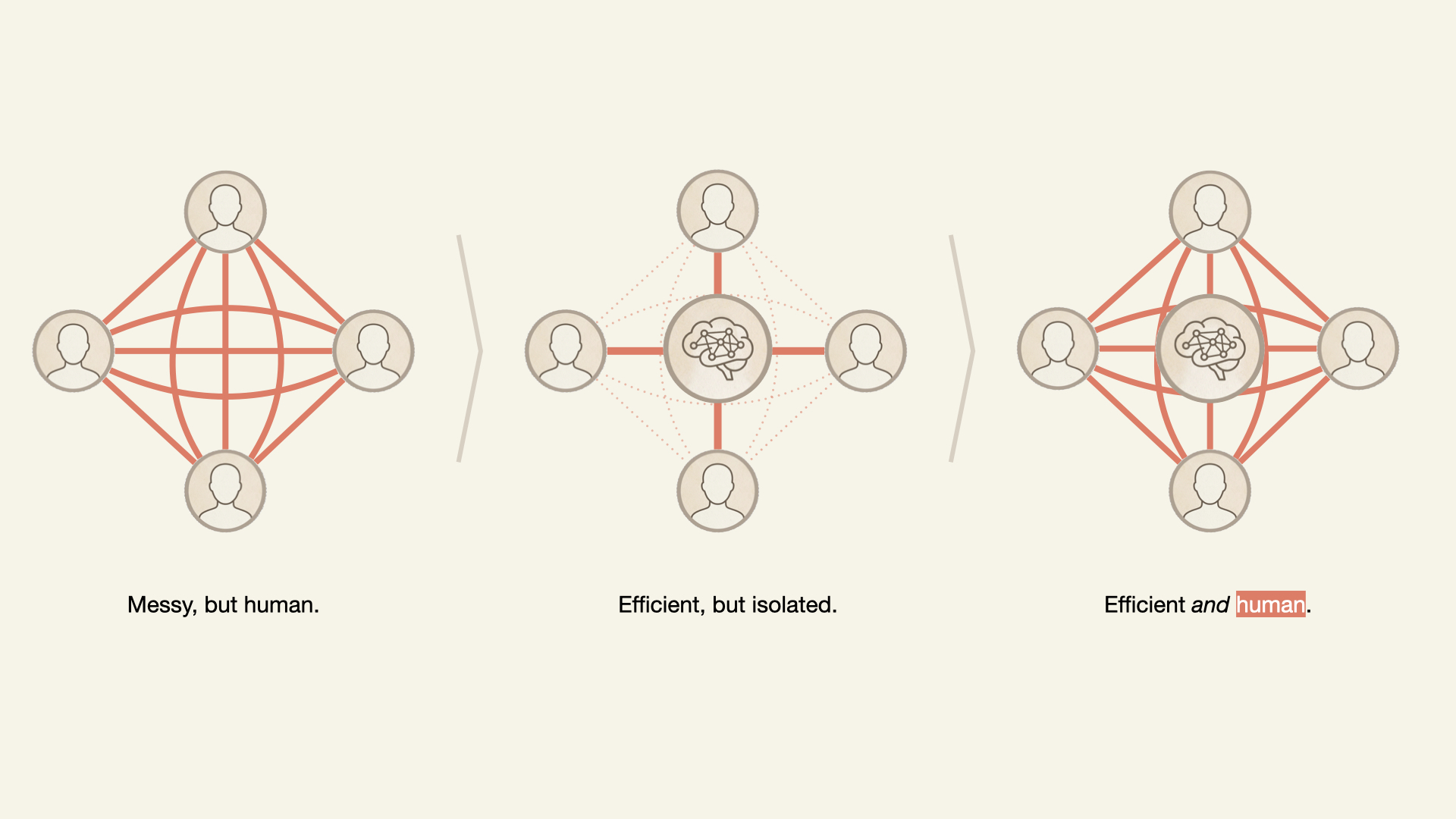
Three diagrams comparing teamwork: a dense, interconnected human network vs a centralized AI-driven network that is efficient but isolates individuals vs an interconnected human network with AI in the middle.
The right combination of AI and human-driven activity increases efficiency while training human connection. (Large preview)

The question isn’t whether to use AI. Contemporary workers have less and less choice. The question is: what kind of team do you want to become when AI is the newest teammate?

“

Conclusion

Leaders who introduce artificial intelligence with an equal amount of emotional intelligence will enable their teams to thrive by leveraging the power of AI while also shielding their teams from the inherent risks associated with the disruptive natures of these new tools.

When the unexpected hits — the crisis, the pivot, the moment that requires trust you can’t manufacture overnight — it will be the teams with cultures intact that will thrive.

REFERENCES

Tuesday, March 31, 2026

Human Strategy In An AI-Accelerated Workflow


UX design is entering a new phase, with designers shifting from makers of outputs to directors of intent. AI can now generate wireframes, prototypes, and even design systems in minutes, but UX has never been only about creating interfaces. It’s about navigating ambiguity, advocating for humans in systems optimised for efficiency, and solving their problems through thoughtful design.

I’ve been working in User Experience design for more than twenty years. Long enough to have seen the many job titles, from when stakeholders asked us to “just make it pretty” to when wireframes were delivered as annotated PDFs. I’ve seen many tools come and go over the years, methodologies rise and fall, and entire platforms disappear.

Yet, nothing has unsettled designers quite like AI.

When generative AI tools first entered my workflow, my reaction wasn’t excitement — it was unease, with a little bit of curiosity. Watching an interface appear in seconds, complete with sensible spacing, readable typography, and halfway-decent copy, triggered a very real fear: If a machine can do this, where does that leave me?

That fear is now widespread. Designers at every level ask the same question, often quietly, “Will an AI agent replace me by next week/month/year?” While the difference between next week and next year seems a lot, it depends on where you are in your career and the speed at which your employer chooses to engage with AI tools. I have been lucky in several roles to be working with organisations that haven’t allowed the use of AI tools due to data security concerns. If you’re interested in any of these conversations, you can view the discussions happening on platforms like Reddit.

Fearing the takeover of AI in our roles is not irrational. We’re seeing AI generate wireframes, prototypes, personas, usability summaries, accessibility suggestions, and entire design systems. Tasks that once took days can now literally take minutes.

Here’s the uncomfortable truth: If your role is largely about producing artefacts, drawing buttons, aligning components, or translating instructions into screens, then parts of that work are already being automated.

Still, UX design has never truly been about just creating a user interface.

UX is about navigating ambiguity. It’s about advocating for humans in systems optimised for efficiency. It’s about translating messy human needs and equally messy business goals into experiences that feel coherent, fair, sensible, and usable. It’s about solving human problems by creating a useful and effective user experience.

AI isn’t replacing that work. Rather, it’s amplifying everything around it. The real shift happening is that designers are moving from being makers of outputs to directors of intent. From creators to curators. From hands-on executors to strategic decision-makers. That feels exciting to me. And the creativity and ingenuity this brings to the world of UX.

And that shift doesn’t reduce our value as UX designers, but it does redefine it.

What AI Does Better Than Us (The “Boring” Stuff) 

Let’s be clear, AI is better than humans at certain aspects of design work. Fighting that reality only keeps us stuck in fear.

Speed And Volume

AI is exceptionally good at generating large volumes of ideas quickly. For example, layout variations, copy options, component structures, and onboarding flows can all be produced in seconds. In early-stage design, this changes everything. Instead of spending hours sketching three concepts, you can review thirty. That doesn’t eliminate creativity but does expand the playground.

McKinsey estimates that generative AI can reduce the time spent on creative and design-related tasks by up to 70%, particularly during ideation and exploration phases.

McKinseys report on generative AI.
McKinseys report on generative AI. (Image source: McKinsey)

AI can also help with the research side of UX, for example, exploring the habits of a certain demographic, and creating personas. While this can reduce research time required, the designer is still required to guardrail this by providing accurate prompts and reviewing generated responses. I have personally found that using AI to assist with the initial research for design projects is incredibly useful, specifically when there is limited time and access to users.

Consistency And Rule Adherence

Design systems live or die by consistency. AI excels at following rules relentlessly, colour tokens, spacing systems, typography scales, and accessibility standards. It doesn’t forget. It doesn’t get tired. It doesn’t “eyeball it.”

AI’s precision makes it incredibly valuable for maintaining large-scale design systems, especially in enterprise or government environments where consistency and compliance matter more than novelty. This is one component of my UX role that I am happy to hand over to AI to manage!

Data Processing At Scale

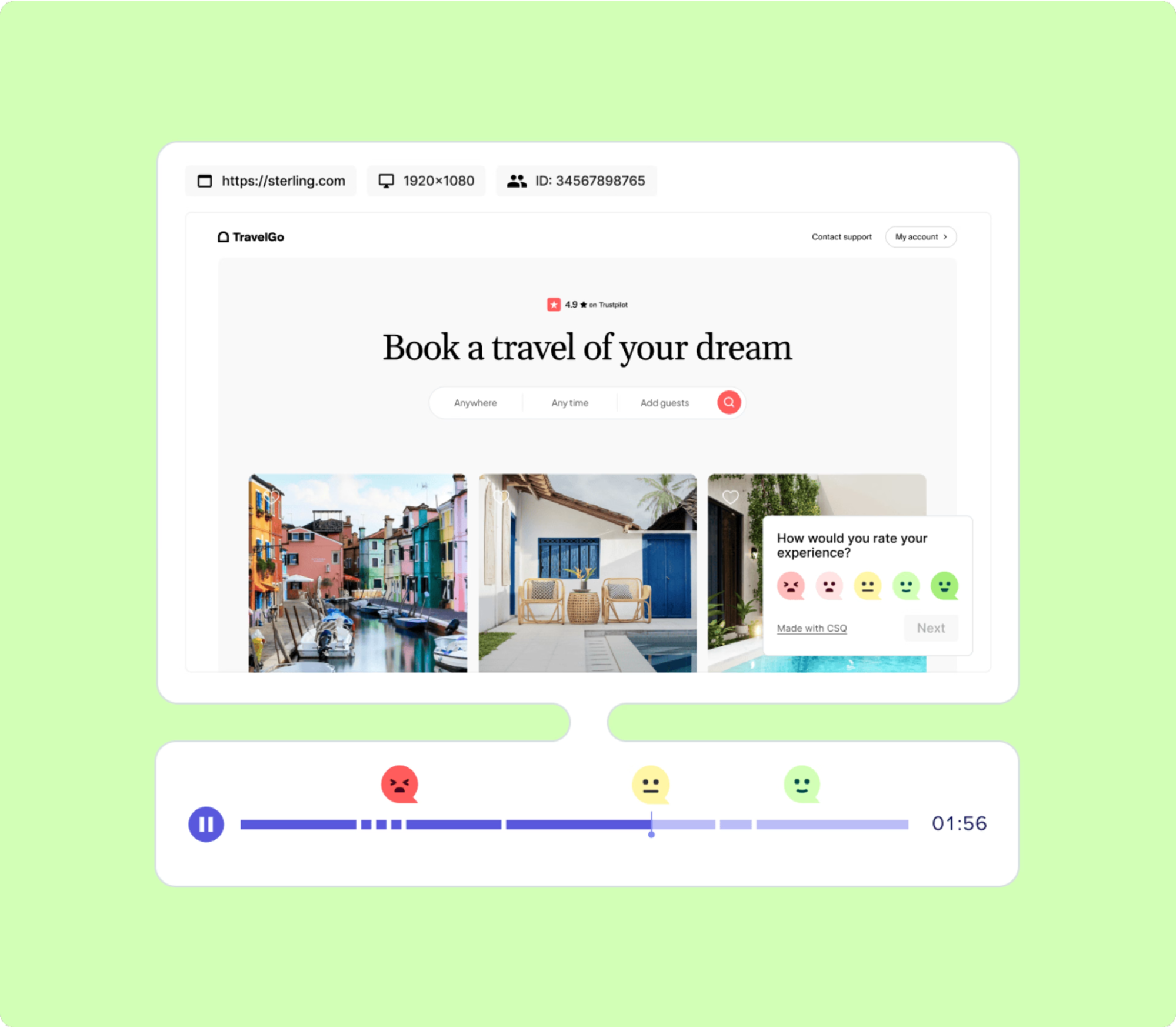
AI can analyse behavioural data at volumes challenging, if not impossible, for a human team to reasonably process. User journey paths, scroll depth, heatmaps to identify mouse interactions, conversion funnels — AI can identify patterns and anomalies almost instantly.

Behavioural analytics platforms increasingly rely on AI to surface insights that designers might otherwise miss. Contentsquare, an AI-powered analytics platform, talks about the impacts and benefits of utilising behavioural analytics data. I’ve always said that quantitative data tells us the “what”, and qualitative data tells us the “why”. This is the human component of research where we get to connect with the users to understand the reason driving the behaviour.

An example of a session replay tool display
An example of a session replay tool display. (Image Source: Contentsquare)

The key insight here is simple: Analysing large volumes of behavioural data was never where our highest value lay.

If AI can take on repetitive production, system enforcement, and raw data analysis, designers would be free to focus on interpretation, judgment, and human meaning, the hardest parts of the job.

What Humans Do Better Than AI (The “Heart” Stuff)

For all its power, AI has a fundamental limitation: it has never and will never be human.

Empathy Is Lived Experience 

AI can describe frustration. It can summarise user feedback. It can mimic empathetic language. But it has never felt the quiet rage of a broken form, the anxiety of submitting sensitive data, or the shame of not understanding an interface that assumes too much.

Empathy in UX isn’t a dataset. It’s a lived, embodied understanding of human vulnerability. This is why user interviews still matter. Why contextual inquiry still matters. Why designers who deeply understand their users consistently make better decisions.

In a previous role where I was designing an incredibly complex fraud alert platform, the key to successful outcomes of that design was based on my understanding of the variety of issues faced by customers. I accessed this information directly from members of the customer-facing team. This information was stored in their brain and based on direct experience with customers. No AI could know or access these goldmines of human experiences.

As the Nielsen Norman Group reminds us, good UX design is not about interfaces. It’s about communication and understanding.

Ethics Require Judgment

AI optimises for the objectives we give it. If the goal is engagement, it will try to maximise engagement — regardless of long-term harm.

It doesn’t inherently recognise dark patterns, manipulation, or emotional exploitation. Infinite scroll, variable rewards, and addictive loops are all patterns AI can enthusiastically optimise unless a human intervenes.

The Center for Humane Technology has documented how algorithmic optimisation can unintentionally undermine wellbeing.

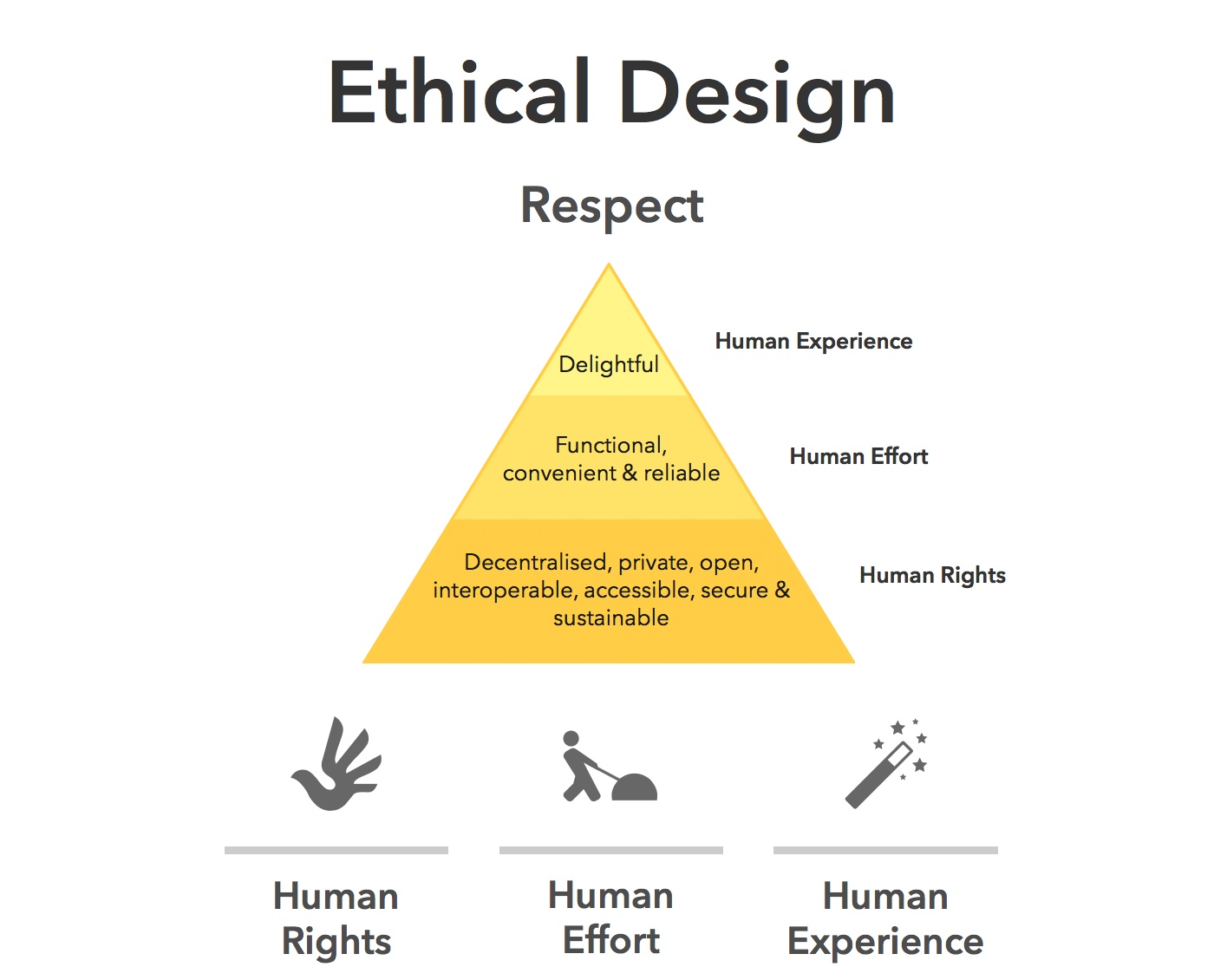
Ethical UX design requires designers who can say, “We could do this, but we shouldn’t.”

Ethical design pyramide
Ethical design choices require human review. (Image source: Medium) 

Strategy Lives In Context

AI doesn’t sit in stakeholder meetings. It doesn’t hear what’s implied but not stated. It doesn’t understand organisational politics, regulatory nuance, or long-term positioning.

Designers act as translators between business intent and human impact. That translation relies on trust, relationships, and context, not pattern recognition.

“

This is why senior designers increasingly operate at the intersection of product, strategy, and culture.

The lesson is clear: As AI takes over execution, human designers become the guardians of intent.

How The Daily Work Of A Designer Is Changing

This shift isn’t theoretical. It’s already reshaping daily design practice.

From Designing To Prompting

Designers are moving from manipulating pixels to articulating intent. Clear goals, constraints, and priorities become the input.

Instead of asking AI to “draw a dashboard,” the task becomes:

  • “Create a dashboard that reduces cognitive load for first-time users.”
  • “Explore layouts optimised for accessibility and low vision.”

Prompting isn’t about clever wording; it’s about clarity of thinking and understanding the intent of the outcomes. You may need to tweak your prompts as you go, but this is all part of the learning process of directing AI to deliver the outcomes needed.

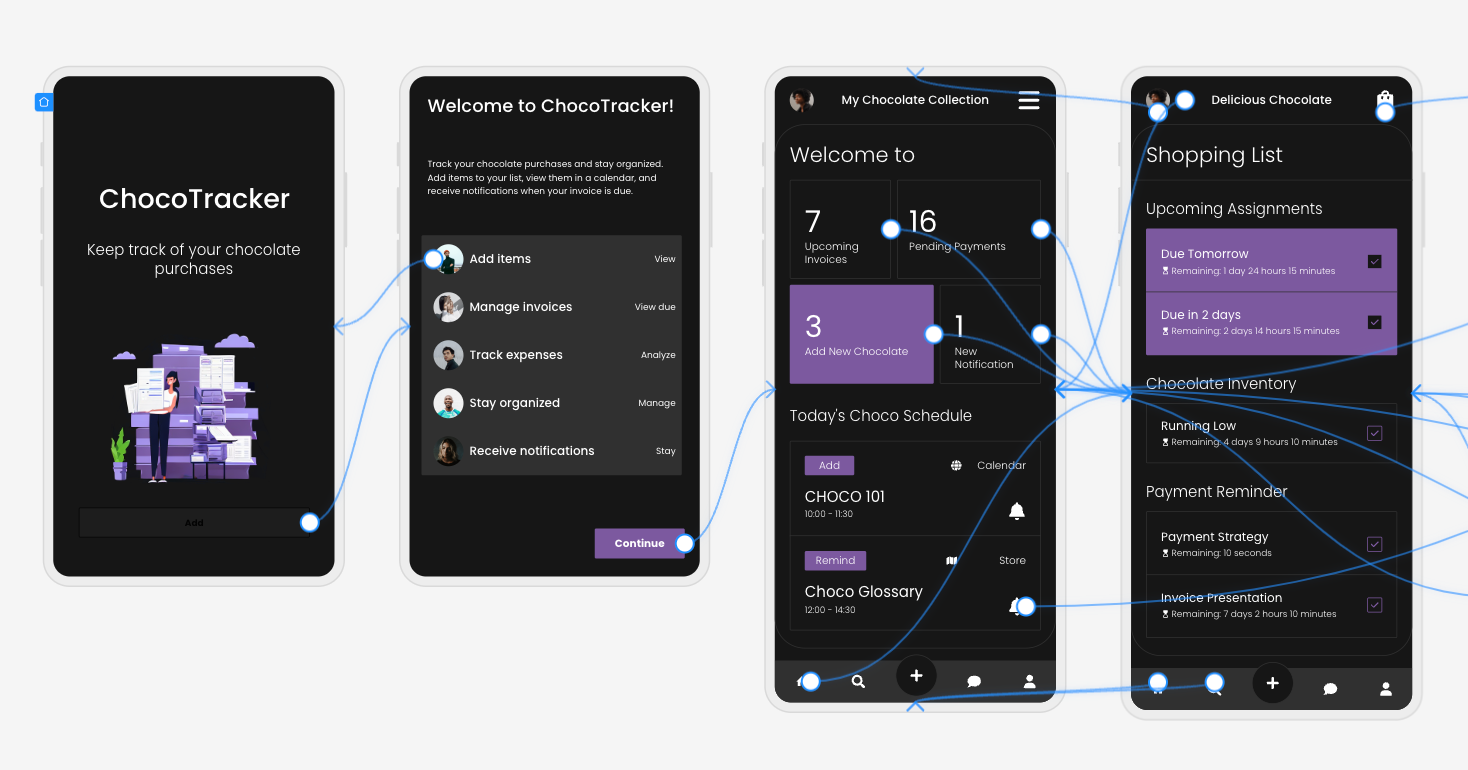
Four design screens complete with user flow mapping
Four design screens created by Uizard Autodesigner, complete with user flow mapping. (Image source: Uizard.io) 

From Making To Choosing

AI produces options. Designers make decisions.

A significant portion of future design work will involve reviewing, critiquing, and refining AI-generated outputs, and then selecting what best serves the user and aligns with ethical, business, and accessibility goals.

This mirrors how experienced designers already work: mentoring juniors, reviewing their concepts, and guiding direction, but at a much greater scale, given the sheer number of design options AI tools can generate.

The Movie Director Metaphor

I often describe the modern designer as a movie director. A director doesn’t operate the camera, build the set, or act every role, but they are responsible for the story, the emotional intent, and the audience experience.

AI tools are the crew. Designers are responsible for the meaning of the story.

A Real-World Shift: What This Looks Like In Practice

To make this less abstract, let’s ground it in a familiar scenario.

Ten years ago, a designer might spend days producing wireframes for a new feature, carefully crafting each screen, annotating every interaction, and defending each decision in reviews. Much of the designer’s perceived value lived in the artefacts themselves.

Today, that same feature can be scaffolded in an afternoon with AI support. But here’s what hasn’t changed — the hard conversations.

The UX designer still has to ask:

  • Who is this actually for?
  • What problem are we solving, and for whom?
  • What happens when this fails?
  • Who might this unintentionally exclude or disadvantage?

In practice, I’ve seen senior designers spend less time inside design tools and more time facilitating workshops, synthesising messy inputs, mediating between stakeholders, and protecting user needs when trade-offs arise.

AI accelerates production, but it does not remove the designer’s responsibility. In fact, it increases it. When options are cheap and plentiful, discernment becomes a scarce skill.

“

Conclusion: How To Prepare Right Now

Don’t panic — practice.

Avoiding AI won’t preserve your relevance. Learning to use it thoughtfully will.

Start small:

  • Explore Figma’s AI features.
  • Use AI for ideation, not final decisions.
  • Treat outputs as conversation starters, not answers.

Confidence comes from familiarity, not avoidance.

Invest In Human Skills.

The most resilient designers will double down on:

  • Psychology and behavioural science;
  • Communication and facilitation;
  • Ethics, accessibility, and inclusion;
  • Strategic thinking and storytelling.

These skills compound over time, and they can’t be automated.

The designer’s responsibility in an AI-accelerated world:

There’s an uncomfortable implication in all of this that we don’t talk about enough: when AI makes it easier to design anything, designers become more accountable for what gets released into the world. Bad design used to be excused by constraints. Limited time, limited tools, limited data. Those excuses are disappearing. When AI removes friction from execution, the ethical and strategic responsibility lands squarely on human shoulders.

This is where UX designers can, and must, step up as stewards of quality, accessibility, and humanity in digital systems.

Final Thought 

AI won’t take your job. But a designer who knows how to think critically, direct intelligently, and collaborate effectively with AI might take the job of a designer who doesn’t.

The future of UX is no less human. It’s more intentional than ever.

Sunday, February 8, 2026

Build Flow, Not Features: The MVP Mistake Most Founders Repeat


Most MVPs don’t fail because they lack features.

They fail because the product doesn’t flow.

Founders often believe: “If we add more features, the product will feel complete.”

But users don’t care about feature count. Users care about one thing:

How fast and how easily can I reach the result I came for?

That’s why the biggest MVP mistake is simple:

Building features instead of building flow.

Features impress. Flow converts.

A product can have:

  • login
  • dashboard
  • chat
  • notifications
  • admin panel
  • payment integration

…and still fail.

Because the user experience is not about modules. It’s about movement.

If a user feels:

  • confused
  • lost
  • delayed
  • overloaded

They won’t explore your features. They will exit.

Flow is what makes a product feel “easy”.

The MVP should be designed like a straight road

A good MVP journey feels like:

  1. I land on the app
  2. I instantly understand the value
  3. I take one action
  4. I get a result
  5. I want to come back

If your MVP can’t deliver this journey within minutes, it’s not an MVP — it’s a prototype with options.

Why founders fall into the “feature trap”

Because features are visible progress.

Flow is invisible progress.

It’s easy to say: “Add chat, add payment, add filters.”

It’s harder to ask:

“Will this reduce user friction?”

So teams build what’s easy to measure: feature completion.

But the real success metric is: friction removal.

A simple rule: Every feature must earn its place

Before adding anything, ask:

Does this feature reduce steps to the core outcome?

If yes → keep it. If no → postpone it.

Example: If your MVP is a quiz/exam system, the core outcome is: attempting the quiz and seeing progress/results.

Everything else must support this.

Not distract from it.

The 3-Flow Framework (use this to design any MVP)

1) Entry Flow (first 60 seconds)

Goal: user should instantly know what to do

Ask:

  • Do users understand the purpose in 5 seconds?
  • Is the CTA obvious?
  • Is there any unnecessary step before value?

2) Action Flow (core task)

Goal: user completes the main action with minimum friction

Ask:

  • How many steps to complete the main action?
  • Where do users get confused?
  • Where do they hesitate?

The 3-Flow Framework (use this to design any MVP)

1) Entry Flow (first 60 seconds)

Goal: user should instantly know what to do

Ask:

  • Do users understand the purpose in 5 seconds?
  • Is the CTA obvious?
  • Is there any unnecessary step before value?

2) Action Flow (core task)

Goal: user completes the main action with minimum friction

Ask:

  • How many steps to complete the main action?
  • Where do users get confused?
  • Where do they hesitate?

Most MVPs fail at step 1, not step 10

Teams waste weeks polishing:

  • admin settings
  • design animations
  • edge-case features

But the real MVP success depends on: the first user journey.

If your first journey isn’t smooth, no scaling rule can save it.

Final thought

MVP success isn’t about building everything.

It’s about building the right journey.

Features are parts. Flow is the system.

And systems win.