Magento 2 store owners have many options available to optimize the store functionality, improve customer experience, capture payments and ease the administrative tasks with 3rd party extensions. Also, there are 3rd party custom themes available to improve the look and feel of the admin panel and storefront.
The only problem with these 3rd party themes and extensions is that sometimes it disrupts the features of default Magento 2 or conflicts with default configuration.
One such issue is No Image for Configurable Product in Magento 2 Cart Page. The simple product image of a configurable product is not displayed in the cart page due to 3rd party extensions or themes.
Generally, the developers follow below steps for fixing the problem:
Preconditions
- Magento 2.2.x
- Create a configurable product.
Steps to Reproduce
- Create a configurable product.
- Add images for all child products
- Do not add images for parent products.
- Add that product in cart page.
It is expected that images of child product are displayed on cart page. If a child product has no images then images of the parent product are displayed.
Unfortunately, it’s not the case ?
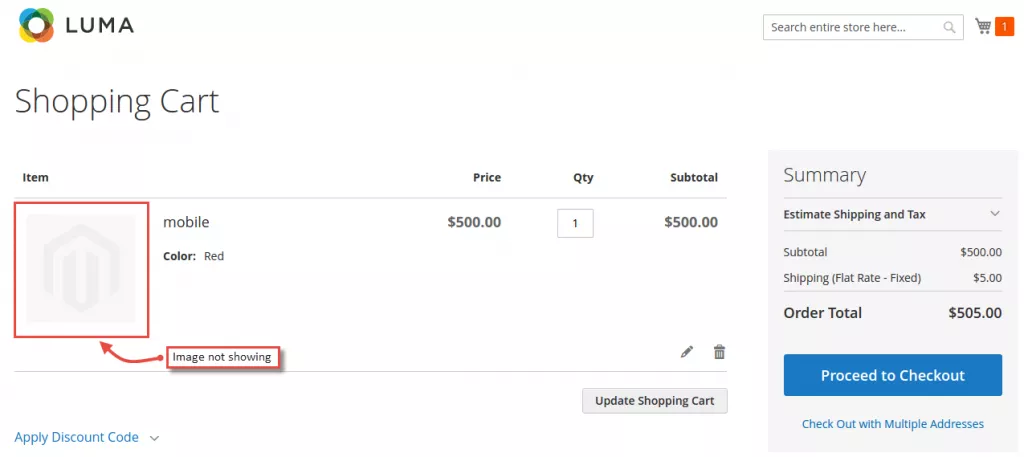
To overcome this issue, one needs to override the Magento 2 code file. Let’s see how to do it.
Solution: No Image for Configurable Product in Magento 2 Cart Page
Copy [MAGENTO_ROOT]vendormagentomodule-catalogBlockProductImageBuilder.php and paste it to [MAGENTO_ROOT]appcodeMagentoCatalogBlockProductImageBuilder.php
find the following code:
if ($simpleOption !== null) { $optionProduct = $simpleOption->getProduct(); $this->setProduct($optionProduct); } And, replace it with the below code:
if ($simpleOption !== null) { $optionProduct = $simpleOption->getProduct(); $objectManager = MagentoFrameworkAppObjectManager::getInstance(); $product = $objectManager->create('MagentoConfigurableProductModelResourceModelProductTypeConfigurable')->getParentIdsByChild($optionProduct->getEntityId()); $parentProduct = $objectManager->create('MagentoCatalogModelProduct')->load($product[0]); $this->setProduct($parentProduct); } That’s all you have to do to solve No Image for Configurable Product in Magento 2 Cart Page!


No comments:
Post a Comment