UX research without users isn’t research. We can shape design ideas with bias, assumptions, guesstimates, and even synthetic users, but it’s anything but UX research. Yet some of us might find ourselves in situations where we literally don’t have access to users — because of legal constraints, high costs, or perhaps users just don’t exist yet. What do we do then?
Luckily, there are some workarounds that help us better understand pain points
and issues that users might have when using our products. This holds
true even when stakeholders can’t give us time or resources to run
actual research, or strict NDAs or privacy regulations prevent us from
speaking to users.
Let’s explore how we can make UX research work when there is no or only limited access to users — and what we can do to make a strong case for UX research.
Find Colleagues Who Are The Closest To Your Customers
When you don’t have access to users, I always try to establish a connection with colleagues who are the closest to our customers. Connect with people in the organization who speak with customers regularly, especially people in sales, customer success, support, and QA. Ultimately, you could convey your questions indirectly via them.
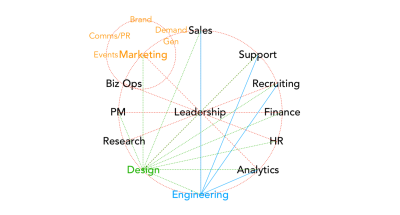
Every
company circles around leadership. And every department is
interconnected. This is especially true for design, engineering,
research, sales, and marketing. Image by Paul Adams. (Large preview)
As Paul Adams noted, there has never been more overlap between designers and salespeople
than today. Since many products are subscription-based, sales teams
need to maintain relationships with customers over time. This requires a
profound understanding of user needs — and meeting these needs well
over time to keep retention and increase loyalty.
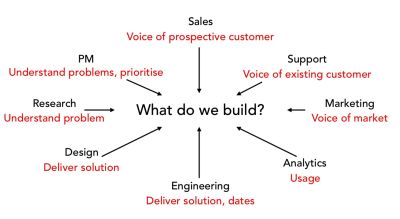
Everybody
on the team shapes UX. And all departments have insights that can guide
and inform design decisions. Image by Paul Adams. (Large preview)
That’s where research
comes in — and that’s exactly where the overlap between UX and sales
comes in. In fact, it’s not surprising to find UX researchers sitting
within marketing teams under the disguise of Customer Success teams, so
whenever you can befriend colleagues from sales and Customer Success teams.
Gaining Insights Without Direct Access To Users
If
you can’t get users to come to you, perhaps you could go where they
are. You could ask to silently observe and shadow them at their
workplace. You could listen in to customer calls and interview call center staff to uncover pain points that users have when interacting with your product. Analytics, CRM reports, and call center logs are also a great opportunity to gain valuable insights, and Google Trends can help you find product-related search queries.
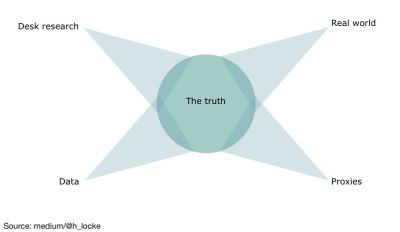
You
might not have all the data, but if you keep exploring various sources,
the truth will eventually come to light. Image by H Locke. (Large preview)
To learn more about potential issues and user frustrations, also turn to search logs, Jira backlogs, and support tickets. Study reviews, discussions, and comments
for your or your competitor’s product, and take a look at TrustPilot
and app stores to map key themes and user sentiment. Or get active
yourself and recruit users via tools like UserTesting, Maze, or
UserInterviews.
These techniques won’t always work, but they can
help you get off the ground. Beware of drawing big conclusions from very
little research, though. You need multiple sources to reduce the impact
of assumptions and biases — at a very minimum, you need five users to discover patterns.
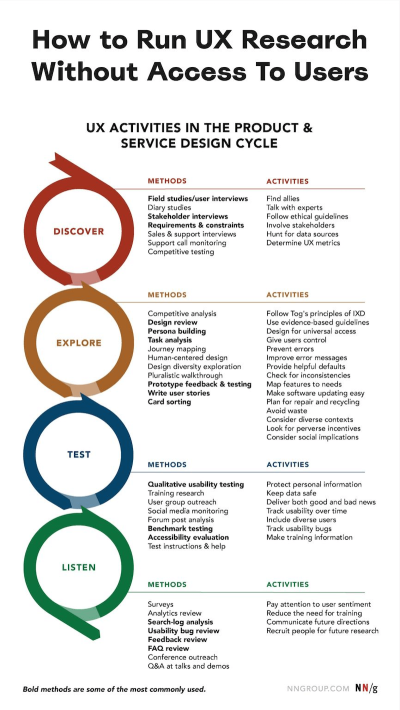
Susan Farrell from the Nielsen Norman Group summarized a wide range of UX activities, useful when you do have access to users, but we can convey them to users or run them even with very limited access to users. (Large preview)
Making A Strong Case For UX Research
Ironically, as H Locke noted,
the stakeholders who can’t give you time or resources to talk to users
often are the first to demand evidence to support your design work. Tap
into it and explain what you need. Research doesn’t have to be
time-consuming or expensive; ask for a small but steady commitment
to gather evidence. Explain that you don’t need much to get started: 5
users × 30 minutes once a month might already be enough to make a
positive change.
Sometimes, the reason why companies are reluctant to grant access to users is simply the lack of trust.
They don’t want to disturb relationships with big clients, which are
carefully maintained by the customer success team. They might feel that
research is merely a technical detail that clients shouldn’t be bothered
with.
Typically, if you work in B2B or enterprise, you won’t have direct access to users. This might be due to strict NDAs or privacy regulations, or perhaps the user group is very difficult to recruit (e.g., lawyers or doctors).
Show that you care
about that relationship. Show the value that your work brings. Explain
that design without research is merely guesswork and that designing
without enough research is inherently flawed.
Once your impact becomes visible, it will be so much easier to gain access to users that seemed almost impossible initially.
Key Takeaways
Ask for reasons for no access to users: there might be none.
Find colleagues who are the closest to your customers.
Make friends with sales, customer success, support, QA.
Convey your questions indirectly via your colleagues.
If you can’t get users to come to you, go where they are.
Ask to observe or shadow customers at their workplace.
Listen in to customer calls and interview call center staff.
Gather insights from search logs, Jira backlog, and support tickets.
Map key themes and user sentiment on TrustPilot, AppStore, etc.
Recruit users via UserTesting, Maze, UserInterviews, etc.
Ask for small but steady commitments: 5 users × 30 mins, 1× month.
Avoid ad-hoc research: set up regular check-ins and timelines.
Every
single action online, even a tiny one such as a click or a mouse
movement, produces a data footprint. In the case of interactions with
the computer mouse, these are called mouse interaction data (or mouse
data for short). Small pieces of simple mouse data aggregate into a
greater and more complex mosaic. Its patterns paint the essence of who
we are and what we do. Machine learning can even use patterns in mouse
data to predict our future actions, such as buying a product. Large
companies leverage mouse data to make informed decisions based on
knowledge of their user base and personalize user experiences to match
their current needs, and that’s just scratching the surface. In this
article, Eduard Kuric discusses mouse interaction data, what kind of
magic can be done with it, and some of the hidden pitfalls to watch out
for so you get a head start incorporating them in your solutions.
Mouse
data is a subcategory of interaction data, a broad family of data about
users generated as the immediate result of human interaction with
computers. Its siblings from the same data family include logs of key
presses or page visits. Businesses commonly rely on interaction data,
including the mouse, to gather insights about their target audience.
Unlike data that you could obtain more explicitly, let’s say via a
survey, the advantage of interaction data is that it describes the actual behavior of actual people.
Collecting
interaction data is completely unobtrusive since it can be obtained
even as users go about their daily lives as usual, meaning it is a quantitative data source
that scales very well. Once you start collecting it continuously as
part of regular operation, you do not even need to do anything, and
you’ll still have fresh, up-to-date data about users at your fingertips —
potentially from your entire user base, without them even needing to
know about it. Having data on specific users means that you can cater to
their needs more accurately.
Of course, mouse data has its
limitations. It simply cannot be obtained from people using touchscreens
or those who rely on assistive tech. But if anything, that should not
discourage us from using mouse data. It just illustrates that we should
look for alternative methods that cater to the different ways that
people interact with software. Among these, the mouse just happens to be
very common.
When using the mouse, the mouse pointer is the de
facto conduit for the user’s intent in a visual user interface. The
mouse pointer is basically an extension of your arm that lets you
interact with things in a virtual space that you cannot directly touch.
Because of this, mouse interactions tend to be data-intensive. Even the simple mouse action of moving the pointer to an area and clicking it can yield a significant amount of data.
Mouse
data is granular, even when compared with other sources of interaction
data, such as the history of visited pages. However, with machine
learning, it is possible to investigate jumbles of complicated data and
uncover a variety of complex behavioral patterns. It can reveal more
about the user holding the mouse without needing to provide any more
information explicitly than normal.
Mouse movements are a rich and highly expressive source of data on user behavior. (Illustration by Michal Opalek) (Large preview)
For starters, let us venture into what kind of information can be obtained by processing mouse interaction data.
Mouse
dynamics refer to the features that can be extracted from raw mouse
data to describe the user’s operation of a mouse. Mouse data by itself
corresponds with the simple mechanics of mouse controls. It consists of mouse events:
the X and Y coordinates of the cursor on the screen, mouse button
presses, and scrolling, each dated with a timestamp. Despite the innate
simplicity of the mouse events themselves, the mouse dynamics using them
as building blocks can capture user’s behavior from a diverse and
emergently complex variety of perspectives.
If you are concerned
about user privacy, as well you should be, mouse dynamics are also your
friend. For the calculation of mouse dynamics to work, raw mouse data
does not need to inherently contain any details about the actual meaning
of the interaction. Without the context of what the user saw as they
moved their pointer around and clicked, the data is quite safe and
harmless.
Some examples of mouse dynamics include measuring the
velocity and the acceleration at which the mouse cursor is moving or
describing how direct or jittery the mouse trajectories are. Another
example is whether the user presses and lets go of the primary mouse
button quickly or whether there is a longer pause before they release
their press. Four categories of over twenty base measures can be
identified: temporal, spatial, spatial-temporal, and performance.
Features do not need to be just metrics either, with other approaches
using a time series of mouse events.
Temporal mouse dynamics:
Movement duration: The time between two clicks;
Response time: The time it takes to click something in response to a stimulus (e.g., from the moment when a page is displayed);
Initiation time: The time it takes from an initial stimulus for the cursor to start moving;
Pause time: The time measuring the cursor’s period of idleness.
Spatial mouse dynamics:
Distance: Length of the path traversed on the screen;
Straightness: The ratio between the traversed path and the optimal direct path;
Path deviation: Perpendicular distance of the traversed path from the optimal path;
Path crossing: Counted instances of the traversed and optimal path intersecting;
Jitter: The ratio of the traversed path length to its smoothed version;
Angle: The direction of movement;
Flips: Counted instances of change in direction;
Curvature: Change in angle over distance;
Inflection points: Counted instances of change in curvature.
Spatial-temporal mouse dynamics:
Velocity: Change of distance over time;
Acceleration: Change of velocity over time;
Jerk: Change of acceleration over time;
Snap: Change in jerk over time;
Angular velocity: Change in angle over time.
Performance mouse dynamics:
Clicks: The number of mouse button events pressing down or up;
Hold time: Time between mouse down and up events;
Click error: Length of the distance between the clicked point and the correct user task solution;
Time to click: Time between the hover event on the clicked point and the click event;
The
spatial angular measures cited above are a good example of how the
calculation of specific mouse dynamics can work. The direction angle of
the movements between points A and B is the angle between the vector AB
and the horizontal X axis. Then, the curvature angle in a sequence of
points ABC is the angle between vectors AB and BC. Curvature distance
can be defined as the ratio of the distance between points A and C and
the perpendicular distance between point B and line AC. (Definitions
sourced from the paper “An efficient user verification system via mouse movements.”)
Spatial
mouse dynamics characterize trajectories traversed by users in terms of
measures, such as angles of direction (x), curvature (y), and curvature
distance. (Illustration by Michal Opalek) (Large preview)
Even
individual features (e.g., mouse velocity by itself) can be delved into
deeper. For example, on pages with a lot of scrolling, horizontal mouse
velocity along the X-axis may be more indicative of something capturing
the user’s attention than velocity calculated from direct
point-to-point (Euclidean) distance in the screen’s 2D space. The
maximum velocity may be a good indicator of anomalies, such as user
frustration, while the mean or median may tell you more about the user
as a person.
From Data To Tangible Value
The
introduction of mouse dynamics above, of course, is an
oversimplification for illustrative purposes. Just by looking at the
physical and geometrical measurements of users’ mouse trajectories, you
cannot yet tell much about the user. That is the job of the machine
learning algorithm. Even features that may seem intuitively useful to
you as a human (see examples cited at the end of the previous section)
can prove to be of low or zero value for a machine-learning algorithm.
Meanwhile,
a deceptively generic or simplistic feature may turn out unexpectedly
quite useful. This is why it is important to couple broad feature
generation with a good feature selection method, narrowing the dimensionality of the model down to the mouse dynamics that help you achieve good accuracy without overfitting.
Some feature selection techniques are embedded directly into machine
learning methods (e.g., LASSO, decision trees) while others can be used
as a preliminary filter (e.g., ranking features by significance assessed
via a statistical test).
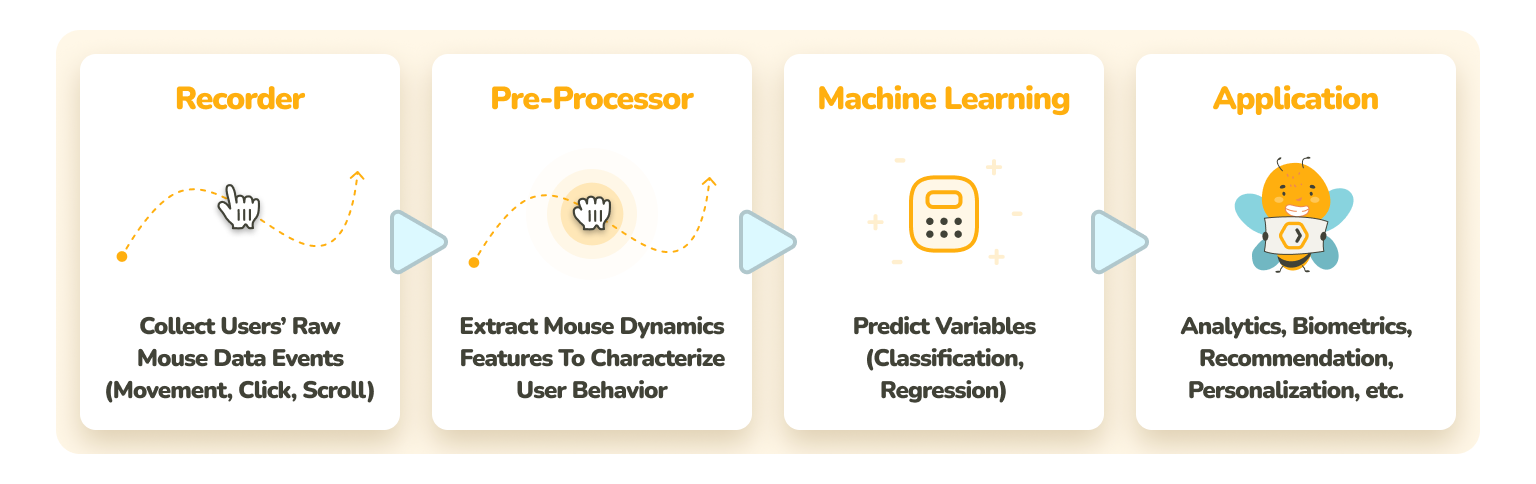
As we can see, there is a sequential
process to transforming mouse data into mouse dynamics, into a
well-tuned machine learning model to field its predictions, and into an
applicable solution that generates value for you and your organization.
This can be visualized as the pipeline below.
The
mouse dynamics machine learning prediction pipeline. From recorded
mouse data, extracted mouse dynamics serve as the basis of machine
learning prediction, applicable for a variety of purposes. (Illustration
by Michal Opalek) (Large preview)
Machine Learning Applications Of Mouse Dynamics
To
set the stage, we must realize that companies aren’t really known for
letting go of their competitive advantage by divulging the ins and outs
of what they do with the data available to them. This is especially true
when it comes to tech giants with access to potentially some of the
most interesting datasets on the planet (including mouse interaction
data), such as Google, Amazon, Apple, Meta, or Microsoft. Still, recording mouse data is known to be a common practice.
With
a bit of grit, you can find some striking examples of the use of mouse
dynamics, not to mention a surprising versatility in techniques. For
instance, have you ever visited an e-commerce site just to see it
recommend something specific to you, such as a gendered line of
cosmetics — all the while, you never submitted any information about
your sex or gender anywhere explicitly?
Let’s take a look at some further applications. Starting some simple categorization of users.
Example 1: Biological Sex Prediction
For businesses, knowing users well allows them to provide accurate recommendations and personalization
in all sorts of ways, opening the gates for higher customer
satisfaction, retention, and average order value. By itself, the
prediction of user characteristics, such as gender, isn’t anything new.
The reason for basing it on mouse dynamics, however, is that mouse data is generated virtually by the truckload. With that, you will have enough data to start making accurate predictions very early.
If
you waited for higher-level interactions, such as which products the
user visited or what they typed into the search bar, by the time you’d
have enough data, the user may have already placed an order or, even
worse, left unsatisfied.
The selection of the machine learning algorithm matters for a problem. In one published scientific paper,
six various models have been compared for the prediction of biological
gender using mouse dynamics. The dataset for the development and
evaluation of the models provides mouse dynamics from participants
moving the cursor in a broad range of trajectory lengths and directions.
Among the evaluated models — Logistic regression, Support vector
machine, Random forest, XGBoost, CatBoost, and LightGBM — CatBoost
achieved the best F1 score.
Putting people into boxes is far from
everything that can be done with mouse dynamics, though. Let’s take a
look at a potentially more exciting use case — trying to predict the
future.
Example 2: Purchase Prediction
Another
e-commerce application predicts whether the user has the intent to make
a purchase or even whether they are likely to become a repeat customer.
Utilizing such predictions, businesses can adapt personalized sales and
marketing tactics to be more effective and efficient, for example, by
catering more to likely purchasers to increase their value — or the
opposite, which is investigating unlikely purchasers to find ways to
turn them into likely ones.
Interestingly, a paper dedicated to the prediction of repeat customership
reports that when a gradient boosting model is validated on data
obtained from a completely different online store than where it was
trained and tuned, it still achieves respectable performance in the
prediction of repeat purchases with a combination of mouse dynamics and
other interaction and non-interaction features.
It is plausible
that though machine-learning applications tend to be highly
domain-specific, some models could be used as a starting seed, carried
over between domains, especially while still waiting for user data to
materialize.
Additional Examples
Applications
of mouse dynamics are a lot more far-reaching than just the domain of
e-commerce. To give you some ideas, here are a couple of other variables
that have been predicted with mouse dynamics:
When
you think about mouse dynamics in-depth, some questions will invariably
start to emerge. The user isn’t the only variable that could determine
what mouse data looks like. What about the mouse itself?
Many
brands and models are available for purchase to people worldwide. Their
technical specifications deviate in attributes such as resolution
(measured in DPI or, more accurately,
CPI), weight, polling rate, and tracking speed. Some mouse devices have
multiple profile settings that can be swapped between at will. For
instance, the common CPI of an office mouse is around 800-1,600, while a
gaming mouse can go to extremes, from 100 to 42,000. To complicate
things further, the operating system has its own mouse settings, such as
sensitivity and acceleration. Even the surface beneath the mouse can
differ in its friction and optical properties.
Can we be sure that mouse data is reliable, given that basically everyone potentially works under different mouse conditions?
For
the sake of argument, let’s say that as a part of a web app you’re
developing, you implement biometric authentication with mouse dynamics
as a security feature. You sell it by telling customers that this form
of auth is capable of catching attackers who try to meddle in a tab that
somebody in the customer’s organization left open on an unlocked
computer. Recognizing the intruder, the app can sign the user out of the
account and trigger a warning sent to the company. Kicking out the real
authorized user and sounding the alarm just because somebody bought a
new mouse would not be a good look. Recalibration to the new mouse would
also produce friction. Some people like to change their mouse
sensitivity or use different computers quite often, so frequent
calibration could potentially present a critical flaw.
We found
that up until now, there was barely anything written about whether or
how mouse configuration affects mouse dynamics. By mouse configuration,
we refer to all properties of the environment that could impact mouse
behavior, including both hardware and software.
From the authors
of papers and articles about mouse dynamics, there is barely a mention
of mouse devices and settings involved in development and testing. This
could be seen as concerning. Though hypothetically, there might not be
an actual reason for concern, that is exactly the problem. There was
just not even enough information to make a judgment on whether mouse
configuration matters or not. This question is what drove the study
conducted by UXtweak Research (as covered in the peer-reviewed paper in Computer Standards & Interfaces).
The quick answer? Mouse configuration does detrimentally affect mouse dynamics. How?
It
may cause the majority of mouse dynamics values to change in a
statistically significant way between different mouse configurations.
It
may lower the prediction performance of a machine learning model if it
was trained on a different set of mouse configurations than it was
tested on.
We
cannot say for certain how big an impact mouse configuration can have
in a specific instance. For the problem that you are trying to solve
(specific domain, machine learning model, audience), the impact could be
big, or it could be negligible. But to be sure, it should definitely
receive attention. After all, even a deceptively small percentage of
improvement in prediction performance can translate to thousands of
satisfied users.
Tackling Mouse Device Variability
Knowledge
is half the battle, and so it is also with the realization that mouse
configuration is not something that can be just ignored when working
with mouse dynamics. You can perform tests to evaluate
the size of the effect that mouse configuration has on your model’s
performance. If, in some configurations, the number of false positives
and false negatives rises above levels that you are willing to tolerate,
you can start looking for potential solutions by tweaking your
prediction model.
Because of the potential variability in
real-world conditions, differences between mouse configurations can be
seen as a concern. Of course, if you can rely on controlled conditions
(such as in apps only accessible via standardized kiosks or
company-issued computers and mouse devices where all system mouse
settings are locked), you can avoid the concern altogether. Given that
the training dataset uses the same mouse configuration as the
configuration used in production, that is. Otherwise, that may be
something new for you to optimize.
Some predicted variables can be
observed repeatedly from the same user (e.g., emotional state or intent
to make a purchase). In the case of these variables, to mitigate the
problem of different users utilizing different mouse configurations, it
would be possible to build personalized models trained and tuned on the
data from the individual user and the mouse configurations they normally
use. You also could try to normalize mouse dynamics by adjusting them
to the specific user’s “normal” mouse behavior. The challenge is how to
accurately establish normality. Note that this still doesn’t address
situations when the user changes their mouse or settings.
Where To Take It From Here
So,
we arrive at the point where we discuss the next steps for anyone who
can’t wait to apply mouse dynamics to machine learning purposes of their
own. For web-based solutions, you can start by looking at MouseEvents in JavaScript, which is how you’ll obtain the elementary mouse data necessary.
Mouse
events will serve as the base for calculating mouse dynamics and the
features in your model. Pick any that you think could be relevant to the
problem you are trying to solve (see our list above, but don’t be
afraid to design your own features). Don’t forget that you can also combine mouse dynamics with domain and application-specific features.
Problem
awareness is key to designing the right solutions. Is your prediction
problem within-subject or between-subject? A classification or a
regression? Should you use the same model for your whole audience, or
could it be more effective to tailor separate models to the specifics of
different user segments?
For example, the mouse behavior of
freshly registered users may differ from that of regular users, so you
may want to divide them up. From there, you can consider the suitable
machine/deep learning algorithm. For binary classification, a Support
vector machine, Logistic regression, or a Random Forest could do the
job. To delve into more complex patterns, you may wish to reach for a
Neural network.
Of course, the best way to uncover which
machine/deep learning algorithm works best for your problem is to
experiment. Most importantly, don’t give up if you don’t succeed at
first. You may need to go back to the drawing board a few times to
reconsider your feature engineering, expand your dataset, validate your
data, or tune the hyperparameters.
Conclusion
With
the ongoing trend of more and more online traffic coming from mobile
devices, some futurist voices in tech might have you believe that “the computer mouse is dead”.
Nevertheless, those voices have been greatly exaggerated. One look at
statistics reveals that while mobile devices are excessively popular,
the desktop computer and the computer mouse are not going anywhere anytime soon.
Classifying
users as either mobile or desktop is a false dichotomy. Some people
prefer the desktop computer for tasks that call for exact controls while
interacting with complex information. Working, trading, shopping, or
managing finances — all, coincidentally, are tasks with a good amount of
importance in people’s lives.
To wrap things up, mouse data can be a powerful information source for improving digital products and services and getting yourself a headway against the competition. Advantageously, data for mouse dynamics does not need to involve anything sensitive or in breach of the user’s privacy.
Even without identifying the person, machine learning with mouse
dynamics can shine a light on the user, letting you serve them more
proper personalization and recommendations, even when other data is
sparse. Other uses include biometrics and analytics.