⭐ If you would like to buy me a coffee, well thank you very much that is mega kind! : https://www.buymeacoffee.com/honeyvig Hire a web Developer and Designer to upgrade and boost your online presence with cutting edge Technologies
Showing posts with label Coding. Show all posts

Saturday, July 25, 2026

Weaponizing And Defending The React Flight Protocol: Deserialization Sinks In RSCs


While React Server Components rely on the custom Flight protocol to stream interactive UIs, this same mechanism introduces powerful deserialization sinks that attackers can exploit. Durgesh Pawar breaks down the mechanics behind the CVSS 10.0 “React2Shell” vulnerability to show how protocol manipulation can lead to remote code execution. It also covers a practical, ranked set of defenses, from strict schema validation to CSRF hardening, for securing React applications against these structural risks.

React Server Components don’t send HTML to your browser. They don’t send JSON either. When a server component renders, what actually travels over the wire is a custom streaming protocol called Flight. It’s a line-delimited format with its own type system, its own reference resolution, and its own rules for reconstructing executable behavior on the client.

Most React developers have never opened the Network tab and actually looked at a Flight payload. It looks like a mix of JSON fragments, dollar-sign-prefixed references, and module pointers that the React runtime silently reassembles into a live component tree. The framework handles it, so nobody questions it.

I’m not sure most teams have thought carefully about what that trust actually implies.

I started pulling apart the Flight protocol after CVE-2025-55182 dropped in December 2025. The security community called it React2Shell, and for good reason. It was a CVSS 10.0, unauthenticated remote code execution vulnerability sitting in the Flight deserialization layer. One crafted HTTP request to a Server Function endpoint, and an attacker had shell access. No credentials needed.

The federal Cybersecurity & Infrastructure Agency (CISA) added it to the Known Exploited Vulnerabilities catalog. Sysdig tied in-the-wild exploitation to North Korean state-sponsored actors deploying file-less implants through the Ethereum blockchain. That’s the kind of CVE that gets your attention.

After spending time in the source (mostly getOutlinedModel and getChunk, which is where the resolution logic that matters actually lives), I realized React2Shell wasn’t a one-off parsing bug. It was a symptom. Flight reconstructs executable references, lazy-loaded components, server RPC endpoints, and async state from a stream of text. That’s a deserialization system.

The attack surface extends well beyond a single missing hasOwnProperty check. This article covers how Flight works on the wire, where the deserialization sinks are, what attackers have already weaponized, and what’s still exposed.

This leads to a ranked, practical set of defenses for your own Server Components: schema validation on every Server Action, the server-only package, cross-site request forgery (CSRF) hardening beyond framework defaults, and an assessment of what the Taint API and Web Application Firewalls (WAFs) provide.

Flight On The Wire #

Open your browser’s Network tab on any Next.js App Router page and look for requests returning Content-Type: text/x-component. That’s Flight. It’s not a single JSON blob. It’s a streaming, line-delimited format where each line is a self-contained “row” that the client-side React runtime processes as it arrives over the connection.

Here’s what a simple Flight payload looks like in practice:

1:I["./src/components/ClientComponent.js",["chunks/main.js"],"default"]
2:J["$","article",null,{"children":"$1"}]
0:D{"name":"RootLayout","env":"Server"}

Row 1 is an import directive. It tells the client to load ClientComponent.js from the bundler’s chunk map. Row 2 is a JSON tree that constructs an <article> HTML element, and the "$1" inside children is a reference back to chunk 1 (the imported component). Row 0 defines the server execution context, marking this as a RootLayout running in the Server environment. Even in this tiny example, you can see the mix of structural data, module references, and cross-chunk pointers that makes Flight different from plain JSON.

The Row Format #

Every row follows the same syntax: <ROW_ID>:<ROW_TAG><PAYLOAD>\n. The row ID is a numeric identifier that other rows can reference. The tag is a single character (or short string) that tells the parser what kind of data follows. The payload is the actual content.

Here are the row tags I found while reading through the source:

TagNameWhat it does
JJSON TreeSerialized virtual DOM nodes, component props, and HTML elements.
MModuleMetadata for a specific Client Component module or chunk.
IImportTells the client to load a module from the bundler’s chunk map.
HLHint/PreloadInstructs the browser to preload resources such as stylesheets or fonts.
DDataServer-rendered element context and environment info.
EErrorSerialized server-side exceptions and error boundaries.

So far, this might look like a benign structured data format with some custom tags, but the real complexity and attack surface live in the prefix system.

The $ Prefix System #

This is where I started paying closer attention.

When the client-side parser encounters a string value starting with $, it doesn’t treat it as literal text. It intercepts the string, checks the prefix, and routes it through a type-specific resolution path. The parseModelString function in ReactFlightClient.js is where this happens. It’s essentially a big switch statement on the character after $.

PrefixTypeWhat the parser does with it
$Model ReferenceResolves to another chunk in the stream (e.g., $2 points to row 2).
$:Property AccessTraverses into a resolved chunk’s properties (e.g., $1:user:name).
$SSymbolCreates a native JavaScript Symbol.
$FServer ReferenceRepresents a callable Server Action (an RPC endpoint on the server).
$LLazy ComponentDefers component loading until it’s needed in the render tree
$@Promise/Raw ChunkReturns the internal Chunk wrapper object itself (often acting as a Thenable/Promise), not its resolved value.
$BBlob/BinaryTriggers the blob deserialization handler for binary data.

Every other prefix resolves a chunk and gives you the parsed result. $@ hands you the raw internal Chunk object instead, the wrapper React uses to track resolution state, pending callbacks, and internal metadata (which is why it’s used for Promises and why exploits use it to get a mutable handle). Exposing framework plumbing through the protocol looks like a design mistake to me, though I’d be interested to hear the rationale if there is one.

And $: (property access) is the other critical prefix. It lets the protocol specify a path like $1:user:name, which tells the parser to resolve chunk 1, then access .user, then access .name on the result. That’s arbitrary property traversal driven by data in the stream. If you’ve spent any time auditing JavaScript for prototype pollution, that pattern should feel familiar.

This Is Not Just A Data Format #

Flight is not JSON with extra steps. JSON gives you data. Flight gives you behavior. It reconstructs module references that trigger client-side code loading, creates server action endpoints the client can invoke as RPC calls, sets up Promise chains that the React runtime will await, and builds lazy-loaded component boundaries that execute on demand.

Whether React developers think of it that way or not, the mechanics look very similar to deserialization systems that have historically caused problems. The stream doesn’t just describe what the UI looks like. It instructs the client runtime on what code to load, what functions to call, and what to trust.

If you want to read the implementation yourself, fair warning: the chunk resolution path is miserable to follow. State transitions bounce between helper functions, and the naming obscures what the code is actually doing. I gave up on static reading and just set breakpoints. The key files are react-client/src/ReactFlightClient.js for the client-side parser (look for parseModelString, getChunk, reviveModel, and getOutlinedModel) and react-server/src/ReactFlightServer.js for the serialization side. The reply handler for Server Actions lives in react-server/src/ReactFlightReplyServer.js.

Why Flight Is A Deserialization Sink #

The deserialization pattern is familiar: Java’s ObjectInputStream gave us ysoserial, Python’s pickle executes code on load(), PHP’s unserialize chains __wakeup and __destruct methods, and .NET’s BinaryFormatter was deprecated entirely.

The pattern: deserialize attacker-controlled input → invoke behavior during reconstruction → lose control of execution.

So JavaScript should be immune to this, right? JSON.parse() only produces plain data objects. No constructors fire. No magic methods run. You get back exactly what the JSON string describes, nothing more.

That’s true for raw JSON.parse(). But it stops being true the moment a framework wraps custom deserialization logic around it. And that’s exactly what Flight does.

Prototype Pollution #

JavaScript uses prototype-based inheritance. Every object has a __proto__ link to its prototype, and property lookups walk up this chain. If an attacker injects __proto__ or constructor.prototype as a key during reconstruction, they modify the shared base prototypes that all objects inherit from. Downstream code reads attacker-controlled values without knowing.

Flight’s $: prefix performs property traversal on deserialized objects. The getOutlinedModel function walks colon-separated paths like $1:user:name by iterating through each segment and accessing it on the parent object. If those path segments include __proto__ or constructor, the traversal walks straight up the prototype chain. That’s not a theoretical risk. It’s exactly how React2Shell worked.

Duck Typing and Thenables #

The V8 engine (and the JavaScript spec) treats any object with a .then property as a Thenable. When you await something, the runtime checks for .then and calls it if it exists. No class check. No internal slot verification. If .then is callable, it gets invoked.

Flight resolves chunks asynchronously. If an attacker constructs an object with a manipulated .then property and gets it into the chunk resolution pipeline, the runtime calls the attacker’s function during normal await behavior. The language semantics do the work.

I initially focused on $F because forging Server Action references seemed like the obvious attack surface. After tracing the resolution path, $: property traversal looked much more interesting. I also spent a few hours examining chunk status transitions (pending, blocked, resolved, errored) to see if you could force a chunk into an unexpected state, though that approach didn’t yield any results.

The Core Problem #

These two risks converge in Flight because the protocol doesn’t just deserialize data. It deserializes behavior. The $ prefix system dictates which execution path the parser takes: $F creates a callable server endpoint, $L sets up lazy code loading, $B triggers a blob handler, $@ exposes internal framework state. The parser’s control flow is driven entirely by what’s in the stream.

If an attacker can influence the stream’s content, they control which functions the parser calls, which objects it constructs, and which internal state it exposes.

The Mechanics Of React2Shell #

This is the CVE that proved the theory. CVE-2025-55182, nicknamed React2Shell, is a CVSS 10.0 unauthenticated remote code execution vulnerability in the Flight deserialization layer. One HTTP request, no login required, full shell access.

I want to walk through the entire gadget chain because understanding it reveals how much power the Flight protocol hands to an attacker who can control the stream.

The Root Cause #

The vulnerability sits in getOutlinedModel, a function responsible for resolving deep property paths from the $: reference system. The instance used in the exploit chain lives in the server-side reply handling code (ReactFlightReplyServer.js). When the parser encounters a reference like $1:user:name, it splits on the colons and walks the path segment by segment. Here’s the vulnerable loop:

for (key = 1; key < reference.length; key++)
    parentObject = parentObject[reference[key]];

Two lines. No hasOwnProperty check. No validation that the property exists on the object itself rather than somewhere up the prototype chain. Just parentObject[reference[key]] and move on.

So an attacker supplies $1:__proto__:constructor:constructor, and the loop traverses from a plain JSON object up through Object.prototype to the Object constructor to the Function constructor. Function in JavaScript behaves like eval(). Function("arbitrary code")() executes.

No allowlist on property names. No check for __proto__. I searched reviveModel and the chunk initialization path for any filtering. Nothing.

The Gadget Chain #

Getting from “I can reach the Function constructor” to “I have RCE” requires chaining several Flight protocol features together. The Resecurity write-up covers the full chain in detail; here’s the high-level sequence:

  • Step 1: Prototype walk to Function.
    The $: path __proto__:constructor:constructor walks from any plain object to Object.prototype, then to the Object constructor, then to Function — JavaScript’s built-in eval() equivalent.
  • Step 2: Raw chunk self-reference.
    $@0 returns the raw internal Chunk wrapper instead of its resolved value, giving the attacker a mutable handle on React’s internal state machine.
  • Step 3: Thenable hijack.
    The attacker sets the chunk’s .then to Chunk.prototype.then, so React’s resolution pipeline treats the manipulated chunk as a legitimate Promise-like object and awaits it.
  • Step 4: Context confusion.
    During the second deserialization pass, the payload overwrites _response._formData.get to point to the hijacked Function constructor and places the attacker’s shell command into _response._prefix.
  • Step 5: Trigger via blob handler.
    $B0 invokes the blob handler, which internally calls response._formData.get(response._prefix + blobId) — now equivalent to Function("attacker_shell_command")(). That’s arbitrary code execution with whatever privileges the Node.js process has.

Each step uses a legitimate Flight protocol feature in a way the designers didn’t anticipate. There’s no single “broken” feature. The vulnerability emerges from how these features compose when an attacker controls the input.

Impact #

The numbers on this one are stark:

  • CVSS 10.0. The maximum possible score.
  • Unauthenticated and pre-auth. No credentials needed — and the deserialization happens before any application-level auth checks run, so even endpoints behind login walls are exposed.
  • Single HTTP request. One POST to a Server Function endpoint.
  • Affected React 19.0.0, 19.1.0, 19.1.1, and 19.2.0, across react-server-dom-webpack, react-server-dom-parcel, and react-server-dom-turbopack.
  • CISA added it to the Known Exploited Vulnerabilities catalog within days.

What Happened In The Wild #

Exploitation was immediate. Sysdig published research linking EtherRAT deployments to North Korean state-sponsored actors who weaponized the vulnerability within hours of disclosure. EtherRAT is a file-less implant that uses the Ethereum blockchain for command-and-control communication — a technique researchers call “EtherHiding” — making takedown nearly impossible because you can’t seize a blockchain.

Separately, Palo Alto’s Unit 42 documented a backdoor called KSwapDoor that masquerades as [kswapd1] on infected Linux systems, blending into process lists alongside the legitimate kswapd0 kernel swap daemon; their analysis confirms KSwapDoor uses RC4 encryption to protect its internal strings and configuration data, while C2 communications run over AES-256-CFB with Diffie-Hellman key exchange across a P2P mesh network. The speed and sophistication of these campaigns — state-sponsored actors deploying novel implants through a single unauthenticated HTTP request — underscores why a CVSS 10.0 in a deserialization layer demands immediate patching, not triage.

The Fix #

The React team’s patch is clean and targeted. The core change caches the genuine hasOwnProperty method at module load time:

var hasOwnProperty = Object.prototype.hasOwnProperty;

Then every property check in the deserialization path uses .call() to invoke the cached reference:

hasOwnProperty.call(value, i);

Even if an attacker shadows hasOwnProperty on a malicious object, the check uses the original prototype method. The prototype chain traversal that powered the gadget chain is blocked. This fix shipped in React 19.0.1, 19.1.2, and 19.2.1.

The fix is correct. But reading through the patches, I noticed the React team hardened ownership checks while leaving the property traversal model intact. The $: prefix still walks colon-separated paths; it just validates each step now. I think exposing arbitrary property traversal through a network protocol was a design mistake, and the patch treats the symptom. If future bugs emerge, they’ll likely come from this same area.

The framework patch closes the known gadget chain, but it doesn’t change the fundamental dynamic: the Flight protocol still reconstructs behavior — executable references, module imports, RPC endpoints, async state — from a stream of text. That reconstruction happens before your application code runs, before your validation logic fires, before your auth middleware even sees the request. Relying solely on the framework to protect your Server Components means trusting that every edge case in a complex deserialization parser has been found and fixed. The defenses that follow are the practical steps you can take to limit the blast radius on your own.

Defenses, Ranked By Impact #

Some of these close real attack paths. Others mostly make you feel safer than you are. I’ve ranked these from most-to-least impactful based on what I’ve seen in the vulnerability research. If you only have time for one change, start at the top.

1. Input Validation On Server Actions (Zod, Valibot) #

This is the single most impactful thing you can do at the application level. The Flight deserializer processes raw, unvalidated network input before your code takes control. Strict schema validation is your primary defense against whatever the protocol reconstructs.

Put a schema validation call at the very top of every Server Action, before any business logic runs — and I mean before anything, including logging. If you log an argument before validating it, and that argument triggers the stringification bug from CVE-2025-55183, you’ve leaked source code before your validation even had a chance to run.

Zod and Valibot both work well for this. Validate types, shapes, string lengths, numeric bounds, and enumerated values. Reject anything that doesn’t match. Use .safeParse(), not .parse() — the throwing variant can surface internal error details in the response if you’re not careful with your error boundaries.

"use server"
import { z } from "zod"

const UpdateProfileSchema = z.object({
  name: z.string().min(1).max(100),
  email: z.string().email(),
  role: z.enum(["user", "editor"]),
})

export async function updateProfile(formData: FormData) {
  const parsed = UpdateProfileSchema.safeParse({
    name: formData.get("name"),
    email: formData.get("email"),
    role: formData.get("role"),
  })
  if (!parsed.success) return { error: "Invalid input" }
  // proceed with parsed.data, this is now the only shape
  // your business logic ever sees
}

One important nuance: If your Server Action accepts a plain object argument (not FormData), validate the whole argument — don’t destructure first and validate fields individually. Destructuring before validation means you’re already accessing properties on the unvalidated input, which is exactly the kind of operation the Flight deserializer can exploit.

"use server"
import { z } from "zod"

const CommentSchema = z.object({
  postId: z.string().uuid(),
  body: z.string().min(1).max(5000),
})

// Good: validate the raw argument first
export async function addComment(data: unknown) {
  const parsed = CommentSchema.safeParse(data)
  if (!parsed.success) return { error: "Invalid input" }
  await db.comments.create(parsed.data)
}

// Bad: destructuring before validation
export async function addCommentUnsafe(
  { postId, body }: { postId: string; body: string }
) {
  // by the time this runs, you've already accessed properties
  // on the deserialized input
  const parsed = CommentSchema.safeParse({ postId, body })
  // ...
}

If your Server Action doesn’t start with a schema parse, it’s a vulnerability waiting to happen. I’d argue this should be a lint rule — and if you’re running eslint-plugin-react, consider writing a custom rule that flags any "use server" export without a validation call in its first statement.

2. The server-only Package #

The server-only package is straightforward and effective.

Import server-only at the top of any file that contains database credentials, raw API calls, internal business logic, or anything else that should never cross the server-client boundary. If a Client Component tries to import that file (directly or transitively), the build fails with a clear error.

import "server-only"
import { db } from "./database"

export async function getUser(id: string) {
  return db.query("SELECT * FROM users WHERE id = $1", [id])
}

The failure mode to watch for is barrel files. If you re-export a server-only function through an index.ts that also exports client-safe utilities, any Client Component importing from that barrel will pull in the server-only module transitively and break the build — or worse, if the barrel doesn’t include the server-only import itself, it may silently let server code through. Keep server-only modules in separate files with their own import paths.

// Don't do this: barrel re-export mixes boundaries
// src/utils/index.ts
export { getUser } from "./users"     // has "server-only"
export { formatDate } from "./dates"  // client-safe

// Do this: separate import paths
// Client Component imports from "src/utils/dates" directly
// Server Component imports from "src/utils/users" directly

It also won’t protect you from data leaking through return values. If a Server Component calls getUser() and passes the full user object (including passwordHash or internalRole) as props to a Client Component, that data rides the Flight stream to the browser. The server-only guard prevents the code from crossing the boundary, not the data the code returns. You must explicitly filter your return shapes.

3. CSRF Protections #

After CVE-2026-27978, relying solely on Next.js’s built-in Origin vs. Host header check isn’t enough. The Origin: null bypass showed that framework-level CSRF protection has edge cases.

For state-changing Server Actions (anything that writes data, deletes records, or modifies permissions), layer your own protections on top of the framework’s defaults.

Cookie configuration.
Set SameSite=Strict or SameSite=Lax on session cookies. If you’re using next-auth or a custom session library, verify this is set explicitly — don’t rely on browser defaults, which vary.

// next.config.js or your auth configuration
cookies: {
  sessionToken: {
    name: "__session",
    options: {
      httpOnly: true,
      sameSite: "strict",
      secure: process.env.NODE_ENV === "production",
      path: "/",
    },
  },
}

Explicit CSRF tokens.
For high-value operations (password changes, role assignments, payment actions), generate a per-session CSRF token on the server, embed it in a hidden form field or custom header, and validate it in the Server Action before proceeding.

"use server"
import { cookies } from "next/headers"
import { validateCsrfToken } from "@/lib/csrf"

export async function deleteAccount(formData: FormData) {
  const token = formData.get("csrf_token") as string
  const sessionToken = (await cookies()).get("csrf_secret")?.value
  if (!validateCsrfToken(token, sessionToken)) {
    return { error: "Invalid request" }
  }
  // proceed with deletion
}

The allowedOrigins gotcha.
Never, under any circumstances, add 'null' to experimental.serverActions.allowedOrigins in your Next.js config (even if the officially advisory is more nuanced, saying “unless intentionally required and additionally protected”). That string literal matches Origin: null — the exact header that sandboxed iframes send — and it reopens the CVE-2026-27978 bypass. If you’re seeing CSRF failures from legitimate requests, the fix is to configure your reverse proxy to set the correct Origin and Host headers, not to weaken the validation.

// Never do this
module.exports = {
  experimental: {
    serverActions: {
      allowedOrigins: ["null"],  // reopens CSRF bypass
    },
  },
}

4. The hasOwnProperty Patch #

I covered this in detail in the React2Shell section. The fix is correct, and it completely neutralizes the known gadget chain. It shipped fast, which I respect.

The action item here is to verify you’re actually running a patched version. The RCE fix landed in React 19.0.1, 19.1.2, and 19.2.1. Check your lockfile:

# npm
npm ls react react-dom react-server-dom-webpack

# pnpm
pnpm ls react react-dom react-server-dom-webpack

# yarn
yarn why react-server-dom-webpack

If you see 19.0.0, 19.1.0Ć¢€“19.1.1, or 19.2.0, you’re vulnerable to the RCE. Update immediately. And don’t stop there: the DoS fixes (CVE-2025-55184, CVE-2025-67779, CVE-2026-23864) require 19.0.4+, 19.1.5+, or 19.2.4+. If you updated after React2Shell and then stopped paying attention, you may still be running a version vulnerable to the DoS variants.

It’s a reactive patch, not a structural redesign.

Note: More on that in Where This Goes Next.

5. The Taint API #

React’s taintObjectReference and taintUniqueValue functions register objects or strings with the runtime. If tainted data tries to pass through the Flight serializer, it throws an error. The idea is to prevent sensitive data — user records, API keys, tokens — from accidentally leaking into the client.

Here’s how it looks in practice:

import {
  experimental_taintObjectReference as taintObjectReference
} from "react"
import "server-only"

export async function getUserRecord(id: string) {
  const user = await db.users.findUnique({ where: { id } })
  taintObjectReference(
    "Do not pass the full user object to Client Components. " +
    "Select only the fields you need.",
    user
  )
  return user
}

If a Server Component passes the tainted user object as props to a Client Component, React throws it at serialization time with your custom error message. That’s genuinely useful as a development-time guardrail.

The catch — and it’s a significant one — is that taint tracks object references, not data content. Any derivation breaks the tracking:

const user = await getUserRecord(id)

// taint is lost. Spread creates a new object.
<ClientProfile user={{ ...user }} />

// taint is lost. Individual properties aren't tracked.
<ClientProfile token={user.apiToken} />

// taint is lost. Serialization round-trip creates new refs.
<ClientProfile user={JSON.parse(JSON.stringify(user))} />

// taint fires. Same object reference.
<ClientProfile user={user} />

taintUniqueValue works on specific strings (like API keys), but it’s also reference-based. If the same key value appears in a different variable, the taint doesn’t follow.

Think of taint as a development guardrail, not a security boundary. It catches honest mistakes: a developer accidentally passing a full user object to the client. It won’t stop an attacker who can influence what gets serialized, and it won’t survive routine data transformations that your own code performs. It’s a useful defense-in-depth layer, but shouldn’t be your primary boundary.

6. WAFs #

Web Application Firewalls can add a detection layer for known attack patterns. They can inspect POST requests carrying the Next-Action header, block payloads containing constructor:constructor or __proto__ chains, and flag error responses containing E{"digest" patterns that indicate the server is leaking internal error details.

If you’re running a WAF, here are specific patterns worth adding:

# Block prototype pollution attempts in request bodies
Rule: body contains "__proto__" OR "constructor:constructor"
Action: BLOCK
Scope: POST requests with header "Next-Action"

# Flag potential Flight error leakage in responses
Rule: response body matches /E\{"digest":"[^"]+"/
Action: LOG + ALERT
Scope: responses with Content-Type "text/x-component"

# Block excessively large Server Action payloads
Rule: Content-Length > 1MB for POST with "Next-Action" header
Action: BLOCK (mitigates CVE-2026-23864 zipbomb vector)

But attackers know about WAF inspection buffers, and they’re usually around 128KB. Prepend 130KB of padding before the malicious payload, and the WAF inspects the padding, finds nothing, and lets the request through. Chunked Transfer-Encoding tricks accomplish the same thing.

The failure mode is treating WAF coverage as a security boundary rather than a noise-reduction layer. WAFs catch automated scanners and low-effort attacks, and that has real value. But a motivated attacker will bypass them with padding or encoding tricks. The defenses that actually stop sophisticated attacks are the ones earlier in this list: validating input before it reaches your business logic, keeping sensitive code off the wire, and staying on patched versions.

What Came After React2Shell #

React2Shell wasn’t the end of it. The security audits that followed the December 2025 disclosure shook out a series of related vulnerabilities in the same deserialization surface. None of them are as severe as the original RCE, but they’re worth tracking because some of them required multiple rounds of patching.

CVECVSSTypeDescriptionFixed In
CVE-2025-551847.5DoSInfinite recursion of nested Promises in Server Function deserialization. Hangs the Node.js event loop.19.0.2, 19.1.3, 19.2.2
CVE-2025-677797.5DoSIncomplete fix for CVE-2025-55184. Same loop via edge cases the first patch missed.19.0.4, 19.1.5, 19.2.4
CVE-2026-238647.5DoS/OOMUnbounded request body buffering and zipbomb-style decompression. Memory exhaustion. Disclosed Jan 2026.19.0.4+, 19.1.5+, 19.2.4+
CVE-2025-551835.3Info DisclosureCrafted requests reflect Server Function source code when the function stringifies an argument.19.0.1, 19.1.2, 19.2.1
CVE-2026-279785.3CSRF BypassNext.js treated Origin: null (sandboxed iframes) as “missing” instead of “cross-origin.”Next.js 16.1.7

The DoS pair (CVE-2025-55184 and CVE-2025-67779) is a textbook example of why deserialization parsers are hard to patch correctly. The first fix shipped, researchers found edge cases it missed, and a second round was needed. CVE-2026-23864 added a third DoS vector through unbounded memory allocation rather than CPU exhaustion. (See the defenses section above for specific version checks.)

CVE-2025-55183 is the sneaky one. It’s a source code exposure bug that triggers when a Server Function calls JSON.stringify (or any implicit stringification) on one of its arguments. Developers do this constantly for logging, debugging, or error reporting.

The attacker sends a crafted argument that, when stringified, causes the deserialization parser to reflect the function’s own source code back in the response. Business logic, database queries, and any hardcoded secrets sitting in Server Action files become readable by anyone who can send an HTTP request.

CVE-2026-27978 is a different class of bug entirely. It’s a CSRF bypass in Next.js’s Server Action handling. Next.js validates that the Origin header matches the Host header to prevent cross-site request forgery. But when a request comes from a sandboxed <iframe>, the browser sends Origin: null.

The Next.js parser in action-handler.ts treated the string 'null' as a missing origin rather than an explicit cross-origin indicator. So an attacker could embed a form inside a sandboxed iframe, submit it, and invoke Server Actions using the victim’s authenticated session cookies. Fixed in Next.js 16.1.7.


Wednesday, July 22, 2026

When It Makes Sense To “Block” The Main Thread


The common rule of thumb is to never “block” the browser’s main thread when running JavaScript tasks. But is this a hard rule? \ describes a use case he encountered involving a screenshot extension where he made an exception to the rule and decided that blocking the main thread was absolutely the right thing to do.

We’ve all heard of the sacred rule in modern web development, the rule never to be broken. The rule of “Never block the main thread.”

You almost can’t miss it as a web developer; it’s in almost every performance guide, and to be fair, it is good advice. We all know the browser’s main thread is single-threaded, meaning it can only do one thing at a time.

Plus, as we know, the main thread isn’t ours alone; we share it with the browser’s rendering engine, input handlers, and other critical tasks. As a result, the less time we hold onto the main thread, the more responsive an app feels. That leads us to share tasks with background workers as we’ve convinced ourselves there should be a hard line between the UI and any computation, and that line shouldn’t be crossed.

And that is what a “recommended” architecture looks like.

But I dare say that *sometimes*, moving the data to a worker is slower than just letting the main thread do the work.

I found this out a few months ago while building a Chrome extension with screenshotting features called Fastary. I kept finding a latency of about 2 to 3 seconds in all my testing, even after using an Offscreen Document (a background process in Chrome extensions) to handle the canvas operations. A screenshot task should feel instant without lag, after all.

It is quite ironic that by reflex, we move work away from the main thread to avoid freezing the UI, but sometimes the act of moving that work (e.g., serializing, copying, and deserializing) can also freeze the UI. And sometimes the recommended approach of letting the background do the work can be slower than just doing the work on the main thread.

Let’s talk about that.

The Architecture Of Browser Context Isolation

To put things in perspective, let’s understand why we isolate browser contexts and how they communicate with each other, with emphasis on the communication part.

A browser is more than a single environment. Different environments are running at the same time, each having its own memory space, what it can access, and rules:

  • The main thread is what we are most familiar with; this is where JavaScript logic runs, where the DOM lives, where styles get rendered, and where users interact.
  • The Web Workers are separate threads that can also execute JavaScript without DOM access. We mostly use this for heavy data tasks.
  • The Service Workers are network-related proxies in charge of intercepting network requests and can even run when the page is closed.
  • And then there are Chrome extension contexts, where we have background service workers, content scripts, and Offscreen Documents (the relevant ones for this article).

Each one of these is isolated from the others. A web worker or background script lives in a different memory space from the main thread. They cannot just reach and read each other’s variables or logic, and this is known as the “shared-nothing” architecture.

How do these isolated environments communicate? They explicitly message each other back and forth using APIs, like postMessage().

The Structured Clone Algorithm

postMessage() tells the browser to take a piece of data and deliver it to the context that requested it. But to do this, the browser relies on the Structured Clone Algorithm (SCA).

You’re probably familiar with JSON.stringify(). SCA is similar, but much stronger and smarter. In its simplest form, SCA is a deep, recursive copy operation, i.e., cloning. It walks through the entire data structure it is given, clones every single value, serializes it into a transportable format, ships those bytes to the target contexts, and then reconstructs the original object on the receiving side.

SCA is fast, or maybe fast-ish… For a small regular config object like {theme: "dark"}, it is imperceptible; you don’t even notice it. The story changes, however, when dealing with heavy data because the SCA is a synchronous blocking O(n) operation, i.e., the cost increases linearly with the size of your data.

Let’s put that into perspective. A user clicks a button, and internally, an 8MB image payload is sent to a background worker for processing. When you call postMessage(), the main thread must immediately stop what it is doing to run this serialization and copying process.

So, if the time it takes to pack, ship, unpack the data, and go back to the start is longer than the time to just process the data on the main thread, why not do that instead?

What About Transferable Objects?

I’m sure some of you are already thinking, “Why not just use Transferable objects?” And that is a valid point. Let’s talk about that.

Developers who really pursue ultra-high-performance web apps usually use Transferable objects (e.g., ArrayBuffer, ImageBitmap, or MessagePort) to bypass the Structured Clone Algorithm. This is because when you transfer an object, you’re not making a copy (like SCM). Instead, the browser switches ownership of the data from one context to another.

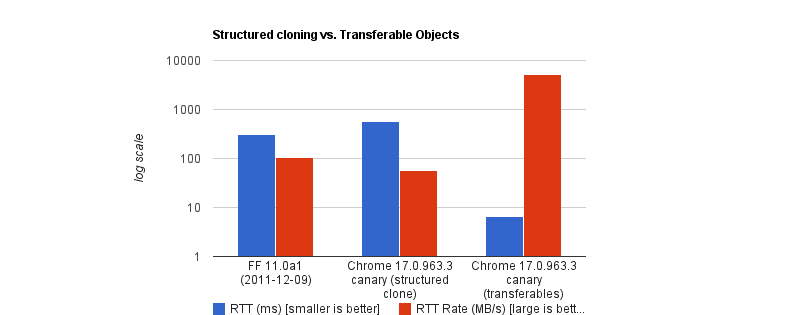
The browser performs a hand-off whereby the sending context loses access to the data instantly, and the receiving context takes full control. It is actually insanely fast. According to Chrome Developers’ benchmark, transferring a massive 32MB ArrayBuffer can take under 7ms, compared to about 300ms when cloning with SCM. That’s a 43x speed boost.

Structured cloning vs. Transferable Objects by Chrome Developers
Structured cloning vs. Transferable Objects by Chrome Developers. (Image source: Chrome for Developers) (Large preview)

But like all good things, there are downsides. To name a few:

  • You lose it once you send it.
    If the UI still needs that data (like to show an image preview), you can’t access it anymore.
  • Not all data is transferable.
    A plain JS object is not. A Blob is not. Even a Base64 string is not.
  • API limitations.
    In the context of browser extensions, Chrome’s internal messaging (chrome.runtime.sendMessage) traditionally forces everything through JSON serialization.

So, as far as my screenshot extension went, Transferable objects were not an option.

Why We Isolate Contexts Anyway

Why do we even bother isolating contexts at all? Why not just leave it all to the main thread?

Offloading long-running CPU tasks to a background thread is absolutely the right thing to do. The browser needs to paint a new frame every 16.6ms to keep things fluid; that means any task that takes >50ms is generally considered “long”. Offloading to the background is absolutely the right thing to do.

The issue, however, is that we’ve turned this “never block the main thread” into an absolute rule, without asking is this task expensive to process or expensive to move?

I have come to realize now that the rule is less “never block the main thread” than “never block the main thread for too long.”

When The Right Architecture Is The Wrong Architecture

My goal with the Fastary extension was to make it feel like a native app, running as smoothly and instantly as you would expect a native app to.

As you already know, I took the recommended approach to use the Offscreen Document to handle DOM work in the background. But to my surprise, that took a different turn.

The Offscreen Document API is a clear winner. You create a hidden, undisplayed document that runs entirely in the background. It has a DOM and supports Canvas. For example, if I want to crop a screenshot, stitch multiple screenshots together, perform heavy image manipulation, or add a watermark, Offscreen Document was made for that.

Turns out that was not the best approach. This was my architecture:

  1. The background Service Worker captures a screenshot with chrome.tabs.captureVisibleTab(), which returns a Base64-encoded data URL string.
  2. The background Service Worker uses chrome.runtime.sendMessage() to ship this image payload to the Offscreen Document.
  3. The Offscreen Document receives the image, loads it into an <img> element, then draws it onto a canvas before it applies the user’s crop coordinates, encodes the result, and sends the processed image back to the background worker.

But when I tested it, the screenshot didn’t feel instant. As I said earlier, there was a consistent 2–3 second lag.

I figured out that when captureVisibleTab() takes a screenshot, it returns a Base64 URL string, and on a standard 1080p screen, that string could be approximately 1MB or more, depending on how detailed the image is. It gets even more interesting on modern Retina displays (e.g., MacBooks) as they tend to automatically double the image’s size by default.

Keep in mind that since the image payload could be doubled and extension messaging relies on JSON serialization (as of this writing), we potentially deal with massive synchronous communication that costs an entire round trip.

The image string data is JSON-serialized at least twice: once when going into the Offscreen Document and once coming back out with the processed results to the background worker. The actual image processing (cropping) done inside the Offscreen Document was fast, no doubt, but I can’t say the same about the transfer overhead.

The Retina High-DPI Problem

As if the latency itself wasn’t enough, I noticed a rather subtle bug — which, now that I think of it, was more of my ignorance. After a screenshot was taken, the crop result was completely off in a way that either weirdly scaled the image or resulted in incorrect coordinates.

It turns out that when a user selects a region to crop, the content script gets the box coordinates using getBoundingClientRect(), which is measured in CSS pixels; this is what the DOM uses. But when the screenshot is captured natively in Chrome, the browser doesn’t crop it automatically; it instead uses the physical hardware pixels to get the full screen capture. And the browser uses devicePixelRatio (DPR) to know how many physical pixels should represent one CSS pixel. Basically, if a user on a Retinal display (DPR = 2) highlights an area of 400x300 CSS pixels, the actual captured image area is 800x600 physical pixels.

Note: One CSS pixel is equal to 1 physical pixel (DPR of 1) on a standard monitor. On a Mac Retina display or a modern 4K monitor, however, the DPR is usually 2 or 3.

For an accurate crop, I needed to apply these two different measurement systems with the right DPR, i.e., scale the crop coordinates by the DPR. But remember, Offscreen Documents have no physical display. Processing any image would have a default DPR equal to 1. To fix this, I would have to capture the exact devicePixelRatio from the active tab, serialize it, pass it alongside the image payload, and manually do the scaling math inside the Offscreen Document. The complexity starts to compound.

What if I broke the golden rule and did the work on the main thread instead?

Working On The Main Thread

Some developers will argue that UI tasks are the only things that should run on the main thread, but I don’t fully agree with that. Personally, I believe that user explicitly-invoked actions that need immediate results can sometimes get a solid pass to run on the main thread, provided the work is incredibly fast (e.g., 1s).

That’s what I did: scrap out the Offscreen Document and reengineer the logic. Instead of:

Background → [serialize] → Offscreen Document → [serialize] → Background → Content Script

…I decided to run the whole image processing in the active tab:

  1. The background Service Worker captures the screen and gets the Base64 string (same as before).
  2. The background sends the payload directly to the content script in the active tab using chrome.scripting.executeScript().
  3. The content script (running on the main thread) receives the payload, draws it to a canvas, performs the crop using the correct DPR value, and copies the result to the clipboard.
// Background Script
const screenshotUrl = await chrome.tabs.captureVisibleTab(undefined, { format: "png" });

// Inject the processing function into the active tab as a content script
await chrome.scripting.executeScript({
  target: { tabId: activeTab.id },
  func: processAndCopyImage,
  args: [{ base64Image: screenshotUrl, cropData: userSelection }]
});

This approach completely clears out multiple context hops and round trips that JSON serialization requires. The only cross-context transfer involves sending the data URL from the background to the content script.

The Retina DPI issue essentially solved itself, as the content script runs directly inside the real, active browser tab because it knows the monitor’s real devicePixelRatio.

But there’s an elephant in the room that you may have noticed.

Sure, the image is now processed on the main thread, and the background manipulates the canvas in the active tab. I could technically be blocking the main thread. That’s where I amended the “no blocking the main thread” rule to “no blocking the main thread for too long.” In this specific case, at least, blocking the main thread for a task the user requests for approximately one second is justifiable. It works conversely as well: maybe don’t isolate processes if the data transfer cost is greater than the processing cost.


Friday, June 5, 2026

The Architecture Of Local-First Web Development

What does it really take to build local-first web apps in 2026? A grounded, experience-driven perspective for developers who’ve been doing this long enough to be skeptical of silver bullets.

Last October, I was sitting in a hotel room in Lisbon, the night before I was supposed to demo a project management tool my team had spent four months building. The hotel Wi-Fi was doing that thing where it connects but nothing actually loads. And I watched our app, this thing I was genuinely proud of, render a blank screen with a spinner. Then a timeout error. Then nothing.

I pulled out my phone, tethered to cellular, and got a shaky connection. The app loaded, but every click was a two-second wait. Create a task? Spinner. Move a task between columns? Spinner. I sat there thinking: we built a front end in React, a back end in Node, a Postgres database, a Redis cache, a GraphQL API with six resolvers just for the task board. All that infrastructure, and the damn thing can’t show me my own data without a round-trip to a server 3,000 miles away.

That was the night I started seriously looking at local-first architecture. Not because I read a blog post or saw a tweet. Because I was embarrassed.

I want to be upfront about something: I spent the first year or so dismissing local-first as academic. I read the Ink & Switch “Local-First Software” paper when it came out in 2019 and thought, “Cool research, not practical for real apps.” I was wrong. The tooling in 2019 genuinely wasn’t ready. But I was also being lazy, defaulting to the architecture I already knew. The paper laid out seven ideals for software: fast, multi-device, offline, collaboration, longevity, privacy, user ownership. And I remember thinking those sounded like a wish list, not engineering requirements.

Seven years later, I’ve shipped three production apps using local-first patterns. I’ve also ripped local-first out of two projects where it was the wrong call. I have opinions. Some of them are probably wrong. But they’re earned.

So here’s what I actually think about building local-first web apps in 2026, written for developers who’ve been doing this long enough to be skeptical of silver bullets.

What “Local-First” Actually Means (And The Confusion That Won’t Die) 

I need to clear something up because I keep having this conversation at meetups. Local-first is not offline-first. It’s not “add a service worker and call it a day.” It’s not a synonym for PWA. I’ve seen all of these conflated in conference talks, and it drives me a little crazy.

Offline-first means your app handles network loss gracefully, but the server is still the source of truth. When the network comes back, the server wins. Cache-first (service workers caching responses) is a performance optimization. You’re serving stale data faster, which is great, but you haven’t changed who owns the data. PWAs are a delivery mechanism: installable, cached, push notifications. None of these is a data architecture.

Local-first is a data architecture. Your user’s device holds the primary copy of their data. The app reads and writes to a local database. Renders instantly. Syncs with servers or other devices in the background. The server, when it exists, is a sync peer with some special authority (authentication, backup, access control). But it’s not the gatekeeper.

The Ink & Switch paper defined seven ideals, and I think they still hold up. But the one that matters most in practice, the one that changes how you build everything, is this:

The client is not a thin view requesting permission to show data. The client is a node in a distributed system with its own database.

That distinction sounds subtle. It isn’t. It changes your entire stack.

Be Honest Early: When You Should Not Do This 

I’m putting this near the top because I’ve watched too many developers (including myself, once) get excited about a new architecture and shoehorn it into projects where it doesn’t belong. I wasted about six weeks trying to make a local-first approach work for an internal analytics dashboard at a previous job. My colleague Sarah finally pulled me aside and said, “The data is generated on the server. There’s nothing to replicate to the client. What are you doing?” She was right.

Local-first is a bad fit when your data is primarily server-generated. Analytics dashboards, social media feeds, search results: the server produces this data, so the client consuming it via API requests is completely fine.

It’s wrong for systems that need strong transactional consistency. Banking, payment processing, and inventory management. If two people try to buy the last item in stock, you need a single authoritative database making that decision with ACID guarantees. Eventual consistency will lose you money, or worse.

It’s overkill for simple CRUD apps with no offline or collaboration needs. If you’re building an internal admin panel used by five people in an office with good internet, adding a sync engine is over-engineering. And it’s physically impractical for massive datasets that won’t fit on client devices.

But here’s where it shines: note-taking, document editing, collaborative design tools, project management, field apps with unreliable connectivity, basically anything where data privacy is a selling point, as well as anything with real-time collaboration. In other words, it’s great for user-generated data that benefits from instant interaction and should survive the server going down.

One more thing I wish someone had told me earlier: you don’t have to go all-in. I’ve had the best results using local-first for specific features within otherwise traditional apps. Offline drafts in a blog editor. Real-time collaborative notes inside a project management tool that’s otherwise standard REST.

The “spectrum of local-first” is a real thing, and starting with one feature is how I’d recommend anyone begin.

Replicas, Not Requests #

If you’ve used Git, you already understand the mental model.

SVN (remember SVN?) was centralized. One server. You check out files, make changes, and commit to the server. Server down? Can’t commit. Can’t even see history.

Git gave every developer a full clone. You commit locally, branch locally, and merge locally. Push and pull when you’re ready. The remote repository is important, but it’s not the only copy of the truth.

Local-first web development is Git for application data. Every client device holds a replica (full or partial) of the relevant data. Writes happen locally. Sync is push/pull in the background. Conflicts get resolved through defined merge strategies.

I remember the first time this clicked for me in practice. I was prototyping a task board, and I wrote a function to add a task. In our old architecture, it would be:

  1. POST to API.
  2. Wait for the response.
  3. If success, update the local state.
  4. If failure, show error toast and maybe roll back optimistic update.

In the local-first version, it was: write to local SQLite, done. The UI updated instantly because it was reading from the same local database. Sync happened whenever. No loading state, no error handling for the write itself, no optimistic update logic (because there’s nothing to be “optimistic” about; the local write isthe state).

The implications ripple through everything. You don’t need React Query or SWR for data fetching, because you’re not fetching. You don’t need Redux or Zustand for server-derived state, because the local database is your state. Your routing doesn’t trigger API calls. Authentication works differently because the server isn’t checking permissions on every read.

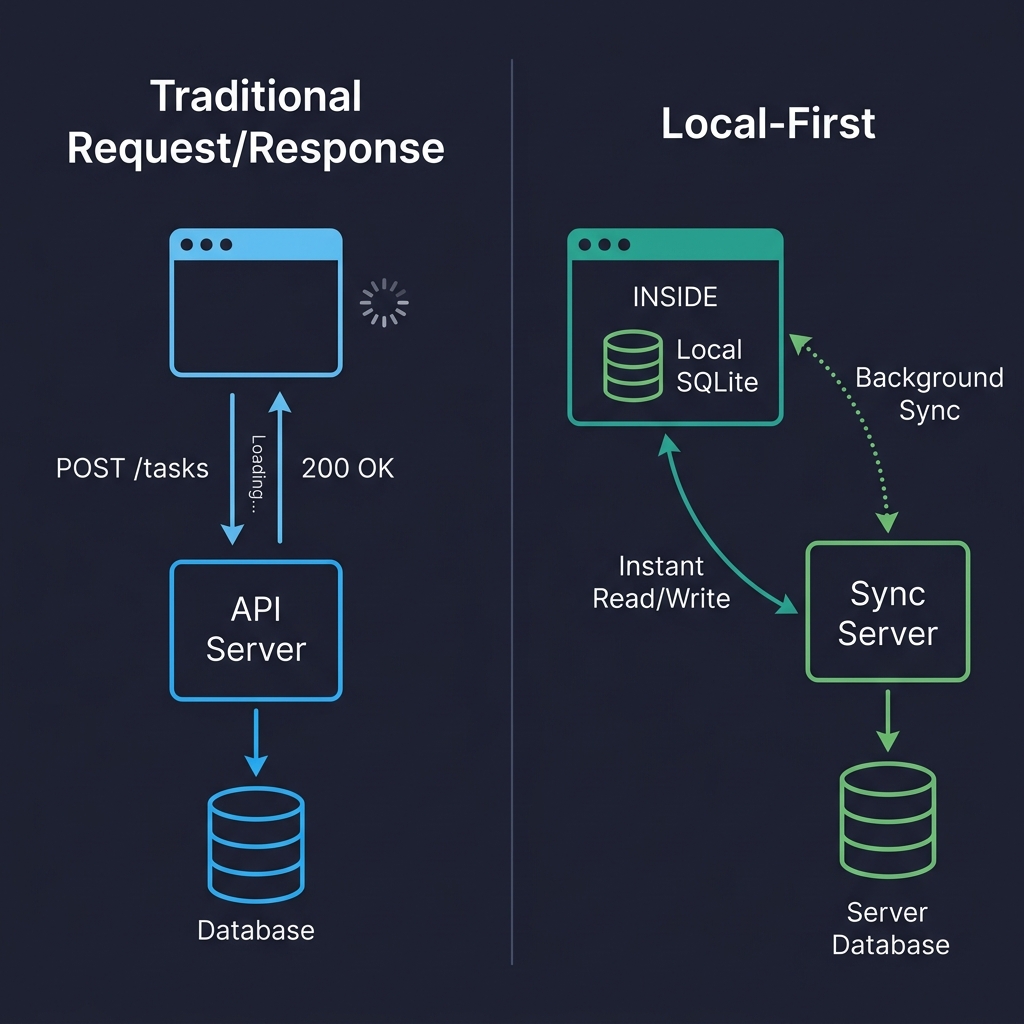
Here’s a visual comparison that might help if you’re the kind of person (like me) who thinks spatially:

Traditional request/response architecture vs. local-first architecture
Traditional request/response architecture vs. local-first architecture. (Large preview)

On the left, every user interaction is a round-trip. Click, wait, render. On the right, reads and writes hit the local database directly. The sync server is still there, but it’s doing its work in the background. The user never waits for it. That’s the fundamental shift.

But I’m getting ahead of myself. Before we can talk about sync and conflicts, we need to talk about where the data actually lives on the client.

Where Data Lives On The Client 

Forget localStorage. It’s synchronous (blocks the main thread), caps at 5-10 MB, and only stores strings. It’s fine for a theme preference. It’s not a database.

IndexedDB is the workhorse that nobody loves. It’s in every browser, it’s asynchronous, it can handle hundreds of megabytes, and its API is absolutely miserable to work with. I’ve used it directly a grand total of once. Now I use it through abstractions or, more often, I don’t use it at all.

Because the real story in 2026 is SQLite running in the browser via WebAssembly.

I know that sounds like a party trick, but it’s not. SQLite compiled to WASM, persisted to the Origin Private File System (OPFS), gives you a real relational database in the browser. Full SQL queries. Transactions. Indexes. The works.

OPFS is the newer API that makes this practical. It gives web apps a sandboxed file system with high-performance synchronous access (in Web Workers), which is exactly what SQLite needs. Before OPFS, you could run SQLite in memory and manually persist to IndexedDB, which worked but was slow and fragile.

Here’s roughly what initialization looks like in a real project (I’m using wa-sqlite here, which is the library I’ve had the best luck with):

import { SQLiteAPI } from 'wa-sqlite';
import { OPFSCoopSyncVFS } from 'wa-sqlite/src/examples/OPFSCoopSyncVFS.js';

async function initDatabase() {
  const module = await SQLiteAPI.initialize();
  const vfs = new OPFSCoopSyncVFS('pm-tool-db');
  await vfs.initialize(module);

  const db = await module.open_v2('workspace.db');

  // HACK: wa-sqlite doesn't handle concurrent writes well on Safari,
  // so we serialize through a queue. See vlcn-io/wa-sqlite#247
  await module.exec(db, `PRAGMA journal_mode=WAL`);

  await module.exec(db, `
    CREATE TABLE IF NOT EXISTS tasks (
      id TEXT PRIMARY KEY,
      title TEXT NOT NULL,
      status TEXT DEFAULT 'backlog',
      assignee_id TEXT,
      project_id TEXT NOT NULL,
      position REAL DEFAULT 0,
      created_at TEXT DEFAULT (datetime('now')),
      updated_at TEXT DEFAULT (datetime('now'))
    )
  `);

  return db;
}

In production, I wrap all database access in a write queue that serializes mutations. I also log every failed write to Sentry with the full SQL statement (scrubbed of PII, obviously) because debugging database issues in a user’s browser is hell without that telemetry.

A gotcha I wasted almost two days on: Safari’s OPFS implementation behaves differently from Chrome’s in subtle ways. Specifically, I hit a bug where createSyncAccessHandle() would silently fail in certain iframe contexts on Safari 18. There’s no error, no exception. It just doesn’t work. I ended up falling back to IndexedDB-backed persistence on Safari, which was slower but at least functioned. (I’m told Safari 1926 fixes this, but I haven’t verified it yet.)

Quick comparison of the options I’ve actually used:

StorageGood ForWatch Out For
IndexedDBBroad compatibility, moderate dataTerrible DX, no SQL, verbose
OPFS + SQLite WASMRelational data, complex queries, serious appsSafari quirks, ~400KB bundle addition
PGlite (Postgres in WASM)Full Postgres compatibility on clientNewer, larger bundle, still maturing

I’ve also tried cr-sqlite, which adds CRDT column support directly to SQLite tables. Clever idea, but I found it too early-stage for production use when I evaluated it in late 2025. The merge semantics were sometimes surprising, and debugging CRDT state inside SQLite was painful. I’d revisit it later this year.

The Part That’s Actually Hard 

Storing data locally is a solved problem. Syncing it reliably across devices and users is where you earn your gray hairs.

When multiple replicas can independently read and write, you need a mechanism to reconcile changes. There are basically four approaches, and I’ve used three of them.

CRDTs (Conflict-Free Replicated Data Types) are data structures designed so that concurrent edits can always be merged without conflicts, mathematically guaranteed. Yjs is the most popular implementation in JavaScript, and it’s genuinely excellent for real-time collaborative text editing. I used it to build a collaborative document editor at my last company, and the experience was mostly good, though I’ll get into the pain points in the conflict resolution section.

Here’s what setting up a shared Yjs document looks like in practice:

import * as Y from 'yjs';
import { WebsocketProvider } from 'y-websocket';

const ydoc = new Y.Doc();

const provider = new WebsocketProvider(
  'wss://sync.our-app.dev',
  'workspace-a1b2c3d4',
  ydoc
);

const tasks = ydoc.getMap('tasks');

// Add a task
const task = new Y.Map();
task.set('title', 'Review Q3 roadmap draft');
task.set('completed', false);
task.set('assignee', 'maria');
// TODO: type this properly once; yjs exports better TS types
// for nested maps. For now, this works fine.
tasks.set('f47ac10b-58cc-4372-a567-0e02b2c3d479', task as any);

tasks.observeDeep(() => {
  // Re-render UI. In practice, I debounce this to ~16ms
  // because observeDeep fires a LOT during active collaboration
  renderTaskList(tasks.toJSON());
});

Automerge is the other major CRDT library, backed by Rust and with a document-oriented model. I’ve used it less, but I know teams who swear by it. Loro is newer, Rust-based, and claims better performance. I haven’t shipped anything with Loro yet.

Database replication is the other big approach, and honestly, for most apps that don’t need Google Docs-style real-time text editing, I think it’s the better choice. The idea is straightforward: replicate rows between a server database (Postgres) and a client database (SQLite) with a sync engine managing the plumbing.

PowerSync does this well. It gives you one-way replication from Postgres to client SQLite with a write-back path for mutations. ElectricSQL is more ambitious, going for full active-active sync between Postgres and SQLite. I’ve used PowerSync in production and ElectricSQL in prototypes. PowerSync felt more stable when I evaluated them both in early 2026, but ElectricSQL’s approach is more powerful if they nail the execution.

Triplit takes a different angle entirely: it’s a full-stack database with sync built in, so you don’t think about “client DB” and “server DB” separately. I haven’t tried it beyond a weekend prototype, but the developer experience was surprisingly nice.

Event sourcing (syncing a log of mutations rather than the current state) is the approach LiveStore takes. I find it intellectually appealing and occasionally useful, but in practice, I’ve found that reconstructing state from an event log adds complexity that most apps don’t need. My controversial opinion: Event sourcing is over-recommended for application development. It’s great for audit logs and certain domains, but for a task board? Just sync the rows.

Not everyone will agree with that. I know event sourcing has passionate advocates, and I’ve been told I’m wrong about this at least twice at conferences. Maybe I just haven’t built the right app for it yet.

Conflicts: The Thing Everyone’s Afraid Of 

I used to think conflict resolution was a terrifying, unsolvable problem. After building three apps that handle it, I’d revise that to: it’s a manageable problem that requires you to think carefully about your specific data model, and most developers overthink it.

Conflicts happen when two replicas modify the same data without seeing each other’s changes. User A edits a task title on their phone while offline. User B edits the same title on their laptop. Both come back online. Now what?

My first attempt at handling this was embarrassingly naive:

// My first try. Don't do this.
function resolveConflict(local: any, remote: any) {
  // just... take the remote one? sure?
  return remote;
}

The problem is obvious: local changes get silently dropped. User A edits a title, syncs, and their edit vanishes. They don’t even know it happened.

What actually works for most cases is last-write-wins (LWW) at the field level, not the record level. If User A changes the title and User B changes the due date, you keep both changes because they touched different fields. You only have a real conflict when both modified the same field, and then you pick the later timestamp.

interface FieldValue {
  value: string | number | boolean;
  // ISO timestamp with enough precision to break most ties
  updatedAt: string;
  // Client ID as tiebreaker when timestamps match.
  // This happens more often than you'd think.
  clientId: string;
}

function pickWinner(a: FieldValue, b: FieldValue): FieldValue {
  const timeA = new Date(a.updatedAt).getTime();
  const timeB = new Date(b.updatedAt).getTime();
  if (timeA !== timeB) return timeA > timeB ? a : b;
  // Deterministic tiebreaker when timestamps match
  return a.clientId > b.clientId ? a : b;
}

// In practice, I apply this per-field across the whole record.
function mergeTask(local: Record<string, FieldValue>, remote: Record<string, FieldValue>) {
  const merged: Record<string, FieldValue> = {};
  const allKeys = new Set([...Object.keys(local), ...Object.keys(remote)]);
  for (const key of allKeys) {
    if (!local[key]) { merged[key] = remote[key]; continue; }
    if (!remote[key]) { merged[key] = local[key]; continue; }
    merged[key] = pickWinner(local[key], remote[key]);
  }
  return merged;
}

In our production app, this handles about 95% of conflicts without any user-visible issues. For the remaining cases (two people editing the same text field), LWW means one person’s edit silently wins. For a task title? Honestly, that’s usually fine. For a document body? No. That’s where CRDTs earn their keep.

But there’s a subtler problem I didn’t appreciate until I hit it: semantic conflicts. Data merges cleanly at the structural level, but the result is nonsensical. Two users, both offline, book the same 2 PM meeting slot with different meetings. Field-level merge accepts both writes because they’re writing to different records. No structural conflict. But you’ve got a double-booking, and your merge function has no idea that’s a problem.

Semantic conflicts require application-level validation, and that has to happen on the server during sync. Your sync engine merges the data structurally, but yourserver needs to check domain invariants before accepting the result. The approach I’ve landed on (after getting it wrong twice) is: validate on the server during the write-back phase, but flag violations rather than silently rejecting them.

Here’s what I mean. When the client pushes mutations to the server during sync, the server runs them through a constraint validation layer before applying them to Postgres:

interface SyncViolation {
  type: 'scheduling_conflict' | 'capacity_exceeded' | 'stale_assignment';
  recordId: string;
  description: string;
  // The conflicting records so the client can show context
  conflictingRecords: string[];
  // When was this violation detected
  detectedAt: string;
}

async function validateSyncBatch(
  mutations: SyncMutation[],
  serverDb: Database
): Promise<{ accepted: SyncMutation[]; violations: SyncViolation[] }> {
  const accepted: SyncMutation[] = [];
  const violations: SyncViolation[] = [];

  for (const mutation of mutations) {
    if (mutation.table === 'calendar_events') {
      // Check for double-booking
      const overlapping = await serverDb.query(
        `SELECT id, title FROM calendar_events
         WHERE room_id = ? AND id != ?
         AND start_time < ? AND end_time > ?`,
        [mutation.data.room_id, mutation.data.id,
         mutation.data.end_time, mutation.data.start_time]
      );

      if (overlapping.length > 0) {
        violations.push({
          type: 'scheduling_conflict',
          recordId: mutation.data.id,
          description: `Conflicts with "${overlapping[0].title}"`,
          conflictingRecords: overlapping.map(r => r.id),
          detectedAt: new Date().toISOString()
        });
        // Still accept the write, but flag it
        // The alternative is rejecting it, but then the user's
        // local state and server state diverge, and that's worse
        accepted.push(mutation);
        continue;
      }
    }
    accepted.push(mutation);
  }

  return { accepted, violations };
}

The key decision here — and I went back and forth on this — is that we accept the conflicting write and flag it, rather than rejecting it outright. If you reject it, the user’s local database has a record that the server refuses to acknowledge, and now you’re in a state divergence situation that’s genuinely hard to recover from. I tried the rejection approach first, and it led to ghost records on the client that users couldn’t delete because they didn’t exist on the server. Nightmare.

So instead, the server accepts the write, stores the violation, and syncs the violation back to the client. The client shows a non-blocking notification: “Your meeting ‘Q3 Planning’ conflicts with ‘Design Review’ in Room B at 2 PM. Tap to resolve.”The user taps, sees both meetings, and picks one to reschedule or cancel. The resolution is a normal write that syncs back.

Is this perfect? No. There’s a window between when the violation is created and when the user resolves it, where both conflicting records exist. For meeting rooms, that’s tolerable. For something like inventory management where two people “buy” the last item, that window is unacceptable, and that’s exactly why I said earlier that local-first is wrong for systems requiring strong transactional consistency.

I’m still iterating on this pattern. The violation table grows if users ignore notifications (we expire them after 72 hours, which feels arbitrary). And deciding which invariants to validate on the server requires you to essentially maintain a parallel set of business rules outside your client-side application logic. It’s not elegant. But it works, and it’s the best approach I’ve found for the class of apps I’m building. If you’ve built something cleaner, I genuinely want to hear about it.

For CRDTs like Yjs, conflict resolution at the character level (for text) works remarkably well. Two people typing in the same paragraph will see both sets of characters appear in a sensible order. But CRDT merging of structured data (maps, arrays, nested objects) can produce results that surprise you. I once watched a Yjs-backed task list duplicate items after a merge because two users had reordered the same list offline, and the CRDT’s list merge semantics interleaved their orderings. Technically correct. Practically confusing. We ended up adding a post-merge de-duplication step, which felt like a hack but solved the problem.

When should you surface conflicts to the user, Git-style? In my experience, almost never for typical app data. Users don’t want to resolve merge conflicts. They want the app to figure it out. The exception is high-stakes content: legal documents, medical records, anything where silently dropping an edit could cause real harm.

The Tools Right Now 

I’m going to give you my honest read on the tools available as of mid-2026, with the caveat that this space is moving fast enough that some of this might be outdated by the time you read it.

Yjs is the most mature CRDT library. Production-ready, huge community, integrates with most collaborative editors (TipTap, BlockNote, Lexical). If you need real-time collaborative editing, start here.

Automerge is solid, Rust-backed, and takes a more document-oriented approach than Yjs. I’ve seen it used well in apps where the data model fits a document metaphor. Fewer integrations than Yjs, but the core is well-engineered.

PowerSync is what I’d recommend for teams that have an existing Postgres back-end and want to add offline support. It’s production-ready, the docs are good, and the mental model (Postgres syncs to client SQLite, client writes go through a defined upload path) is easy to reason about. In our app, initial sync for a workspace with around 5,000 tasks takes about 1.2 seconds on a decent connection and about 3.5 seconds on a throttled 3G simulation. That was acceptable for us.

ElectricSQL is going for something more ambitious: true active-active replication between Postgres and SQLite, with “shapes” defining what data syncs to which client. I want this to succeed because the developer experience in prototypes was excellent. But when I evaluated it for production in February 2026, I hit enough rough edges (particularly around shape management and reconnection behavior) that I went with PowerSync instead. I plan to revisit it.

Triplit impressed me in a weekend prototype. Full-stack database with sync built in, nice TypeScript API. I haven’t stress-tested it with real production load, and I’d want to before committing.

Zero (from Rocicorp, the Replicache people) is interesting because it takes a query-based approach to sync, which is different from the row-replication model. Replicache was sunset in favor of Zero, which tells you something about how fast approaches are evolving in this space. Worth watching, but I wouldn’t build on it yet for a production app.

TinyBase is a lightweight reactive store that’s great for smaller apps or prototyping. I used it for a personal side project (a reading tracker) and liked it a lot. Not sure I’d use it for a team-scale product.

PGlite (Postgres compiled to WASM) is wild. Same SQL dialect on client and server. Combined with ElectricSQL, you could theoretically run identical queries everywhere. I think this is where things are heading long-term, but PGlite’s bundle size and memory footprint are still concerns for mobile browsers.

One thing the Replicache sunset taught me: don’t bet your architecture on a single tool from a small company without a fallback plan. I keep my sync layer abstracted enough that I could swap engines in a few weeks, not months. I know that sounds like premature abstraction, but in a space this young, I think it’s just prudence.

Building A Real App: Architecture, Auth, And Migrations #

I want to walk through how I actually structure a local-first app in practice, because the layer diagrams you see in blog posts rarely match what the code looks like.

My current stack for a collaborative project management tool looks like this:

  • UI: React components that never call fetch() for data reads.
  • Query layer: useLiveQuery hooks that subscribe to the local SQLite database and re-render automatically when data changes.
  • Local database: SQLite via wa-sqlite, persisted to OPFS.
  • Mutation layer: Plain INSERT/UPDATE/DELETE statements against local SQLite.
  • Sync: PowerSync managing replication between local SQLite and our Postgres back-end.
  • Server: Postgres, a Node.js auth service, and a small sync validation layer.

The component code ends up looking almost absurdly simple compared to what I used to write:

import { useLiveQuery } from '@powersync/react';
import { db } from '../lib/database';

function TaskBoard({ projectId }: { projectId: string }) {
  const tasks = useLiveQuery(
    `SELECT * FROM tasks WHERE project_id = ? AND archived = 0 ORDER BY position`,
    [projectId]
  );

  async function addTask(title: string) {
    await db.execute(
      `INSERT INTO tasks (id, title, project_id, position, created_at)
       VALUES (?, ?, ?, ?, datetime('now'))`,
      [crypto.randomUUID(), title, projectId, tasks.length]
    );
    // That's it. useLiveQuery picks up the change automatically.
    // No invalidation, no refetch, no loading state.
  }

  // No isLoading check. Data is local. It's always there after the first sync.
  return (
    <div>
      {tasks.map(task => <TaskCard key={task.id} task={task} />)}
      <NewTaskInput onSubmit={addTask} />
    </div>
  );
}

Compare that to the React Query + REST equivalent, which would be at least twice the code and include loading states, error states, optimistic update logic with rollback, and cache invalidation. I don’t miss it.

AUTH IN A LOCAL-FIRST WORLD 

Authentication works roughly the same as traditional apps: JWT tokens, OAuth flows, and session management. The token authenticates the sync connection rather than every individual request. Offline access works because the data is already local. The user was authenticated when the data was originally synced.

Authorization is trickier, and I think most local-first articles under-explain this. You cannot sync your entire database to every client and rely on client-side code to hide unauthorized data. Someone will open DevTools, find the local SQLite file, and see everything. The client is not a trust boundary.

You enforce authorization at the sync layer. PowerSync has “sync rules” that define which rows go to which clients. ElectricSQL has “shapes.” Either way, the server only sends data that the user is authorized to see. When the client sends writes back, the server validates them against authorization rules before applying them to Postgres. If a user tries to modify something they shouldn’t, the server rejects it during sync.

I also want to mention end-to-end encryption (E2EE), because it pairs naturally with local-first. Since data lives on the client, you can encrypt it before sync. The server stores and relays encrypted blobs it can’t read. Apps like Anytype do this. We haven’t implemented E2EE in our current app, but it’s on the roadmap for when we handle more sensitive data.

SCHEMA MIGRATIONS ON A THOUSAND DEVICES 

This one caught me off guard the first time. On the server, you run a migration against one database you control. On the client, every user has their own database that might be running any version of your schema, depending on when they last opened the app.

I use a simple migration runner that checks a version number at app startup:

const MIGRATIONS = [
  {
    version: 1,
    sql: `
      CREATE TABLE IF NOT EXISTS tasks (
        id TEXT PRIMARY KEY,
        title TEXT NOT NULL,
        status TEXT DEFAULT 'backlog',
        project_id TEXT NOT NULL,
        created_at TEXT DEFAULT (datetime('now'))
      );
    `
  },
  {
    version: 2,
    // Added priority and due_date in sprint 4
    sql: `
      ALTER TABLE tasks ADD COLUMN priority INTEGER DEFAULT 0;
      ALTER TABLE tasks ADD COLUMN due_date TEXT;
    `
  },
  {
    version: 3,
    // Denormalized assignee name for offline display.
    // Yes, I know this is a trade-off. The JOIN was killing
    // performance on low-end Android devices.
    sql: `
      ALTER TABLE tasks ADD COLUMN assignee_name TEXT DEFAULT '';
    `
  }
];

async function runMigrations(db: Database) {
  await db.execute(`
    CREATE TABLE IF NOT EXISTS _schema_version (version INTEGER)
  `);

  const rows = await db.execute('SELECT version FROM _schema_version');
  const currentVersion = rows.length > 0 ? rows[0].version : 0;

  for (const migration of MIGRATIONS) {
    if (migration.version > currentVersion) {
      console.log(`Migrating local DB to v${migration.version}`);
      await db.execute('BEGIN');
      try {
        await db.execute(migration.sql);
        await db.execute(
          'INSERT OR REPLACE INTO _schema_version (rowid, version) VALUES (1, ?)',
          [migration.version]
        );
        await db.execute('COMMIT');
      } catch (err) {
        await db.execute('ROLLBACK');
        // In production, this fires a Sentry alert with the
        // migration version and error details
        throw err;
      }
    }
  }
}

Design your migrations to be additive. New columns with defaults. New tables. Don’t rename or drop columns unless you absolutely must, because users running old app versions will still be syncing data, and your server needs to handle the mismatch. I learned this the hard way when I dropped a column that an older client was still writing to, which caused silent sync failures for about 200 users over a weekend. Not fun.

If I Were Starting A New Project Today 

I get asked this a lot, so here’s my current answer. It changes every six months or so.

For a collaborative app with real-time features and offline support, I’d start with: React on the front end, PowerSync for sync, SQLite via wa-sqlite on the client (persisted to OPFS with IndexedDB fallback for Safari), and Supabase (which gives me Postgres, auth, and row-level security out of the box). I’d use Yjs only if I needed rich text collaboration, and I’d avoid it if I didn’t, because CRDTs add meaningful complexity to your data model.

For a simpler app where I mostly need offline support and instant reads but collaboration is secondary, I might skip the sync engine entirely and just use a local SQLite database with a custom sync layer that pushes/pulls from a REST API. I know that sounds like reinventing the wheel, but for simple cases, a custom sync that you fully understand is better than a general-purpose sync engine that adds concepts you don’t need.

I would not currently use ElectricSQL or Zero for production, not because they’re bad, but because I want another 6-12 months of maturity before I’d trust them for something I’m on-call for. I’ve been burned before by building on early-stage infrastructure (I was an early Meteor adopter, if that tells you anything) and I’m more cautious now about where I accept novelty risk.

Performance: What’s Actually Fast And What Hurts

Reads are instant. That’s not marketing. Querying a local SQLite database for a list of 500 tasks takes under two milliseconds on my M2 MacBook and about eight milliseconds on a mid-range Android phone. No network. No spinner. No loading state.

Writes are instant, too. INSERT INTO tasks runs locally, the UI updates reactively, and sync happens whenever. Users perceive writes as instantaneous because they are.

Initial sync is where you pay the cost. Bootstrapping the local replica on first load (or on a new device) means downloading potentially megabytes of data. In our app, a workspace with 5,000 tasks, 200 projects, and 50 users takes about 1.2 seconds on broadband and four to five seconds on a slow mobile connection. We mitigate this with partial sync (only sync the user’s active projects) and by showing a one-time “Setting up your workspace” screen during the first sync. After that initial sync, incremental updates are tiny.

Bundle size is a real concern. SQLite compiled to WASM adds roughly 400KB gzipped to your JavaScript bundle. That’s not trivial, especially if you care about Time to Interactive on mobile. I lazy-load the database module with dynamic import() so it doesn’t block the initial render.

Memory is the other gotcha. SQLite WASM runs in memory, and on mobile browsers with aggressive memory limits, a large database can cause tab crashes. I haven’t found a great solution for this beyond keeping the synced dataset small through partial sync and being aggressive about pruning old data.

Note: Speaking of memory issues, I’ve been reading Designing Data-Intensive Applications by Martin Kleppmann for the third time. Every re-read, I catch something new. If you haven’t read it and you’re thinking about distributed data, just stop and read it first.

Testing This Stuff #

I’ll keep this brief because the honest answer is that testing local-first apps is harder than testing traditional apps, and the tooling isn’t great yet.

What works for me: unit tests for merge logic (these are pure functions, easy to test), integration tests that spin up two client instances in memory and verify they converge after concurrent edits, and Playwright E2E tests that use context.setOffline(true) to simulate offline/online transitions.

What I haven’t figured out well: reproducing bugs that only happen during conflict resolution with specific timing. When a user reports that a task “lost its description,” I often can’t reproduce it because I don’t know exactly what sequence of offline edits and sync events led to the conflict. I’ve started logging sync events in more detail (what was sent, what was received, what conflicts were detected, how they were resolved) and shipping those logs to our observability stack. It helps, but it’s not as clean as I’d like.

Property-based testing with something like fast-check is genuinely useful for CRDT logic. Generate random operation sequences, apply them in random orders, and assert convergence. I wish I’d started doing this earlier.

What I’m Watching, What Worries Me

I’m excited about where this is going. PGlite (full Postgres in the browser) feels like a glimpse of a future where the client/server data layer distinction just dissolves. You write SQL, it runs everywhere, sync is a runtime concern rather than an architectural decision. We’re not there yet, but you can see it from here.

I’m also watching the convergence of local-first and AI. Running models locally, keeping data on-device, using cloud AI only with explicit consent, and encrypted data. The privacy implications are compelling, and I think “your data never leaves your device” will become a real product differentiator as AI eats more of the software experience.

What worries me is fragmentation. Every sync engine uses its own protocol. There’s no standard. If ElectricSQL shuts down (it won’t, probably, but if), migrating to PowerSync isn’t trivial. I abstract my sync layer partly for this reason, but it still makes me nervous.

The web has standards for nearly everything. We don’t have one for sync, and I don’t see one emerging soon.

I’m also worried about the complexity budget. Local-first adds real architectural complexity: sync engines, conflict resolution, client-side migrations, partial replication, and auth at the sync boundary. For a team of experienced developers building the right kind of app, that complexity pays for itself many times over. For a team that just needs a CRUD app, it’s a trap.

I keep coming back to something a developer named Kevin said to me at a local-first meetup in Berlin last year:

“The best architecture is the one your team can debug at 2 AM.”

He’s right. If local-first makes your app faster, more reliable, and better for users, and your team understands how the sync works, go for it. If you’re adding it because it sounds cool and you don’t fully understand the failure modes yet, build a prototype first. Learn where it breaks. Then decide.

I’m building my fourth local-first app right now: a collaborative planning tool for small teams, with offline support and optional E2E encryption. It’s the most ambitious thing I’ve attempted with this architecture. I’ll write about how it goes.

If you’re starting out, pick one feature in your current app that would benefit from instant local reads and offline writes. Add a local SQLite database. Wire up reactive queries. See how it feels. I think you’ll have the same reaction I did: oh, this is how it should have always worked.

Further Reading