background-attachment. We’ll show some common tricks that can be done with the background as well as what’s in store for backgrounds in CSS 3 (including four new background properties!).The CSS Background is one of the fundamentals that you simply need to know. We will cover the basics of using CSS backgrounds, including properties such as background-attachment. We’ll show some common tricks that can be done with the background as well as what’s in store for background in CSS 3 (including four new background properties!).
Working With Background in CSS 2
Overview
We have five main background properties to use in CSS 2. They are as follows:
background-color: specifies the solid color to fill the background with.background-image: calls an image for the background.background-position: specifies where to place the image in the element’s background.background-repeat: determines whether the image is tiled.background-attachment: determines whether the image scrolls with the page.
These properties can all be merged into one short-hand property: background. One important thing to note is that the background accounts for the contents of the element, including the padding and border. It does not include an element’s margin. This works as it should in Firefox, Safari and Opera, and now in IE8. But in IE7 and IE6 the background does not include the border, as illustrated below.
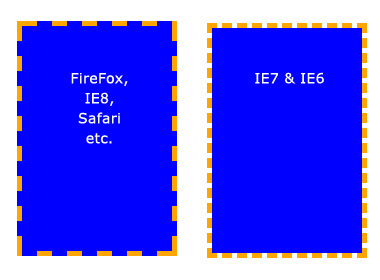
Background does not extend to the borders in IE7 and IE6.
Basic Properties
Background color
The background-color property fills the background with a solid color. There are a number of ways to specify the color. The follow commands all have the same output:
The background-color property can also be set to transparent, which makes any elements underneath it visible instead.
Background image
The background-image property allows you to specify an image to be displayed in the background. This can be used in conjunction with background-color, so if your image is not tiled, then any space that the image doesn’t cover will be set to the background color. Again, the code is very simple. Just remember that the path is relative to the style sheet. So, in the following snippet, the image is in the same directory as the style sheet:
But if the image was in a sub-folder named images, then it would be:
Background repeat By default, when you set an image, the image is repeated both horizontally and vertically until the entire element is filled. This may be what you want, but sometimes you want an image to be displayed only once or to be tiled in only one direction. The possible values (and their results) are as follows:
Background position
The background-position property controls where a background image is located in an element. The trick with background-position is that you are actually specifying where the top-left corner of the image will be positioned, relative to the top-left corner of the element.
In the examples below, we have set a background image and are using the background-position property to control it. We have also set background-repeat to no-repeat. The measurements are all in pixels. The first digit is the x-axis position (horizontal) and the second is the y-axis position (vertical).
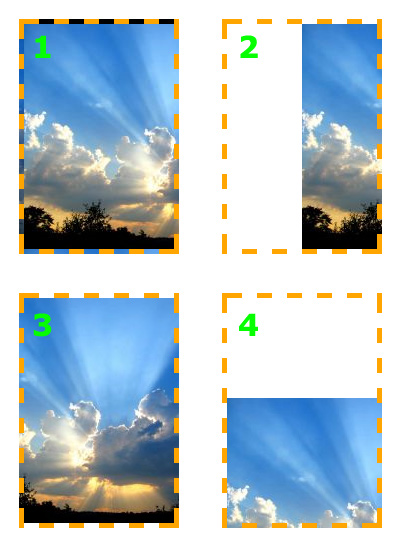
The image can be set to any position you like.
The background-position property also works with other values, keywords and percentages, which can be useful, especially when an element’s size is not set in pixels.
The keywords are self-explanatory. For the x-axis:
- left
- center
- right
And for the y-axis:
- top
- center
- bottom


No comments:
Post a Comment