A closer look at why users don’t need more tools in their daily lives.
What they need are seamless integrations of useful features to match
already existing, established mental models.
We often hear about shiny new tools that change everything (yet again). But in practice, most people don’t need more tools to deal with in their daily lives. What we actually need are better integrations of useful capabilities that neatly align with our existing and established mental models.
Users
don’t get excited about shiny new “smart” workflows, or navigating
Terminal commands, or jumping between endless back-and-forth chat
interactions. They need seamless integrations of useful features to address problems with high severity, high frequency, and a high level of frustration.
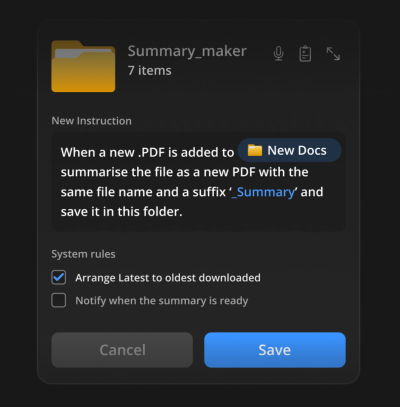
Now, that’s useful: seamless integration of AI features when creating new folders. By Karthikeya GS.
1. AI-First vs. Quiet AI
I’ve always been puzzled by the notion of “AI-first”
products. They might speed up production, but we need to know really
well first what we actually want to build. AI-first often doesn’t
account for years of small and big design decisions that have shaped expectations and mental models over the years.
A neat Claude Excel integration, with users studying specific rows or columns, instead of switching between tools all the time.
I love the notion of “Quiet AI”.
These are tools that are mostly invisible, sit in the background, and
do small tasks on the user’s behalf. They never scream for attention but
happily assist in repetitive, frustrating tasks that can easily be
automated or assisted with a smart helper.
Excellent examples of Quiet AI include Claude’s integration within Microsoft Excel, PowerPoint, and Word, providing assistance in context without disrupting the user’s workflow.
So no wonder that I absolutely love the idea of folder instructions!
There, users can define what a folder is supposed to do, based on the
purpose they created it for. It sounds much more complicated than it
actually is.
Users define instructions, choose system rules, and the system takes care of the task.
The instructions define what the folder is for, how files should be organized,
how sub-folders should behave, and what actions can happen inside.
Instead of manually maintaining a folder, you set its intent once and
let the system follow it.
It’s a seamless integration
of AI helpers just when and where users want and need it. With
permissions and actions locally scoped to that specific folder on the
user’s machine, unless the user extends access, permissions, or system
rules on their own.
Users could automate tasks where the work actually happens, e.g., generating summaries on the fly.
Here are some useful examples:
For a passport renewal,
get the form and collect all the documents I need for it. Inform about
missing documents, and fill out the form to the best of your abilities.
When new invoices
are added to the folder, rename them according to the sequence, sort
them by invoice number, and organize them in folders by client.
When a new PDF is added to the folder, generate a summary, send it to my pocket, and send me a notification via email.
User’s
value doesn’t emerge from users having to juggle between multiple
applications, views, and sources every few minutes. That’s when they are
slowed down, and that’s when they make mistakes.
It comes from helping users do the work they need to do — by reducing frustrations, slowdowns and mistakes, and taking care of tasks that otherwise would take too much time and too much effort to complete well.
Yet again, seamless integrations
— a very underused but incredibly impactful way to deliver value fast,
without adding the burden of installing and learning yet another tool.
What people say, feel, think, and do are often very different things. To understand the underlying reasons for user behavior, it helps to look beyond the surface and explore hidden motivations, root causes, and the different layers of reality that shape how people act. Brought to you by Measuring UX Impact, friendly video course on UX and design patterns by Vitaly.
Many companies think they know fairly well what their users want and need, and how they make their decisions. Yet most of the time these are merely big assumptions and big hunches — with little real evidence to support them. In practice, obvious reasons might be true, but they rarely paint the full picture.
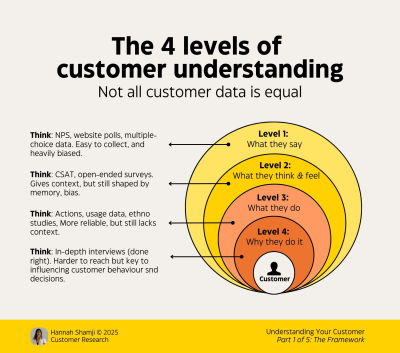
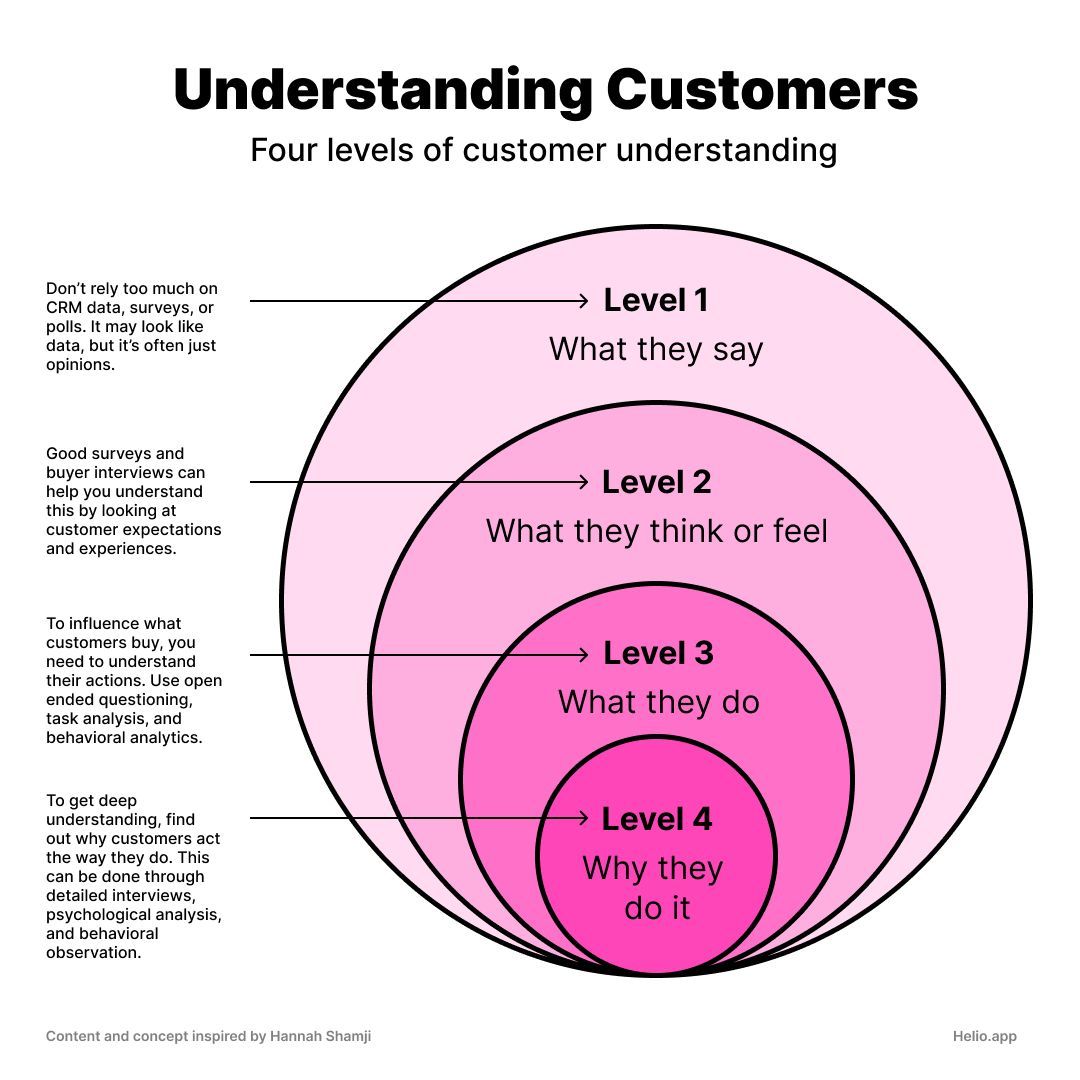
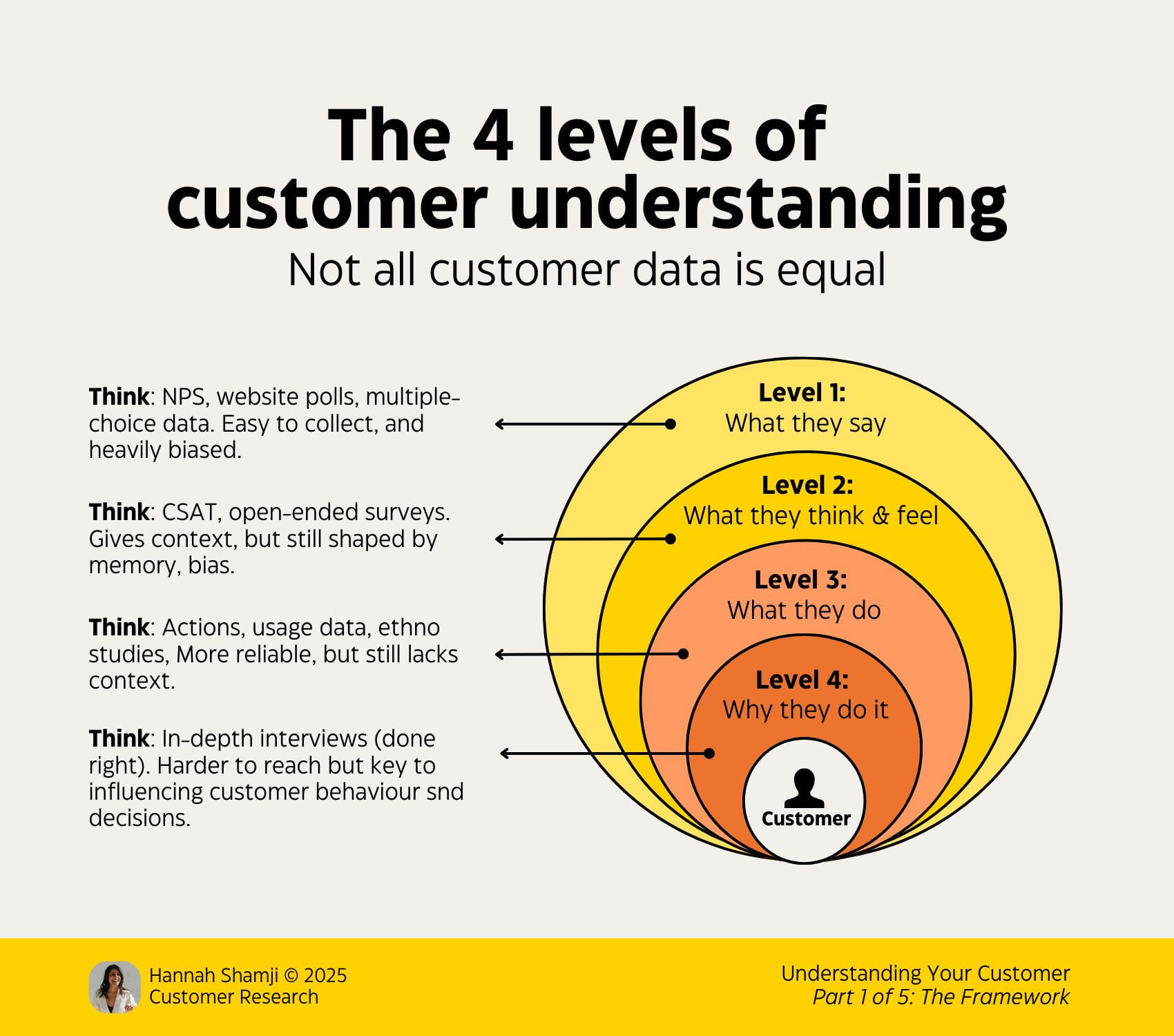
To understand our customers, we must triangulate across four levels of customer understanding by Hannah Shamji. It’s a useful way to think about the underlying reasons for user behavior, hidden motivations, and the complex layers of messy and noisy reality that are often overlooked. Let’s see how it works.
Four levels of customer understanding: what people say, think or feel, do, and why they do it. By Hannah Shamji. (Large preview)
Don’t Ask Users Your Burning Questions
To learn about customers, it might seem reasonable to ask people what they think and draw conclusions from it. But it’s rarely an effective way to get actionable answers. In fact, as it turns out, what people think, feel, say, and do are often very different things.
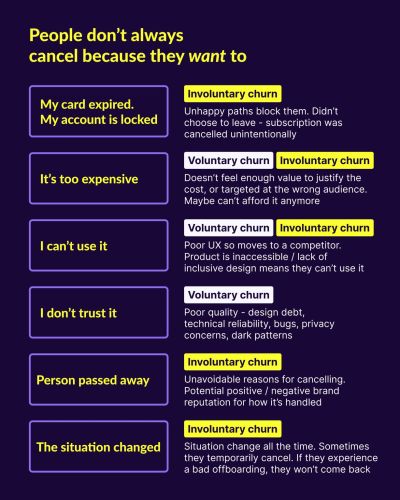
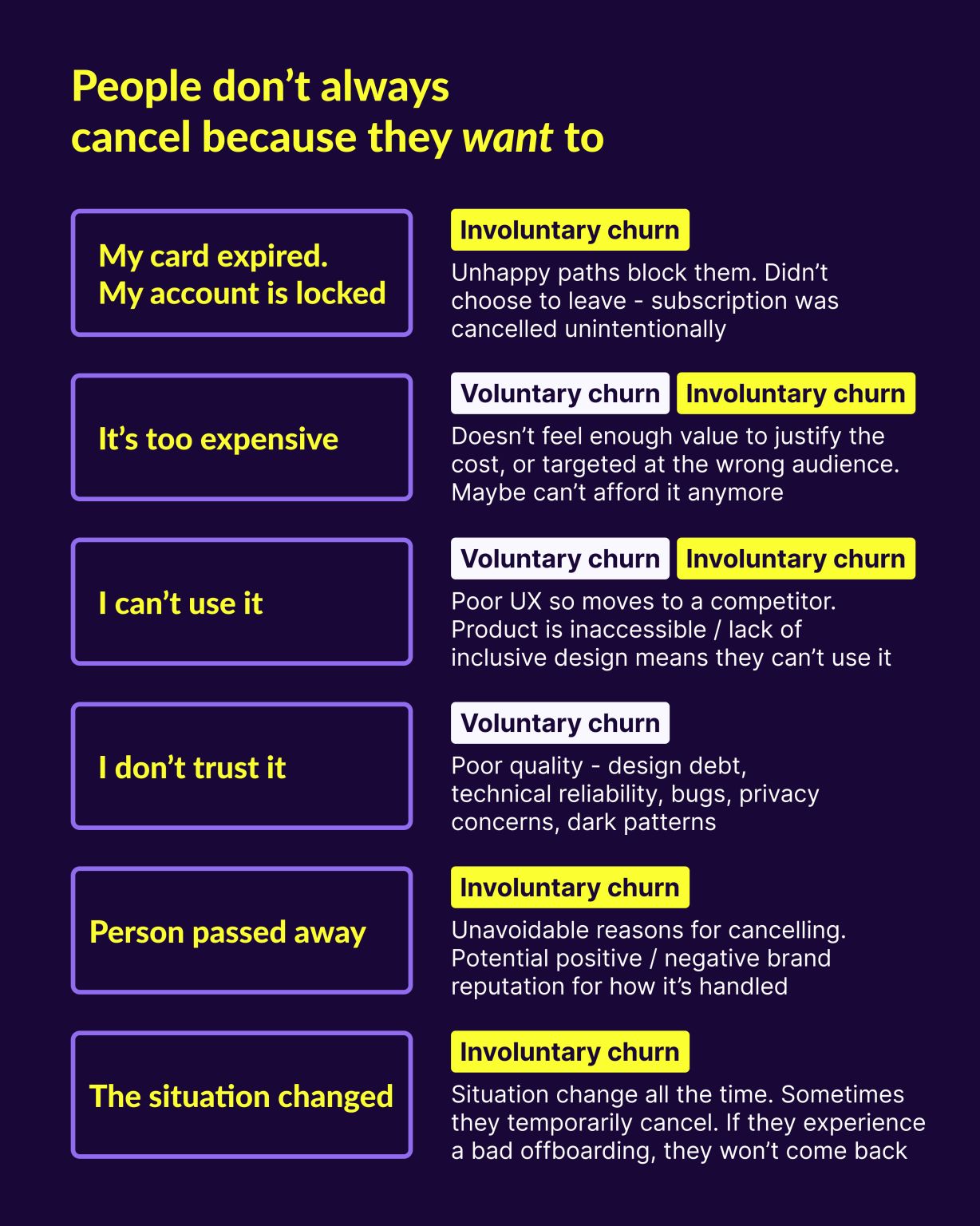
People don’t always cancel because they want to. Reasons for voluntary and involuntary customer churn. By Emily Anderson. (Large preview)
As Erika Hall wrote, asking a question directly is the worst way to get a true and useful answer to that question. We don’t always understand or are aware of our true motivations. We often apply our own context and interpretations to questions.
We also exaggerate (a lot!). We focus on edge cases and unrealistic scenarios, and we favor short-term goals over long-term goals. So if users say that they absolutely need to compare products in a table, it doesn’t mean that they couldn’t get to their underlying goal without it.
“Possible” Vs. “Probable”
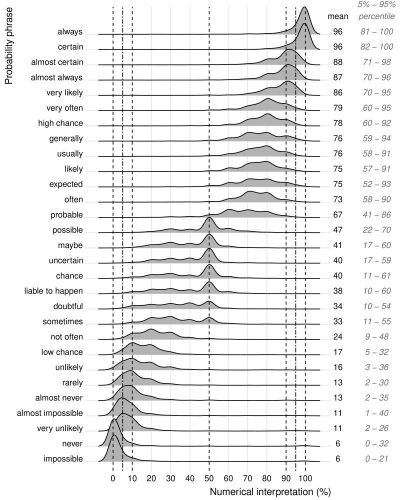
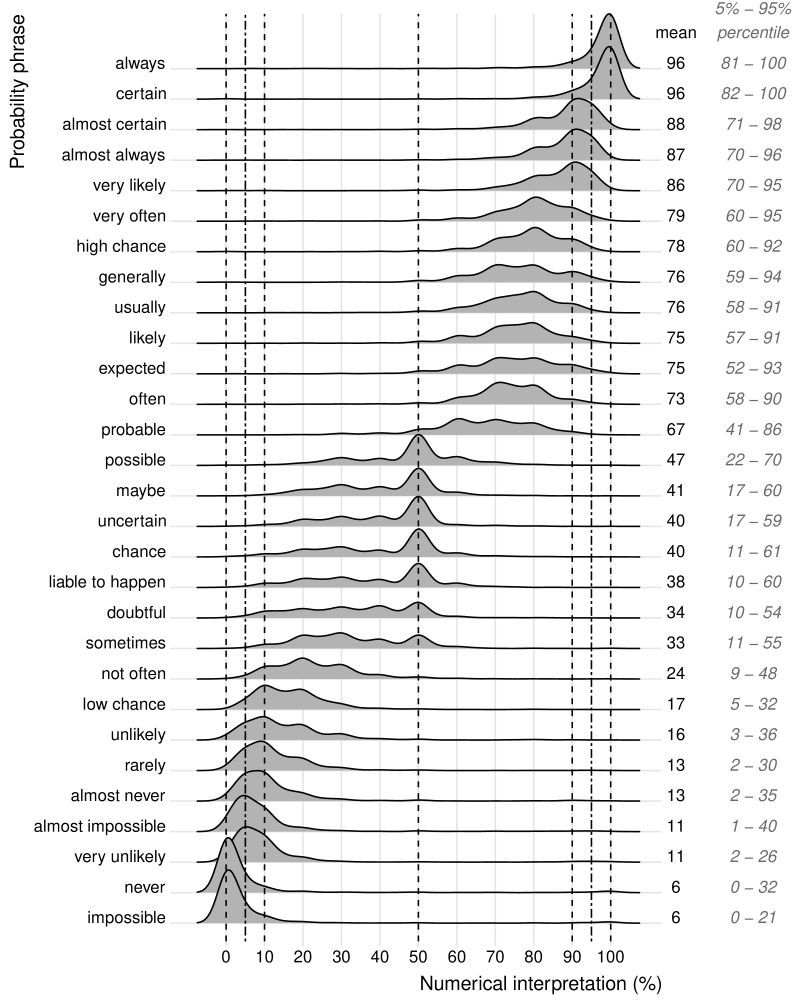
Just to indicate how tricky listening to words alone is: even little nuances in words chosen matter. In practice, users are rarely precise in expressing their thoughts, and a good example is the distinction between possible, plausible, and probable, as discovered by Thomas D’hooge.
Numerical interpretation of probability phrases and their ranges. Source. (Large preview)
A study on Dutch verbal probability terms shows how unreliable the choice of words is. While extreme words have some agreement, terms like “possible,” “maybe,” “uncertain,” or “likely” lead to a wide spread of interpretations. So we shouldn’t rely on what people say, but rather try to go deeper.
The Levels Of Understanding
To get a more realistic and less biased view of customers’ needs, we need to understand a broader picture across 4 levels:
Four levels of customer understanding: what people say, think or feel, do, and why they do it. By Hannah Shamji, visualized by Helio. (Large preview)
Level 1: “What they say” Easier to collect, but mostly opinions, and most unreliable. People often explain their behavior through the lens of how they perceive it, or how they want it to be perceived, which isn’t always accurate. We shouldn’t rely too much on CRM data, surveys, or polls.
Level 2: “What they think and feel” Gives more context, but is still heavily shaped by memory and personal preferences. Good user research and interviews help us understand expectations and experiences.
Level 3: “What they do” We study actual behavior, actions taken or skipped, usage data, and analytics. We run task analysis and workflow analysis to understand how people use the product.
Level 4: “Why they do it” We study underlying motivations and root causes, through observations of real workflows and in-depth interviews. Typically, it requires a trustworthy relationship with the user, repeat interviews, and task walkthroughs.
Personally, I wouldn’t recommend NPS (alternative). It’s worth noting that different levels might reveal conflicting or contradictory data. To get a better understanding, we need to triangulate and reconcile data with mixed-method research.
Capturing Emotions And Nuance
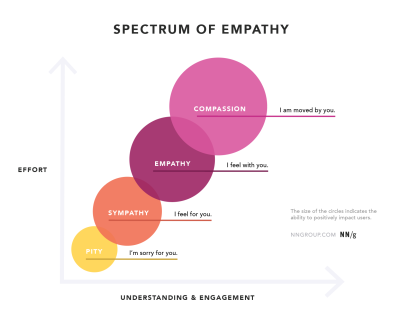
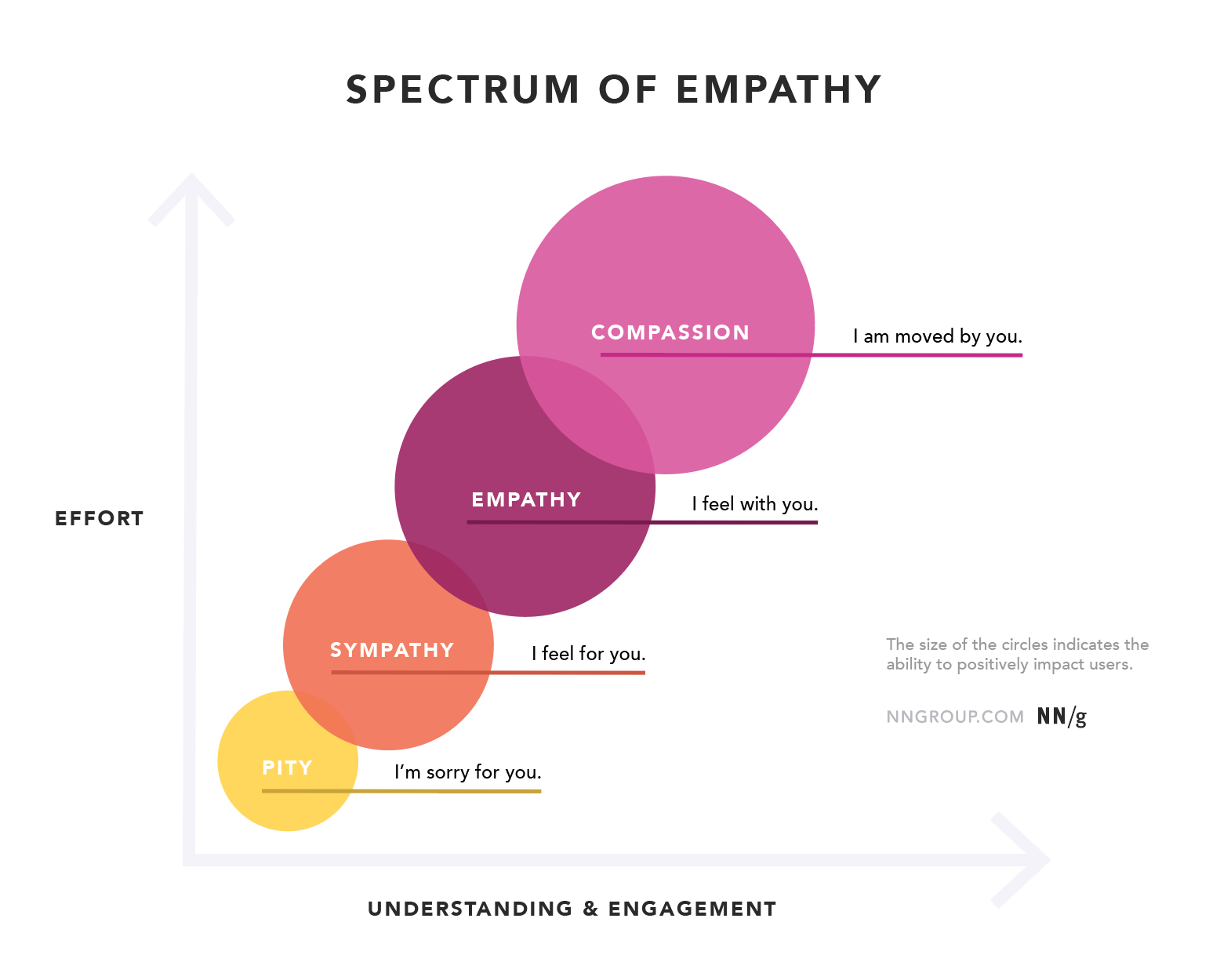
Emotions are always difficult to capture, but they are easier to spot once you observe people doing what they need to do without external influence or interruptions. The ability to positively impact users grows by moving from sympathy to empathy or even compassion, as articulated by Sarah Gibbons.
In the past, I was using “speak-aloud” protocol and asked users to walk me through their thought process as they were completing tasks. But it actually turns out to be quite disruptive. Because people are focused on speaking at the same time while solving a task, many emotions remain hidden or obscured by their language.
So, when conducting usability testing, I don’t ask users to speak through their experience. Instead, I observe where they tap or hover with the mouse, where their mouse circles without an action, where they scroll, and how long. Eventually, when a user confirms that they are done or that they are stuck, I ask questions.
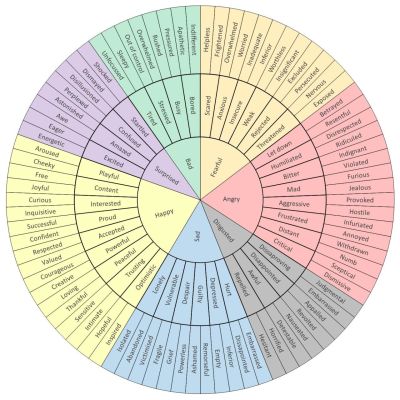
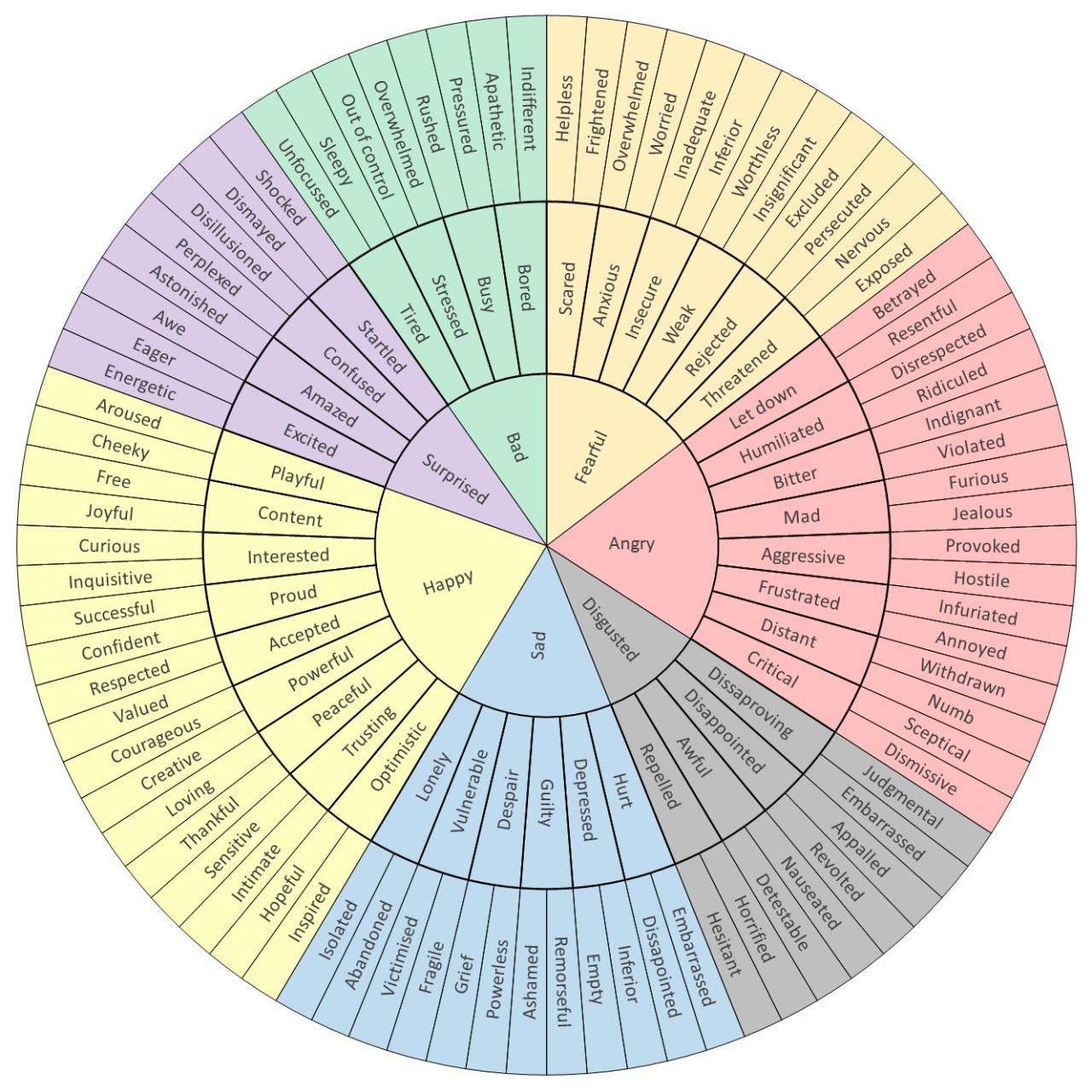
The Wheel of Emotions helps articulate emotions more precisely. (Large preview)
The Emotion Wheel (website) by Geoffrey Roberts is a helpful little tool for better describing a range of emotions during user interviews or design sessions. It certainly needs refinement for product design needs, but it helps us get more precise about the sentiment customers or colleagues might be experiencing, moving beyond just “good” or “bad”.
One helpful trick is to use mirroring — repeating what a user has said, or ask the same question twice, just paraphrasing it. Or navigating the emotions wheel (see above) to better capture and understand the emotion.
These strategies help uncover some of the issues that perhaps didn’t come up in the first answer. That’s also when a user tends to add more useful context and details as they explain their confusion.
“Our work is about others — their problems, their pain, their mess. Our job is to make sense of it and then do something about it. Not to emote or perform but to act on and solve it. There is a flawed belief that to build great things, you first need to emotionally fully absorb someone else’s experience.”
— Alin Buda
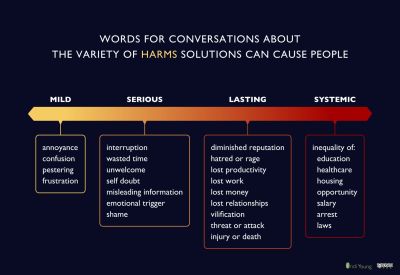
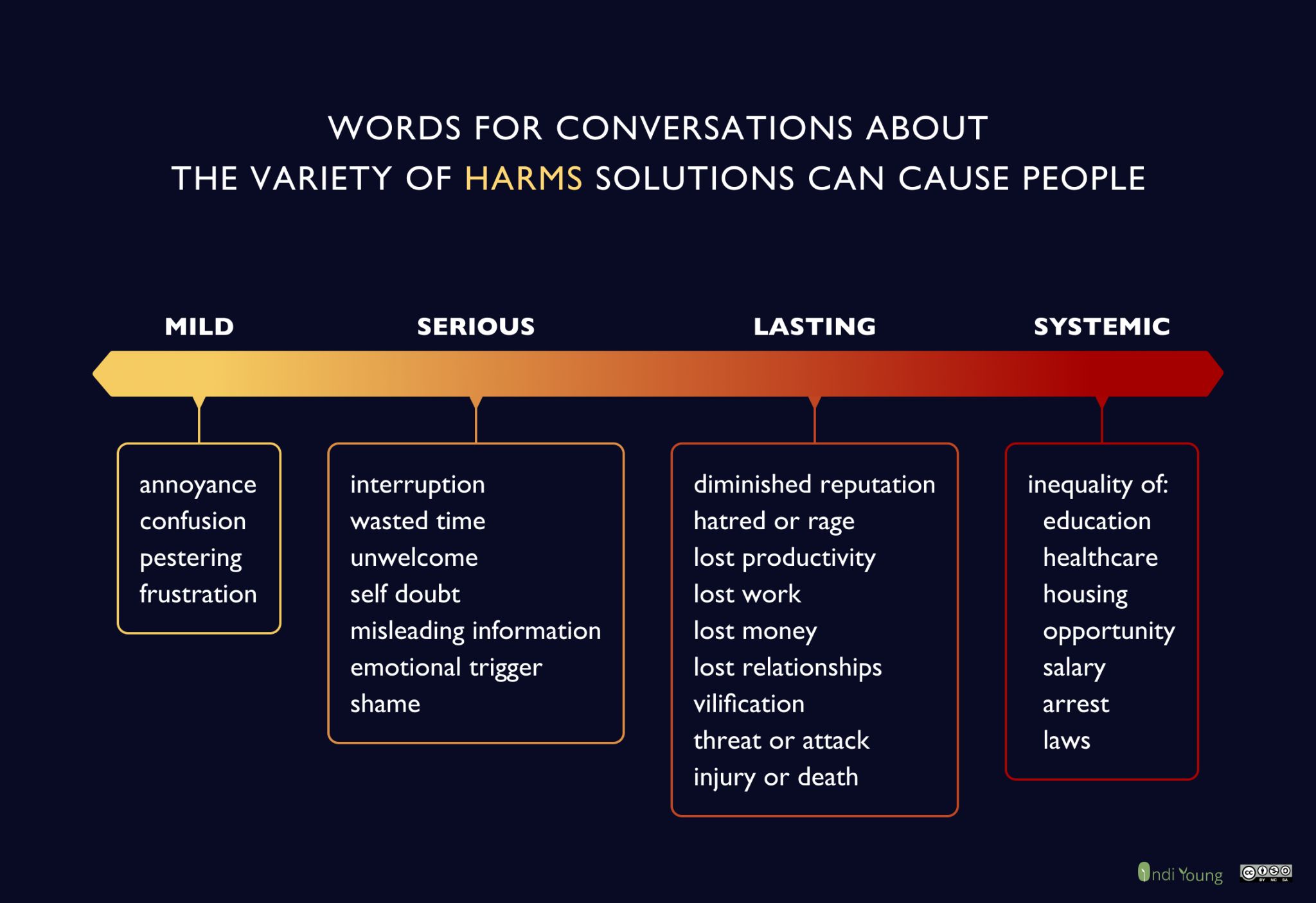
Different solutions can cause different levels of harm, which can be way more severe and impactful than emotional response. By Indi Young. (Large preview)
I think that Alin brings up a very strong argument, and personally, I find it difficult to disagree with. However, I do see user’s emotional response as a signalof how well the product is working for them. How engaged or detached they are in their journey, how they react to aesthetics, how confused or confident they are.
Ultimately, these are signals. To make a difference, we must go beyond emotions and explore what people actually do. Usually, this means relentlessly observing, diagnosing, and focusing on underlying user needs.
Observe And Diagnose, Don’t Validate
Instead of asking, we need to observe. Usually, I focus on small things that make or break an experience. I see where users lose time, repeat actions, hover without clicking, or click and then go back. Pay attention to subtle cues like scratching their neck, raising eyebrows, or expressions of worry, joy, or confusion.
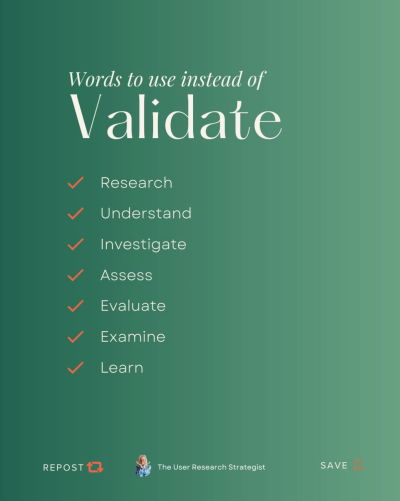
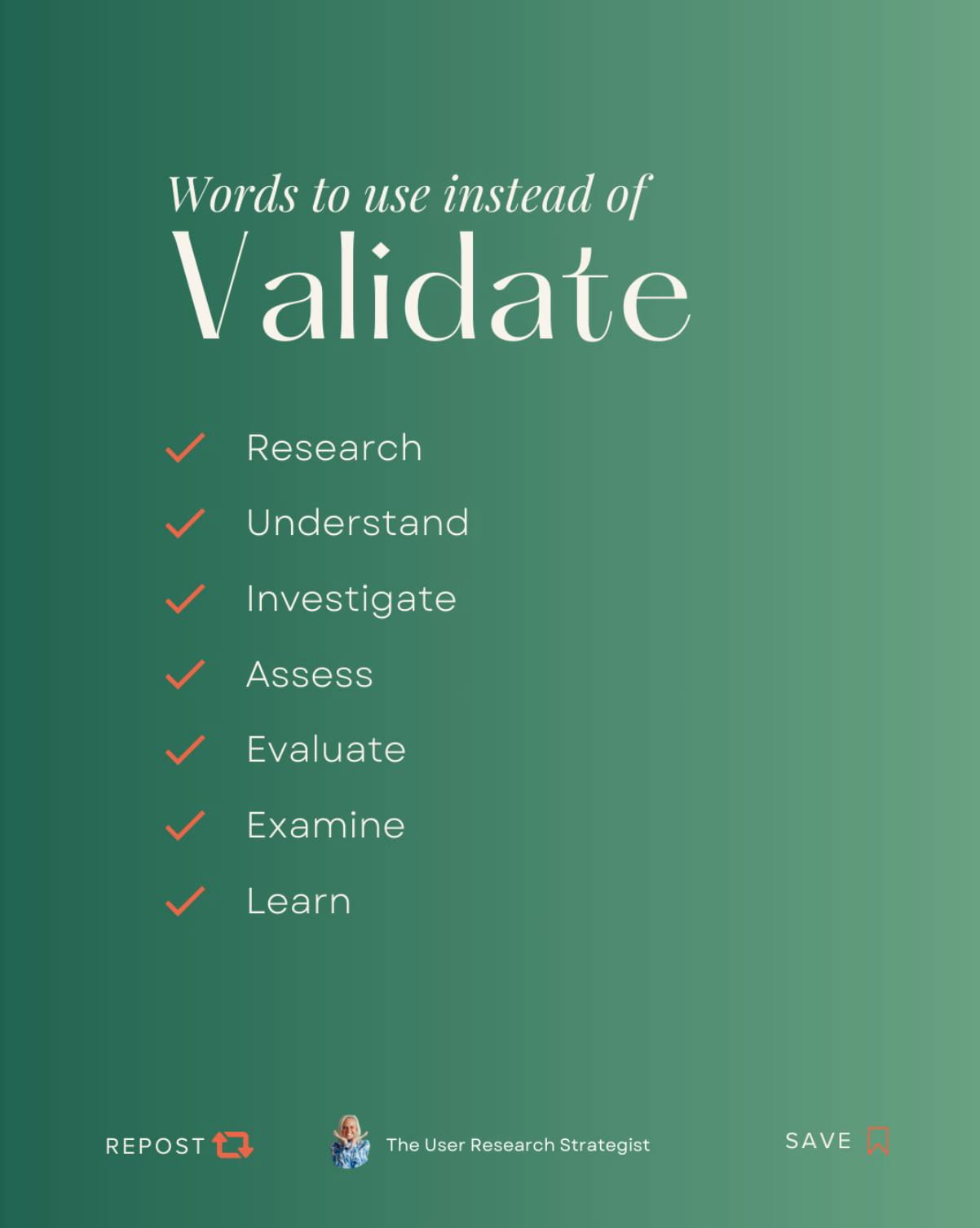
Many companies talk about “validation” through user testing, but often that means simply confirming existing assumptions. But we should instead diagnose existing behavior without preconceived notions or affiliations. We don’t validate — we actually research instead.
Words to use instead of “validate”: research, understand, investigate, assess, evaluate, examine, learn. By Nikki Anderson. (Large preview)
That research means not just understanding customers’ real motivations, but also risks, doubts, concerns, worries, and perhaps even harms.
The only way to get there is by building a sincere, honest, and trustworthy relationship — one that feels right and resonates deeply. When customers truly care and want to help, getting to a real understanding becomes much, much easier.
Practical Ways To Uncover User Needs
We don’t need expensive tools to uncover user needs. David Travis provides a fantastic overview of helpful strategies to do just that. Here are some initiatives to spread the word about real user’s struggles or gain a deeper understandingof user needs:
Exposure hours, when every employee must be exposed to their customersfor at least 2 hours every 6–12 weeks.
Live UX testing, where we invite everyone in the company to join and observe.
Co-design with users, where we show new features and ask users to rank them.
Helpdesk insights, where we ask for frequent complaints and questions from the support every 3–6 months.
Listening in, where we tune in on a customer service call, web chat, or eavesdrop where users hang out.
The core idea here is that you don’t need extensive and expensive tools to uncover user needs. You need to create spaces where customers’ struggles can be exposed and make these struggles visible across the entire company.
It can be short video clips of user sessions or a monthly newsletter with what we learned this month. Making these pain points visible can rally everyone from marketing to engineering to keep users’ struggles at the back of their minds.
Wrapping Up
To make an impact, we must go way beyond user feedback. It’s never enough to listen to surveys — we must observe customers’ actual behaviors and build relationships to truly understand their goals and their motivations.
And most importantly, we need to understand what questions we actually want to have answered. Not what “validation” we need to move on with the project, but what we don’t know and what we need to research.
Without it, everything else is merely hunches and assumptions — and often wrong and expensive ones.
Practical guidelines on designing time-critical products that prevent errors and improve accuracy.
No design exists in isolation. As designers, we often imagine
specific situations in which people will use our product. It might be
indeed quite common — but there will also be other — urgent, frustrating, stressful situations. And they are the ones that we rarely account for.
So how do we account for such situations? How can we help people use our products while coping with stress — without adding to their cognitive load? Let’s take a closer look.
Study Where Your Product Fits Into People’s Lives
When designing digital products, sometimes we get a bit too attached to our shiny new features and flows
— often forgetting the messy reality in which these features and flows
have to neatly fit. And often it means 10s of other products, 100s of
other tabs, and 1000s of other emails.
Design never exists in isolation. It must fit the user’s context and their expectations to do its job. (Image source: Engine And Power Dashboard) (Large preview)
If your customers have to use a slightly older machine, with a smallish
22” screen and a lot of background noise, they might use your product
differently than you might have imagined, e.g., splitting the screen
into halves to see both views at the same time (as displayed above).
Chances are high that our customers will use our product while doing something else,
often with very little motivation, very little patience, plenty of
urgent (and way more important) problems, and an unhealthy dose of
stress. And that’s where our product must do its job well.
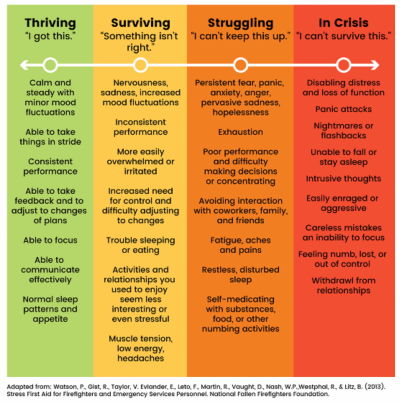
What exactly do we mean when we talk about “stress”? As H Locke noted, stress is the body’s response to a situation it cannot handle. There is a mismatch between what people can control, their own skills, and the challenge in front of them.
If the situation seems unmanageable and the goal they want to achieve moves further away, it creates an enormous sense of failing. It can be extremely frustrating and demotivating.
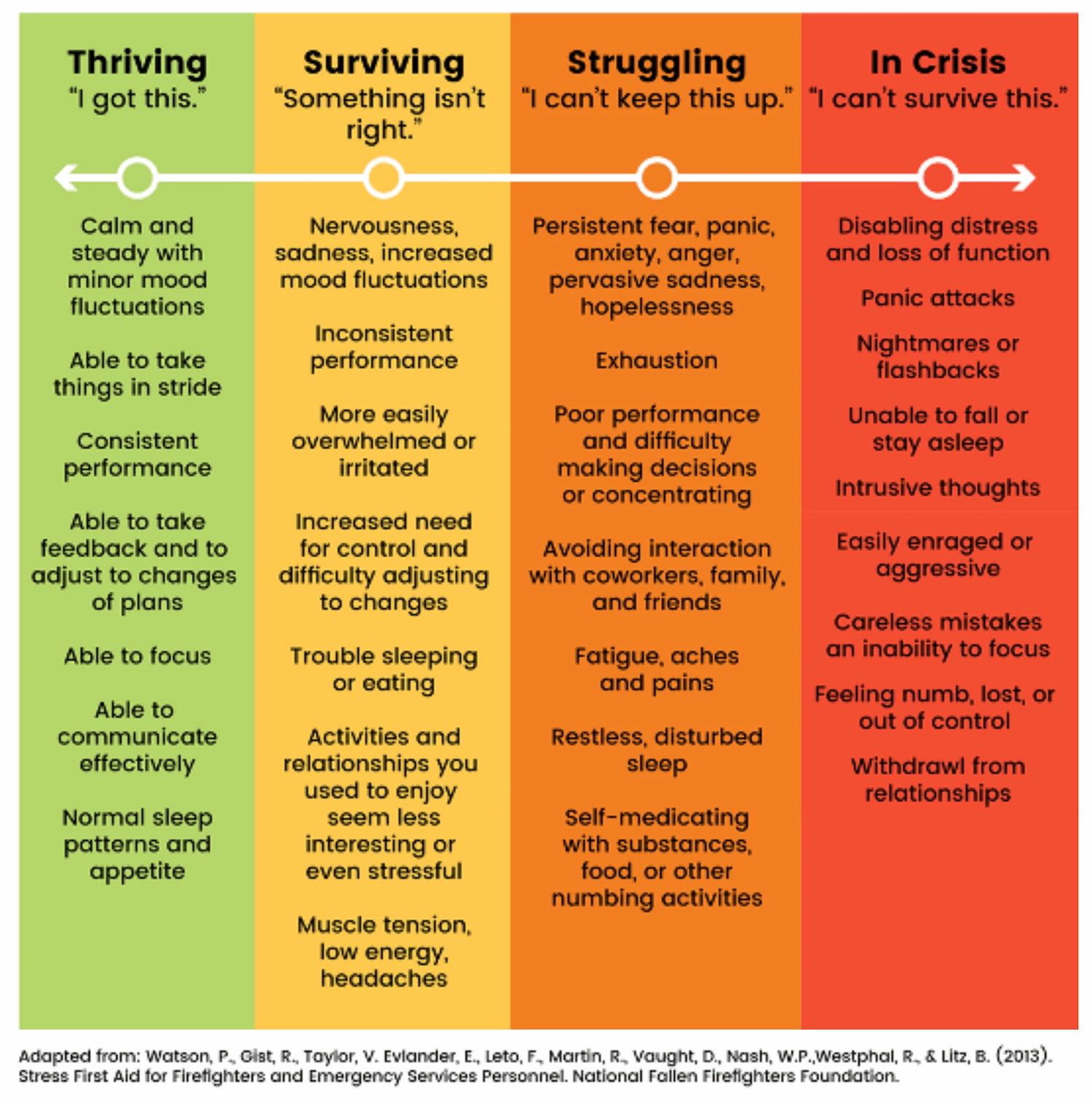
Stress has many levels. The key is not to let it spiral into dangerous zones. (Image source: Alypain) (Large preview)
Some failures have a local scope, but many have a far-reaching impact.
Many people can’t choose the products they have to use for work, so
when a tool fails repeatedly, causes frustration, or is unreliable, it
affects the worker, the work, the colleagues, and processes within the
organization. Fragility has a high cost — and so does frustration.
It’s
not a big surprise: stress disrupts attention, memory, cognition, and
decision-making. It makes it difficult to prioritize and draw logical
conclusions. In times of stress, we rely on fast, intuitive judgments, not reasoning. Typically, it leads to instinctive responses based on established habits.
Overwhelming
products can add to the cognitive load and lead to mistakes. However,
people also get used to any products once they’ve used them long enough.
(Large preview)
When users are in an emergency, they experience cognitive tunneling
— it’s a state when their peripheral vision narrows, reading
comprehension drops, fine motor skills deteriorate, and patience drops
sharply. Under pressure, people often make decisions hastily, while
others get entirely paralyzed. Either way is a likely path to mistakes — often irreversible ones and often without time for extensive deliberations.
Ideally,
these decisions would be made way ahead of time — and then suggested
when needed. But in practice, it’s not always possible. As it turns out,
a good way to help people deal with stress is by providing order around how they manage it.
People can’t really multi-task,
especially in very stressful situations or emergencies. Especially with
a big chunk of work in front of them, people need some order to make
progress, reliably. That’s why simpler pages usually work better than
one big complex page.
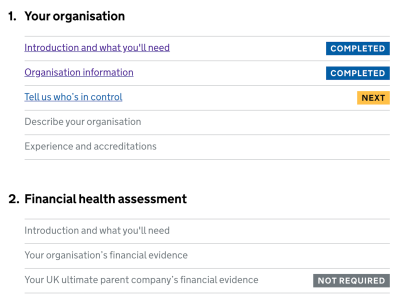
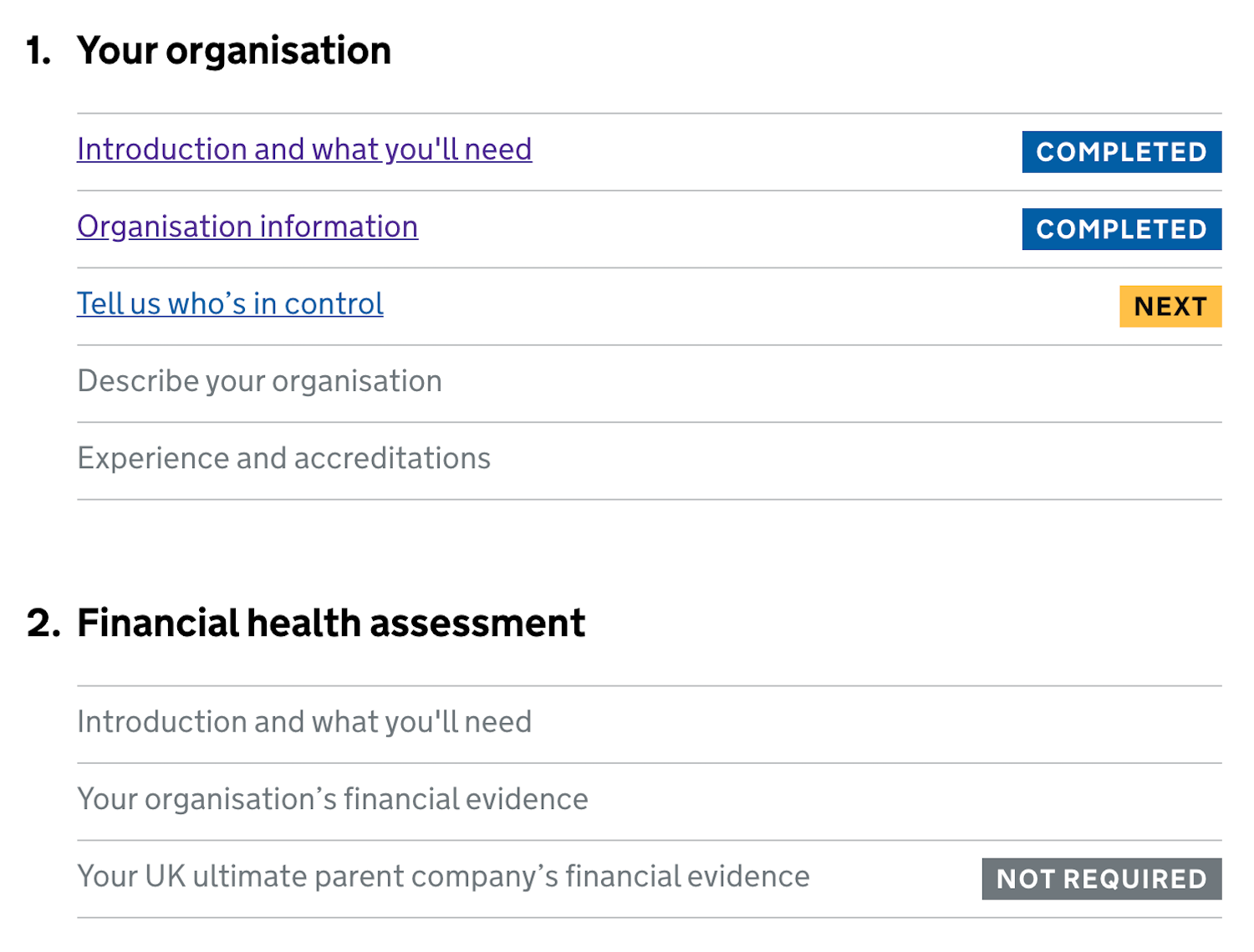
Order means giving users a clear plan of action to complete a task. No distractions, no unnecessary navigation. We ask simple questions and prompt simple actions, one after another, one thing at a time.
Poorly designed products can add to the cognitive load and lead to mistakes. (Large preview)
An example of the plan is the Task List Pattern, invented by fine folks at Gov.uk. We break a task into a sequence of sub-tasks, describe them with actionable labels, assign statuses, and track progress.
To support accuracy, we revise default settings, values, presets, and actions. Also, the order of actions
and buttons matters, so we put high-priority things first to make them
easier to find. Then we add built-in safeguards (e.g., Undo feature) to
prevent irreversible errors.
The
most effective help during emergencies is to help people deal with the
situation in a well-defined and effective way. That means being prepared
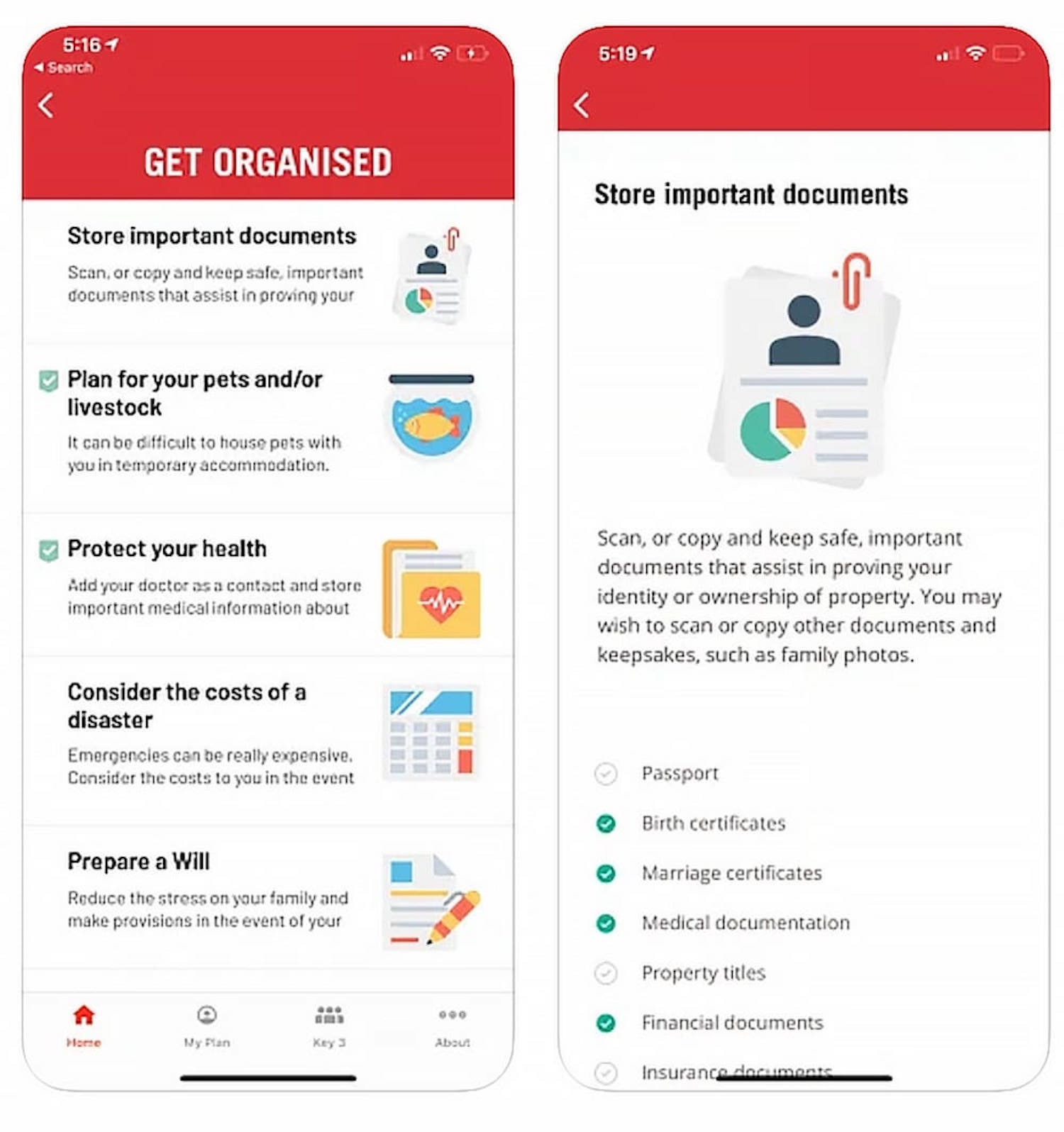
for and designing an emergency mode, e.g., to activate instant alerts on emergency contacts, distribute pre-assigned tasks, and establish a line of communication.
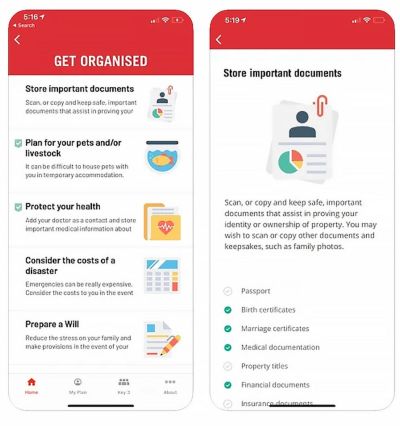
Rediplan App by Australian Red Cross is an emergency plan companion that encourages citizens to prepare their documents and belongings with a few checklists and actions — including key contracts, meeting places, and medical information, all in one place.
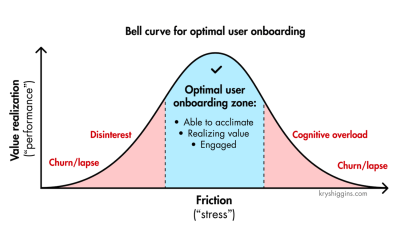
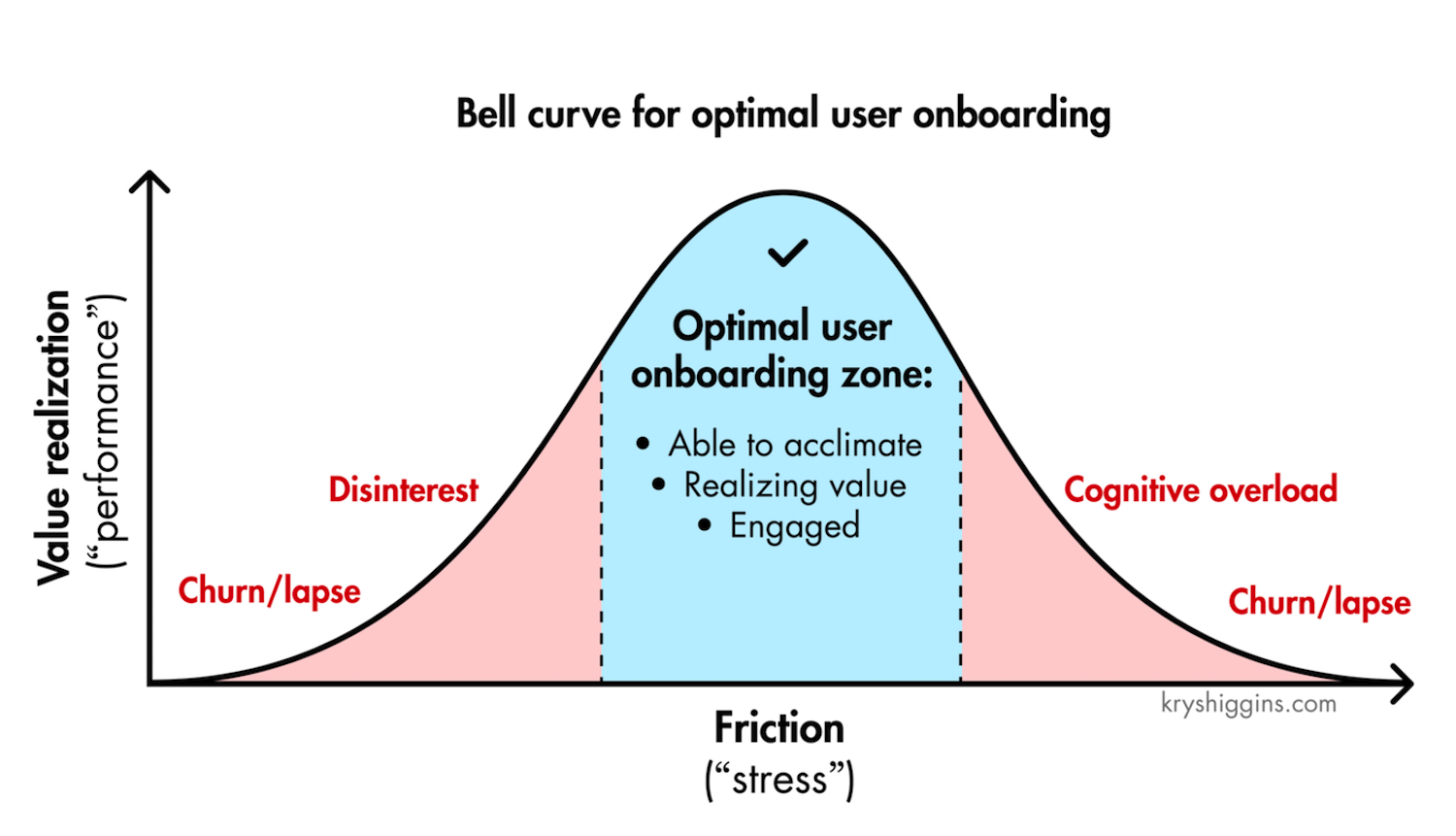
Not all stress is equally harmful, though. As Krystal Higgins points out, if there is not enough friction when onboarding new users and the experience is too passive or users are hand-held even through the most basic tasks, you risk that they won’t realize the personal value they gain from the experience and, ultimately, lose interest.
We
need to find the sweet spot between value realization and friction to
create experiences that keep users engaged. (Image source: Krystal Higgins) (Large preview)
Stress cases aren’t edge cases.
We can’t predict the emotional state in which a user comes to our site
or uses our product. A person looking for specific information on a
hospital website or visiting a debt management website, for example, is
most likely already stressed. Now, if the interface is overwhelming, it
will only add to their cognitive load.
Stress-testing your product is critical to prevent this from happening. It’s useful to set up an annual day to stress test your product and refine emergency responses. It could be as simple as running content testing, or running tests in a real, noisy, busy environment where users actually work — at peak times.
And
in case of emergencies, we need to check if fallbacks work as expected
and if the current UX of the product helps people manage failures and
exceptional situations well enough.
Emergencies will happen eventually — it’s just a matter of time. With good design, we can help mitigate risk and control damage, and make it hard to make irreversible mistakes. At its heart, that’s what good UX is exceptionally good at.
You can find more details on UX Strategy in 🪴 Measure UX & Design Impact (8h), a practical guide for designers and UX leads to measure and show your UX impact on business. Use the code 🎟 IMPACT to save 20% off today. Jump to the details.
As always in design, timing matters, and so do timely notifications. Let’s ex
In many products, setting notification channels on mute is a default,
rather than an exception. The reason for that is their high frequency,
which creates disruptions and eventually notification fatigue, when any
popping messages get dismissed instantly.
There is a good reason for it: high frequency of notifications.
In usability testing, it’s the most frequent complaint, yet every app
desperately tries to capture a glimpse of our attention, sending more
notifications our way. Let’s see how we could make the notifications UX
slightly better.
plore how we might improve the notifications UX.
The Many Faces Of Notifications
Notifications
are distractions by nature; they bring a user’s attention to a
(potentially) significant event they aren’t aware of or might want to be
reminded of. As such, they can be very helpful and relevant, providing
assistance and bringing structure and order to the daily routine. Until
they are not.
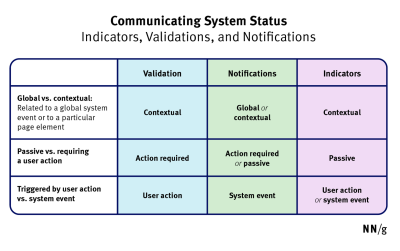
“Status
communication often relies on validation, status indicators, and
notifications. While they are often considered to be similar, they are
actually quite different.”
Notifications are informational messages that alert the user of general occurrences within a system. (Image source: NN/g) (Large preview)
In general, notifications can be either informational (calendar reminders, delay notifications, election night results) or encourage action (approve payment, install an update, confirm a friend request). They can stream from various sources and have various impacts.
UI notifications
appear as subtle cards in UIs as users interact with the web interface —
as such, they are widely accepted and less invasive than some of their
counterparts.
In-browser push notifications are more difficult to dismiss, and draw attention to themselves even if the user isn’t accessing the UI.
In-app notifications
live within desktop and mobile apps, and can be as humble as UI
notifications, but can take a more central role with messages pushed to
the home screen or the notifications center.
OS notifications
such as software updates or mobile carrier changes also get in the mix,
often appearing together with a wide variety of notes, calendar
updates, and everything in between.
Finally, notifications can find their way into email, SMS, and social messaging apps, coming from chatbots, recommendation systems, and actual humans.
But we don’t pay the same amount of attention to every notification. It can take weeks until they eventually install a software update prompted by their OS notification, or just a few hours to confirm or decline a new LinkedIn request.
Not Every Notification Is Equal
The level of attention users grant to notifications depends on their nature, or, more specifically, how and when notifications are triggered. People care more
about new messages from close friends and relatives, bank transactions
and important alerts, calendar notifications, and any actionable and
awaited confirmations or releases.
People care less
about news updates, social feed updates, announcements, new features,
crash reports, promotional and automated messages in general. Most
importantly, a message from another human being is always valued much higher than any automated notification.
Design For Levels Of Severity
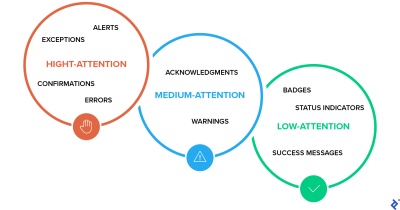
As Sara Vilas suggests, we can break down notification design across three levels of severity: high, medium, and low attention.
And then, notification types need to be further defined by specific
attributes on those three levels, whether they are alerts, warnings,
confirmations, errors, success messages, or status indicators.
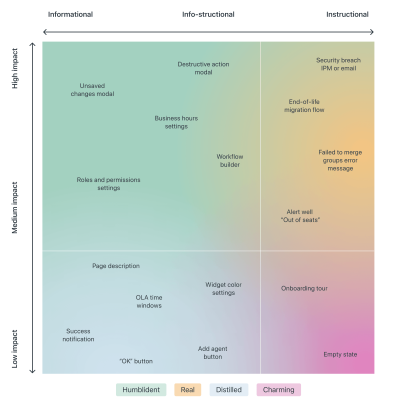
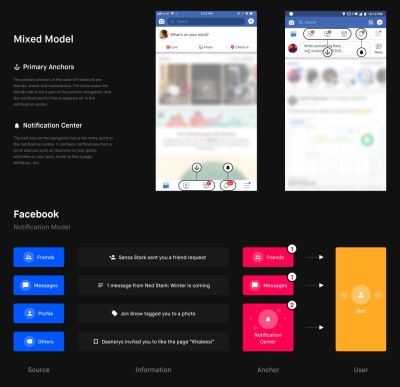
A variety of triggers (or) origins of information, from a Zendesk Mapping Tone by Shankar Balasubramanian (Gmail team). (Large preview)
Confirmations (potentially destructive actions that need user confirmation to proceed).
Medium Attention
Warnings (no immediate action required),
Acknowledgments (feedback on user actions),
Success messages.
Low Attention
Informational messages (aka passive notifications, something is ready to view),
Badges (typically on icons, signifying something new since last interaction),
Status indicators (system feedback).
Taking it one step further, we can map the attention against the type of messaging we are providing — very similar to Zendesk’s mapping tone
above, which plots impact against the type of messaging, and shows how
the tone should adjust — becoming more humble, real, distilled or
charming.
So, notifications can be different, and
different notifications are perceived differently; however, the more
personal, relevant, and timely notifications are, the higher engagement
we should expect.
Start Sending Notifications Slowly But Steadily
It’s
not uncommon to sign up, only to realize a few moments later that the
inbox is filling up with all kinds of irrelevant messages. That’s
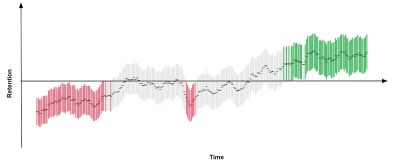
exactly the wrong thing to do. A study by Facebook showed that sending fewer notifications improved user satisfaction and long-term usage of a product.
Initially,
once the notification rate was reduced, there was indeed a loss of
traffic, but it has “gradually recovered over time”, and after an
extended period, it had fully recovered and even turned out to be a gain.
A good starting point is to set up a slow default notification frequency
for different types of customers. As the customer keeps using the
interface, we could ask them to decide on the kind of notifications
they’d prefer and their frequency.
Send notifications slowly,
and over time slowly increase and/or decrease the number of
notifications per type of customer. This might work much better for our
retention rates.
Don’t Rely On Generic Defaults: Set Up Notification Modes
Typically,
users can opt in and opt out of every single type of notification in
their settings. In general, it’s a good idea, but it can also be very
overwhelming — and not necessarily clear how important each notification
is. Alternatively, we could provide predefined recommended options, perhaps with a “calm mode” (low frequency), a “regular mode” (medium frequency), and a “power-user mode” (high frequency).
As
time passes, the format of notifications might need adjustments as
well. Rather than having notifications sent one by one as events occur,
users could choose a “summary mode,” with all notifications grouped into a single standalone message delivered at a particular time each day or every week.
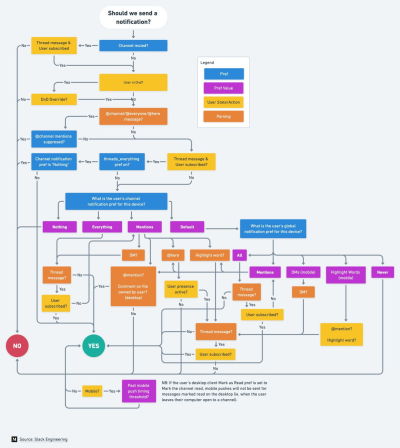
That’s one of the settings that Slack provides
when it comes to notifications; in fact, the system adapts the
frequency of notifications over time, too. Initially, as Slack channels
can be quite silent, the system sends notifications for every posted
message.
As activities become more frequent, Slack recommends reducing the notification level so the user will be notified only when they are actually mentioned.
Make Notification Settings A Part Of Onboarding
We could also include frequency options in our onboarding design. A while back Basecamp, for example, has introduced “Always On” and “Work Can Wait” options
as a part of their onboarding, so new customers can select if they wish
to receive notifications as they occur (at any time), or choose
specific time ranges and days when notifications can be sent.
On
Basecamp, new customers can select if they wish to receive
notifications as they occur, or choose specific time ranges and days
when notifications can be sent. (Large preview)
Or, the other way around, we could ask users when they don’t want to be disturbed,
and suspend notifications at that time. Not every customer wants to
receive work-related notifications outside of business hours or on the
weekend, even if their colleagues might be working extra hours on Friday
night on the other side of the planet.
Allow Users To Snooze Or Pause Notifications
User’s context changes continuously.
If you notice an unusual drop in engagement rate, or if you’re
anticipating an unusually high volume of notifications coming up (a
birthday, wedding anniversary, or election night, perhaps), consider
providing an option to mute, snooze, or pause notifications, perhaps for the next 24 hours.
This
might go very much against our intuition, as we might want to re-engage
the customer if they’ve gone silent all of a sudden, or we might want
to maximize their engagement when important events are happening.
However, it’s easy to reach a point when a seemingly harmless
notification will steer a customer away, long term.
Another option would be to suggest a change of medium used to consume notifications. Users tend to associate different levels of urgency with different channels of communication.
In-app notifications, push notifications, and text messages are considered to be much more intrusive
than good ol’ email, so when frequency exceeds a certain threshold, you
might want to nudge users towards a switch from push notifications to
daily email summaries.
Wrapping Up
As always in design, timing matters, and so do timely notifications.
Start slowly, and evolve your notification frequency depending on how
exactly a user actually uses the product. For every type of user, set up
notification profiles: frequent users, infrequent users,
one-week-experience users, one-month-experience users, and so on.
And whenever possible, allow your users to snooze and mute notifications
for a while. Eventually, you might even want to suggest a change in the
medium used to consume notifications. And when in doubt, postpone,
rather than sending through.