Anchor text best practices for gaining backlinks (external links)
When another website links to yours, you can’t directly control the anchor text they use for the backlink—the other website makes that choice. But in some cases, you can influence it.
For example, if you have an existing relationship with the website owner, you can politely ask them to adjust the anchor text. Or, if you’re doing link-building outreach (contacting other sites to request a link), you can suggest anchor text options.
With that in mind, let’s see how to keep your external anchor profile clean and effective, even when you don’t have full control.
Discourage over-optimized or exact-match anchor text
As with internal linking, the same applies to external linking—anchor text that matches your target keyword exactly is good, but when it appears too often, it can start to look suspicious to search engines.
Google sees this kind of pattern as a potential manipulation tactic. Because in reality, it’s rare for different websites to all link to your page using the exact same keyword over and over again.
If dozens of websites are linking to your page using the exact phrase “best SEO tool,” Google’s algorithms may assume you’re trying to game the system.
Let’s say you’re doing outreach to get backlinks to your “Best SEO tool” article.
When another website links to you, don’t insist they use the exact-match keyword in every case. Instead, encourage them to use partial-matches like:
- “This SEO software”
- “Tools we used in our audit”
- “Platform for keyword research”
These still tell Google what your page is about without raising suspicion.
Ask for anchor text variations when doing link-building outreach
Imagine you find a website with a broken link on a resource about “technical SEO.” You reach out to let them know about the broken link and suggest adding a link to your guide on technical SEO as a replacement.
Instead of asking all of them to link with the exact phrase, you could suggest a few natural variations, like:
- “Improve site structure”
- “Healthy technical SEO setup”
- “Ways to fix crawl issues”
This keeps the link profile natural while still pointing to the same page.
It also helps search engines understand that your content covers more than one phrase so you’re more likely to show up for related searches, too.
Encourage brand mentions
In situations where you do have some influence on external link anchor text, like when you’re writing a guest post, it’s better to aim for something brand-related rather than forcing a keyword in.
Let’s say you’re reaching out to multiple website owners to request a link for one of your posts, “Best SEO tool.” If every backlink you secure (suppose through guest posts) points to your post with anchor text “best SEO tool,” it can look a little forced.
So what’s a better approach?
Use your brand name, “All About SEO,” and mention it in a way that fits naturally in the sentence. Something like:
- “All About SEO’s review of the best SEO tool”
- “In this post from All About SEO”
- “All About SEO recommends the following as best”
It’s normal for other websites to edit your guest posts, but you can encourage them to keep your anchor text as you kept it.
Because these kinds of anchors reinforce your brand across the web, and they’re a lot less likely to trigger any spam filters.
Monitor anchor profile diversity with tools
As your website earns more backlinks, your anchor text profile can start to lean too heavily on one type of link, such as exact-match phrases or repetitive patterns. That’s why it’s important to keep an eye on your anchor text diversity over time.
A diverse anchor profile includes branded anchors, natural phrases, partial matches, and even generic terms.
When that mix starts to get lopsided, it’s a signal to step back and review what types of links you’ve been building or attracting.
You can use SEO tools like Semrush, Ahrefs, or Majestic to monitor this. Let’s see how to do this using Semrush:
- Log in to Semrush.
- From the sidebar, go to “SEO” > “Link Building” > “Backlink Analytics.”
- From the top bar, head over to the “Anchors” report.

Here you can see a breakdown of all anchor texts pointing to your domain. You’ll be able to spot which phrases are overused.
Check if one anchor type dominates.
For example, if 60% of your backlinks use the same keyword, that’s worth reviewing and changing. Tracking this over time helps you spot risky trends before they create problems.
Tip: Create a quarterly habit of reviewing anchor text reports when actively doing outreach or publishing guest content.
Disavow unnatural links with manipulative anchors
Sometimes, despite your best efforts, you’ll find backlinks pointing to your website with anchor text that looks manipulative.
Maybe it’s unrelated to your content or uses spammy wording, embedded awkwardly in a sentence. For example:
“Click here for best payday loans online free approval before midnight.”
If this sentence appears in a casino article and the anchor text “best payday loans online free approval” links to your SEO blog, that’s an unnatural link. And it may hurt your SEO if left unchecked.
How?
When search engines see links from irrelevant or low-quality websites pointing to your content, especially with unrelated anchor text, it may signal that the link is part of a link scheme—a coordinated effort to artificially boost rankings through buying backlinks—rather than an organically earned link.
If you see this occasionally, it’s usually not a big deal. But if it starts to happen at scale or looks like part of a pattern, it’s worth performing an anchor text audit.
If, after the audit, you notice multiple spammy domains using the same manipulative anchor with unnatural links, it may be time to disavow them.
To do so, you can use tools like Semrush, Ahrefs, or Google Search Console.
To do that in Semrush:
- Go to “SEO” > “Link Building” > “Backlink Audit.”

- Scroll down and filter for “Toxic domains.”

- Review and add questionable links to your disavow list (use the built-in tool).

If you’re unsure whether or not to disavow a link, try reaching out to the website owner and requesting link removal first. That shows good faith before taking the formal disavowal route.
Note: Only disavow if you’re confident the links are harming your site. Google ignores most low-quality links on its own, so this is a last step, not a routine one.
How to audit your anchor text profile
An anchor text audit helps you see the big picture: how other websites and your own website are linking to you, which phrases they’re using, and whether there are any red flags like overuse, spammy patterns, or missed opportunities.
You can do this audit every four months or at least twice a year. This way, it becomes easier to catch issues before they affect rankings.
As you go through the audit, focus on:
- Anchor diversity: Are too many links using the same keyword-heavy phrase? Can you shift to related keywords?
- Relevance: Do the anchor texts match the content they point to?
- Ratio: How many links are branded vs. exact-match vs. generic (e.g., “click here”)?
- Spam signals: Are any links using unrelated or manipulative anchors?
Tools to audit anchor text profile
Several SEO tools can help you audit anchor text performance, both for internal and external links. But the right one depends on what kind of data you’re looking for.
- Semrush: Offers in-depth anchor text insights in both “Backlink Analytics” and “Site Audit.” It’s useful for spotting over-optimized anchors, repeated phrasing, and toxic backlink risks.
- Ahrefs: Strong for backlink analysis if you want to drill into anchor text by the referring domain or see historical changes over time.
- Majestic: Known for its trust flow metrics and detailed anchor breakdowns. It’s particularly helpful when analyzing older link profiles or niche domains.
- Google Search Console (GSC): A free and simple way to check your top-linked pages and anchor text trends. While it doesn’t provide quality scoring, it’s good for spotting patterns at a high level.
- Screaming Frog & Sitebulb: Both tools crawl your website and show internal link structures, including anchor text used between pages.
Walkthrough of an anchor text audit
Let’s see how to audit your anchor text using Semrush:
- Go to the “SEO” > “On-page & Tech SEO” > “Site Audit” tool and enter your domain.

- Click “Start Audit.”
- Adjust the crawl settings as needed (like crawl depth or number of pages), then hit “Start Site Audit” again to begin the scan.

- Once the audit finishes, open the “Issues” tab.
- In the search bar at the top, type “anchor” to filter the results.

This will highlight any anchor-related problems, like multiple links using identical anchors or links with empty or non-descriptive anchor text.
Let’s now see how to audit your anchor text profile using Google Search Console:
- Go to “Links” > “Top linking text.”
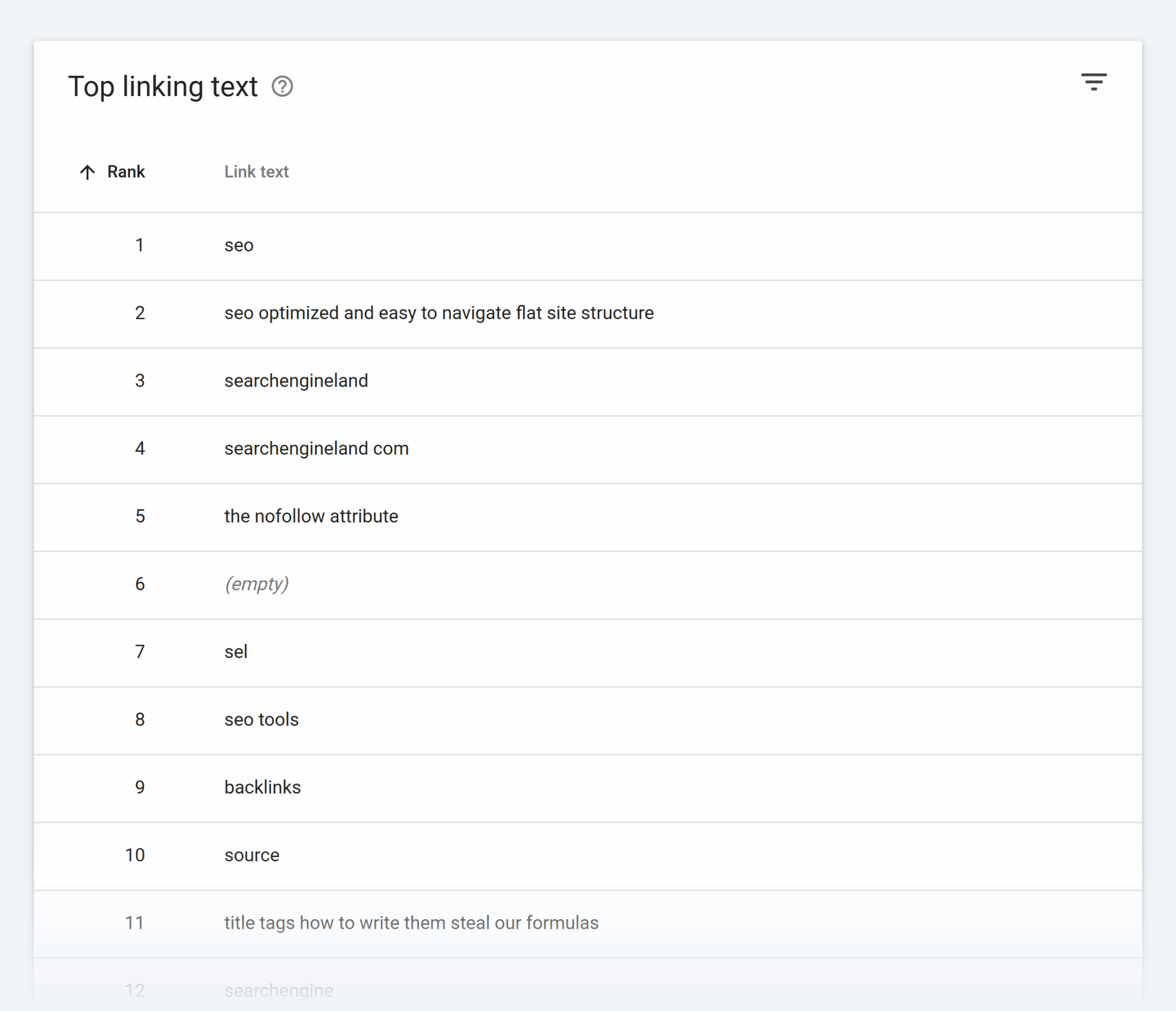
- Review which anchor texts are used most frequently in external backlinks.
- Check the “Top linked pages” section to see which pages are getting the most links and what kind of anchors they’re attracting.

- Compare the anchors to your actual content titles or topics. If they don’t match, it may signal irrelevant or outdated backlinks.
Note: GSC won’t show spam signals or link quality. It’s best used alongside a tool like Semrush or Ahrefs to get the whole picture.
What distinguishes each audit tool?
Here’s a comparison of tools to help you decide which tool is most suitable for your needs:
| Tool | Best For | Why You’d Use It |
| Semrush | Balanced overview of external and internal anchors | Identify overused anchor phrases Analyze backlink sources Catch internal anchor issues at scale |
| Ahrefs | Deep external backlink and anchor analysis | Track anchor text by referring domain Monitor trends over time Evaluate link velocity |
| Majestic | Trust/relevance scoring for legacy or niche domains | Understand trust signals tied to anchor sources for older or risk-prone backlinks |
| GSC | Quick checks on the most common anchor text | Identify high-level patterns for free, including top-linked pages and anchors |
| Screaming Frog | Internal anchor audit on large websites | Crawl website structure Evaluate internal anchor diversity Export data for manual analysis |
| Sitebulb | Visualizing internal link and anchor structure | Review anchor usage visually Identify underlinked pages or duplicate anchors in clusters |
Key metrics to monitor anchor text
Once you’ve run an anchor audit, the next step is knowing what to evaluate. Here are three key metrics that can help you understand gaps and areas for improvement.
Anchor diversity
This tells you how varied your anchor text is across backlinks and internal links.
If most of your backlinks use the same keyword-heavy phrase over and over, it can look unnatural even if the links are from different domains.
Google prefers to see a mix of anchor text:
- Branded (your brand name)
- Generic (“click here” or “read more”)
- Partial-match (includes part of your target keyword)
- Natural phrases (fit naturally into the sentence without sounding forced)
Target URL match
Anchor text that actually reflects the content of the page it links to matches the target URL.
If the anchor says “technical SEO guide” but links to a homepage or a sales page with no tech SEO content, that’s a disconnect.
This can confuse both search engine crawlers and users when they don’t find content related to what they were led to.
Make sure your anchor text and the target page align in topic and intent. It doesn’t have to be an exact match, but it should be relevant.
Internal vs. external link ratio
A healthy anchor text profile includes a balance of internal and external links.
If one side is doing all the heavy lifting, like strong internal links but barely any backlinks, or vice versa, it could mean your SEO is at risk. For example, pages may struggle to rank because they don’t have enough internal links passing authority, or they’re missing strong backlinks from other websites.
To get a better idea of this, monitor how anchor text is being used, both:
- Internally: Are you repeating the same phrases too often or using vague terms like “read more”?
- Externally: Are your backlinks relying too heavily on keyword-rich anchors from low-quality websites?
To understand this, look at your top-performing pages and see how they’re being linked to, both from inside your website and from other domains.
You can find this using Semrush’s Backlinks Analytics feature, Ahrefs’ Top Pages feature, or Moz’s Links feature.
To find this using Semrush:
- Go to “SEO” > “Link Building” > “Backlink Analytics”
- Head over to the “Backlinks” tab
- Filter or search for your top pages.

Here, you can see the source page that’s linking to your page, the number of external links and internal links, and the anchor text along with the target URL.
You can identify patterns like overused anchors, missing internal links, or valuable external links you could replicate. You can even decide whether to add more relevant internal links or reach out to high-quality websites for similar backlinks.
Identify thin anchor variation and spammy patterns
When looking through your anchor text data, one of the easiest red flags to spot is repetition.
If a single page is being linked to using the same anchor text repeatedly, that’s a sign of thin anchor variation. Even if those links are legit, it can look like you’re over-optimizing.
Why?
Because your anchor text looks deliberately keyword-stuffed rather than natural. And that makes your profile feel a bit off to search engines.
To prevent this, make sure your links reflect how people naturally talk about your content. Because when the exact phrase keeps popping up, it starts to lose meaning.
You’ll also want to watch out for spammy patterns, when anchors don’t match the content they’re linking to.
This happens more often with backlinks. For example, if a low-quality website links to your blog post using a random commercial phrase like “best SEO agency cheap,” or the anchor is totally irrelevant to the topic of your page.
When that happens across multiple domains, it starts to look like spam, even if you didn’t ask for those links in the first place.
These patterns are easy to miss unless you lay everything out side-by-side, as in the backlink analysis above. Group similar anchors together and match them to their target URLs. Then, you’ll start to see where the repetition is too heavy or where the links don’t make sense.
Use a pivot table to map anchor phrases to destination URLs
A pivot table is a tool that lets you group and count items in a spreadsheet, and it’s one of the easiest ways to understand your anchor data clearly.
By grouping anchor phrases alongside the URLs they point to, you can quickly notice where things are off.
Maybe one page is getting 10 different links, but eight of them use the same phrase. Or maybe several pages are being linked to with the same generic anchor, “click here.”
Here’s how to create a pivot table for analysis:
- Export your anchor data from an SEO tool (like Semrush, Ahrefs, or Majestic).
- In Semrush: go to “SEO” > “Link building” > “Backlink Analytics.”
- “Export” the available data as a CSV or Excel sheet.
- Open a spreadsheet software like Excel.
- Add two columns: one for the anchor text and one for the destination URL.
- Insert a pivot table that shows anchor text in one column and destination URLs in the other.
- Use the values field to count how many times each combination shows up.

Now, scan for repetition.
It’s worth revisiting those links, if:
- A single anchor phrase is pointing to one URL dozens of times
- A page is only being linked with vague or irrelevant anchors
A pivot table makes it easier to spot issues you might have missed, and it gives you a clearer picture of how people (or your internal links) are describing your content.
Prioritize pages with poor performance or ranking stagnation
Ranking stagnation is when a page ranks somewhere in the middle of the search engine results page (SERP) and doesn’t move, even after updates or improvements are made. Some of your pages may already be doing well, but others might be stuck in place, even though the content is strong.
That’s when it makes sense to analyze your anchors more closely.
First, identify the pages that are underperforming. To do so, you can use tools like Semrush, Google Search Console, or Ahrefs.
Using Semrush:
- Go to “SEO” > “Competitive Research” > “Organic Research”
- Enter your domain > click “Pages”
- You’ll see a list of URLs sorted by current traffic and keywords

Here, you can even see a full report for each page by visiting its URL.
Look for pages that used to rank but have dropped over time, or newer pages that haven’t gained traction yet.
If the content is solid but the traffic or rankings aren’t moving, anchor text could be part of the problem.
Now, look at the anchor phrases pointing to those pages and consider the following:
- Are they all the same?
- Are they too vague to give Google any real signal?
- Are there any internal links to the page at all?
In some cases, you might find that the anchor text doesn’t match the page’s actual topic or title, making it hard for search engines to understand how that page fits into your website’s overall structure.
Once you’ve spotted a low-performing page, you can start improving its internal linking with better, more descriptive anchors.
Over time, these minor tweaks can make a measurable difference.
Note: You don’t need to overhaul the whole post. Adding a few strategic links from high-authority posts can help Google rediscover and re-evaluate the page.
How to improve anchor text at scale
It’s manageable to fix a few anchor text issues manually when you run a small blog or website like our fictional blog, “All About SEO.”
But if you’re working on a larger website or publishing content regularly, you’ll need a system to handle and improve anchor text issues.
Let’s look at some ways to keep your anchor text consistent, relevant, and optimized at scale.
Use SEO add-ons in your CMS
Manually adding internal anchor text across dozens (or hundreds) of posts can get messy fast. But you can use SEO plugins—software extensions that can be added to your CMS, like WordPress, that give you extra search optimization features—to help automate this process.
These scan your existing content and automatically suggest internal links based on keyword context. Instead of going through each post one by one, you can quickly see where a page is: underlinked (has few internal links), which anchor phrases are being repeated too often, or where better opportunities exist.
Most of these tools also let you customize anchor text before inserting it, so you’re not stuck with the same phrase.
And if you’ve built a list of priority pages, some plugins let you boost those pages by targeting them more often in suggestions.
For large websites, this kind of automation saves a lot of time and keeps your internal anchors more intentional as your content library grows.
A couple of WordPress plugins to optimize SEO include: Link Whisper, Linksy AI, or Linkilo.
Installing the Link Whisper SEO plugin
Let’s see how you can change anchor text easily using Link Whisper:
- Download the Link Whisper plugin from your Link Whisper account.
- In your WordPress dashboard, go to “Plugins” > “Add New.”
- Click on “Upload Plugin“, then select the Link Whisper ZIP file from your computer.
- Click “Install Now,” then “Activate Plugin” once the installation is done.
- In the WordPress sidebar, click on “Link Whisper” to open the license page.
- Access the email you received upon signing up for Link Whisper and copy the license key from there.
- Paste your license key into the input field and click “Activate License.”
- Once activated, click “Complete Install” to run your first link scan.
- On the Dashboard page, click the “Run scan” button to let Link Whisper crawl your content and set up reports.

How to use Link Whisper
Once done, you will then have access to all the features as shown in the image above:
- Posts Crawled
- Link Clicks
- Orphaned Posts
- Broken Links
- 404 errors
From here, click the wrench icon in the corner of each tab, and that’s it! Link Whisper will automatically fix any issues.
And to automatically add internal links to each post:
- Open a specific post
- Scroll down and find “Link Whisper”
- Click “Enable AI-Powered Suggestions”

Once you enable the AI-powered suggestions option, you will see a list of relevant links that you can add to your post. You can even customize the anchor text if you don’t like their suggestions.
Click “INSERT LINKS INTO POST,” and that’s it. You’re good to proceed with the next post!
Automate anchor text audits during content updates or migrations
If your company is making changes to its website—whether it’s a simple content update or a CMS migration—links and anchor text can easily get messed up.
For example, maybe a link that used to say “SEO checklist” and point to your main guide now just says “checklist” or sends people to the wrong page.
By running a before-and-after crawl in tools like Screaming Frog, Sitebulb, or Lumar, you can instantly see which links or anchor text have changed, gone missing, or point somewhere new, so you can fix problems right away.
Let’s see how to do this using Screaming Frog:
- Go to “File” > “Settings” > “Storage Mode” and select “Database Storage.” Then, click “OK.” This ensures every crawl is auto-saved so you can open and compare them later.

- In “Spider” mode, enter your website URL (e.g., https://searchengineland.com) and click “Start.”
- When it finishes, go to “Bulk Export” > “Links” to capture all link data. This will be your baseline file.
- Once your migration or update is complete, repeat the exact same crawl settings. You can even schedule this ahead of time in “File” > “Scheduling” to run automatically after the go-live date.
- Export the “All Inlinks” report again from “Bulk Export.”
- Go to “Mode” > “Compare.”
- In the top toolbar, click “Select Crawl” for the “Current” slot and choose your after-crawl.
- Then click “Select Crawl” for “Previous” and choose your before-crawl.

- Click the “Config” (cog) icon > “Compare” and enable “Change Detection” for:
- “Unique Inlinks”
- “Inlinks”
- “Internal Outlinks”
- “Unique Internal Outlinks”
- “External Outlinks”
- “Unique External Outlinks”
- Click “OK” to flag any changes.

- Then, click “Compare” to see where link targets have changed, been removed, or added.
- You can view these changes in the “Change Detection” tab or in the lower window “Inlinks” tab with “Added” and “Removed” filters.

This way, you can spot missing, broken, or misdirected links at scale without manually checking each page. It saves you time and effort, and helps you fix problems before they impact SEO.
Track anchor evolution using SEO reports
Anchor text isn’t something you fix once and forget.
As your content grows and new backlinks come in, patterns will shift. So you should keep an eye on those changes over time.
You can do this by setting up a simple SEO report that tracks anchor trends. Most tools like Semrush, Ahrefs, or even Looker Studio—which pulls from GSC—let you monitor values like:
- Most common anchor phrases by page
- Anchor text distribution (branded, organic, etc.)
Here’s how you can set up a custom anchor monitoring report in Semrush:
- Go to “Reports” > “My Reports.”
- Click “Start from scratch.”

- Now go to the “Widgets” icon.

- From here, search for “anchor” and drag & drop the following widgets:
- Anchors Types
- Anchors
- Top Anchors

- Give a suitable name to your report.

- Now, click the “Generate PDF report” button in the top right corner of the page.
- Schedule the report to receive it either daily/weekly/monthly.
- Click “Generate PDF.”

This way, you’ll get the report depending on the desired frequency you choose.
Even if you only check once a month, these trends can show you where things are starting to skew like a page being linked too aggressively with a single keyword.
Once you know these details, you can work on sorting them before they become a problem.
Build an internal linking playbook or style guide
If you want consistent anchor text across your website, you need to document what “good” looks like. This is the best way to keep writers, editors, and SEOs aligned, especially when different people create content.
Your playbook doesn’t need to be complicated. It should cover essentials like:
- What kinds of anchor phrases to use (and avoid)
- How to vary anchor text naturally without keyword stuffing
- How often to link to key pages (like pillar content or product pages)
- How to handle duplicate anchors in a single post
You can also include examples of strong vs. weak anchor usage, and maybe even keep a short list of high-priority URLs you want to build links toward.
This kind of guide speeds workflows for everyone. Because when people know what’s expected, they’re less likely to overuse keywords or miss internal link opportunities altogether.
Train writers and editors on good anchor habits
Even with the best tools and audits, good anchor text still comes down to people.
If your writers or editors don’t know what makes a good internal link, it’s easy for vague or repetitive anchors to slip through.
If you’ve already created a style guide or linking playbook, make sure it’s shared during onboarding, and also bake it into your content briefs. That way, the habit forms early, and your internal links stay helpful and consistent without needing to be rewritten later.
Build a quick anchor text checklist into your editorial process, and revisit it during your content audits, usually done monthly or quarterly. It doesn’t have to be too formal—a few simple reminders would work:
- Does the anchor clearly describe the page it links to?
- Is it too generic (like “click here” or “read more”)?
- Is the same phrase being used too many times across different posts?
- Could the anchor be swapped for something more natural or intent-driven?
Audit your existing anchor text
The best way to improve your anchor text is to see what’s already working and what isn’t.
Run a quick audit of your top pages using Semrush or GSC to check how anchors are being used and whether they align with the page’s actual topic.
Once you know this, focus on updating anchors for any content that’s stagnating in rankings or not getting enough internal links.
And if you want to get a better understanding of linking before fixing anchors, check out our guide


No comments:
Post a Comment