⭐ If you would like to buy me a coffee, well thank you very much that is mega kind! : https://www.buymeacoffee.com/honeyvig Hire a web Developer and Designer to upgrade and boost your online presence with cutting edge Technologies

Tuesday, January 20, 2026

Billions of entities vanished from Google’s Knowledge Graph in June 2025. Here’s how it signals a bold new direction in AI-powered search. Google’s Knowledge Graph saw its largest contraction in a decade in June: a two-stage, one-week drop of 6.26% – over 3 billion entities deleted. Since 2015, we’ve tracked the Knowledge Graph and have never witnessed a cull of this magnitude. We’re calling it Google’s great clarity cleanup. Knowledge Graph sensor If you recently noticed issues with a Knowledge Panel for yourself or a client, this update may seem like the culprit – but in most cases, it wasn’t. The real story is much bigger. What we just witnessed offers a clear signal about Google’s direction. The Knowledge Graph is the fact-checking core of Google’s algorithmic trinity, giving it a competitive edge. The way Google refines this advantage tells us exactly where it’s headed in the AI assistive engine race. Google’s summer Knowledge Graph tradition – and 2025’s twist Since 2015, Google has rolled out major Knowledge Graph changes each summer – almost like hitting a big red “update” button. Some stand out more than others. The “Budapest update” of summer 2019 expanded Google’s ability to verify facts in the Knowledge Graph. The summer 2023 update zoomed in on people, especially content creators. History has taught us that when a Knowledge Graph update signals a clear strategic shift, it’s a preview of the next stage in SEO, AEO, and GEO. Those insights have kept us consistently ahead of the curve. This year, Google hit the button twice – first on June 13, then again on June 20. The message was unmistakable: the June update was about one thing – clarity. It marks the start of what I call the age of algorithmic clarity. A strategic contraction in the Knowledge Graph From May 2024 to May 2025, the Knowledge Graph expanded at a steady 2.79% – healthy, incremental growth by our tracking. Then, in June, everything flipped: over two closely timed updates, the graph contracted by 6.26%, wiping out more than 3 billion entities in a single week. That’s twice the net additions of the entire previous year, erased almost overnight. The scale and speed point to a deliberate “anti-hoarding” move – trading sheer volume for clarity and confidence. The goal is a leaner, higher-quality dataset that will underpin AI features like AI Overviews, AI Mode, and Google Learn About. No other Big Tech player currently has a comparable knowledge base, so refining it is a direct investment in Google’s AI advantage. And this was no blanket purge. The data shows three specific areas where Google cut decisively, each revealing a different facet of its clarity-first strategy. 1. The massive drop in event entities is a post-pandemic reset The “event” category dropped 76.91% as Google wound down the temporary, pandemic-era surge in event tracking. At the start of the COVID-19 pandemic, our data showed an explosion of event-related entities, presumably to help users navigate cancellations and online events. Events in the Knowledge Graph For the last five years, turnover in event entities has been incredibly fast. We saw this with our own webinars: online events were often added as entities within 15 minutes of being published, then deleted shortly after. The average lifespan of an event entity dropped from 839 days pre-COVID to just 124 days after March 2020. Now that the world has stabilized, Google is switching off event reactivity. The resources required to maintain that level of real-time event data are no longer justified, so the system has been reset. The lesson is clear: take advantage of temporary opportunities while you can, but don’t build your digital strategy around chasing the latest algorithmic updates. Build your AI assistive engine optimization strategy on stable corporate, personal, and product brands. 2. Google is cleaning house by removing ambiguous thing entities The focus on events was a temporary five-year glitch we can now safely forget. The more significant cleanup comes from the “thing” category – Google’s most generic classification. This update reduced the number of entities labeled as “thing” by 15.27%, which is about 8 billion entities. Multityping – when Google assigns multiple categories or types to the same entity – is common, and “thing” is often used as one of those extra types. In our dataset, about half of all entities are multityped, and 27.83% – roughly 13 billion entities in Google’s Knowledge Graph – have “thing” as one of their types. While the total number of thing entities dropped sharply, the proportion of entities that are unityped – given only a single, definitive type – rose from 23.9% to 28.7%. This points to a shift toward single, unambiguous typing for concepts, topics, or things. Google's great clarity cleanup- The shift to unambiguous thing entities After manually checking 10,000 unityped thing entities (a process that left my eyes and brain aching), the pattern is clear – Google is moving away from using it as a lazy label, and toward reserving it for concepts and topics that cannot be classified in any other way. Over the last decade, the Thing entity type has been an easy, sometimes spammy, entry point into the Knowledge Graph. That entry point is closing fast, and getting a foothold as a “thing” will soon be viable only for entities with no alternative classification. Get the newsletter search marketers rely on. See terms. 3. Google is removing ambiguity by focusing on unityped person entities This focus on clarity for person entities continues a long-term trend we saw in 2023 and again in 2024. The 2023 update increased the number of person entities threefold, while also concentrating on subtitles that signal E-E-A-T. Roles like “writer” and “author” rose by 21% while others were removed. It was a clear move to highlight expertise. The 2024 update continued that focus, particularly on identifying person entities with a “content Creator” role. The June update takes it a step further, significantly changing the proportion of person entities that are unityped. Google’s confidence that an entity is unambiguously a person rose from 70.16% to 76.78% during this update. It is actively removing other classifications from person entities to ensure there is no doubt in its algorithmic mind. These very clearly point to a huge focus on person entities for N-E-E-A-T-T. Google's great clarity cleanup- The shift to unambiguous person entities Clarity is now the only point of entry The June update confirms a principle I’ve emphasized since Hummingbird in 2013: in the Knowledge Graph, clarity is the only point of entry. You and your client may have invested heavily in a digital marketing strategy to be visible across every channel for awareness and consideration. Your brand may be seen and evaluated. However, the final step, conversion, comes down to a bottom-of-the-funnel moment of truth for both humans and AI assistive engines: confidence in understanding the brand. “Do I know who they are, and can I trust them?” The tidy room The solution is algorithmic knowledge – the Knowledge Graph (and that means the Knowledge Graph of every Big Tech player). Your identity, offering, and credibility must be clearly and confidently understood by the algorithmic encyclopedias that make the final recommendation to your perfect client. Most brands fail here, and yet the fix is straightforward. AI is like an eager-to-please child – present it with a messy, contradictory digital footprint, and it gets confused. This update shows Google actively tidying that bottom-of-the-funnel “room” and discarding any brand that creates ambiguity. A solid, unityped, confident place in the Knowledge Graph is your only route to being at the top of the algorithmic mind at that zero-sum, bottom-of-the-funnel “perfect click” moment. Breaking: Google strikes again on Knowledge Graph clarity On Aug. 11, in a break from its decade-long tradition of a single summer Knowledge Graph update, Google launched a second clarity cleanup less than two months after the first. This one-day update showed an even sharper focus on corporation, organization, and brand entities. Google strikes again on Knowledge Graph clarity


Google selecting the wrong canonical URLs? Here’s how to fix “Duplicate without user-selected canonical” errors and prevent indexing issues.

The first time I saw the “Duplicate without user-selected canonical” error in Google Search Console, I gulped. “Oh, no. Please, not this.” 

Then I saw it again – and again. I heard rumors of other SEO professionals experiencing the same error. 

I hope it was just another bug in Google Search Console. “It can’t be. It has to be a joke,” I thought. 

It was snowballing, and it felt like there was nothing I could do to stop it. 
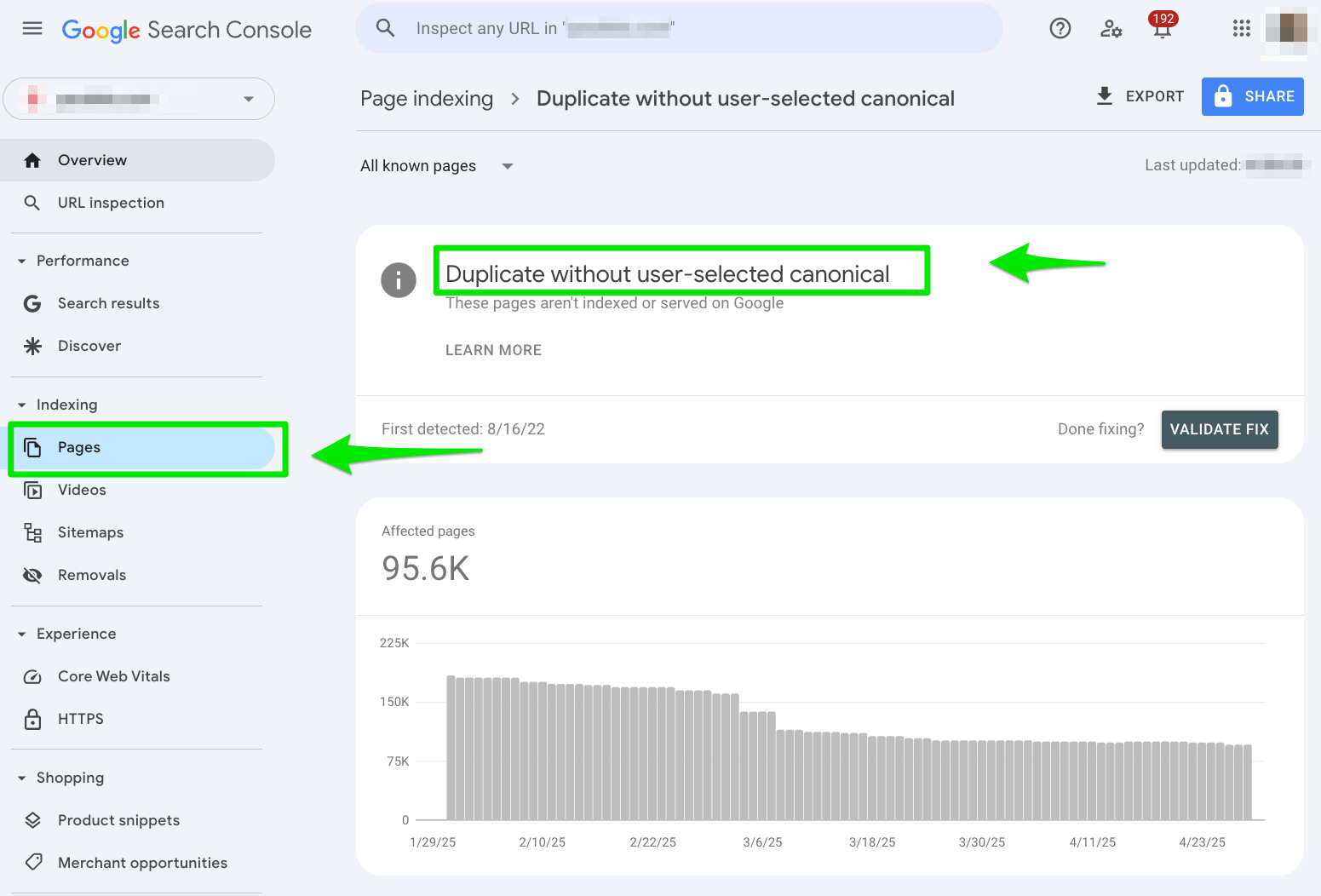
duplicate-without-user-selected-canonical-google-search-console-error

It’s one of the worst Google Search Console errors to hit the streets, and it’s more charitable than the chunky sneaker fashion craze. 

It’s time for us to band together and figure out a way to fix these Google Search Console errors. 

How do I fix a ‘Duplicate without user-selected canonical’ error in Google Search Console?

1. Go to Google Search Console > Pages > Duplicate without user-selected canonical 

Head over to Google Search Console’s Pages report and select the “Duplicate without user-selected canonical” error under the Why pages aren’t indexed section.

duplicate-without-user-selected-canonical-pages-report-google-search-console

Once you’re in there, export the report into a spreadsheet. 

google-search-console-export-duplicate-without-user-selected-canonical

2. Check your canonical tags 

Next, manually check your canonical tags for a sample size of the URLs from the report. I manually check around 10 URLs with the Inspect URL tool in Google Search Console.

If you notice a pattern where Google selects your canonical tag, you should implement self-referencing canonical tags sitewide. 

In the example below, you can see that this URL is missing the user-declared canonical tag. Google is selecting its own canonical tag. 

Google Search Console Error Duplicate Without Canonical Inspect Url 1

In your spreadsheet, you can begin to filter by common duplicate content issues that can be fixed with proper canonical tags, like: 

  • Parameter URLs: Anything after the ? should have a self-referencing canonical tag. 
  • Language subfolders: Double-check your language subfolders (e.g., /en/). 

2. HTTP vs. HTTPS

Another common reason this error appears in Google Search Console is the incorrect redirect error from HTTP to HTTPS. 

HTTP is like watching a VHS movie, while HTTPS is like watching the same film in 4K streaming. 

Google prefers the HTTPS version of your site. 

For example: 

  • https://website.com/
  • https://website.com/

And Gary Illyes of Google confirmed it, saying:

“DYK that HTTPS URLS in a dup cluster have a higher chance of becoming canonical?” 

So if you see your HTTP version still hanging around in your export spreadsheet from Google Search Console, you’re diluting your own content. 

I recommend using a 301 redirect from HTTP to HTTPS. 

If you can’t do that, add a canonical tag to every HTTP variant. 

3. Include a trailing slash in URLs

If you want to play it safe, always include a trailing slash in your URL to avoid duplicate content. 

The key is consistency. 

John Mueller from Google breaks it down: 

  • “The slash after a hostname or domain name is irrelevant… but a slash anywhere else is a significant part of the URL and will change the URL if it’s there or not.” 

Translation: Don’t skip that slash. Dropping or adding it changes your URL and can create duplicate content. 

For example: 

  • https://website.com/double-decker-taco
  • https://website.com/double-decker-taco/ 

Google treats both URLs as separate pages. 

Once you have your URLs with the trailing slash set up, create a 301 redirect from all the URLs without the trailing slash. 


4. www vs. non-www 

Picture this: you send out two versions of the same dish, one plated on fine china and the other in a Chinese takeout food box. They have the same recipe and flavor. 

But to Google, they’re two entirely different entrées. 

That’s how search engines see your www and non-www versions of your URLs. 

For example: 

  • https://www.tacosareawesome.com/
  • https://tacosareawesome.com/

When it comes to choosing www or non-www versions, there’s no one side that is better. 

Again, you just want to be consistent with your URL structure. Do not have both. 

Whichever side you choose, remember to 301 redirect any URLs from your non-preferred version. 

5. Session IDs or tracking parameters

Session IDs and tracking parameters are like serving loaded nachos with different toppings every time. 

One with cilantro. Another with spicy sauce. 

And another with a drizzle of lime. 

The nachos are the same, but different. 

Search engines treat your URLs with session IDs or tracking parameters as individual, separate URLs, causing duplicate content if not handled properly. 

For example: 

  • https://www.tacosareawesome.com/
  • https://www.tacosareawesome.com/?utm=medium=referral/ 

The best way to handle URLs with parameters or session IDs is to: 

  • Do not include the parameter URL in internal links.
  • Always include a self-referencing canonical tag without the parameters.
  • Set up robots.txt files to block URL parameters
User-agent: *

Disallow: /*?sessionid=

Disallow: /*?utm_source=

6. Write original content

Google won’t penalize you for duplicate content, but it will filter out your weaker, similar, or repetitive pages.

That means your shiny new page might never see the light of day. 

Ask yourself: Are you using the same intro or FAQ across your product or location pages?

That’s like wearing the same outfit to every party. You blend into the crowd. 

I always aim to ensure each piece of content is 50% unique on each page, with a focus on the product description or regional information. 

If you’re content is templated, search engines are likely yawning and ready for a nap after crawling your site. You want to keep your content fresh with a different angle. 

Removing duplicate content is the only way to fix the ‘Duplicate without user-selected canonical’ error 

Ah, the ancient art of fixing duplicate content is nothing new to the SEO industry. Every SEO professional has dabbled in it from time to time. 

If you’ve got the “Duplicate without user-selected canonical” error in Google Search Console, I implore you to start auditing your content. 

Because here’s the thing: duplicate content has never been cool. It was a spammy way to get rankings back in the day. 

Remember that time when Who Let the Dogs Out was on every radio station? And Fubu was still around? 

That’s when duplicate content was cool. Duplicate content will forever be a stain on the history of SEO. 

Enough time will never pass for these errors to go away unless you roll up your sleeves and remove the duplicate content. 

No comments:

Post a Comment