Most
developers spend their days fixing bugs, shipping features, and jumping
into the next sprint without even thinking about it. After a while, you
begin to ask yourself, “Is this still what I want to be doing?” This
article looks at how you can move into a new direction in your career
without starting from scratch, and how the skills you already use, like
problem-solving, communication, and empathy, can open new doors.
Has
work felt “different” to you? You show up, do your work, fix what needs
fixing, and get the job done, but the excitement isn’t quite the same
anymore. Maybe the work has become too routine, or maybe you’ve grown in
a way your role hasn’t kept up with. You catch yourself thinking, “I’ve been doing this for years, but where do I go from here?”
It’s not always about the burnouts or frustrations. Sometimes it’s just curiosity.
You’ve learned a lot, built things, solved problems, and now a small
part of you wants to see what else you can do. Maybe the rise of AI is
making you look at your job differently, or maybe you feel ready for a
new kind of challenge that does not look like your current day-to-day.
I
have seen many people across different fields go through this.
Developers moving into product work, designers shifting to UX research,
engineers getting into teaching, or support folks building communities.
Everyone reaches that point where they want their work to feel
meaningful again.
The good thing is you are not starting from
zero. The experience you already have, like solving problems, making
decisions, working, and communicating with people, those are real,
valuable skills that carry over anywhere. Most of the time, the next
step is not about leaving tech behind. It’s about finding where your
skills make the most sense next.
This article is about that: How
to rethink your path when things start to feel a bit stale, and how to
move toward something new without losing everything you’ve built so far.
Redefining Your Toolkit
When
people start thinking about changing careers, the first thing they
usually do is focus on what they do not have. The missing skills, the
new tools they need to learn, or how far behind they feel. It is a
normal reaction, but it is not always the best place to begin.
Instead, try looking at what is already there. You have probably built more useful skills than you realize.
Many of us get used to describing ourselves by our job titles, such as
developer, designer, or analyst, but those titles do not fully explain
what we actually do. They just tell us where we sit on a team. The real
story is the work behind the title.
Think of a developer, for
example. On paper, the job is to write code, but in reality, a developer
spends most of their time solving problems, making decisions, and
building systems that make sense to other people. The same goes for
designers. They do not just make things look good; they pay attention to
how people think, how they move through a screen, and how to make
something feel clear and simple.
Your skills don’t disappear when your title changes. They just find new ways to show up.
These are what people call transferable skills,
but you do not need the fancy term to get the idea. These are abilities
that stay useful no matter where you go. Problem-solving, curiosity,
clear communication, empathy, and learning fast — these are the things
that make you good at what you do, even if the tools or roles change.
You
already use them more than you think. When you fix a bug, you are
learning how to track a problem back to its roots. When you explain a
technical idea to someone non-technical, you are practicing clarity.
When you deal with tight deadlines, you are learning how to manage
priorities. None of these disappear if you switch fields. You apply it
somewhere else.
So, before you worry about what you do not know,
take a moment to see what you already do well. Write it down if you have
to. Not just the tasks, but the thinking behind them. That is where
your real value is.
Four Real-World Paths to Explore
Once
you start seeing your skills beyond your job title, you may realize how
many directions you can actually take. The tech world keeps changing
fast: tools change, teams change, new roles show up every year, and
people move in ways they never planned.
Here are four real paths that many people in tech are taking today.
From
To
What Changes
Why It Works
Developer
Product Manager
You move from building the product to shaping what gets built and why.
Developers already understand tradeoffs, user needs, and how features come together. That is product thinking in action.
Engineer
Developer Advocate
You focus less on code delivery and more on helping others succeed with your product.
You already know the technology inside out, so turning that knowledge into clear communication makes you a natural teacher.
Back-end Engineer
Solutions Engineer
You bring your problem-solving mindset to real client challenges.
It is not about selling, it is about understanding problems deeply and building trust through technical skill.
Designer
UX Researcher or Service Designer
You shift from visuals to understanding how people think, feel, and interact.
Good design starts with empathy, and that same skill fits perfectly in research and experience design.
What
many people discover when they take one of these steps is that their
daily work changes, not their identity. The tools and routines might be
different, but the core way they think and solve problems stays the
same.
The biggest change is usually perspective. Instead of focusing on how something gets built, you begin to care more about why
it matters, who it helps, and what impact it has. For many people, that
shift often brings back the excitement they might have lost somewhere
along the way.
Your First Steps Towards A New Path
When
you find a direction that feels interesting, the next step is figuring
out how to move toward it without losing your footing where you are.
This is where curiosity turns into a plan.
1. Take A Look At What You Bring
Start
by checking your strengths. It does not have to be anything complex.
Write down what you do well, what feels natural to you, and what people
usually ask you for help with.
If you want a simple guide, Learning People
has a good breakdown for auditing your personal skills, including a
template for identifying and evaluating your skills. Try filling it out;
it’s well worth the few minutes it takes to complete.
After
listing your strengths, try matching them with roles you’re curious
about. For example, if you’re a developer who enjoys explaining things,
that could connect well with mentoring, writing tutorials, or developer
advocacy.
2. Learn By Getting Close To It
Job
descriptions aren’t a perfect reflection of the realities of working a
specific job. Talking with people who do that job will. So, reach out to
people who already do what you’re interested in and ask them what their
day-to-day looks like, what parts they enjoy, and what surprised them
when they started.
And if possible, shadow someone or volunteer to
help on a project. You don’t need a job change to explore something
new. Short, hands-on experiences often teach you far more than any
course, and many people are more than willing to take you under their
wing, especially if you are offering your time and help in exchange for
experience.
3. Build Proof Through Small Experiments
Do
something small that points in the direction you want to go. Maybe
build a simple tool, write a short piece about what you’re learning, or
help a local startup or open-source team. These don’t need to be
perfect, but they just need to exist. They show direction, not
completion.
Blogging has always been a perfect way to share your
learning path and demonstrate your excitement about it. Plus, it
establishes a track record of the knowledge you acquire.
4. Shape Your Story As You Grow
Instead of going with the idea of “I’m switching careers,” try thinking of it as “I’m building on what I already do.”
That simple shift makes your journey clearer. It shows that you’re not
starting from zero — you’re simply moving forward with more intention.
Navigating The Mental Hurdles
Every career shift, even when it feels exciting, comes with doubts. You might ask yourself, “What if I’m not ready?” or “What if I can’t keep up?” These thoughts are more common than people admit.
Imposter Syndrome
One fear that shows up a lot is imposter syndrome, that feeling you do not belong or that others are “better” or “smarter” at something than you. A recent piece from Nordcloud shared that more than half (58%) of IT professionals have felt this at some point in their career.
Comparison
is a silent thief of confidence. Seeing others move faster can make you
feel late. But everyone has different opportunities and different
timing. What matters is the direction you are moving in, not how fast
you go.
Here’s a thought worth remembering:
People
who have successfully changed their careers did not wait until they felt
brave. Most of them still had doubts, but they just moved anyway, one
small step at a time.
Starting Again
Another
worry is the idea of starting over. You may feel that you’ve spent too
many years in one space to move into another. But you are not returning
to the beginning. You are moving with experience. Your habits,
discipline, and problem-solving stay with you. They just show up in a
different way.
It’s hard — and self-defeating — to imagine the
work it takes to start all over again, especially when you have invested
many years into what you do. But remember, it’s not always too late.
Even Kurt Vonnegut was 47 when he wrote his seminal book, Slaughterhouse Five. You can still enjoy a very long and fruitful career, even in middle age.
Finances
Money
and stability also weigh a lot. The fear of losing income or looking
uncertain can hold you back. And everyone’s money situation can be
wildly different. You may have family to support, big loans to pay back,
a lack of reserves, or any number of completely valid reasons for not
wanting to give up a steady paycheck when you’re already receiving one.
A
simple way to reduce that pressure is to start with small steps. Take a
small side gig, try part-time work, or help on a short project in the
area you’re curious about. These small tests give you clarity without
shaking your foundation.
Conversations With Industry Experts
Below
are short interviews with a handful of tech professionals serving in
different roles. I wanted to talk with real people who have recently
switched careers or are in the process of doing so because it helps
illustrate the wide range of situations, challenges, and opportunities
you might expect to encounter in a career change.
Thomas Dodoo: Graphic Designer, 5 Years Of Experience
Background:
Thomas has an IT background. He first got interested in tech through
game development in school, but later discovered that design was what he
enjoyed more. Over time, he moved fully into graphic design and branding.
Question: When you were starting, what confused you the most about choosing your path?
Thomas:
I wasn’t sure if I should stay with game development or follow design. I
liked both, but design came more naturally, so I just kept learning
little by little.
Question: Was there a moment that made you take your design work more seriously?
Thomas: Yes, the first time someone trusted me with their full brand. It made me realise this could be more than a hobby.
Question: What skills did you carry over from development into your design work?
Thomas:
My background in development helped me think more logically about
design. I break things down, think in steps, and focus on how things
work, not just how they look.
Adwoa Mensah: Product Manager, 4 Years Of Experience
Background: Adwoa moved from software testing to product management.
Question: When did you realize it was time to change careers?
Adwoa: I realised it when I started caring more about why
things were being built, not just checking if they worked. I enjoyed
asking questions, giving input, and thinking about the bigger picture,
and testing alone started to feel limiting.
Question: What new skills did you need to learn to move into your new field?
Adwoa:
I had to learn how to communicate better, especially with designers,
developers, and stakeholders. I also worked on planning, prioritising
work, and understanding users more deeply. I learned most of this by
watching product managers I worked with, asking questions, reading, and
slowly taking on more responsibility on real projects.
Konstantinos Tournas: AI Engineer
Background:
Konstantinos started programming with zero experience. He had no
technical background at first, but he developed a strong interest in
artificial intelligence and worked his way into the field.
Question: What moments in your journey made you question yourself, and how did you move past them?
Konstantinos:
There were many moments in my career journey when I doubted myself,
mainly because I started completely from zero, with no programming
background and no connections in the field. What helped me push through
was the motivation I had to learn and my genuine love for artificial
intelligence. Every time I questioned myself, I reminded myself where I
started and how far I had come in such a short amount of time.
Question: When you feel pressure or doubt in your work, what helps you stay grounded?
Konstantinos:
When I feel pressure or self-doubt, I usually take a walk in nature. It
helps me clear my mind and think creatively about how I can improve my
work. In programming, the work rarely stops when your shift ends;
problems in the code follow you throughout the day, and overcoming them
requires creativity. Walking helps me reset and return with better
ideas.
Question: How do you deal with comparing yourself to others in your field?
Konstantinos:
Even though I’m competitive by nature, I constantly try to learn from
others in my field. I don’t like showing off; I prefer listening. I know
I can become great at what I do, but that doesn’t happen overnight.
Comparison can be healthy, as long as it pushes you to grow rather than
discourages you.
Question: What would you say to someone who feels like they are not good enough to pursue the path they want?
Konstantinos:
I started programming without a university degree and with an entirely
different background. Patience and persistence truly are the keys to
success; it might sound cliché, but they were precisely what helped me.
In less than six months, with long hours of focused work, consistency,
and determination, I managed to get hired for my dream job simply
because I believed in myself and wanted it badly enough.
Yinjian Huang: Product Designer (AI, SaaS), 5 Years Of Experience
Background: Yinjian works in product design
across AI, SaaS, and B2B products. Her work focuses on building
early-stage products, shaping user experience, and working closely with
engineering and product teams on AI-driven features.
Question: Looking back, what is one decision you made that you think others in your field could learn from?
Yinjian:
Keep learning across disciplines: design, PM, AI, and engineering. The
broader your fluency, the better you can design and reason holistically.
Cross‑functional knowledge compounds and unlocks better product
judgment.
Question: What do you wish you had known about handling stress, workload, or expectations earlier in your career?
Yinjian:
Communicate early if the workload is too heavy or a deadline is at
risk. Flag constraints, renegotiate scope, and make trade‑offs explicit.
Early clarity beats late surprises.
Question: How do you evaluate whether a new opportunity or challenge is worth taking on?
Yinjian:
I evaluate opportunities on three axes: the learning delta (skills I’ll
gain), the people I’ll work with, and alignment with my interests.
Question: What advice would you give to someone who wants to grow in your field but feels stuck or unsure of where to start?
Yinjian:
Growth can feel overwhelming at first because there’s so much to learn.
Build a simple roadmap: start by making your craft solid, then expand
adjacent skills. Find the best resources, practice relentlessly, and
seek feedback on tight cycles. Momentum comes from small, consistent
wins.
The Bottom Line
This whole piece is just a reminder that it’s fine to question where you are and want something different.
Everyone hits that moment when things stop feeling exciting, and you
start wondering what’s next. It doesn’t mean you’ve failed. It usually
means you’re growing.
I wrote this because I’ve been in that space
too, still figuring out what direction makes the most sense for me. So
if you’re feeling stuck or unsure, I hope this gave you something
useful. You don’t need to have everything sorted out right now. Just
keep learning, stay curious, and take one small step at a time.
We
often spotlight wireframes, research, or tools like Figma, but none of
that moves the needle if we can’t collaborate well. Great UX doesn’t
happen in isolation. It takes conversations with engineers, alignment
with product, sales, and other stakeholders, as well as the ability to
listen, adapt, and co-create. That’s where design becomes a team sport,
and when your ability to capture the outcomes multiplies the UX impact.
When
people talk about UX, it’s usually about the things they can see and
interact with, like wireframes and prototypes, smart interactions, and
design tools like Figma, Miro, or Maze. Some of the outputs are even
glamorized, like design systems, research reports, and pixel-perfect UI
designs. But here’s the truth I’ve seen again and again in over two
decades of working in UX: none of that moves the needle if there is no
collaboration.
Great UX doesn’t happen in isolation.
It happens through conversations with engineers, product managers,
customer-facing teams, and the customer support teams who manage support
tickets. Amazing UX ideas come alive in messy Miro sessions,
cross-functional workshops, and those online chats (e.g., Slack or
Teams) where people align, adapt, and co-create.
Some of the most
impactful moments in my career weren’t when I was “designing” in the
traditional sense. They have been gaining incredible insights when
discussing problems with teammates who have varied experiences,
brainstorming, and coming up with ideas that I never could have come up
with on my own. As I always say, ten minds in a room will come up with
ten times as many ideas as one mind. Often, many ideas are the most
useful outcome.
There have been times when a team has helped to
reframe a problem in a workshop, taken vague and conflicting feedback,
and clarified a path forward, or I’ve sat with a sales rep and heard the
same user complaint show up in multiple conversations. This is when design becomes a team sport, and when your ability to capture the outcomes multiplies the UX impact.
Why This Article Matters Now
The reason collaboration feels so urgent now is that the way we work since COVID has changed, according to a study published by the US Department of Labor.
Teams are more cross-functional, often remote, and increasingly
complex. Silos are easier to fall into, due to distance or lack of
face-to-face contact, and yet alignment has never been more important.
We can’t afford to see collaboration as a “nice to have” anymore. It’s a
core skill, especially in UX, where our work touches so many parts of an organisation.
Let’s break down what collaboration in UX really means, and why it deserves way more attention than it gets.
What Is Collaboration In UX, Really?
Let’s start by clearing up a misconception. Collaboration is not the same as cooperation.
Cooperation: “You do your thing, I’ll do mine, and we’ll check in later.”
Collaboration: “Let’s figure this out together and co-own the outcome.”
Collaboration, as defined in the book Communication Concepts, published by Deakin University, involves working with others to produce outputs
and/or achieve shared goals. The outcome of collaboration is typically a
tangible product or a measurable achievement, such as solving a problem
or making a decision. Here’s an example from a recent project:
Recently,
I worked on a fraud alert platform for a fintech business. It was a
six-month project, and we had zero access to users, as the product had
not yet hit the market. Also, the users were highly specialised in the
B2B finance space and were difficult to find. Additionally, the team
members I needed to collaborate with were based in Malaysia and
Melbourne, while I am located in Sydney.
Instead of treating that
as a dead end, we turned inward: collaborating with subject matter
experts, professional services consultants, compliance specialists, and
customer support team members who had deep knowledge of fraud patterns
and customer pain points. Through bi-weekly workshops using a Miro
board, iterative feedback loops, and sketching sessions, we worked on design solution options. I even asked them to present their own design version as part of the processAfter months of iterating on the fraud investigation platform through
these collaboration sessions, I ended up with two different design
frameworks for the investigator’s dashboard. Instead of just presenting
the “best one” and hoping for buy-in, I ran a voting exercise with PMs,
engineers, SMEs, and customer support. Everyone had a voice. The winning
design was created and validated with the input of the team, resulting
in an outcome that solved many problems for the end user and was owned by the entire team. That’s collaboration!
It is definitely one of the most satisfying projects of my career.
On
the other hand, I recently caught up with an old colleague who now
serves as a product owner. Her story was a cautionary tale: the design
team had gone ahead with a major redesign of an app without looping her
in until late in the game. Not surprisingly, the new design missed
several key product constraints and business goals. It had to be
scrapped and redone, with her now at the table. That experience
reinforced what we all know deep down: your best work rarely happens in
isolation.
As illustrated in my experience, true collaboration can span many roles.
It’s not just between designers and PMs. It can also include QA testers
who identify real-world issues, content strategists who ensure our
language is clear and inclusive, sales representatives who interact with
customers on a daily basis, marketers who understand the brand’s voice,
and, of course, customer support agents who are often the first to hear
when something goes wrong. The best outcomes arrive when we’re open to different perspectives and inputs.
Why Collaboration Is So Overlooked?
If collaboration is so powerful, why don’t we talk about it more?
In my experience, one reason is the myth of the “lone UX hero”.
Many of us entered the field inspired by stories of design geniuses
revolutionising products on their own. Our portfolios often reflect that
as well. We showcase our solo work, our processes, and our wins. Job
descriptions often reinforce the idea of the solo UX designer, listing
tool proficiency and deliverables more than soft skills and team
dynamics.
And then there’s the team culture within many
organisations of “just get the work done”, which often leads to fewer
meetings and tighter deadlines. As a result, a sense of collaboration is
inefficient and wasted. I have also experienced working with some
designers where perfectionism and territoriality creep in — “This is my
design” — which kills the open, communal spirit that collaboration
needs.
When Collaboration Is The User Research
In
an ideal world, we’d always have direct access to users. But let’s be
real. Sometimes that just doesn’t happen. Whether it’s due to budget
constraints, time limitations, or layers of bureaucracy, talking to end
users isn’t always possible. That’s where collaboration with team
members becomes even more crucial.
The next best thing to talking
to users? Talking to the people who talk to users. Sales teams, customer
success reps, tech support, and field engineers. They’re all user
researchers in disguise!
On another B2C project, the end users
were having trouble completing the key task. My role was to redesign the
onboarding experience for an online identity capture tool for end
users. I was unable to schedule interviews with end users due to budget
and time constraints, so I turned to the sales and tech support teams.
I
conducted multiple mini-workshops to identify the most common
onboarding issues they had heard directly from our customers. This led
to a huge “aha” moment: most users dropped off before the document
capture process. They may have been struggling with a lack of
instruction, not knowing the required time, or not understanding the
steps involved in completing the onboarding process.
That insight
reframed my approach, and we ultimately redesigned the flow to
prioritize orientation and clear instructions before proceeding to the
setup steps. Below is an example of one of the screen designs, including
some of the instructions we added.
This kind of collaboration is user research. It’s not a substitute for talking to users directly, but it’s a powerful proxy when you have limited options.
But What About Using AI?
Glad
you asked! Even AI tools, which are increasingly being used for idea
generation, pattern recognition, or rapid prototyping, don’t replace
collaboration; they just change the shape of it.
AI can help you
explore design patterns, draft user flows, or generate multiple
variations of a layout in seconds. It’s fantastic for getting past
creative blocks or pressure-testing your assumptions. But let’s be
clear: these tools are accelerators, not oracles. As an innovation and
strategy consultant Nathan Waterhouse points out, AI can point you in a direction, but it can’t tell you which direction is the right
one in your specific context. That still requires human judgment,
empathy, and an understanding of the messy realities of users and
business goals.
You still need people, especially those closest to
your users, to validate, challenge, and evolve any AI-generated idea.
For instance, you might use ChatGPT to brainstorm onboarding flows for a
SaaS tool, but if you’re not involving customer support reps who
regularly hear “I didn’t know where to start” or “I couldn’t even log in,”
you’re just working with assumptions. The same applies to engineers who
know what is technically feasible or PMs who understand where the
business is headed.
If
collaboration doesn’t come naturally or hasn’t been a focus, that’s
okay. Like any skill, it can be practiced and improved. Here are a few
ways to level up:
Cultivate curiosity about your teammates. Ask
engineers what keeps them up at night. Learn what metrics your PMs care
about. Understand the types of tickets the support team handles most
frequently. The more you care about their challenges, the more they’ll
care about yours.
Get comfortable facilitating. You
don’t need to be a certified Design Sprint master, but learning how to
run a structured conversation, align stakeholders, or synthesize
different points of view is hugely valuable. Even a simple “What’s
working? What’s not?” retro can be an amazing starting point in
identifying where you need to focus next.
Share early, share often. Don’t
wait until your designs are polished to get input. Messy sketches and
rough prototypes invite collaboration. When others feel like they’ve
helped shape the work, they’re more invested in its success.
Practice active listening. When
someone critiques your work, don’t immediately defend. Pause. Ask
follow-up questions. Reframe the feedback. Collaboration isn’t about
consensus; it’s about finding a shared direction that can honour
multiple truths.
Co-own the outcome. Let go
of your ego. The best UX work isn’t “your” work. It’s the result of many
voices, skill sets, and conversations converging toward a solution that
helps users. It’s not “I”, it’s “we” that will solve this problem
together.
Conclusion: UX Is A Team Sport
Great design doesn’t emerge from a vacuum. It comes from open dialogue, cross-functional understanding, and a shared commitment to solving real problems for real people.
If there’s one thing I wish every early-career designer knew, it’s this:
So
next time you’re tempted to go heads-down and just “crank out a
design,” pause to reflect. Ask who else should be in the room. And
invite them in, not just to review your work, but to help create it.
Because in the end, the best UX isn’t just what you make. It’s what you make together.
The
Core Model is a practical methodology that flips traditional digital
development on its head. Instead of starting with solutions or
structure, we begin with a hypothesis about what users need and follow a
simple framework that brings diverse teams together to create more
effective digital experiences. By asking six good questions in the right
order, teams align around user tasks and business objectives, creating
clarity that transcends organizational boundaries.
Ever
sat in a meeting where everyone jumped straight to solutions? “We need a
new app!” “Let’s redesign the homepage!” “AI will fix everything!” This
solution-first thinking is endemic in digital development — and it’s
why so many projects fail to deliver real value. As the creator of the
Core Model methodology, I developed this approach to flip the script: instead of starting with solutions, we start FROM the answer.
What’s
the difference? Starting with solutions means imposing our preconceived
ideas. Starting FROM the answer to a user task means forming a
hypothesis about what users need, then taking a step back to follow a
simple structure that validates and refines that hypothesis.
Six Good Questions That Lead to Better Answers
At
its heart, the Core Model is simply six good questions asked in the
right order, with a seventh that drives action. It appeals to common
sense — something often in short supply during complex digital projects.
When I introduced this approach to a large organization struggling with their website, their head of digital admitted: “We’ve been asking all these questions separately, but never in this structured way that connects them.”
These questions help teams pause, align around what matters, and create solutions that actually work:
Who are we trying to help, and what’s their situation?
What are they trying to accomplish?
What do we want to achieve?
How do they approach this need?
Where should they go next?
What’s the essential content or functionality they need?
What needs to be done to create this solution?
This
simple framework creates clarity across team boundaries, bringing
together content creators, designers, developers, customer service,
subject matter experts, and leadership around a shared understanding.
Starting With a Hypothesis
The Core Model process typically begins before the workshop. The project lead or facilitator works with key stakeholders to:
Identify candidate cores based on organizational priorities and user needs.
Gather existing user insights and business objectives.
Form initial hypotheses about what these cores should accomplish.
Prepare relevant background materials for workshop participants.
This
preparation ensures the workshop itself is focused and productive, with
teams validating and refining hypotheses rather than starting from
scratch.
The Core Model: Six Elements That Create Alignment
Let’s explore each element of the Core Model in detail:
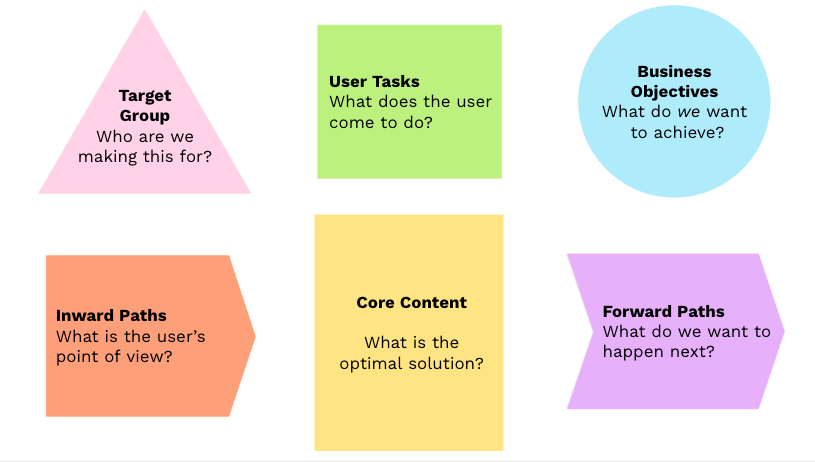
The
Core Model framework with its six elements: Target Group, User Tasks,
Business Objectives, Inward Paths, Forward Paths, and Core Content. (Large preview)
1. Target Group: Building Empathy First
Rather
than detailed personas, the Core Model starts with quick proto-personas
that build empathy for users in specific situations:
A parent researching childcare options late at night after a long day.
A small business owner trying to understand tax requirements between client meetings.
A new resident navigating unfamiliar public services in their second language.
The key is to humanize users and understand their emotional and practical context before diving into solutions.
2. User Tasks: What People Are Actually Trying to Do
Beyond features or content, what are users actually trying to accomplish?
Making an informed decision about a major purchase.
Finding the right form to apply for a service.
Understanding next steps in a complex process.
Checking eligibility for a program or benefit.
These tasks should be based on user research and drive everything that follows. Top task methodology is a great approach to this.
3. Business Objectives: What Success Looks Like
Every digital initiative should connect to clear organizational goals:
Increasing online self-service adoption.
Reducing support costs.
Improving satisfaction and loyalty.
Meeting compliance requirements.
Generating leads or sales.
These objectives provide the measurement framework for success. (If you work with OKRs, you can think of these as Key Results that connect to your overall Objective.)
4. Inward Paths: User Scenarios and Approaches
This element goes beyond just findability to include the user’s entire approach and mental model:
What scenarios lead them to this need?
What terminology do they use to describe their problem?
How would the phrase their need to Google or an LLM?
What emotions or urgency are they experiencing?
What channels or touchpoints do they use?
What existing knowledge do they bring?
Understanding these angles of different approaches ensures we meet users where they are.
5. Forward Paths: Guiding the Journey
What should users do after engaging with this core?
Take a specific action to continue their task.
Explore related information or options.
Connect with appropriate support channels.
Save or share their progress.
These paths create coherent journeys (core flows) rather than dead ends.
6. Core Content: The Essential Solution
Only after mapping the previous elements do we define the actual solution:
What information must be included?
What functionality is essential?
What tone and language are appropriate?
What format best serves the need?
This becomes our blueprint for what actually needs to be created.
Action Cards: From Insight to Implementation
The Core Model process culminates with action cards that answer the crucial seventh question: “What needs to be done to create this solution?”
These cards typically include:
Specific actions required;
Who is responsible;
Timeline for completion;
Resources needed;
Dependencies and constraints.
Action
cards transform insights into concrete next steps, ensuring the
workshop leads to real improvements rather than just interesting
discussions.
The Power of Core Pairs
A
unique aspect of the Core Model methodology is working in core
pairs—two people from different competencies or departments working
together on the same core sheet. This approach creates several benefits:
Cross-disciplinary insight Pairing someone with deep subject knowledge with someone who brings a fresh perspective.
Built-in quality control Partners catch blind spots and challenge assumptions.
Simplified communication One-to-one dialogue is more effective than group discussions.
Shared ownership Both participants develop a commitment to the solution.
Knowledge transfer Skills and insights flow naturally between disciplines.
The
ideal pair combines different perspectives — content and design,
business and technical, expert and novice — creating a balanced approach
that neither could achieve alone.
Creating Alignment Within and Between Teams
The Core Model excels at creating two crucial types of alignment:
Within Cross-Functional Teams
Modern teams bring together diverse competencies:
Content creators focus on messages and narrative.
Designers think about user experience and interfaces.
Developers consider technical implementation.
Business stakeholders prioritize organizational needs.
The
Core Model gives these specialists a common framework. Instead of the
designer focusing only on interfaces or the developer only on code,
everyone aligns around user tasks and business goals.
As one UX designer told me:
“The
Core Model changed our team dynamic completely. Instead of handing off
wireframes to developers who didn’t understand the ‘why’ behind design
decisions, we now share a common understanding of what we’re trying to
accomplish.”
Between Teams Across the Customer Journey
Users
don’t experience your organization in silos — they move across
touchpoints and teams. The Core Model helps connect these experiences:
Marketing teams understand how their campaigns connect to service delivery.
Product teams see how their features fit into larger user journeys.
Support teams gain context on user pathways and common issues.
Content teams create information that supports the entire journey.
By
mapping connections between cores (core flows), organizations create
coherent experiences rather than fragmented interactions.
Breaking Down Organizational Barriers
The
Core Model creates a neutral framework where various perspectives can
contribute while maintaining a unified direction. This is particularly
valuable in traditional organizational structures where content
responsibility is distributed across departments.
The Workshop: Making It Happen
The
Core Model workshop brings these elements together in a practical
format that can be adapted to different contexts and needs.
Workshop Format and Timing
For complex projects with multiple stakeholders across organizational silos, the ideal format is a full-day (6–hour) workshop:
First Hour: Foundation and Context
Introduction to the methodology (15 min).
Sharing user insights and business context (15 min).
Reviewing pre-workshop hypotheses (15 min).
Initial discussion and questions (15 min).
Hours 2–4: Core Mapping
Core pairs work on mapping elements (120 min).
Sharing between core pairs and in plenary between elements.
Facilitators provide guidance as needed.
Hours 5–6: Presentation, Discussion, and Action Planning
Each core pair presents its findings (depending on the number of cores).
Extensive group discussion and refinement.
Creating action cards and next steps.
The format is highly flexible:
Teams experienced with the methodology can conduct focused sessions in as little as 30 minutes.
Smaller projects might need only 2–3 hours.
Remote teams might split the workshop into multiple shorter sessions.
Workshop Environment
The Core Model workshop thrives in different environments:
Analog: Traditional approach using paper core sheets.
Digital: Virtual workshops using Miro, Mural, FigJam, or similar platforms.
Hybrid: Digital canvas in physical workshop, combining in-person interaction with digital documentation.
Note: You can find all downloads and templates here.
Core Pairs: The Key to Success
The composition of core pairs is critical to success:
One person should know the solution domain well (subject matter expert).
The other brings a fresh perspective (and learns about a different domain).
This combination ensures both depth of knowledge and fresh thinking.
Cross-functional pairing creates natural knowledge transfer and breaks down silos.
Workshop Deliverables
Important to note: The workshop doesn’t produce final solutions.
Instead, it creates a comprehensive brief containing the following:
Priorities and context for content development.
Direction and ideas for design and user experience.
Requirements and specifications for functionality.
Action plan for implementation with clear ownership.
This
brief becomes the foundation for subsequent development work, ensuring
everyone builds toward the same goal while leaving room for specialist
expertise during implementation.
Getting Started: Your First Core Model Implementation
Ready to apply the Core Model in your organization? Here’s how to begin:
1. Form Your Initial Hypothesis
Before bringing everyone together:
Identify a core where users struggle and the business impact is clear.
Gather available user insights and business objectives.
Form a hypothesis about what this core should accomplish.
Identify key stakeholders across relevant departments.
2. Bring Together the Right Core Pairs
Select participants who represent different perspectives:
Content creators paired with designers.
Business experts paired with technical specialists.
Subject matter experts paired with user advocates.
Veterans paired with fresh perspectives.
3. Follow the Seven Questions
Guide core pairs through the process:
Who are we trying to help, and what’s their situation?
What are they trying to accomplish?
What do we want to achieve?
How do they approach this need?
Where should they go next?
What’s the essential content or functionality?
What needs to be done to create this solution?
4. Create an Action Plan
Transform insights into concrete actions:
Document specific next steps on action cards.
Assign clear ownership for each action.
Establish timeline and milestones.
Define how you’ll measure success.
In Conclusion: Common Sense In A Structured Framework
The
Core Model works because it combines common sense with structure —
asking the right questions in the right order to ensure we address what
actually matters.
By starting FROM the answer, not WITH the solution, teams avoid premature problem-solving and create digital experiences that truly serve user needs while achieving organizational goals.
Whether
you’re managing a traditional website, creating multi-channel content,
or developing digital products, this methodology provides a framework
for better collaboration, clearer priorities, and more effective
outcomes.
We
often spotlight wireframes, research, or tools like Figma, but none of
that moves the needle if we can’t collaborate well. Great UX doesn’t
happen in isolation. It takes conversations with engineers, alignment
with product, sales, and other stakeholders, as well as the ability to
listen, adapt, and co-create. That’s where design becomes a team sport,
and when your ability to capture the outcomes multiplies the UX impact.
When
people talk about UX, it’s usually about the things they can see and
interact with, like wireframes and prototypes, smart interactions, and
design tools like Figma, Miro, or Maze. Some of the outputs are even
glamorized, like design systems, research reports, and pixel-perfect UI
designs. But here’s the truth I’ve seen again and again in over two
decades of working in UX: none of that moves the needle if there is no
collaboration.
Great UX doesn’t happen in isolation.
It happens through conversations with engineers, product managers,
customer-facing teams, and the customer support teams who manage support
tickets. Amazing UX ideas come alive in messy Miro sessions,
cross-functional workshops, and those online chats (e.g., Slack or
Teams) where people align, adapt, and co-create.
Some of the most
impactful moments in my career weren’t when I was “designing” in the
traditional sense. They have been gaining incredible insights when
discussing problems with teammates who have varied experiences,
brainstorming, and coming up with ideas that I never could have come up
with on my own. As I always say, ten minds in a room will come up with
ten times as many ideas as one mind. Often, many ideas are the most
useful outcome.
There have been times when a team has helped to
reframe a problem in a workshop, taken vague and conflicting feedback,
and clarified a path forward, or I’ve sat with a sales rep and heard the
same user complaint show up in multiple conversations. This is when design becomes a team sport, and when your ability to capture the outcomes multiplies the UX impact.
Why This Article Matters Now
The reason collaboration feels so urgent now is that the way we work since COVID has changed, according to a study published by the US Department of Labor.
Teams are more cross-functional, often remote, and increasingly
complex. Silos are easier to fall into, due to distance or lack of
face-to-face contact, and yet alignment has never been more important.
We can’t afford to see collaboration as a “nice to have” anymore. It’s a
core skill, especially in UX, where our work touches so many parts of an organisation.
Let’s break down what collaboration in UX really means, and why it deserves way more attention than it gets.
What Is Collaboration In UX, Really?
Let’s start by clearing up a misconception. Collaboration is not the same as cooperation.
Cooperation: “You do your thing, I’ll do mine, and we’ll check in later.”
Collaboration: “Let’s figure this out together and co-own the outcome.”
Collaboration, as defined in the book Communication Concepts, published by Deakin University, involves working with others to produce outputs
and/or achieve shared goals. The outcome of collaboration is typically a
tangible product or a measurable achievement, such as solving a problem
or making a decision. Here’s an example from a recent project:
Recently,
I worked on a fraud alert platform for a fintech business. It was a
six-month project, and we had zero access to users, as the product had
not yet hit the market. Also, the users were highly specialised in the
B2B finance space and were difficult to find. Additionally, the team
members I needed to collaborate with were based in Malaysia and
Melbourne, while I am located in Sydney.
Instead of treating that
as a dead end, we turned inward: collaborating with subject matter
experts, professional services consultants, compliance specialists, and
customer support team members who had deep knowledge of fraud patterns
and customer pain points. Through bi-weekly workshops using a Miro
board, iterative feedback loops, and sketching sessions, we worked on design solution options. I even asked them to present their own design version as part of the process.
After
months of iterating on the fraud investigation platform through these
collaboration sessions, I ended up with two different design frameworks
for the investigator’s dashboard. Instead of just presenting the “best
one” and hoping for buy-in, I ran a voting exercise with PMs, engineers,
SMEs, and customer support. Everyone had a voice. The winning design
was created and validated with the input of the team, resulting in an
outcome that solved many problems for the end user and was owned by the entire team. That’s collaboration!
It is definitely one of the most satisfying projects of my career.
On
the other hand, I recently caught up with an old colleague who now
serves as a product owner. Her story was a cautionary tale: the design
team had gone ahead with a major redesign of an app without looping her
in until late in the game. Not surprisingly, the new design missed
several key product constraints and business goals. It had to be
scrapped and redone, with her now at the table. That experience
reinforced what we all know deep down: your best work rarely happens in
isolation.
As illustrated in my experience, true collaboration can span many roles.
It’s not just between designers and PMs. It can also include QA testers
who identify real-world issues, content strategists who ensure our
language is clear and inclusive, sales representatives who interact with
customers on a daily basis, marketers who understand the brand’s voice,
and, of course, customer support agents who are often the first to hear
when something goes wrong. The best outcomes arrive when we’re open to different perspectives and inputs.
Why Collaboration Is So Overlooked?
If collaboration is so powerful, why don’t we talk about it more?
In my experience, one reason is the myth of the “lone UX hero”.
Many of us entered the field inspired by stories of design geniuses
revolutionising products on their own. Our portfolios often reflect that
as well. We showcase our solo work, our processes, and our wins. Job
descriptions often reinforce the idea of the solo UX designer, listing
tool proficiency and deliverables more than soft skills and team
dynamics.
And then there’s the team culture within many
organisations of “just get the work done”, which often leads to fewer
meetings and tighter deadlines. As a result, a sense of collaboration is
inefficient and wasted. I have also experienced working with some
designers where perfectionism and territoriality creep in — “This is my
design” — which kills the open, communal spirit that collaboration
needs.
In
an ideal world, we’d always have direct access to users. But let’s be
real. Sometimes that just doesn’t happen. Whether it’s due to budget
constraints, time limitations, or layers of bureaucracy, talking to end
users isn’t always possible. That’s where collaboration with team
members becomes even more crucial.
The next best thing to talking
to users? Talking to the people who talk to users. Sales teams, customer
success reps, tech support, and field engineers. They’re all user
researchers in disguise!
On another B2C project, the end users
were having trouble completing the key task. My role was to redesign the
onboarding experience for an online identity capture tool for end
users. I was unable to schedule interviews with end users due to budget
and time constraints, so I turned to the sales and tech support teams.
I
conducted multiple mini-workshops to identify the most common
onboarding issues they had heard directly from our customers. This led
to a huge “aha” moment: most users dropped off before the document
capture process. They may have been struggling with a lack of
instruction, not knowing the required time, or not understanding the
steps involved in completing the onboarding process.
That insight
reframed my approach, and we ultimately redesigned the flow to
prioritize orientation and clear instructions before proceeding to the
setup steps. Below is an example of one of the screen designs, including
some of the instructions we added.
This kind of collaboration is user research. It’s not a substitute for talking to users directly, but it’s a powerful proxy when you have limited options.
But What About Using AI?
Glad
you asked! Even AI tools, which are increasingly being used for idea
generation, pattern recognition, or rapid prototyping, don’t replace
collaboration; they just change the shape of it.
AI can help you
explore design patterns, draft user flows, or generate multiple
variations of a layout in seconds. It’s fantastic for getting past
creative blocks or pressure-testing your assumptions. But let’s be
clear: these tools are accelerators, not oracles. As an innovation and
strategy consultant Nathan Waterhouse points out, AI can point you in a direction, but it can’t tell you which direction is the right
one in your specific context. That still requires human judgment,
empathy, and an understanding of the messy realities of users and
business goals.
You still need people, especially those closest to
your users, to validate, challenge, and evolve any AI-generated idea.
For instance, you might use ChatGPT to brainstorm onboarding flows for a
SaaS tool, but if you’re not involving customer support reps who
regularly hear “I didn’t know where to start” or “I couldn’t even log in,”
you’re just working with assumptions. The same applies to engineers who
know what is technically feasible or PMs who understand where the
business is headed.
If
collaboration doesn’t come naturally or hasn’t been a focus, that’s
okay. Like any skill, it can be practiced and improved. Here are a few
ways to level up:
Cultivate curiosity about your teammates. Ask
engineers what keeps them up at night. Learn what metrics your PMs care
about. Understand the types of tickets the support team handles most
frequently. The more you care about their challenges, the more they’ll
care about yours.
Get comfortable facilitating. You
don’t need to be a certified Design Sprint master, but learning how to
run a structured conversation, align stakeholders, or synthesize
different points of view is hugely valuable. Even a simple “What’s
working? What’s not?” retro can be an amazing starting point in
identifying where you need to focus next.
Share early, share often. Don’t
wait until your designs are polished to get input. Messy sketches and
rough prototypes invite collaboration. When others feel like they’ve
helped shape the work, they’re more invested in its success.
Practice active listening. When
someone critiques your work, don’t immediately defend. Pause. Ask
follow-up questions. Reframe the feedback. Collaboration isn’t about
consensus; it’s about finding a shared direction that can honour
multiple truths.
Co-own the outcome. Let go
of your ego. The best UX work isn’t “your” work. It’s the result of many
voices, skill sets, and conversations converging toward a solution that
helps users. It’s not “I”, it’s “we” that will solve this problem
together.
Conclusion: UX Is A Team Sport
Great design doesn’t emerge from a vacuum. It comes from open dialogue, cross-functional understanding, and a shared commitment to solving real problems for real people.
If there’s one thing I wish every early-career designer knew, it’s this:
So
next time you’re tempted to go heads-down and just “crank out a
design,” pause to reflect. Ask who else should be in the room. And
invite them in, not just to review your work, but to help create it.
Because in the end, the best UX isn’t just what you make. It’s what you make together.
Communication
theory is not just an academic exercise. UX practitioners benefit from
an understanding of what we know about effective communication. Victor
Yocco reviews the components of the Transactional Model of
communication, explaining how we might apply this framework to
preparing, conducting, and analysing our UX research. You will
understand how many UX research best practices align with the model and
get an example of a tool for tracking alignment.
Communication
is in everything we do. We communicate with users through our research,
our design, and, ultimately, the products and services we offer. UX
practitioners and those working on digital product teams benefit from
understanding principles of communication and their application to our
craft. Treating our UX processes as a mode of communication between
users and the digital environment can help unveil in-depth, actionable
insights.
In this article, I’ll focus on UX research. Communication is a core component of UX research,
as it serves to bridge the gap between research insights, design
strategy, and business outcomes. UX researchers, designers, and those
working with UX researchers can apply key aspects of communication
theory to help gather valuable insights, enhance user experiences, and
create more successful products.
Communications
as an academic field encompasses various models and principles that
highlight the dynamics of communication between individuals and groups.
Communication theory examines the transfer of information from one
person or group to another. It explores how messages are transmitted,
encoded, and decoded, acknowledges the potential for interference (or
‘noise’), and accounts for feedback mechanisms in enhancing the
communication process.
In this article, I will focus on the Transactional Model of Communication.
There are many other models and theories in the academic literature on
communication. I have included references at the end of the article for
those interested in learning more.
The Transactional Model of Communication (Figure 1) is a two-way process that emphasizes the simultaneous sending and receiving of messages and feedback.
Importantly, it recognizes that communication is shaped by context and
is an ongoing, evolving process. I’ll use this model and understanding
when applying principles from the model to UX research. You’ll find that
much of what is covered in the Transactional Model would also fall
under general best practices for UX research, suggesting even if we
aren’t communications experts, much of what we should be doing is
supported by research in this field.
Let’s take a deeper dive into the six key factors and their applications within the realm of UX research:
Sender:
In UX research, the sender is typically the researcher who conducts
interviews, facilitates usability tests, or designs surveys. For
example, if you’re administering a user interview, you are the sender
who initiates the communication process by asking questions.
Receiver:
The receiver is the individual who decodes and interprets the messages
sent by the sender. In our context, this could be the user you interview
or the person taking a survey you have created. They receive and
process your questions, providing responses based on their understanding
and experiences.
Message: This is the content
being communicated from the sender to the receiver. In UX research, the
message can take various forms, like a set of survey questions,
interview prompts, or tasks in a usability test.
Channel:
This is the medium through which the communication flows. For instance,
face-to-face interviews, phone interviews, email surveys administered
online, and usability tests conducted via screen sharing are all
different communication channels. You might use multiple channels
simultaneously, for example, communicating over voice while also using a
screen share to show design concepts.
Noise:
Any factor that may interfere with the communication is regarded as
‘noise.’ In UX research, this could be complex jargon that confuses
respondents in a survey, technical issues during a remote usability
test, or environmental distractions during an in-person interview.
Feedback:
The communication received by the receiver, who then provides an
output, is called feedback. For example, the responses given by a user
during an interview or the data collected from a completed survey are
types of feedback or the physical reaction of a usability testing
participant while completing a task.
Applying the Transactional Model of Communication to Preparing for UX Research #
We
can become complacent or feel rushed to create our research protocols. I
think this is natural in the pace of many workplaces and our need to
deliver results quickly. You can apply the lens of the Transactional
Model of Communication to your research preparation without adding much
time. Applying the Transactional Model of Communication to your
preparation should:
Improve Clarity The
model provides a clear representation of communication, empowering the
researcher to plan and conduct studies more effectively.
Minimize misunderstanding By highlighting potential noise sources, user confusion or misunderstandings can be better anticipated and mitigated.
Enhance research participant participation With
your attentive eye on feedback, participants are likely to feel valued,
thus increasing active involvement and quality of input.
You can address the specific elements of the Transactional Model through the following steps while preparing for research:
In
UX research, the sender can often be the UX researcher conducting the
study, while the receiver is usually the research participant.
Understanding this dynamic can help researchers craft questions or tasks
more empathetically and efficiently. You should try to collect some
information on your participant in advance to prepare yourself for
building a rapport.
For example, if you are conducting contextual
inquiry with the field technicians of an HVAC company, you’ll want to
dress appropriately to reflect your understanding of the context in
which your participants (receivers) will be conducting their work.
Showing up dressed in formal attire might be off-putting and create a
negative dynamic between sender and receiver.
The
message in UX research typically is the questions asked or tasks
assigned during the study. Careful consideration of tenor, terminology,
and clarity can aid data accuracy and participant engagement. Whether
you are interviewing or creating a survey, you need to double-check that
your audience will understand your questions and provide meaningful
answers. You can pilot-test your protocol or questionnaire with a few
representative individuals to identify areas that might cause confusion.
Using
the HVAC example again, you might find that field technicians use
certain terminology in a different way than you expect, such as asking
them about what “tools” they use to complete their tasks yields you an
answer that doesn’t reflect digital tools you’d find on a computer or
smartphone, but physical tools like a pipe and wrench.
The
channel selection depends on the method of research. For instance,
face-to-face methods might use physical verbal communication, while
remote methods might rely on emails, video calls, or instant messaging.
The choice of the medium should consider factors like tech
accessibility, ease of communication, reliability, and participant
familiarity with the channel. For example, you introduce an additional
challenge (noise) if you ask someone who has never used an iPhone to
test an app on an iPhone.
Minimizing Noise
Noise
in UX research comes in many forms, from unclear questions inducing
participant confusion to technical issues in remote interviews that
cause interruptions. The key is to foresee potential issues and have
preemptive solutions ready.
Facilitating Feedback
You
should be prepared for how you might collect and act on participant
feedback during the research. Encouraging regular feedback from the user
during UX research ensures their understanding and that they feel
heard. This could range from asking them to ‘think aloud’ as they
perform tasks or encouraging them to email queries or concerns after the
session. You should document any noise that might impact your findings
and account for that in your analysis and reporting.
Track Your Alignment to the Framework
You
can track what you do to align your processes with the Transactional
Model prior to and during research using a spreadsheet. I’ll provide an
example of a spreadsheet I’ve used in the later case study section of
this article. You should create your spreadsheet during the process of
preparing for research, as some of what you do to prepare should align
with the factors of the model.
You can use these tips for
preparation regardless of the specific research method you are
undertaking. Let’s now look closer at a few common methods and get
specific on how you can align your actions with the Transactional Model.
Applying the Transactional Model to Common UX Research Methods
UX
research relies on interaction with users. We can easily incorporate
aspects of the Transactional Model of Communication into our most common
methods. Utilizing the Transactional Model in conducting interviews,
surveys, and usability testing can help provide structure to your
process and increase the quality of insights gathered.
Interviews
Interviews
are a common method used in qualitative UX research. They provide the
perfect method for applying principles from the Transactional Model. In
line with the Transactional Model, the researcher (sender) sends
questions (messages) in-person or over the phone/computer medium
(channel) to the participant (receiver), who provides answers (feedback)
while contending with potential distraction or misunderstanding
(noise). Reflecting on communication as transactional can help remind us
we need to respect the dynamic between ourselves and the person we are
interviewing. Rather than approaching an interview as a unidirectional interrogation, researchers need to view it as a conversation.
Applying
the Transactional Model to conducting interviews means we should
account for a number of facts to allow for high-quality communication.
Note how the following overlap with what we typically call best
practices.
Asking Open-ended Questions
To
truly harness a two-way flow of communication, open-ended questions,
rather than close-ended ones, are crucial. For instance, rather than
asking, “Do you use our mobile application?” ask, “Can you describe your use of our mobile app?”. This encourages the participant to share more expansive and descriptive insights, furthering the dialogue.
Actively Listening
As
the success of an interview relies on the participant’s responses,
active listening is a crucial skill for UX researchers. The researcher
should encourage participants to express their thoughts and feelings
freely. Reflective listening techniques, such as
paraphrasing or summarizing what the participant has shared, can
reinforce to the interviewee that their contributions are being
acknowledged and valued. It also provides an opportunity to clarify
potential noise or misunderstandings that may arise.
Being Responsive
Building
on the simultaneous send-receive nature of the Transactional Model,
researchers must remain responsive during interviews. Providing
non-verbal cues (like nodding) and verbal affirmations (“I see,”
“Interesting”) lets participants know their message is being received
and understood, making them feel comfortable and more willing to share.
Minimizing Noise
We
should always attempt to account for noise in advance, as well as
during our interview sessions. Noise, in the form of misinterpretations
or distractions, can disrupt effective communication. Researchers can
proactively reduce noise by conducting a dry run in advance of the scheduled interviews.
This helps you become more fluent at going through the interview and
also helps identify areas that might need improvement or be
misunderstood by participants. You also reduce noise by creating a
conducive interview environment, minimizing potential distractions, and
asking clarifying questions during the interview whenever necessary.
For
example, if a participant uses a term the researcher doesn’t
understand, the researcher should politely ask for clarification rather
than guessing its meaning and potentially misinterpreting the data.
Additional
forms of noise can include participant confusion or distraction. You
should let participants know to ask if they are unclear on anything you
say or do. It’s a good idea to always ask participants to put their
smartphones on mute. You should only provide information critical to the process when introducing the interview
or tasks. For example, you don’t need to give a full background of the
history of the product you are researching if that isn’t required for
the participant to complete the interview. However, you should let them
know the purpose of the research, gain their consent to participate, and
inform them of how long you expect the session to last.
Strategizing the Flow
Researchers
should build strategic thinking into their interviews to support the
Transaction Model. Starting the interview with less intrusive questions
can help establish rapport and make the participant more comfortable,
while more challenging or sensitive questions can be left for later when
the interviewee feels more at ease.
A well-planned interview
encourages a fluid dialogue and exchange of ideas. This is another area
where conducting a dry run can help to ensure high-quality research. You
and your dry-run participants should recognize areas where questions
aren’t flowing in the best order or don’t make sense in the context of
the interview, allowing you to correct the flow in advance.
While
much of what the Transactional Model informs for interviews already
aligns with common best practices, the model would suggest we need to
have a deeper consideration of factors that we can sometimes give less
consideration when we become overly comfortable with interviewing or are
unaware of the implications of forgetting to address the factors of
context considerations, power dynamics, and post-interview actions.
Context Considerations
You
need to account for both the context of the participant, e.g., their
background, demographic, and psychographic information, as well as the
context of the interview itself. You should make subtle yet meaningful
modifications depending on the channel you are conducting an interview.
For
example, you should utilize video and be aware of your facial and
physical responses if you are conducting an interview using an online
platform, whereas if it’s a phone interview, you will need to rely on
verbal affirmations that you are listening and following along, while
also being mindful not to interrupt the participant while they are
speaking.
Power Dynamics
Researchers
need to be aware of how your role, background, and identity might
influence the power dynamics of the interview. You can attempt to
address power dynamics by sharing research goals transparently and
addressing any potential concerns about bias a participant shares.
We
are responsible for creating a safe and inclusive space for our
interviews. You do this through the use of inclusive language, listening
actively without judgment, and being flexible to accommodate different
ways of knowing and expressing experiences. You should also empower participants as collaborators whenever possible.
You can offer opportunities for participants to share feedback on the
interview process and analysis. Doing this validates participants’
experiences and knowledge and ensures their voices are heard and valued.
You
have a number of options for actions that can close the loop of your
interviews with participants in line with the “feedback” the model
suggests is a critical part of communication. Some tactics you can
consider following your interview include:
Debriefing Dedicate
a few minutes at the end to discuss the participant’s overall
experience, impressions, and suggestions for future interviews.
Short surveys Send a brief survey via email or an online platform to gather feedback on the interview experience.
Follow-up calls Consider
follow-up calls with specific participants to delve deeper into their
feedback and gain additional insight if you find that is warranted.
Thank you emails Include a “feedback” section in your thank you email, encouraging participants to share their thoughts on the interview.
You
also need to do something with the feedback you receive. Researchers
and product teams should make time for reflexivity and critical
self-awareness.
We shouldn’t practice our craft in a silo. Instead, seeking feedback from colleagues and mentors to maintain ethical research practices should be a standard practice for interviews and all UX research methods.
By
considering interviews as an ongoing transaction and exchange of ideas
rather than a unidirectional Q&A, UX researchers can create a more
communicative and engaging environment. You can see how models of
communication have informed best practices for interviews. With a better
knowledge of the Transactional Model, you can go deeper and check your
work against the framework of the model.
Surveys
The
Transactional Model of Communication reminds us to acknowledge the
feedback loop even in seemingly one-way communication methods like
surveys. Instead of merely sending out questions and collecting
responses, we need to provide space for respondents to voice their
thoughts and opinions freely. When we make participants feel heard,
engagement with our surveys should increase, dropouts should decrease,
and response quality should improve.
Like other methods, surveys
involve the researcher(s) creating the instructions and questionnaire
(sender), the survey, including any instructions, disclaimers, and
consent forms (the message), how the survey is administered, e.g.,
online, in person, or pen and paper (the channel), the participant
(receiver), potential misunderstandings or distractions (noise), and
responses (feedback).
Designing the Survey
Understanding
the Transactional Model will help researchers design more effective
surveys. Researchers are encouraged to be aware of both their role as
the sender and to anticipate the participant’s perspective as the
receiver. Begin surveys with clear instructions, explaining why you’re
conducting the survey and how long it’s estimated to take. This
establishes a more communicative relationship with respondents right
from the start. Test these instructions with multiple people prior to
launching the survey.
Crafting Questions
The
questions should be crafted to encourage feedback and not just a simple
yes or no. You should consider asking scaled questions or items that
have been statistically validated to measure certain attributes of
users.
For example, if you were looking deeper at a mobile banking application, rather than asking, “Did you find our product easy to use?” you would want to break that out into multiple aspects of the experience and ask about each with a separate question such as “On
a scale of 1–7, with 1 being extremely difficult and 7 being extremely
easy, how would you rate your experience transferring money from one
account to another?”.
Minimizing Noise
Reducing
‘noise,’ or misunderstandings, is crucial for increasing the
reliability of responses. Your first line of defense in reducing noise
is to make sure you are sampling from the appropriate population you
want to conduct the research with. You need to use a screener that will filter out non-viable participants
prior to including them in the survey. You do this when you correctly
identify the characteristics of the population you want to sample from
and then exclude those falling outside of those parameters.
Additionally,
you should focus on prioritizing finding participants through random
sampling from the population of potential participants versus using a
convenience sample, as this helps to ensure you are collecting reliable
data.
When looking at the survey itself, there are a number of
recommendations to reduce noise. You should ensure questions are easily
understandable, avoid technical jargon, and sequence questions
logically. A question bank should be reviewed and tested before being
finalized for distribution.
For example, question statements like “Do you use and like this feature?”
can confuse respondents because they are actually two separate
questions: do you use the feature, and do you like the feature? You
should separate out questions like this into more than one question.
You
should use visual aids that are relevant whenever possible to enhance
the clarity of the questions. For example, if you are asking questions
about an application’s “Dashboard” screen, you might want to provide a
screenshot of that page so survey takers have a clear understanding of
what you are referencing. You should also avoid the use of jargon if you
are surveying a non-technical population and explain any terminology
that might be unclear to participants taking the survey.
The Transactional Model suggests active participation in communication is necessary for effective communication.
Participants can become distracted or take a survey without intending
to provide thoughtful answers. You should consider adding a question
somewhere in the middle of the survey to check that participants are
paying attention and responding appropriately, particularly for longer
surveys.
This is often done using a simple math problem such as “What is the answer to 1+1?”
Anyone not responding with the answer of “2” might not be adequately
paying attention to the responses they are providing and you’d want to
look closer at their responses, eliminating them from your analysis if
deemed appropriate.
Encouraging Feedback
While
descriptive feedback questions are one way of promoting dialogue, you
can also include areas where respondents can express any additional
thoughts or questions they have outside of the set question list. This
is especially useful in online surveys, where researchers can’t
immediately address participant’s questions or clarify doubts.
You should be mindful that too many open-ended questions can cause fatigue,
so you should limit the number of open-ended questions. I recommend two
to three open-ended questions depending on the length of your overall
survey.
Post-Survey Actions
After
collecting and analyzing the data, you can send follow-up
communications to the respondents. Let them know the changes made based
on their feedback, thank them for their participation, or even share a
summary of the survey results. This fulfills the Transactional Model’s
feedback loop and communicates to the respondent that their input was
received, valued, and acted upon.
You can also meet this
suggestion by providing an email address for participants to follow up
if they desire more information post-survey. You are allowing them to
complete the loop themselves if they desire.
Applying the
transactional model to surveys can breathe new life into the way surveys
are conducted in UX research. It encourages active participation from
respondents, making the process more interactive and engaging while
enhancing the quality of the data collected. You can experiment with
applying some or all of the steps listed above. You will likely find you
are already doing much of what’s mentioned, however being explicit can
allow you to make sure you are thoughtfully applying these principles
from the field communication.
Usability Testing
Usability
testing is another clear example of a research method highlighting
components of the Transactional Model. In the context of usability
testing, the Transactional Model of Communication’s application opens a
pathway for a richer understanding of the user experience by positioning
both the user and the researcher as sender and receiver of
communication simultaneously.
Here are some ways a researcher can use elements of the Transactional Model during usability testing:
Task Assignment as Message Sending
When
a researcher assigns tasks to a user during usability testing, they act
as the sender in the communication process. To ensure the user
accurately receives the message, these tasks need to be clear and
well-articulated. For example, a task like “Register a new account on
the app” sends a clear message to the user about what they need to do.
You
don’t need to tell them how to do the task, as usually, that’s what we
are trying to determine from our testing, but if you are not clear on
what you want them to do, your message will not resonate in the way it
is intended. This is another area where a dry run in advance of the
testing is an optimal solution for making sure tasks are worded clearly.
Observing and Listening as Message Receiving
As
the participant interacts with the application, concept, or design, the
researcher, as the receiver, picks up on verbal and nonverbal cues. For
instance, if a user is clicking around aimlessly or murmuring in
confusion, the researcher can take these as feedback about certain
elements of the design that are unclear or hard to use. You can also ask
the user to explain why they are giving these cues you note as a way to
provide them with feedback on their communication.
Real-time Interaction
The
transactional nature of the model recognizes the importance of
real-time interaction. For example, if during testing, the user is
unsure of what a task means or how to proceed, the researcher can
provide clarification without offering solutions or influencing the
user’s action. This interaction follows the communication flow
prescribed by the transactional model. We lose the ability to do this
during unmoderated testing; however, many design elements are forms of
communication that can serve to direct users or clarify the purpose of
an experience (to be covered more in article two).
Noise
In
usability testing, noise could mean unclear tasks, users’ preconceived
notions, or even issues like slow software response. Acknowledging noise
can help researchers plan and conduct tests better. Again, carrying out
a pilot test can help identify any noise in the main test scenarios,
allowing for necessary tweaks before actual testing. Other forms of
noise can be less obvious but equally intrusive. For example, if you are
conducting a test using a Macbook laptop and your participant is used
to a PC, there is noise you need to account for, given their
unfamiliarity with the laptop you’ve provided.
The fidelity of the
design artifact being tested might introduce another form of noise.
I’ve always advocated testing at any level of fidelity, but you should
note that if you are using “Lorem Ipsum” or black and white designs,
this potentially adds noise.
One of my favorite examples of this
was a time when I was testing a financial services application, and the
designers had put different balances on the screen; however, the total
for all balances had not been added up to the correct total. Virtually
every person tested noted this discrepancy, although it had nothing to
do with the tasks at hand. I had to acknowledge we’d introduced noise to
the testing. As at least one participant noted, they wouldn’t trust a
tool that wasn’t able to total balances correctly.
Encouraging Feedback
Under
the Transactional Model’s guidance, feedback isn’t just final thoughts
after testing; it should be facilitated at each step of the process.
Encouraging ‘think aloud’ protocols, where the user verbalizes their thoughts, reactions, and feelings during testing, ensures a constant flow of useful feedback.
You
are receiving feedback throughout the process of usability testing, and
the model provides guidance on how you should use that feedback to
create a shared meaning with the participants. You will ultimately
summarize this meaning in your report. You’ll later end up uncovering if
this shared meaning was correctly interpreted when you design or
redesign the product based on your findings.
We’ve
now covered how to apply the Transactional Model of Communication to
three common UX Research methods. All research with humans involves
communication. You can break down other UX methods using the Model’s
factors to make sure you engage in high-quality research.
Analyzing and Reporting UX Research Data Through the Lens of the Transactional Model
The
Transactional Model of Communication doesn’t only apply to the data
collection phase (interviews, surveys, or usability testing) of UX
research. Its principles can provide valuable insights during the data
analysis process.
The Transactional Model instructs us to view any communication as an interactive, multi-layered dialogue
— a concept that is particularly useful when unpacking user responses.
Consider the ‘message’ components: In the context of data analysis, the
messages are the users’ responses. As researchers, thinking critically
about how respondents may have internally processed the survey
questions, interview discussion, or usability tasks can yield richer
insights into user motivations.
Just
as the Transactional Model emphasizes the simultaneous interchange of
communication, UX researchers should consider the user’s context while
interpreting data. Decoding the meaning behind a user’s words or actions
involves understanding their background, experiences, and the situation
when they provide responses.
In
the Transactional Model, noise presents a potential barrier to
effective communication. Similarly, researchers must be aware of
snowballing themes or frequently highlighted issues during analysis.
Noise, in this context, could involve patterns of confusion,
misunderstandings, or consistently highlighted problems by users. You
need to account for this, e.g., the example I provided where
participants constantly referred to the incorrect math on static
wireframes.
Remember
that as a UX researcher, your interpretation of user responses will be
influenced by your understandings, biases, or preconceptions, just as
the responses were influenced by the user’s perceptions. By
acknowledging this, researchers can strive to neutralize any subjective
influence and ensure the analysis remains centered on the user’s
perspective. You can ask other researchers to double-check your work to
attempt to account for bias.
For example, if you come up with a
clear theme that users need better guidance in the application you are
testing, another researcher from outside of the project should come to a
similar conclusion if they view the data; if not, you should have a
conversation with them to determine what different perspectives you are
each bringing to the data analysis.
Understanding
your audience is crucial for delivering a persuasive UX research
presentation. Tailoring your communication to resonate with the specific
concerns and interests of your stakeholders can significantly enhance
the impact of your findings. Here are some more details:
Identify Stakeholder Groups Identify
the different groups of stakeholders who will be present in your
audience. This could include designers, developers, product managers,
and executives.
Prioritize Information Prioritize
the information based on what matters most to each stakeholder group.
For example, designers might be more interested in usability issues,
while executives may prioritize business impact.
Adapt Communication Style Adjust
your communication style to align with the communication preferences of
each group. Provide technical details for developers and emphasize user
experience benefits for executives.
Respecting
this Transactional Model’s feedback loop, remember to revisit user
insights after implementing design changes. This ensures you stay
user-focused, continuously validating or adjusting your interpretations
based on users’ evolving feedback. You can do this in a number of ways.
You can reconnect with users to show them updated designs and ask
questions to see if the issues you attempted to resolve were resolved.
Another
way to address this without having to reconnect with the users is to
create a spreadsheet or other document to track all the recommendations
that were made and reconcile the changes with what is then updated in
the design. You should be able to map the changes users requested to
updates or additions to the product roadmap for future updates. This
acknowledges that users were heard and that an attempt to address their
pain points will be documented.
Crucially, the Transactional Model
teaches us that communication is rarely simple or one-dimensional. It
encourages UX researchers to take a more nuanced, context-aware approach
to data analysis, resulting in deeper user understanding and more
accurate, user-validated results.
Tracking Your Application of the Transactional Model to Your Practice
You
might find it useful to track how you align your research planning and
execution to the framework of the Transactional Model. I’ve created a
spreadsheet to outline key factors of the model and used this for some
of my work. Demonstrated below is an example derived from a study
conducted for a banking client that included interviews and usability
testing. I completed this spreadsheet during the process of planning and
conducting interviews. Anonymized data from our study has been
furnished to show an example of how you might populate a similar
spreadsheet with your information.
You can customize the
spreadsheet structure to fit your specific research topic and interview
approach. By documenting your application of the transactional model,
you can gain valuable insights into the dynamic nature of communication
and improve your interview skills for future research.
Stage
Columns
Description
Example
Pre-Interview Planning
Topic/Question (Aligned with research goals)
Identify the research question and design questions that encourage open-ended responses and co-construction of meaning.
Testing
mobile banking app’s bill payment feature. How do you set up a new
payee? How would you make a payment? What are your overall impressions?
Participant Context
Note relevant demographic and personal information to tailor questions and avoid biased assumptions.
35-year-old
working professional, frequent user of the online banking and mobile
application but unfamiliar with using the app for bill pay.
Engagement Strategies
Outline planned strategies for active listening, open-ended questions, clarification prompts, and building rapport.
Open-ended
follow-up questions (“Can you elaborate on XYZ? Or Please explain more
to me what you mean by XYZ.”), active listening cues, positive
reinforcement (“Thank you for sharing those details”).
Shared Understanding
List potential challenges to understanding participant’s perspectives and strategies for ensuring shared meaning.
Initially,
the participant expressed some confusion about the financial jargon I
used. I clarified and provided simpler [non-jargon] explanations,
ensuring we were on the same page.
During Interview
Verbal Cues
Track participant’s language choices, including metaphors, pauses, and emotional expressions.
Participant
used a hesitant tone when describing negative experiences with the bill
payment feature. When questioned, they stated it was “likely their
fault” for not understanding the flow [it isn’t their fault].
Nonverbal Cues
Note participant’s nonverbal communication like body language, facial expressions, and eye contact.
Frowning and crossed arms when discussing specific pain points.
Researcher Reflexivity
Record moments where your own biases or assumptions might influence the interview and potential mitigation strategies.
Recognized
my own familiarity with the app might bias my interpretation of users’
understanding [e.g., going slower than I would have when entering
information]. Asked clarifying questions to avoid imposing my
assumptions.
Power Dynamics
Identify instances where power differentials emerge and actions taken to address them.
Participant
expressed trust in the research but admitted feeling hesitant to
criticize the app directly. I emphasized anonymity and encouraged open
feedback.
Unplanned Questions
List unplanned questions prompted by the participant’s responses that deepen understanding.
What
alternative [non-bank app] methods for paying bills that you use?
(Prompted by participant’s frustration with app bill pay).
Post-Interview Reflection
Meaning Co-construction
Analyze how both parties contributed to building shared meaning and insights.
Through
dialogue, we collaboratively identified specific design flaws in the
bill payment interface and explored additional pain points and areas
that worked well.
Openness and Flexibility
Evaluate how well you adapted to unexpected responses and maintained an open conversation.
Adapted
questioning based on participant’s emotional cues and adjusted language
to minimize technical jargon when that issue was raised.
Participant Feedback
Record any feedback received from participants regarding the interview process and areas for improvement.
Thank
you for the opportunity to be in the study. I’m glad my comments might
help improve the app for others. I’d be happy to participate in future
studies.
Ethical Considerations
Reflect on whether the interview aligned with principles of transparency, reciprocity, and acknowledging power dynamics.
Maintained
anonymity throughout the interview and ensured informed consent was
obtained. Data will be stored and secured as outlined in the research
protocol.
Key Themes/Quotes
Use this column to identify emerging themes or save quotes you might refer to later when creating the report.
Frustration with a confusing interface, lack of intuitive navigation, and desire for more customization options.
Analysis Notes
Use as many lines as needed to add notes for consideration during analysis.
Add notes here.
You
can use the suggested columns from this table as you see fit, adding or
subtracting as needed, particularly if you use a method other than
interviews. I usually add the following additional Columns for
logistical purposes:
Date of Interview,
Participant ID,
Interview Format (e.g., in person, remote, video, phone).
By
incorporating aspects of communication theory into UX research, UX
researchers and those who work with UX researchers can enhance the
effectiveness of their communication strategies, gather more accurate
insights, and create better user experiences. Communication theory
provides a framework for understanding the dynamics of communication,
and its application to UX research enables researchers to tailor their
approaches to specific audiences, employ effective interviewing
techniques, design surveys and questionnaires, establish seamless
communication channels during usability testing, and interpret data more
effectively.
As the field of UX research continues to evolve,
integrating communication theory into research practices will become
increasingly essential for bridging the gap between users and design
teams, ultimately leading to more successful products that resonate with
target audiences.
As a UX professional, it is important to continually explore and integrate new theories and methodologies to enhance your practice.
By leveraging communication theory principles, you can better
understand user needs, improve the user experience, and drive successful
outcomes for digital products and services.
Integrating
communication theory into UX research is an ongoing journey of learning
and implementing best practices. Embracing this approach empowers
researchers to effectively communicate their findings to stakeholders
and foster collaborative decision-making, ultimately driving positive
user experiences and successful design outcomes.
 Background:
Thomas has an IT background. He first got interested in tech through
game development in school, but later discovered that design was what he
enjoyed more. Over time, he moved fully into graphic design and branding.
 Background: Adwoa moved from software testing to product management.
 Background:
Konstantinos started programming with zero experience. He had no
technical background at first, but he developed a strong interest in
artificial intelligence and worked his way into the field.
 Background: Yinjian works in product design
across AI, SaaS, and B2B products. Her work focuses on building
early-stage products, shaping user experience, and working closely with
engineering and product teams on AI-driven features.