A product team at a large health insurer wants to add AI that writes the full written determination for benefits appeals specialists. The technology works as specified. However, the specialists stop using it, and the ones who keep using it take longer on each case than the ones who ignore it.
A short evaluation with the specialists surfaces the problem fast: reading an AI-written determination carefully enough to sign it takes about as long as writing one, and the specialist also has to check for mistakes they would never have made themselves. The feature adds work to a task these people had already mastered.
Rescoping the release fixes it. A second version surfaces the policy provisions and prior decisions relevant to each appeal and leaves the writing to the specialist. The search step disappears, review time drops, and the part of the job the specialist is good at stays where it was.
The technology is identical in both versions, and the difference is which part of the task the AI handles.
Finding The Break-even Line
Every interface change costs the user something before it pays anything back. They have to rebuild their picture of how the tool works, learn where things are now, and decide how far to trust what the AI hands them. Nelson Cowan’s review of working memory research (2001) put the limit at about four items held in mind at once. All three of those jobs draw on the same small supply.
An AI feature in an enterprise software setting requires more from the user than a redesigned menu, because it changes what they do all day. Hand the synthesis to an AI and the user becomes a checker. Give it the recommendation too, and the job shrinks to signing off. Either change costs user attention, and for people whose training is their standing at work, either one can feel like a demotion. For example, in one study, Sophia Ackerhans (2025) and colleagues found that physicians asked to sign AI-assisted decisions reported a more serious threat to their professional identity, and explanations of the AI’s reasoning raised both trust and that threat together.
An AI feature earns its place when what it returns beats what it costs the user to adjust, for one user doing one task.
We can call that the break-even line. Returns to users come in three forms:
- Effort the feature removes,
- Errors it catches that the person would have missed, and
- Consistency across people doing the same work.
For example, an AI-powered fraud screening tool shows the errors-caught form at work, since the analyst reviews flags they would never have raised themselves, which costs attention, and the catch rate pays for it. That puts the feature above the break-even line.
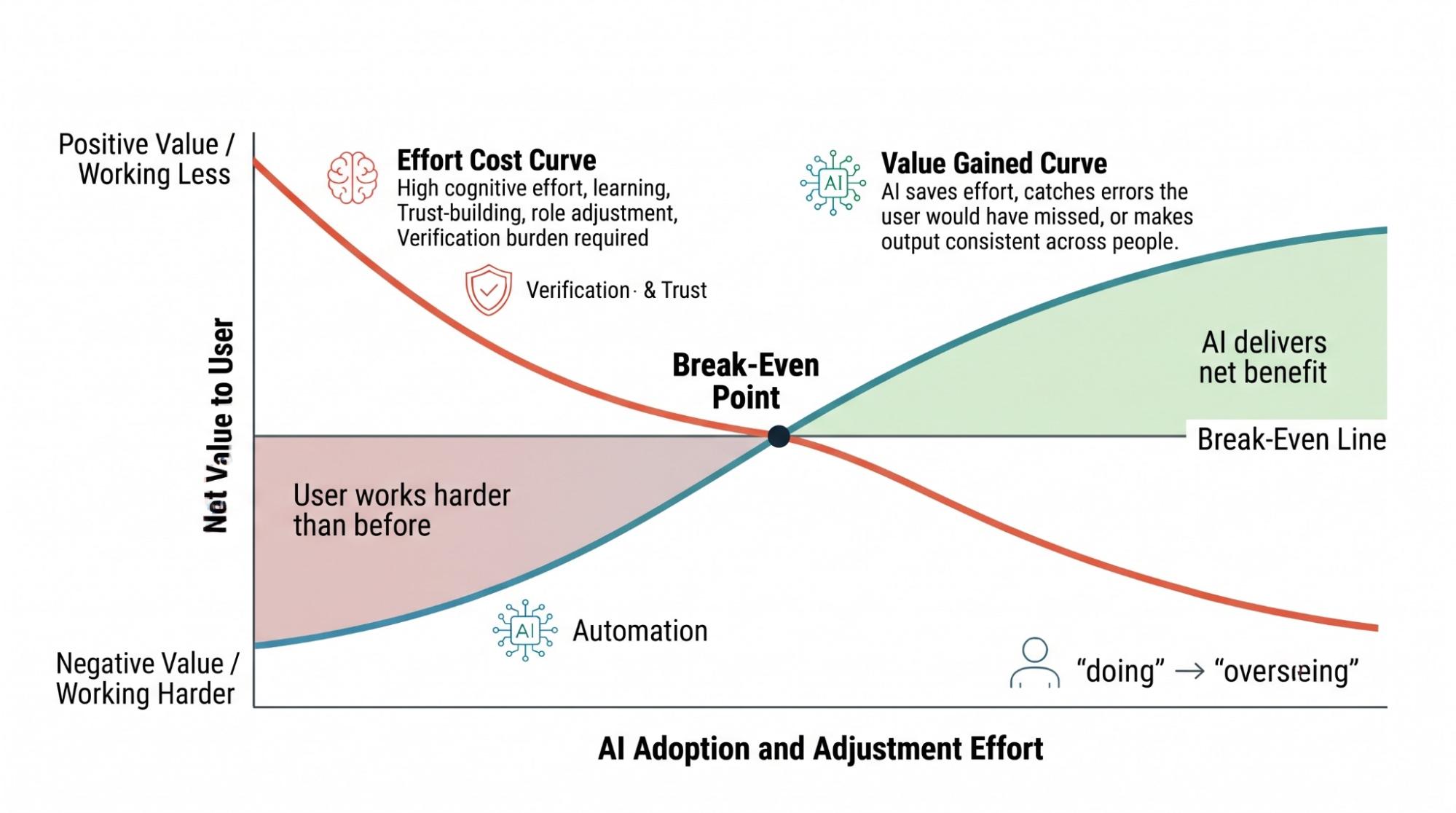
Four questions can help your team locate the break-even line before design work starts. Each one produces a design condition the brief can act on.
These questions do not replace the build decision. Funding, strategy, and existing commitments all weigh on that, and four questions cannot see any of it.
Run through all four questions together, since no single question settles the issue alone. Do it while the feature is still a proposal, before anyone sinks weeks into design. You will also need at least one person who does the task for a living, such as a loan officer, analyst, or benefits specialist. They do not have to sit in the roadmap meeting, and a short conversation tells you where the mental effort actually sits and whether the feature would help or add work.
Question 1: Does This Reduce The Total Effort The Task Takes For This User?
Count everything the task asks of the user: the thinking, the clicking, and the checking they will owe once AI is involved. Fewer clicks proves nothing on its own, because a feature can cut clicks and still leave the person working harder. Write down the cost even when it goes up, since Question 2 may find a return that pays for it.
A loan officer reading 40 financial disclosures to find the three that conflict with lending policy is thinking hard, and AI that surfaces those conflicts cuts that demand directly. Compare that with typing a loan number into a tracking system, which costs a few seconds and almost no thought. Pre-filling that field relocates the cost instead of removing it, because the officer now checks what the machine entered. Conventional wisdom says to automate the repetitive and monotonous tasks, and the pre-filled field is where that advice misfires. In this example:
- When AI fills in a field, the user takes on checking it.
- The original task requires a short keystroke sequence and no sustained attention.
- The automation trades a low-effort action for a high-attention one.
You can find the tasks worth automating by comparing total effort before and after. Count the checking the user inherits on the after side.
Who the user is matters as much as what the task is. One feature can clear the line for a junior analyst and fall short for a senior one. Hand a junior analyst an AI-drafted risk summary, and they gain a starting point they lack the pattern library to produce on their own. A senior analyst, however, reads that same summary against the analysis already formed in their head, spends four minutes doing it, and learns nothing.
A finding like that tells you who to ship to. Scope the addition to the group it serves.
Design condition: Name the user segment the addition serves, and design an exit for the other segments.
Question 2: Does This Beat The Way The User Does The Task Now?
Compare the AI approach against the user’s current method, including the spreadsheets and workarounds they built for themselves. Genuine ambiguity is one reason AI comes out ahead when someone explores options, produces a starting point, or looks for patterns too numerous to spot by hand. Scale, speed, and consistency across a group of people doing the same job are three more. A fourth is catching what the current method reliably misses, which is how the fraud screening tool earns its place. The advantage disappears once the user has a practiced route to a known answer.
For example, an HR team building a succession planning tool finds the answer running both ways inside one product. Using AI to surface internal candidates whose skill combinations nobody would think to search for wins on ambiguity and scale together, since no single right answer exists and manual review of that search space would take weeks. Drafting the notification email after someone picks a candidate loses to the method already in place. The format is familiar, the writing takes two minutes, and the person sending it holds firm opinions about tone. The candidate search earns the addition. The email draft layers an interaction onto a task that runs fine without one.
The nature of the input and the shape of the output are separate decisions. A task can hold genuine ambiguity and still call for a structured visual result instead of a conversational one. Pair this audit with a modality evaluation for the output side.
Design condition: Remove AI from any step where the user’s current method already reaches the answer quickly and reliably.Question 3: Can The User Catch The Errors?
Every AI system makes mistakes. The question is whether your user will notice. Start with how visible the error is. Then weigh what it costs when nobody catches it, and whether the user still has the skill to catch it. Question 1 asks what checking costs. This one asks whether checking is even possible.
Error visibility varies enormously, and product teams tend to estimate it badly. For example, an AI trip planner that suggests a museum on the day it closes produces an invisible error, because nothing in the output looks wrong. The traveler finds out while standing outside a locked door in Tokyo. Compare that with a suggested flight that departs before the connecting flight lands, where the contradiction sits right there on the screen.
Automation bias makes the invisible cases worse. Raja Parasuraman and Dietrich Manzey (2010) reviewed decades of human factors research showing that people defer to automated output even when that output is wrong, across aviation, medicine, and process control. Trust climbs fast, and rarely as a conscious decision. Once it does, users stop applying the scrutiny that would catch the mistake.
Map the error surface, meaning the ways this feature can be wrong, before design work starts. List the three likeliest error types. Rate each one on visibility to the user and consequence if it slips through. Any combination of low visibility and high consequence becomes a design requirement.
Show users where the output came from and how the system produced it. That is provenance, and it is what lets trust settle at the right level. People who can see the source, the data behind it, and when it was pulled catch errors more often. Tell the traveler that a restaurant’s hours came from a page cached in March and they know what to check. A confident-sounding paragraph with no source attached leaves them guessing.
Design condition: Any addition with a high-consequence, low-visibility error surface ships with provenance display and verification prompts, or it does not ship.Question 4: After A Year Of Using This, Can The User Still Tell When The AI Is Wrong?
Letting the routine work go is a real benefit of adding AI. Nobody needs to protect a specialist’s ability to format a citation or an analyst’s ability to total a column by hand, and arguing to preserve skills the technology has absorbed wastes everyone’s time.
Still, the judgment that catches the machine’s mistakes stays exempt from replacement. That judgment makes every other delegation safe, and disuse degrades it like any other skill.
Research in radiology shows how fast a suggestion can override a reader’s own judgment. In a 2023 experiment, Thomas Dratsch and colleagues had 27 radiologists read mammograms alongside what they were told was an AI system (a simulation created solely for the experiment). The radiologists worked through a 10-image training set where the suggested category was always correct, then 40 more mammograms with incorrect suggestions planted in 12 of them. The result showed how incorrect AI suggestions damaged diagnostic accuracy at every experience level. The most experienced readers, averaging 15 years, assigned the correct category 82.3% of the time when the suggestion was right and 45.5% of the time when it was wrong, while the least experienced group fell from 79.7% to 19.8%. Experience softened the effect without preventing it. A year of deferring to the same system, with the judgment it replaced sitting unused, leaves a reader in a weaker position than the one these radiologists started from.
Question 3 looks at your user today. Extend the same test 12 months forward and you arrive at Question 4. Teams that answer the first and skip the second read the resulting failures as a quality problem in the model, when the cause is the human judgment they took out of daily use.
Ask whether this user could judge the quality of the output 12 months from now if the feature vanished tomorrow. When the answer is no, the design needs a mechanism that keeps verification skill in use. Periodic blind review works well and costs little, with the user forming a judgment before seeing what the AI produced. Rotating a share of cases off AI assistance does a similar job, as does a weekly comparison between machine output and a human-produced version.
Design condition: Name the mechanism that keeps verification skill in use, and build it into the workflow itself. A slide in the training deck will not do it.A decision Matrix
Table 1 below gathers the four questions, the signals pointing each way, and the condition each one produces.
Audit question AI earns its place when… AI costs the user when… Design condition Does this reduce the total effort the task takes for this user? The task demands synthesis across large or varied inputs, and judgment calls create the bottleneck The task follows a known procedure with a fast manual path, or verification costs as much as the original work Name the segment served, and give other segments an exit Does this beat the way the user does the task now? The AI approach wins on ambiguity, scale, speed, consistency, or catch rate against the method the user has now The user’s current method already reaches the answer quickly and reliably Remove AI from steps the current method already handles well Can the user catch the errors? Errors appear on their face, stakes stay low, correction is cheap Errors stay subtle, stakes run high, or verification needs the skill being delegated Provenance display and verification prompts, or no build After a year, can the user still tell when the AI is wrong? AI absorbs volume while the user keeps making the judgment calls AI absorbs the judgment calls with no feedback on quality A named mechanism that keeps verification skill in use Table 1: The AI Addition Decision Matrix. Clear answers across all four questions point toward building the feature as proposed. A poor answer on Question 1 calls for a design condition or a change in scope, unless Question 2 finds a return that covers the cost. Questions 2 and 4 work the same way without that exception. A poor answer on Question 3 can stop the build.
Put the conditions in the design brief, where they become project requirements. Teams reduce AI features to yes or no because roadmap reviews demand it, and that throws away everything the audit found. A feature that answers well on Questions 1 and 2 and poorly on Question 3 proceeds only with provenance built in. Write that in on day one. Requirements that arrive at the end read as polish, and teams cut polish when timelines slip.
Running The Audit On The Appeals Scenario
Let’s return to the insurer scenario from our opening. The first version of the tool fails Question 1. Writing a determination takes sustained thought, and the AI that produces the draft moves that effort into verification without reducing the total. An hour with the four questions would surface that before the first version reaches design.
Question 2 points in the same direction. Appeals determinations follow a familiar structure, and specialists reach the answer through a practiced route. The ambiguity in the task sits earlier, in finding which provisions and prior decisions apply.
Question 3 raises the stakes. A wrong determination affects someone’s medical coverage, and an error buried in fluent prose stays invisible until the next appeal arrives. That answer produces the provenance requirement in the second version, which cites the source document and retrieval date for every provision it surfaces.
Question 4 explains why the second version holds up. Specialists still write every determination, so the judgment that evaluates the retrieved material stays in daily use. Keeping version one would train specialists for a year to approve text they no longer have the practice to assess.
The Same Audit On Meeting Summaries
AI-generated meeting summaries sit inside products that millions of people open every day, and the audit reaches a different answer for them.
On Question 1, a summary removes the work of writing notes and adds the work of checking whether it attributed a decision to the right person. Total effort drops for the participant who never took notes. For the person who always took the notes and circulated them, the trade is closer, and the verification lands on them. That split is exactly what Question 1 is built to surface.
Question 2 compares the summary against someone typing while half-listening, which produces patchy notes. A summary beats that on completeness and on consistency from meeting to meeting, so the feature clears this question for most teams.
A summary that assigns a commitment to the wrong person looks exactly like a correct one, and nobody rereads the transcript to check. On Question 3, low visibility and real consequence together turn into a requirement for a linked source timestamp behind every action item.
The feature clears Question 4, and the design needs no mechanism. Nobody loses a skill worth protecting by giving up meeting notes, and the participants keep making every decision the summary records.
Two clear answers, one segment finding, and one condition. The timestamps ship with the feature, and the habitual note-taker is the segment the team checks after launch.
The 60-minute Version Of The Audit
You can run this before the next AI feature reaches your roadmap.
- State the task specifically (10 minutes). Write it at the level of one user in one sitting. For example, help a mid-level financial analyst find the three highest-risk items in a 40-page due diligence report inside a two-hour review window. A task described as helping users summarize documents is too loose to evaluate.
- Answer the questions with someone who does the work (25 minutes). Their read on where the effort actually sits beats any product team estimate. Ask which parts of the task they find hard, listen for whether the proposed feature touches those parts, and ask what they would lose the ability to check if the feature made the judgment calls for a year.
- Map the error surface (15 minutes). Identify the three likeliest error types, each rated on visibility and consequence. Low visibility plus high consequence becomes a build requirement. For instance, a medical diagnostic tool suggesting a treatment plan with a high mortality rate if incorrect requires strict provenance and verification triggers, while a scheduling assistant proposing the wrong meeting time is easier to spot and repair.
- Write the conditions into the brief (10 minutes). Provenance display, verification prompts, segment scoping, and skill mechanisms belong in the brief that goes to design, in the same document as the feature description.
Everett Rogers (2003) called this pro-innovation bias, the assumption that new capability means progress before anyone verifies the benefit, and competitive pressure turns a rival’s announcement into an internal mandate. An hour of structured questions gives your team a way to answer that pressure.
Bringing The Results Into The Room #
Audit results land badly when a designer presents them as reasons the feature should not exist. The conditions are the useful output, so bring those into the product review.
Start by naming the segment the feature serves, which makes the answer a yes for someone. Hand over the error surface as a requirement with a cost attached. A product manager can act on a request for timestamps behind every attributed decision, and nobody can act on a worry that users might not trust the output. Then offer the change in scope without waiting to be asked. A version that surfaces the provisions instead of writing the determination is a smaller build with a better adoption story, and that framing moves a roadmap conversation forward.
A sentence that works out loud: We think this clears the bar for junior analysts and adds a verification step for senior analysts, so we would scope it to onboarding and revisit the rest next quarter.
The attention a person can spend in a working day stays fixed no matter how good your model gets. Before the next feature reaches design, write down what it will cost the person doing the work and which of the three returns pays for it. With both answers in hand, your team can walk into the roadmap review with a scope to propose.
References
- “Perceived trust and professional identity threat in AI-based clinical decision support systems: Scenario-based experimental study on AI process design features”, Ackerhans, S., Wehkamp, K., Petzina, R., Dumitrescu, D., & Schultz, C. (2025)
- “The magical number 4 in short-term memory: A reconsideration of mental storage capacity”, Cowan, N. (2001)
- “Automation bias in mammography: The impact of artificial intelligence BI-RADS suggestions on reader performance”, Dratsch, T., Chen, X., Rezazade Mehrizi, M., Kloeckner, R., Mähringer-Kunz, A., Püsken, M., Baeßler, B., Sauer, S., Maintz, D., & Pinto dos Santos, D. (2023)
- “Complacency and bias in human use of automation: An attentional integration”, Parasuraman, R., & Manzey, D. H. (2010)
- “Diffusion of Innovations”, Rogers, E. M. (2003)


