In modern supply chains, visibility and real-time execution is very crucial. That’s how the integration betweenSAP S/4HANAandSAP Extended Warehouse Management (EWM)comes
into the picture. Understanding how these systems communicate can help
businesses streamline warehouse operations while keeping ERP data
accurate.
Below is the breakdown of how data flows between these systems and why it matters.
1. Master Data Synchronisation – Laying the Foundation
Before warehouse operations begin, EWM needs accurate information. SAP S/4HANA provides:
Material Master Data
Warehouse Structure (storage types, bins)
Customer & Vendor Master
Packaging & Handling Unit Specifications
This ensures that EWM knows what is in the warehouse, where it
should go, and how it should be handled. Master data synchronisation
eliminates errors and aligns ERP and warehouse operations.
2. Transaction Data Exchange – Driving Execution
Once master data is in sync, transaction data starts flowing: From SAP S/4HANA to EWM:
Inbound Deliveries (Goods Receipts)
Outbound Deliveries (Shipments)
Stock Transport Orders
Production Orders (for warehouse supply)
From EWM to SAP S/4HANA:
Goods Receipt Confirmations
Goods Issue Confirmations
Inventory Updates
This two-way exchange ensures that warehouse movements are
accurately reflected in ERP for inventory, financials, and order
fulfilment.
3. Communication Technologies – The Connective Tissue
SAP offers multiple ways for systems to talk to each other:
IDocs:Traditional asynchronous messaging
Core Interface (CIF):Used in SCM for master and transaction data sync
RFC (Remote Function Calls):Synchronous updates and confirmations
SOAP / REST APIs:Real-time integration in modern landscapes
These technologies allow the ERP and warehouse systems to stay aligned, even in complex, high-volume environments.
4. High-Level Flow – From Order to Warehouse to Delivery
Master Data Sync:Materials, warehouse structure, and customer info flow from S/4HANA to EWM.
Delivery Documents:ERP creates inbound/outbound deliveries → sent to EWM for warehouse task creation.
Warehouse Execution:EWM handles putaway, picking, packing, and other physical processes.
Confirmations & Inventory Updates:EWM posts goods receipt/issue confirmations back to S/4HANA.
Financial & Billing Integration:ERP captures inventory changes and manages accounting and billing.
This integration ensures real-time visibility, accuracy, and operational efficiency.
Why is it important?
Accurate inventory across ERP and warehouse systems
Faster, more reliable order fulfilment
Reduced errors and manual interventions
Real-time updates for finance and operations
Foundation for automation and digital warehouse initiatives
In short, theS/4HANA ↔ EWM connectiontransforms warehouse operations from a reactive, manual process into a digital, integrated, and efficient execution engine.
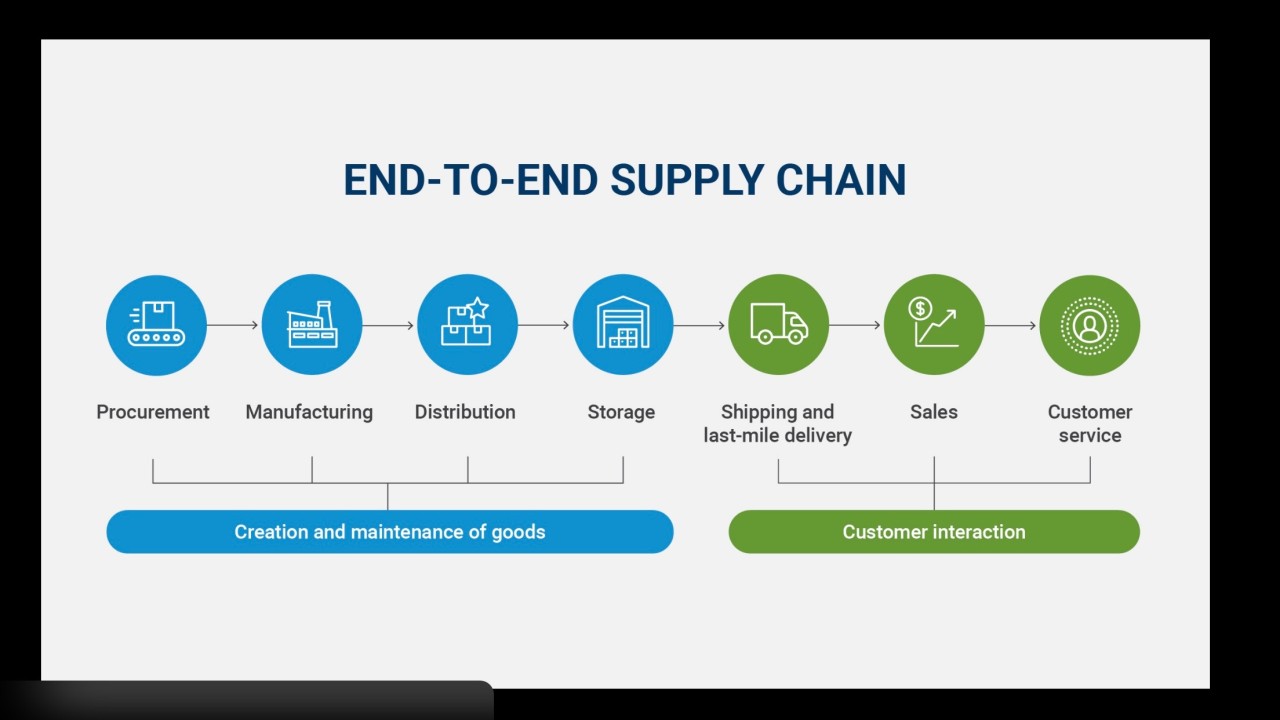
gement (SCM) is about synchronisingdemand, supply, production, inventory, logistics, and financeinto one connected ecosystem that drives profitability and customer satisfaction.
In today’s environment of volatility, shorter product lifecycles,
and rising customer expectations, the supply chain has become a
strategic differentiator.
1. Demand & Planning – Turning Market Signals into Action
Everything starts with demand. Key planning capabilities include:
Demand Forecasting
Sales & Operations Planning (S&OP)
Material Requirements Planning (MRP)
Capacity Planning
Effective planning ensures:
The right inventory levels
Stable production schedule
Optimised working capital
Improved service levels
Poor planning leads to excess stock, stockouts, expediting costs,
and margin erosion. Planning can directly impact the financial
performance.
2. Procurement – Building a Reliable Supply Base
Once demand is translated into requirements, procurement activates the supply side. Core activities include:
Strong supplier partnerships are foundational to supply chain stability.
3. Manufacturing & Quality – Creating Value Efficiently
Manufacturing converts raw materials into finished goods.
Integrated supply chains connect:
Production Planning
Shop Floor Execution
Quality Management
Raw Material & Finished Goods Inventory
Quality assurance is embedded across:
Incoming inspections
In-process checks
Final product validation
Operational excellence in manufacturing drives:
Cost efficiency
On-time delivery
Consistent product quality
Brand trust
4. Inventory & Warehouse Management – Controlling the Flow
Inventory acts as the buffer between demand and supply, but it must be controlled intelligently. Warehouse management ensures:
Accurate stock visibility
Optimized storage utilization
Efficient picking and putaway
Real-time inventory updates
Advanced warehouse capabilities include:
Task management
RF-enabled execution
Labor management
Integration with transportation planning
Solutions such asSAP Extended Warehouse ManagementandSAP S/4HANAenable
real-time coordination between warehouse operations, production, and
order fulfilment. Warehouse excellence directly impacts delivery
performance and cost control.
5. Order Fulfilment & Logistics – Delivering to the Customer
Each function is interconnected. Each delay has a downstream
impact. Each improvement compounds across the network. Organisations
that treat the supply chain as a strategic asset can create sustainable
competitive advantage.
💬 As businesses continue their digital transformation journeys,
the supply chain will remain at the centre of operational excellence and
growth strategy. Where is your organization focusing its next supply
chain improvement initiative? Let's connect and exchange thoughts and
knowledge.
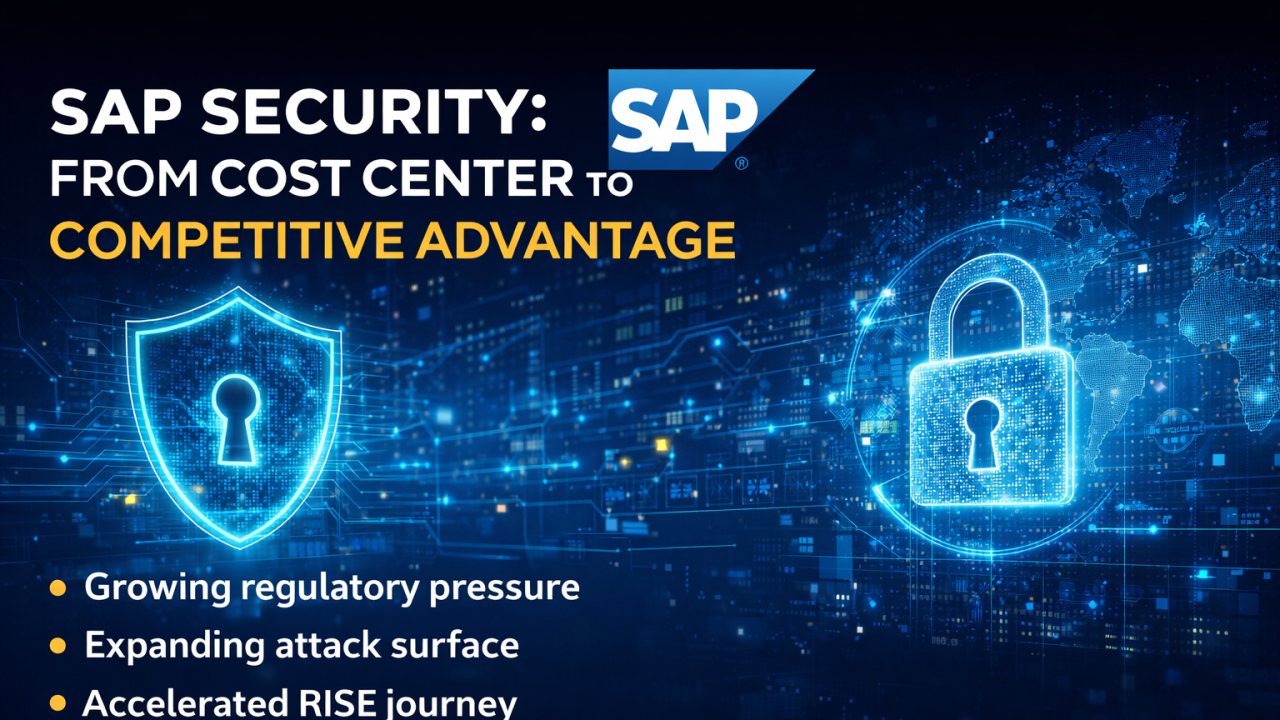
Beyond Compliance: SAP Security as Strategic Advantage
In every conversation I have about digital transformation, there's an uncomfortable truth we need to address:TRUSThas become our mostvaluableand mostvulnerablebusiness asset.
At the heart of this challenge sits something many still underestimate:SAP security.
These aren't just IT systems, they're the Crown Jewels that house our
financial data, supply chain operations, HR records, and intellectual
property. For most organizations, SAP is the business.
As organizations accelerate their cloud journey throughRISE with SAP, the opportunity for modernization is huge! But this shift demands a fundamental rethinking of how we protect the digital core.
Three realities are forcing this transformation
The regulatory landscape is intensifying globally
From NIS2 in Europe to the UK's newCyber Security and Resilience Billextending
cybersecurity requirements across critical digital services and supply
chains, SAP systems sit squarely in the crosshairs of compliance
obligations. This isn't just about avoiding fines, it's about
maintaining the license to operate in regulated industries and markets.
With RISE with SAP, understanding the shared responsibility model
becomes a governance imperative,while SAP provides robust Infrastructure security, your data, configurations, and access controls remain your accountability.
The attack surface has exploded.
RISE with SAP unlocks incredible connectivity and agility, but our
ERP systems are no longer isolated fortresses. They're connected
ecosystems spanning multiple clouds, IoT devices, third-party
applications, and AI platforms. Every integration point represents both
opportunity and risk and a single misconfiguration can expose decades of
business-critical data.
Business velocity cannot wait for traditional security approaches
Digital transformation initiatives demand speed and agility.
Security can no longer be the gatekeeper that delays RISE migrations or
S/4HANA upgrades, it must become the guardrail that enables us to
accelerate safely. This can only be enabled when business leaders invite
Security to the table early! The organisations that will thrive are
making a fundamental cultural shift - from "patching vulnerabilities" to
"designing for resilience." They're embedding security by design into
every RISE journey from day zero, not bolting it on after go-live.
They're measuring risk in terms of business impact, not just technical
vulnerabilities.
Most critically, they're reframing SAP security from a cost center to acompetitive advantage.
When your digital core is genuinely secure, you can onboard partners
faster, enter new markets with confidence, and leverage emerging
technologies without compromising trust.
Here's the question I encourage every leadership team to ask:
"If our SAP systems were compromised or unavailable for 48
hours, what would that mean for our customers, our operations, and our
brand? And are we truly prepared for that reality?"
If the honest answer gives you pause, then SAP security deserves a different level of attention and investment.
The bottom line:As
we navigate the UK's new Cyber Security and Resilience Bill, NIS2
compliance, and accelerate our RISE with SAP journeys, security isn't
just about protection it's about enablement. When we embed security by
design into our digital core from day one, we don't just mitigate risk;
we unlock the confidence to transform at unprecedented speed and scale.
The digital core of your business deserves nothing less.
The organizations that recognize this today will be the ones defining
their industries tomorrow.
The Evolution of SAP Warehouse Management: From Manual Processes to Intelligent Integration
Long before the release of EWM in SAP SCM, SAP
steadily enhanced its classic Warehouse Management solution with each
R/3 release, layer by layer building the foundation for today’s
intelligent, connected supply chains. Here’s a structured look at that
evolution and what it meant for operations.
1. Manual Warehouse Management – The Starting Point
In the earliest stages, warehouse operations were largely manual:
Paper-based inventory tracking
Physical bin cards
Manual stock counts
Limited system visibility
ERP systems recorded transactions, but warehouse execution relied heavily on people and paperwork. Impact: Low transparency, delayed updates, high dependency on physical verification.
2. Locator-Based Management – Structured Storage
The next step introduced bin-level management: what many called “locator” control.
Storage types, sections, and bins
Structured putaway strategies
Basic stock visibility by location
With the rise of SAP R/3 Warehouse Management (WM), organizations gained the ability to manage stock at a much more granular level. Impact: Improved storage discipline and better stock traceability.
3. SAP WM – Core Warehouse Execution
As SAP R/3 WM matured, it introduced:
Transfer Orders
Putaway and picking strategies
Inventory differences management
Batch and handling unit support
Impact: Standardized execution processes and reduced manual errors.
4. WMS with RF (Radio Frequency) – Real-Time Execution
The integration of RF devices changed everything.
Real-time confirmation of warehouse tasks
Immediate inventory updates
Reduced paperwork
Increased picking accuracy
This brought SAP WM from batch processing to near real-time execution. Impact: Improved productivity and data accuracy.
5. Task Management – Optimizing Workflows
With enhanced releases, SAP introduced more structured task management capabilities:
Queue management
Task interleaving
Resource prioritization
Better workload balancing
Warehouse supervisors gained greater control over operational efficiency. Impact: Shift from transaction processing to operational optimization.
6. Labor Management System (LMS) – Measuring Performance
Labor became measurable.
Engineered labor standards
Performance tracking
Productivity benchmarking
Incentive program support
Warehouse operations moved toward data-driven workforce management. Impact: Higher accountability and improved labor utilization.
7. Transportation Management (TMS) Integration – Beyond the Four Walls
The final step before advanced SCM solutions was integration with transportation:
Shipment visibility
Dock scheduling
Yard management coordination
Freight planning alignment
Integration between Warehouse Management and Transportation Management ensured smoother outbound and inbound flows. Impact: Extended visibility from warehouse floor to transportation network.
Then Came EWM
When SAP Extended Warehouse Management (EWM) was introduced within SAP Supply Chain Management (SCM), it was a natural evolution.
EWM consolidated and expanded:
Advanced slotting
Wave management
Yard management
Integrated labor management
Advanced RF and automation support
Full supply chain integration
It represented the culmination of years of incremental enhancement in the classic R/3 WM environment.
Key Takeaway
SAP jumped from manual warehouses to intelligent supply chains. It evolved:
Understanding this evolution helps consultants and leaders appreciate:
Why legacy WM systems look the way they do
Why EWM is structured as it is
How digital transformation in warehousing truly happens
SAP vs ERP – What’s the Difference?
Many people use SAP and ERP interchangeably — but they’re not the same. 🔹
ERP (Enterprise Resource Planning) is a business management system that
integrates functions like Finance, HR, Supply Chain, Sales, and
Procurement into one platform. 🔹 SAP is a leading company that provides ERP software solutions. 👉 ERP is the concept/system 👉 SAP is a company that builds ERP software In simple terms: ERP is the category. SAP is one of the top providers in that category. hashtag#SAPhashtag#ERPhashtag#DigitalTransformationhashtag#BusinessGrowthhashtag#EnterpriseSolutions
Exploring UX in the SAP ecosystem
Exploring UX in the SAP ecosystem is a bit like looking at a
"before and after" home renovation show. For years, SAP was known for
the SAP GUI—functional, but famously dense and complex. Today, the focus
has shifted entirely toward making enterprise software feel as
intuitive as a banking app or social media feed.
The Core Philosophy SAP UX
Enterprise software was once known for being powerful—but complex.
SAP changed that narrative with a clear and focused UX philosophy: make
business software simple, role-based, and delightful.
Technically, SAP UX is powered by SAPUI5, enabling responsive,
device-agnostic applications that work seamlessly across desktop,
tablet, and mobile. Combined with intelligent insights from modern
platforms like SAP S/4HANA, users can access real-time data and make
informed decisions within the same interface.
In essence UX in SAP
In essence, SAP UX proves that enterprise software doesn’t have to
be complicated. When designed around people, roles, and real business
needs, even complex systems can feel simple.
Prescriptive
class name conventions are no longer enough to keep CSS maintainable in
a world of increasingly complex interfaces. Can the new @scope rule finally give developers the confidence to write CSS that can keep up with modern front ends?
When
learning the principles of basic CSS, one is taught to write modular,
reusable, and descriptive styles to ensure maintainability. But when
developers become involved with real-world applications, it often feels
impossible to add UI features without styles leaking into unintended
areas.
This issue often snowballs into a self-fulfilling loop;
styles that are theoretically scoped to one element or class start
showing up where they don’t belong. This forces the developer to create
even more specific selectors to override the leaked styles, which then
accidentally override global styles, and so on.
In
the real world, however, it doesn’t always work out like that.
Priorities can change, and with change, implementation becomes
inconsistent. Small changes to the HTML structure can require many CSS
class name revisions. With highly interactive front-end applications,
class names following the BEM pattern can become long and unwieldy
(e.g., app-user-overview__status--is-authenticating), and not fully adhering to the naming rules breaks the system’s structure, thereby negating its benefits.
Given these challenges, it’s no wonder that developers have turned to frameworks, Tailwind being the most popular CSS framework. Rather than trying to fight what seems like an unwinnable specificity war between styles, it is easier to give up on the CSS Cascade and use tools that guarantee complete isolation.
Developers Lean More On Utilities
How do we know that some developers are keen on avoiding cascaded styles? It’s the rise of “modern” front-end tooling — like CSS-in-JS frameworks
— designed specifically for that purpose. Working with isolated styles
that are tightly scoped to specific components can seem like a breath of
fresh air. It removes the need to name things — still one of the most hated and time-consuming front-end tasks — and allows developers to be productive without fully understanding or leveraging the benefits of CSS inheritance.
But
ditching the CSS Cascade comes with its own problems. For instance,
composing styles in JavaScript requires heavy build configurations and
often leads to styles awkwardly intermingling with component markup or
HTML. Instead of carefully considered naming conventions, we allow build
tools to autogenerate selectors and identifiers for us (e.g., .jsx-3130221066),
requiring developers to keep up with yet another pseudo-language in and
of itself. (As if the cognitive load of understanding what all your
component’s useEffects do weren’t already enough!)
Further
abstracting the job of naming classes to tooling means that basic
debugging is often constrained to specific application versions compiled
for development, rather than leveraging native browser features that
support live debugging, such as Developer Tools.
Luckily,
modern CSS features not only make writing standard CSS more flexible
but also give developers like us a great deal more power to manage the
cascade and make it work for us. CSS Cascade Layers
are a great example, but there’s another feature that gets a surprising
lack of attention — although that is changing now that it has recently
become Baseline compatible.
The CSS @scope At-Rule
I consider the CSS @scope at-rule
to be a potential cure for the sort of style-leak-induced anxiety we’ve
covered, one that does not force us to compromise native web advantages
for abstractions and extra build tooling.
“The @scope
CSS at-rule enables you to select elements in specific DOM subtrees,
targeting elements precisely without writing overly-specific selectors
that are hard to override, and without coupling your selectors too
tightly to the DOM structure.”
In other words, we can work with isolated styles in specific instances without sacrificing inheritance, cascading, or even the basic separation of concerns that has been a long-running guiding principle of front-end development.
Plus, it has excellent browser coverage. In fact, Firefox 146 added support for @scope in December, making it Baseline compatible for the first time. Here is a simple comparison between a button using the BEM pattern versus the @scope rule:
<!-- BEM --><buttonclass="button button--primary"><spanclass="button__text">Click me</span><spanclass="button__icon">→</span></button><style>.button .button__text{/* button text styles */}.button .button__icon{/* button icon styles */}.button--primary{ primary button styles */ }</style>
The @scope rule allows for precision with less complexity.
The developer no longer needs to create boundaries using class names,
which, in turn, allows them to write selectors based on native HTML
elements, thereby eliminating the need for prescriptive CSS class name
patterns. By simply removing the need for class name management, @scope can alleviate the fear associated with CSS in large projects.
Basic Usage
To get started, add the @scope rule to your CSS and insert a root selector to which styles will be scoped:
@scope(<selector>){/* Styles scoped to the <selector> */}
So, for example, if we were to scope styles to a <nav> element, it may look something like this:
@scope(nav){a{/* Link styles within nav scope */}a:active{/* Active link styles */}a:active::before{/* Active link with pseudo-element for extra styling */}@media(max-width: 768px){a{/* Responsive adjustments */}}}
This, on its own, is not a groundbreaking feature. However, a second argument can be added to the scope to create a lower boundary, effectively defining the scope’s start and end points.
/* Any `a` element inside `ul` will not have the styles applied */@scope(nav) to (ul){a{font-size: 14px;}}
This practice is called donut scoping, and there are several approaches one could use, including a series of similar, highly specific selectors coupled tightly to the DOM structure, a :not pseudo-selector, or assigning specific class names to <a> elements within the <nav> to handle the differing CSS.
Regardless of those other approaches, the @scope
method is much more concise. More importantly, it prevents the risk of
broken styles if classnames change or are misused or if the HTML
structure were to be modified. Now that @scope is Baseline compatible, we no longer need workarounds!
We can take this idea further with multiple end boundaries to create a “style figure eight”:
/* Any <a> or <p> element inside <aside> or <nav> will not have the styles applied */@scope(main) to (aside, nav){a{font-size: 14px;}p{line-height: 16px;color: darkgrey;}}
Compare that to a version handled without the @scope rule, where the developer has to “reset” styles to their defaults:
main a{font-size: 14px;}main p{line-height: 16px;color: darkgrey;}main aside a,
main nav a{font-size: inherit;/* or whatever the default should be */}main aside p,
main nav p{line-height: inherit;/* or whatever the default should be */color: inherit;/* or a specific color */}
Check out the following example. Do you notice how simple it is to target some nested selectors while exempting others?
Consider a scenario where unique styles need to be applied to slotted content within web components.
When slotting content into a web component, that content becomes part
of the Shadow DOM, but still inherits styles from the parent document.
The developer might want to implement different styles depending on
which web component the content is slotted into:
<!-- Same <user-card> content, different contexts --><product-showcase><user-cardslot="reviewer"><imgsrc="avatar.jpg"slot="avatar"><spanslot="name">Jane Doe</span></user-card></product-showcase><team-roster><user-cardslot="member"><imgsrc="avatar.jpg"slot="avatar"><spanslot="name">Jane Doe</span></user-card></team-roster>
In this example, the developer might want the <user-card> to have distinct styles only if it is rendered inside <team-roster>:
There are additional ways that @scope can remove the need for class management without resorting to utilities or JavaScript-generated class names. For example, @scope opens up the possibility to easily target descendants of any selector, not just class names:
/* Only div elements with a direct child button are included in the root scope */@scope(div:has(> button)){p{font-size: 14px;}}
And they can be nested, creating scopes within scopes:
Plus, the root scope can be easily referenced within the @scope rule:
/* Applies to elements inside direct child `section` elements of `main`, but stops at any direct `aside` that is a direct chiled of those sections */@scope(main > section) to (:scope > aside){p{background-color: lightblue;color: blue;}/* Applies to ul elements that are immediate siblings of root scope */:scope + ul{list-style: none;}}
The @scope at-rule also introduces a new proximity
dimension to CSS specificity resolution. In traditional CSS, when two
selectors match the same element, the selector with the higher
specificity wins. With @scope, when two elements have equal
specificity, the one whose scope root is closer to the matched element
wins. This eliminates the need to override parent styles by manually
increasing an element’s specificity, since inner components naturally
supersede outer element styles.
<style>@scope(.container){.title{color: green;}}
<!-- The <h2> is closer to .container than to .sidebar so "color: green" wins. -->
@scope(.sidebar){.title{color: red;}}</style><divclass="sidebar"><divclass="container"><h2class="title">Hello</h2></div></div>
Conclusion
Utility-first
CSS frameworks, such as Tailwind, work well for prototyping and smaller
projects. Their benefits quickly diminish, however, when used in larger
projects involving more than a couple of developers.
Front-end development has become increasingly overcomplicated in the last few years, and CSS is no exception. While the @scope rule isn’t a cure-all, it can reduce the need for complex tooling. When used in place of, or alongside strategic class naming, @scope can make it easier and more fun to write maintainable CSS.
Autonomy
is an output of a technical system. Trustworthiness is an output of a
design process. Here are concrete design patterns, operational
frameworks, and organizational practices for building agentic systems
that are not only powerful but also transparent, controllable, and
trustworthy.
In the first part of this series,
we established the fundamental shift from generative to agentic
artificial intelligence. We explored why this leap from suggesting to
acting demands a new psychological and methodological toolkit for UX
researchers, product managers, and leaders. We defined a taxonomy of
agentic behaviors, from suggesting to acting autonomously, outlined the
essential research methods, defined the risks of agentic sludge, and
established the accountability metrics required to navigate this new
territory. We covered the what and the why.
Now, we move from the foundational to the functional. This article provides the how:
the concrete design patterns, operational frameworks, and
organizational practices essential for building agentic systems that are
not only powerful but also transparent, controllable, and worthy of user trust. If our research is the diagnostic tool, these patterns are the treatment plan.
They are the practical mechanisms through which we can give users a
palpable sense of control, even as we grant AI unprecedented autonomy.
The goal is to create an experience where autonomy feels like a
privilege granted by the user, not a right seized by the system.
Designing for agentic AI is designing for a relationship.
This relationship, like any successful partnership, must be built on
clear communication, mutual understanding, and established boundaries.
To
manage the shift from suggestion to action, we utilize six patterns
that follow the functional lifecycle of an agentic interaction:
Pre-Action (Establishing Intent) The Intent Preview and Autonomy Dial ensure the user defines the plan and the agent’s boundaries before anything happens.
In-Action (Providing Context) The
Explainable Rationale and Confidence Signal maintain transparency while
the agent works, showing the “why” and “how certain.”
Post-Action (Safety and Recovery) The Action Audit & Undo and Escalation Pathway provide a safety net for errors or high-ambiguity moments.
Below,
we will cover each pattern in detail, including recommendations for
metrics for success. These targets are representative benchmarks based
on industry standards; adjust them based on your specific domain risk.
1. The Intent Preview: Clarifying the What and How
This pattern is the conversational equivalent of saying, “Here’s what I’m about to do. Are you okay with that?” It’s the foundational moment of seeking consent in the user-agent relationship.
Before
an agent takes any significant action, the user must have a clear,
unambiguous understanding of what is about to happen. The Intent
Preview, or Plan Summary, establishes informed consent. It is the
conversational pause before action, transforming a black box of
autonomous processes into a transparent, reviewable plan.
Psychological Underpinning Presenting
a plan before action reduces cognitive load and eliminates surprise,
giving users a moment to verify the agent truly understands their
intent.
Anatomy of an Effective Intent Preview:
Clarity and Conciseness The
preview must be immediately digestible. It should summarize the primary
actions and outcomes in plain language, avoiding technical jargon. For
instance, instead of “Executing API call to cancel_booking(id: 4A7B),” it should state, “Cancel flight AA123 to San Francisco.”
Sequential Steps For
multi-step operations, the preview should outline the key phases. This
reveals the agent’s logic and allows users to spot potential issues in
the proposed sequence.
Clear User Actions The
preview is a decision point, not just a notification. It must be
accompanied by a clear set of choices. It’s a moment of intentional
friction, a ‘speed bump’ in the process designed to ensure the user is
making a conscious choice, particularly for irreversible or high-stakes
actions.
Let’s revisit our travel assistant scenario from the first part of this series.
We use this proactive assistant to illustrate how an agent handles a
flight cancellation. The agent has detected a flight cancellation and
has formulated a recovery plan.
The Intent Preview would look something like this:
Proposed Plan for Your Trip Disruption
I’ve detected that your 10:05 AM flight has been canceled. Here’s what I plan to do:
Cancel Flight UA456 Process refund and confirm cancellation details.
Rebook on Flight DL789 Book a confirmed seat on a 2:30 PM non-stop flight, as this is the next available non-stop flight with a confirmed seat.
Update Hotel Reservation Notify the Marriott that you will be arriving late.
Email Updated Itinerary Send the new flight and hotel details to you and your assistant, Jane Doe.
[ Proceed with this Plan ] [ Edit Plan ] [ Handle it Myself ]
This
preview is effective because it provides a complete picture, from
cancellation to communication, and offers three distinct paths forward:
full consent (Proceed), a desire for modification (Edit Plan), or a full
override (Handle it Myself). This multifaceted control is the bedrock
of trust.
The
Intent Preview is the primary pattern for building user trust. By
clearly stating what the agent plans to do and offering simple, direct
controls like “Proceed,” “Edit,” or “Handle it Myself,” we transform a
black box into a transparent and controllable experience.
When to Prioritize This Pattern This
pattern is non-negotiable for any action that is irreversible (e.g.,
deleting user data), involves a financial transaction of any amount,
shares information with other people or systems, or makes a significant
change that a user cannot easily undo.
Risk of Omission Without this, users feel ambushed by the agent’s actions and will disable the feature to regain control.
Metrics for Success:
Acceptance Ratio Plans Accepted Without Edit / Total Plans Displayed. Target > 85%.
Override Frequency Total Handle it Myself Clicks / Total Plans Displayed. A rate > 10% triggers a model review.
Recall Accuracy Percentage of test participants who can correctly list the plan’s steps 10 seconds after the preview is hidden.
Applying This to High-Stakes Domains
While
travel plans are a relatable baseline, this pattern becomes
indispensable in complex, high-stakes environments where an error
results in more than an inconvenience for an individual traveling. Many
of us work in settings where wrong decisions may result in a system
outage, putting a patient’s safety at risk, or numerous other
catastrophic outcomes that unreliable technology would introduce.
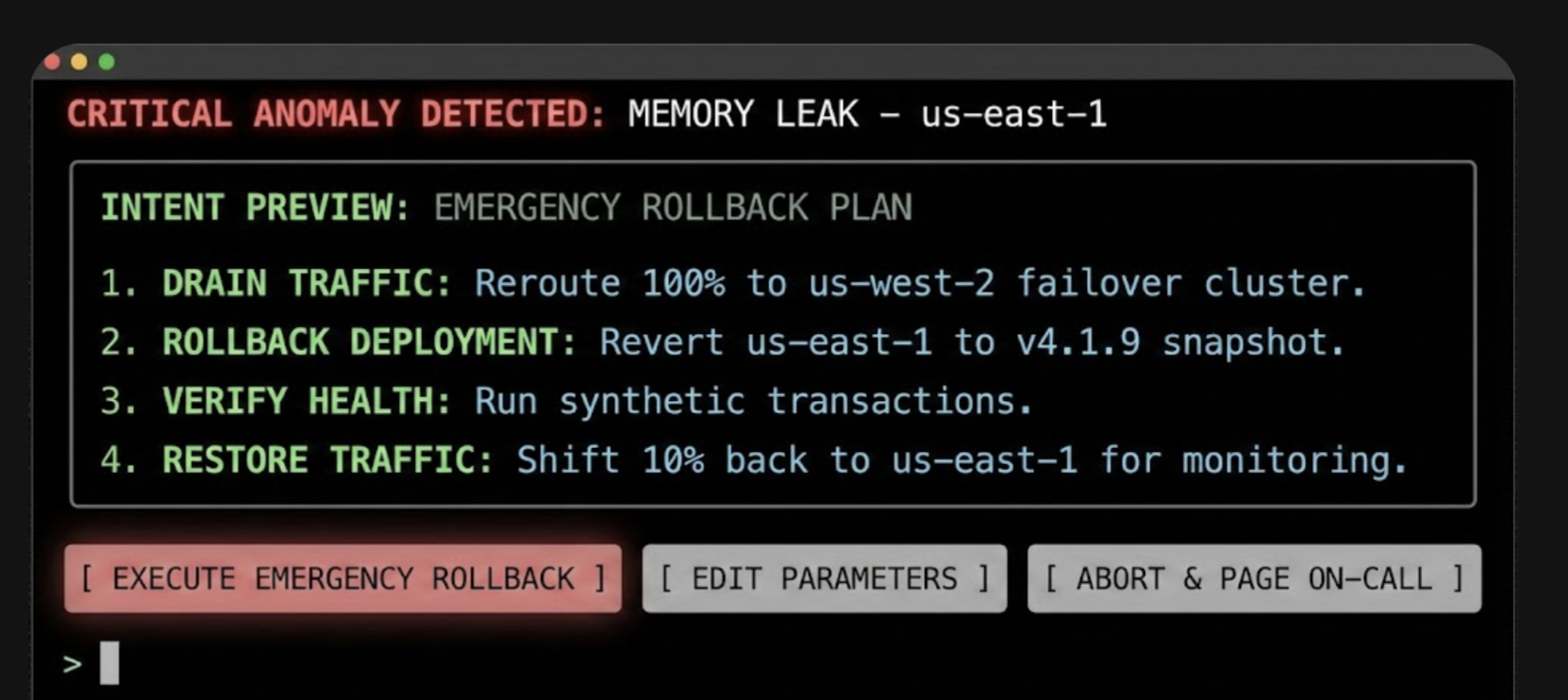
Consider
a DevOps Release Agent tasked with managing cloud infrastructure. In
this context, the Intent Preview acts as a safety barrier against
accidental downtime.
The intent preview in a higher-stakes setting, for example, cloud infrastructure.
In
this interface, the specific terminology (Drain Traffic, Rollback)
replaces generalities, and the actions are binary and impactful. The
user authorizes a major operational shift based on the agent’s logic,
rather than approving a suggestion.
2. The Autonomy Dial: Calibrating Trust With Progressive Authorization
Every
healthy relationship has boundaries. The Autonomy Dial is how the user
establishes it with their agent, defining what they are comfortable with
the agent handling on its own.
Trust is not a binary switch; it’s
a spectrum. A user might trust an agent to handle low-stakes tasks
autonomously but demand full confirmation for high-stakes decisions. The
Autonomy Dial, a form of progressive authorization, allows users to set
their preferred level of agent independence, making them active
participants in defining the relationship.
Psychological Underpinning Allowing
users to tune the agent’s autonomy grants them a locus of control,
letting them match the system’s behavior to their personal risk
tolerance.
Implementation This can be
implemented as a simple, clear setting within the application, ideally
on a per-task-type basis. Using the taxonomy from our first article, the
settings could be:
Observe & Suggest I want to be notified of opportunities or issues, but the agent will never propose a plan.
Plan & Propose The agent can create plans, but I must review every one before any action is taken.
Act with Confirmation For familiar tasks, the agent can prepare actions, and I will give a final go/no-go confirmation.
Act Autonomously For pre-approved tasks (e.g., disputing charges under $50), the agent can act independently and notify me after the fact.
An
email assistant, for example, could have a separate autonomy dial for
scheduling meetings versus sending emails on the user’s behalf. This
granularity is key, as it reflects the nuanced reality of a user’s
trust.
When to Prioritize This Pattern Prioritize
this in systems where tasks vary widely in risk and personal preference
(e.g., financial management tools, communication platforms). It is
essential for onboarding, allowing users to start with low autonomy and
increase it as their confidence grows.
Risk of Omission Without
this, users who experience a single failure will abandon the agent
completely rather than simply dialing back its permissions.
Metrics for Success:
Trust Density Percentage breakdown of users per setting (e.g., 20% Suggest, 50% Confirm, 30% Auto).
Setting Churn Number of Setting Changes / Total Active Users per month. High churn indicates trust volatility.
3. The Explainable Rationale: Answering Why?
After
taking an action, a good partner explains their reasoning. This pattern
is the open communication that follows an action, answering Why? before it’s even asked. “I did that because you’ve told me in the past that you prefer X.”
When an agent acts, especially autonomously, the immediate question in the user’s mind is often, Why did it do that?
The Explainable Rationale pattern proactively answers this question,
providing a concise justification for the agent’s decisions. This is not
a technical log file. In my first article of this series, we discussed
translating system primitives into user-facing language to prevent
deception. This pattern is the practical application of that principle.
It transforms the raw logic into a human-readable explanation grounded
in the user’s own stated preferences and prior inputs.
Psychological Underpinning When
an agent’s actions are explainable, they feel logical rather than
random, helping the user build an accurate mental model of how the agent
thinks.
Effective Rationales:
Grounded in Precedent The best explanations link back to a rule, preference, or prior action.
Simple and Direct Avoid complex conditional logic. Use a simple “Because you said X, I did Y” structure.
Returning to the travel example, after the flight is rebooked autonomously, the user might see this in their notification feed:
I’ve rebooked your canceled flight.
New Flight: Delta 789, departing at 2:30 PM.
Why I took this action:
Your original flight was canceled by the airline.
You’ve pre-approved autonomous rebooking for same-day, non-stop flights.
[ View New Itinerary ] [ Undo this Action ]
The
rationale is clear, defensible, and reinforces the idea that the agent
is operating within the boundaries the user established.
When to Prioritize This Pattern Prioritize
it for any autonomous action where the reasoning isn’t immediately
obvious from the context, especially for actions that happen in the
background or are triggered by an external event (like the flight
cancellation example).
Risk of Omission Without
this, users interpret valid autonomous actions as random behavior or
‘bugs,’ preventing them from forming a correct mental model.
Metrics for Success:
Why? Ticket Volume Number of support tickets tagged “Agent Behavior — Unclear” per 1,000 active users.
Rationale Validation Percentage of users who rate the explanation as ‘Helpful’ in post-interaction microsurveys.
This
pattern is about the agent being self-aware in the relationship. By
communicating its own confidence, it helps the user decide when to trust
its judgment and when to apply more scrutiny.
To help users
calibrate their own trust, the agent should surface its own confidence
in its plans and actions. This makes the agent’s internal state more
legible and helps the user decide when to scrutinize a decision more
closely.
Psychological Underpinning Surfacing
uncertainty helps prevent automation bias, encouraging users to
scrutinize low-confidence plans rather than blindly accepting them.
Implementation:
Confidence Score A simple percentage (e.g., Confidence: 95%) can be a quick, scannable indicator.
Scope Declaration A
clear statement of the agent’s area of expertise (e.g., Scope: Travel
bookings only) helps manage user expectations and prevents them from
asking the agent to perform tasks it’s not designed for.
Visual Cues A
green checkmark can denote high confidence, while a yellow question
mark can indicate uncertainty, prompting the user to review more
carefully.
When to Prioritize This Pattern Prioritize
when the agent’s performance can vary significantly based on the
quality of input data or the ambiguity of the task. It is especially
valuable in expert systems (e.g., medical aids, code assistants) where a
human must critically evaluate the AI’s output.
Risk of Omission Without
this, users will fall victim to automation bias, blindly accepting
low-confidence hallucinations, or anxiously double-check high-confidence
work.
Metrics for Success:
Calibration Score Pearson correlation between Model Confidence Score and User Acceptance Rate. Target > 0.8.
Scrutiny Delta Difference
between the average review time of low-confidence plans and
high-confidence plans. Expected to be positive (e.g., +12 seconds).
5. The Action Audit & Undo: The Ultimate Safety Net
Trust
requires knowing you can recover from a mistake. The Undo function is
the ultimate relationship safety net, assuring the user that even if the
agent misunderstands, the consequences are not catastrophic.
The
single most powerful mechanism for building user confidence is the
ability to easily reverse an agent’s action. A persistent, easy-to-read
Action Audit log, with a prominent Undo button for every possible
action, is the ultimate safety net. It dramatically lowers the perceived
risk of granting autonomy.
Psychological Underpinning Knowing
that a mistake can be easily undone creates psychological safety,
encouraging users to delegate tasks without fear of irreversible
consequences.
Design Best Practices:
Timeline View A chronological log of all agent-initiated actions is the most intuitive format.
Clear Status Indicators Show whether an action was successful, is in progress, or has been undone.
Time-Limited Undos For
actions that become irreversible after a certain point (e.g., a
non-refundable booking), the UI must clearly communicate this time
window (e.g., Undo available for 15 minutes). This transparency about
the system’s limitations is just as important as the undo capability
itself. Being honest about when an action becomes permanent builds
trust.
When to Prioritize This Pattern This
is a foundational pattern that should be implemented in nearly all
agentic systems. It is absolutely non-negotiable when introducing
autonomous features or when the cost of an error (financial, social, or
data-related) is high.
Risk of Omission Without this, one error permanently destroys trust, as users realize they have no safety net.
Metrics for Success:
Reversion Rate Undone Actions / Total Actions Performed. If the Reversion Rate > 5% for a specific task, disable automation for that task.
Safety Net Conversion Percentage of users who upgrade to Act Autonomously within 7 days of successfully using Undo.
6. The Escalation Pathway: Handling Uncertainty Gracefully
A
smart partner knows when to ask for help instead of guessing. This
pattern allows the agent to handle ambiguity gracefully by escalating to
the user, demonstrating a humility that builds, rather than erodes,
trust.
Even the most advanced agent will encounter situations
where it is uncertain about the user’s intent or the best course of
action. How it handles this uncertainty is a defining moment. A
well-designed agent doesn’t guess; it escalates.
Psychological Underpinning When
an agent acknowledges its limits rather than guessing, it builds trust
by respecting the user’s authority in ambiguous situations.
Escalation Patterns Include:
Requesting Clarification “You mentioned ‘next Tuesday.’ Do you mean September 30th or October 7th?”
Presenting Options “I found three flights that match your criteria. Which one looks best to you?”
Requesting Human Intervention For
high-stakes or highly ambiguous tasks, the agent should have a clear
pathway to loop in a human expert or support agent. The prompt might be:
“This transaction seems unusual, and I’m not confident about how to
proceed. Would you like me to flag this for a human agent to review?”
When to Prioritize This Pattern Prioritize
in domains where user intent can be ambiguous or highly
context-dependent (e.g., natural language interactions, complex data
queries). Use this whenever the agent operates with incomplete
information or when multiple correct paths exist.
Risk of Omission Without this, the agent will eventually make a confident, catastrophic guess that alienates the user.
Metrics for Success:
Escalation Frequency Agent Requests for Help / Total Tasks. Healthy range: 5-15%.
When
an agent makes a mistake, the error message is the apology. It must be
designed with psychological precision. This moment is a critical
opportunity to demonstrate accountability. From a service design
perspective, this is where companies can use the service recovery paradox:
the phenomenon where a customer who experiences a service failure,
followed by a successful and empathetic recovery, can actually become
more loyal than a customer who never experienced a failure at all. A
well-handled mistake can be a more powerful trust-building event than a
long history of flawless execution.
The key is treating the error as a relationship rupture that needs to be mended. This involves:
Acknowledge the Error The message should state clearly and simply that a mistake was made. Example: I incorrectly transferred funds.
State the Immediate Correction Immediately follow up with the remedial action. Example: I have reversed the action, and the funds have been returned to your account.
Provide a Path for Further Help Always
offer a clear link to human support. This de-escalates frustration and
shows that there is a system of accountability beyond the agent itself.
A well-designed repair UI might look like this:
We made a mistake on your recent transfer. I apologize. I transferred $250 to the wrong account.
✔ Corrective Action: The transfer has been reversed, and your $250 has been refunded. ✔ Next Steps: The incident has been flagged for internal review to prevent it from happening again.
Need further help? [ Contact Support ]
Building the Governance Engine for Safe Innovation #
The
design patterns described above are the user-facing controls, but they
cannot function effectively without a robust internal support structure.
This is not about creating bureaucratic hurdles; it is about building a
strategic advantage. An organization with a mature governance framework
can ship more ambitious agentic features with greater speed and
confidence, knowing that the necessary guardrails are in place to
mitigate brand risk. This governance engine turns safety from a
checklist into a competitive asset.
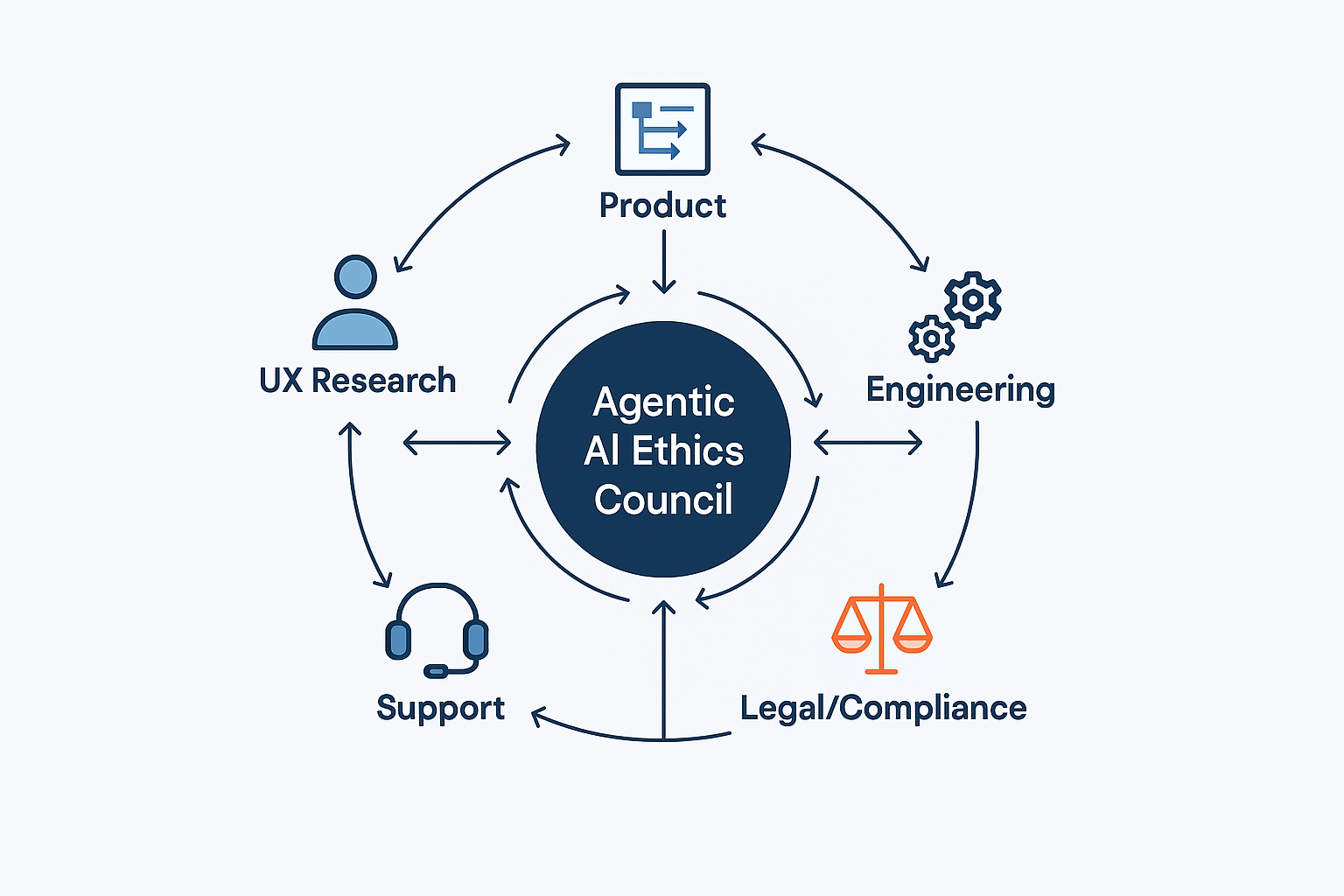
This engine should function as a formal governance body, an Agentic AI Ethics Council,
comprising a cross-functional alliance of UX, Product, and Engineering,
with vital support from Legal, Compliance, and Support. In smaller
organizations, these ‘Council’ roles often collapse into a single triad
of Product, Engineering, and Design leads.
A Checklist for Governance
Legal/Compliance This
team is the first line of defense, ensuring the agent’s potential
actions stay within regulatory and legal boundaries. They help define
the hard no-go zones for autonomous action.
Product The
product manager is the steward of the agent’s purpose. They define and
monitor its operational boundaries through a formal autonomy policy that
documents what the agent is and is not allowed to do. They own the
Agent Risk Register.
UX Research This team
is the voice of the user’s trust and anxiety. They are responsible for a
recurring process for running trust calibration studies, simulated
misbehavior tests, and qualitative interviews to understand the user’s
evolving mental model of the agent.
Engineering This
team builds the technical underpinnings of trust. They must architect
the system for robust logging, one-click undo functionality, and the
hooks needed to generate clear, explainable rationales.
Support These
teams are on the front lines of failure. They must be trained and
equipped to handle incidents caused by agent errors, and they must have a
direct feedback loop to the Ethics Council to report on real-world
failure patterns.
Effective
agentic AI is a team sport. A successful governance model, or Agentic
AI Ethics Council, creates a continuous feedback loop between UX,
Product, Engineering, Legal, and Support, turning risk management into a
strategic asset for safe and rapid innovation.
This
governance structure should maintain a set of living documents,
including an Agent Risk Register that proactively identifies potential
failure modes, Action Audit Logs that are regularly reviewed, and the
formal Autonomy Policy Documentation.
Where to Start: A Phased Approach for Product Leaders
For
product managers and executives, integrating agentic AI can feel like a
monumental task. The key is to approach it not as a single launch, but
as a phased journey of building both technical capability and user trust
in parallel. This roadmap allows your organization to learn and adapt,
ensuring each step is built on a solid foundation.
Phase 1: Foundational Safety (Suggest & Propose)
The
initial goal is to build the bedrock of trust without taking
significant autonomous risks. In this phase, the agent’s power is
limited to analysis and suggestion.
Implement a rock-solid Intent Preview:
This is your core interaction model. Get users comfortable with the
idea of the agent formulating plans, while keeping the user in full
control of execution.
Build the Action Audit & Undo
infrastructure: Even if the agent isn’t acting autonomously yet, build
the technical scaffolding for logging and reversal. This prepares your
system for the future and builds user confidence that a safety net
exists.
Phase 2: Calibrated Autonomy (Act with Confirmation)
Once
users are comfortable with the agent’s proposals, you can begin to
introduce low-risk autonomy. This phase is about teaching users how the
agent thinks and letting them set their own pace.
Introduce the Autonomy Dial with limited settings: Start by allowing users to grant the agent the power to Act with Confirmation.
Deploy the Explainable Rationale:
For every action the agent prepares, provide a clear explanation. This
demystifies the agent’s logic and reinforces that it is operating based
on the user’s own preferences.
Phase 3: Proactive Delegation (Act Autonomously)
This is the final step, taken only after you have clear data from the previous phases demonstrating that users trust the system.
Enable Act Autonomously
for specific, pre-approved tasks: Use the data from Phase 2 (e.g., high
Proceed rates, low Undo rates) to identify the first set of low-risk
tasks that can be fully automated.
Monitor and Iterate:
The launch of autonomous features is not the end, but the beginning of a
continuous cycle of monitoring performance, gathering user feedback,
and refining the agent’s scope and behavior based on real-world data.
Design As The Ultimate Safety Lever
The
emergence of agentic AI represents a new frontier in human-computer
interaction. It promises a future where technology can proactively
reduce our burdens and streamline our lives. But this power comes with
profound responsibility.
As
UX professionals, product managers, and leaders, our role is to act as
the stewards of that trust. By implementing clear design patterns for
control and consent, designing thoughtful pathways for repair, and
building robust governance frameworks, we create the essential safety
levers that make agentic AI viable. We are not just designing
interfaces; we are architecting relationships. The
future of AI’s utility and acceptance rests on our ability to design
these complex systems with wisdom, foresight, and a deep-seated respect
for the user’s ultimate authority.





How SAP Supports Businesses
SAP empowers organizations with real-time insights, standardized workflows, and reliable reporting across departments. By automating processes and ensuring data consistency, it minimizes manual effort, enhances accuracy, optimizes costs, and improves overall operational performance. Through seamless integration of end-to-end business processes, SAP enables companies to plan effectively, execute efficiently, and adapt swiftly to evolving market demands.
Why Organizations Choose SAP
Businesses adopt SAP to drive scalability, boost productivity, maintain regulatory compliance, and gain comprehensive visibility into their operations. It supports sustainable growth by aligning people, processes, and technology while promoting continuous improvement and delivering superior customer value.
In today’s fast-paced and competitive landscape, SAP is more than just an IT solution — it serves as a strategic foundation for business transformation and long-term success.
hashtag#sap
hashtag#erp
hashtag#digitaltransformation
hashtag#supplychainmanagement
hashtag#businessoperations
hashtag#manufacturing
hashtag#logistics
hashtag#datadriven
hashtag#enterprisesolutions
hashtag#sapindia🚀 Complete SAP Organizational Structure – End-to-End Integration View
Understanding SAP starts with mastering the organizational structure.
From Client → Company → Company Code to integration across:
Finance (FI)
Controlling (CO)
Materials Management (MM)
Sales & Distribution (SD)
Production Planning (PP)
Quality Management (QM)
🔄 Key Process Flows:
✔ Procure to Pay (P2P)
✔ Plan to Produce
✔ Order to Cash (O2C)
Everything in SAP is interconnected — configuration decisions in one module directly impact others.
Strong fundamentals in org structure = Strong SAP consultant.
hashtag#SAP hashtag#SAPMM hashtag#SAPSD hashtag#SAPFICO hashtag#SAPPP hashtag#SAPQM hashtag#ERP hashtag#ProcureToPay hashtag#OrderTo