⭐ If you would like to buy me a coffee, well thank you very much that is mega kind! : https://www.buymeacoffee.com/honeyvig Hire a web Developer and Designer to upgrade and boost your online presence with cutting edge Technologies
Showing posts with label UX design. Show all posts

Friday, July 28, 2023

How To Create A Rapid Research Program To Support Insights At Scale

 Accelerate your organization’s growth and innovation with the power of Rapid Research. From inception to implementation, here is the step-by-step roadmap on how to build the program from scratch and uncover the untapped ROI opportunities waiting to propel your initiatives to new heights.

While the User Experience practice has been expanding and will continue to balloon in the coming years, so have its sub-disciplines such as content strategy, operations, and user research. As the practice of UX Research matures, scalability will continue to be important in order to meet the rapid needs of iterative product development.

While there are several effective ways to scale user research, such as increasing researcher-to-designer ratios, leveraging big data and real-time analytics, or research democratization, one of the most effective methods is developing a Rapid Research program. In a Rapid Research program, teams are provided quick insight into key problems at an unprecedented operational speed.

Rapid Research-type support has been around for a while and has taken different shapes across different organizations. What remains true, however, is the goal to provide actionable insights from end-users at a quick pace that fits within product sprints and maintains pace with agile development practices.

In this article, I’m going to unpack what a Rapid Research program is, how to build one in your organization, and underscore the unique benefits that a program like this can provide to your team. Given that there is no singular ‘right way’ to scale insights or mature a user research practice, this outline is intended to provide building blocks and considerations that you may take in the context of the culture, opportunities, and challenges of your organization.

What Is Rapid Research? #

Rapid research is a relatively recent program where typical user research practices and operations are standardized and templatized to provide a consistent, repeatable cadence of insights. As the name suggests, a core requirement of a rapid research program is that it delivers quicker-than-average insights. In many teams, this means delivering research on a weekly cadence where a confluence of guardrails, templates, and requirements work to ensure a smooth and consistent process.

Programs like Rapid Research may be created out of a necessity to keep up with the pace of development while freeing the bandwidth of expert researchers’ time for more complex discovery work that often takes longer. A rapid research program can be a crucial component of any team’s insight ecosystem, balanced against solving different business problems with flexible levels of support.

A visualization of what makes a rapid research, which is Scope, Timing, Compartmentalization, and Consistency
Rapid Research programs are carefully crafted by focusing on scope, timing, compartmentalization, and consistency. (Large preview)

Scope #

Research Methods #

In order to make research more rapid, teams may consider some research methodologies out of the question in their Rapid Research program. Methods such as longitudinal diary studies, surveys, or long-form interviews might suffer from lower quality if done too quickly. When determining the scope of your rapid research program, ask yourself what methods you can easily templatize and, most importantly, which best support the needs of your experience teams.

For example, if your experience teams work on 2-week sprints and need insights in that time, then you will need to consider which research methods can reliably be conducted in 1–2 week increments.

Sample Size And Research Duration #

Methods alone won’t ensure a successful implementation of a rapid research program. You will also need to consider sample size and session duration. Even if you decide usability tests are a reasonable methodology for your rapid research framework, you may be introducing too much complexity to run them with 15+ users within 60-min sessions and analyze all that data efficiently. This may require you to narrow your focus to fewer sessions with shorter duration.

Participant Recruitment #

While there may be fewer and shorter sessions for each study, you also need to consider your participant pool. Recruitment is one of the most difficult aspects of conducting any user research, and this effort must be considered when determining the scope of the program. Recruitment can jeopardize the pace of your program if you source highly specific participants or if they are harder to reach due to internal bureaucracy or compliance constraints.

In order to simplify recruitment, consider what types of participants are both the easiest to reach and who account for the most use cases or products you expect to be researching. Be careful with this, though, as you don’t want to broaden your customer profiles too much for fear of not getting the helpful feedback you need, as UserZoom says:

“Why is sourcing participants such a challenge? Well, you could probably find as many users as you like by spreading the net as wide as possible and offering generous incentives, but you won’t necessarily find the ‘right’ participants.”

— UserZoom, “Four top challenges UX teams face in 2020 and how to solve them

Timing #

Why Timing Matters #

Coupled tightly with scope, the timing of your rapid research end-to-end process will be paramount to the program’s success. Even if you have narrowed the scope to only a handful of research methods with limited sessions at shorter durations and with specific participant profiles, it won’t be ‘rapid’ if your end-to-end project timeline is as long as your average traditional study. Care must be taken to ensure that the project timelines of your rapid research studies are notably quicker than your average studies so that this program feels differentiating and adds value on top of the work your team is already doing.

Reconsidering scope #

If your timelines are about the same, or your rapid cadence is less than 50% more efficient than your average study, consider whether or not you’re being judicious enough in your scope above. Always monitor your timelines and identify where you can speed things up or limit the scope in order to reach a quick turnaround, which is acceptable. One way to support shorter project timelines is through compartmentalization.

Compartmentalization #

About Compartmentalization #

One way to balance scope, timing, and consistency is by breaking up pieces of your average study process into smaller, separate efforts. Consider what your program would look like if you separated project intake from the study kick-off or if discussion guides were not dependent on recruitment or participant types. Splitting out your workflow into separate parts and templating them may eliminate typical dependencies and streamline your processes.

Ways To Compartmentalize #

Once you’ve determined the set of research methods and ideal participants to include in your program, you may:

  • Templatize the discussion guides to provide a quick starting point for researchers and cut down on upfront preparation time.
  • Create a consistent recruitment schedule independent of the study method to start before study intake or kick-off to save upfront time.
  • Pre-schedule recurring kick-off and readout sessions to set expectations for all studies while limiting timeline risk when at the mercy of others’ calendars.

There is a myriad of opportunities to do things differently than your typical research study when you reconsider the relationships and interdependencies in the process.

Consistency #

Expectability #

While a quality rapid research program takes into consideration scope, timing, and compartmentalization, it also needs to consider consistency. It would be difficult to discern whether or not the program was ‘rapid’ if, on one week, a study takes one week, and on another week, a study takes 2.5 weeks. Both may be below your current study average. However, project stakeholders may blur the lines between the differences in your rapid studies and your typical studies due to the variability in approach. In addition, it may be difficult to operationalize compartmentalization or rapid recruitment without some form of expected cadence.

More Agility #

As you and your team get used to operating within your rapid cadence, you may identify additional opportunities to templatize, compartmentalize or focus scope. If the program is inconsistent from study to study, it may be more difficult to notice these opportunities for increased agility, hindering your program from becoming even more rapid over time.

More after jump! Continue reading below ↓

A Rapid Research Case Study #

While working at one of the largest telecommunications companies in the US, I had the privilege of witnessing the growth of the UX Research team from just four practitioners to over 25 by the time I left. During this time, the company had matured its user experience practice, including the standards, processes, and discipline of user research.

Identifying The Need #

As we grew, human insight became a central part of the product development process, which meant an exponential increase in its demand. While this was a great thing and allowed our team to grow, the work we were doing was not sustainable — we were constantly trying to keep pace with product teams who brought us in too late in the process simply to validate their ideas. Not only did we always feel rushed, but we were stuck doing only evaluative work, which not only stifled innovation but also did not satisfy our more senior researchers who wished to do more generative research.

How It Fits In #

Once diagnosing this issue, our leadership initiated several new processes to build a more well-rounded research portfolio that supported iterative research while enabling generative research. This included a democratization program, quarterly planning, and my initiative: Rapid Research. We determined that we needed a program that would allow us to take on mid-sized projects at the pace of product development while providing a new opportunity to hire junior researchers who would be a great talent pool for our team and provide a meaningful way for those new to the field to grow their skills.

Getting Started #

In order to build the rapid research program, I audited the previous year’s worth of research to determine our average timelines, the most common methodologies used for iterative and mid-sized projects, and to identify our primary customer who we do research with most often. My findings would be the bedrock of the program:

  • Most iterative research was lite interviews and brief usability tests.
  • Many objectives could be covered in 30-minute sessions.
  • Mid-sized projects were often with just a handful of current customers.
  • Our average study time was 2–3 weeks, so we’d need to cut this down.
  • Given the above constraints, study goals should be highly focused.

Building The Program #

At first, we did not have the budget for hiring new junior researchers to staff the program team. What we did have, however, was a contract with a research vendor who we’ve worked with for years, so we decided to partner with researchers from their team to run our rapid research program.

  • We created specific templates for ‘rapid’ usability tests and interviews.
  • Studies were capped at two objectives and only a handful of questions in order to fit into 30-min sessions.
  • Study intake was governed via a simple intake form, required to be filled out by EOD every Wednesday.
  • We scheduled standing kick-off and readout sessions every Friday and shared these invites with product teams for visibility.
  • To further establish our senior researchers as Portfolio Research Leads and to protect against scope creep, we required teams to formally request ‘rapid’ studies through them first.
  • We started our rapid cadence at two weeks and were able to cut it down to just one week after piloting the program for a month.

Strong Results #

We saw the incredible value and strong results from building our rapid research program, especially alongside the other processes our team was standing up to support varying insights needs.

  • Speed
    We were able to eventually run three research studies simultaneously, enabling us to deliver more research at twice the pace of a traditional study.
  • Scale
    Through this enablement of speed, consistent recruitment, and templatized process, we ran over 100 studies & 650+ moderated interviews.
  • Impact
    Because we outsourced rapid research to a vendor, our team was freed up to deliver foundational research, which doubled our work capacity.
  • Growth
    Eventually, we hired junior researchers and transitioned the program from the vendor, increasing subject matter expertise & operational efficiency.

How To Build A Rapid Research Program #

The following steps outline a process for getting started with building your own rapid research program in your organization. Exactly which steps you choose to follow, or if you decide to add more or less to your process, will be entirely up to you and the unique needs of your team. Follow the proceeding steps while considering the above guidelines regarding scope, timing, compartmentalization, and consistency.

Build your rapid research program in four steps: determine if you even need one in the first place; identify your starting scope, timing and cadence; build infrastructure, standards and rules; pilot, get feedback, and iterate over time
Follow these four steps to build your rapid research program. (Large preview)

Determine If You Even Need A Rapid Research Program #

While seemingly counter-intuitive, the first step in building a rapid research program is considering whether you even need one in the first place. Every new initiative or tactic intended to mature user research practice should consider the available talent and capabilities of the team and the needs or opportunities of the organization it sits within. It would be unfortunate to invest time to build a robust, rapid research program only to find that nobody uses or needs it.

Reflection On Current Needs #

Start by documenting the needs of your experience teams or the organization you support by the different types of requests you receive.

  • Are you often asked to deliver research faster?
  • What are the types of research which are most often requested?
  • Does your team have the capability or operational rigor required to deliver at a faster pace?
  • Are you staffed enough to support a more rapid pace, even if you could deliver one?
  • Is delivering faster, rigidly-scoped research in service to your long-term goals as a research team, or might it sacrifice them?

Gather More Information #

Answering these questions should be your first step before any meaningful work is done to build a rapid research program. In addition, you might consider the following information-gathering activities:

  • Audit previous research you or your team have done to determine their average scope, timeline, and method.
  • Conduct a series of internal stakeholder interviews to identify what potential value a rapid research program might hold.
  • Look for signals for where the organization is going. If leadership is hiring or training teams on agile methods or demanding teams to take a step back to focus on discovery can help you decide when and where to invest your time.

These additional inputs will either help you refine your approach to building a program or to steer away from doing so.

Limitations Of Rapid Research #

Finally, when considering if you should build a rapid research program in the first place, you should consider what the program cannot do.

  • What a rapid research program might save on time, it cannot necessarily save on effort. You will still need researchers to deliver this work, which means you may need to restructure your team or hire more people.
  • If you decide to make your rapid research program self-service, you likely will still need ResOps support for recruitment and managing the intake process effectively.
  • It is also possible to hire a research vendor partner to lead this program, though that will require a budget that not every team may have.
  • As mentioned above, a good rapid research program is tight and focused in its scope, which limits the type of projects it can accommodate.

Identify Your Starting Scope, Timing & Cadence #

Once you’ve decided to pursue a rapid research program, you’ll need to understand what form your program should take in order to deliver the highest value to your team and those you support. As mentioned above, a right-sized scope should consider the research methods, requirements, session quantity & duration, and participant profiles, which you can confidently accommodate. And you will need to determine the end-to-end timing and program cadence that differentiates from current work while providing just enough time to still deliver sustainable quality.

Determine Participant Profiles #

Start building your scope backwards from the needs gaps you’re filling within your team based on the answers to the discovery questions above. You’ll want to identify the primary type(s) of end-users this program will research.

  1. Audit the past 6–12 months of research you or your team has done, looking at the most common customer type with whom you do research.
  2. Then, couple that with any knowledge you may have of where the business or your experience teams will be focused for the following 6–12 months.

For example, if your audit revealed that your team had focused most frequently on current customers over the past year, and you also know that your business will soon focus on the acquisition of new customers, consider including both current customers and prospective customers in your rapid research scope.

Remember the important note about consistency above? Once you’ve identified potential participant profiles, make sure you can consistently recruit them. For example, if you use a research panel to source participants for research studies, test the incidence of your participant profiles. If you find they don’t have many panelists with the attributes you need, you might spend too much time in recruitment and jeopardize the speed of the program.

A balance should be struck between participant profiles that are specific enough to be useful for most projects and those broad enough to reach easily.

Determine Research Methods #

You can conduct the same audit and rough forecasting when determining the research methods your program ought to support but with two additional considerations:

  1. Team strategy,
  2. Individual career development.

User researchers tend to focus their work further upstream, where they’re driving product roadmaps or influencing business strategy. This can bode well for your rapid research program if it is focused on evaluative research projects, which are often quicker and cheaper to conduct.

The ultimate goal is for the rapid research program to be a complement to what your team provides or as an enabler for freeing up their bandwidth so that they can focus on the type of work they want to do more of.

Right-size Research Methods #

Once you’ve determined which research methods you want to include in your rapid research program, consider the level of rigor you need to balance effort and complexity.

Determining Timelines #

Project timelines within a rapid research cadence are directly affected by the above scope decisions for participant profiles and research methodology. Timelines can also compound in highly regulated industries such as healthcare or banking, where you may be required to gather legal & compliance approval on every moderation guide. In order to call this a rapid research program, the end-to-end project timelines need to be shorter than a typical project of a similar scope, or at least feel that way.

Determine rapid research timelines through a table which documents Steps, Dependencies, Timing Today, Changes, Must Be true, and New Timing in columns from left to right. Changes, Must Be True, and New Timing are your new Rapid Research considerations. Under the table, comparison can be made between Today’s Total Timing and the New Total Timing
Build a table of the current steps in your process, their dependencies, and timing. Then, compare that with new timing expectations based on changes in efficiency. (Large preview)
  1. Scope current minimum effort
    Start by jotting down the minimum amount of time it takes a researcher on your team to do each sub-step in your current non-rapid research process. Do this for the same participant profiles and methods you want to include in your rapid research program.
  2. Dependencies
    Now, identify which sub-steps are dependent on others and think of ways to program them in order to build efficiency. For example, if you need legal approval on every moderation guide before data collection, which takes 2–3 days, see if Legal will commit to a change to a 24-hour SLA for rapid research-specific projects. Another example is if you typically give stakeholders a few days to provide feedback on moderation guides, change this for rapid research projects to cut down dependency time.
  3. Identify compartmentalization
    In addition to programming project dependencies, consider the above guidance for compartmentalizing some of the programs in order to remove dependencies entirely, such as with recruitment. Identify what parts of the process don’t have the same dependencies in your rapid research program and can be started earlier. By removing dependencies entirely, you may be able to do several things simultaneously to speed up project timelines.

Once you’ve documented your current research process (steps, dependencies, timing) and the changes you need to make to build efficiencies or remove dependencies, document what ‘must be true’ in order to consistently deliver identified changes. Create a table to document all of these details, then sum up the total timelines to compare your typical end-to-end research project timeline with your potential new ‘rapid’ timeline.

Ask yourself if this seems ‘rapid’ when stacked against your average study duration.

  • If not, look back at the guidance above. Ask yourself if there are other customer types that may be easier to get in front of that you haven’t considered. Consider whether you need to create a new process, expedite existing processes, or create new relationships in order to make your timelines even more rapid.
  • If so, congratulations! You might have just landed on the right scope for your rapid research program. Consider whether this new rapid timeline is something that you can deliver consistently and reliably over time and whether or not you have enough access to participants, and enough budget, to carry out this cadence long-term.

Build Infrastructure, Standards & Rules #

It’s time to set the foundation. Return back to the tables you made above and create an action plan with the following steps and a timeline to build the infrastructure required to bring your program to life. As part of this, you’ll need to establish the rules and standards for communicating with partners. You might consider a playbook and formal scope document to inform others of the ins/outs of the program.

Gather Buy-in #

Prioritize any work that requires buy-in, generating understanding, or acquiring budget first before spending your time and energy building templates or documentation. You wouldn’t want to create a 20-page scope document outlining the bandwidth for two researchers, a limit to 1 round of stakeholder feedback, and a 24hr SLA for legal approval, only to find out others cannot commit to that.

Create Templates #

You’ll need plenty of templates, tools, and processes specific to the scope of your program.

  • If you’re limiting moderation guides to a maximum of 10 questions, then create a specific discussion guide template reflecting that.
  • If your data analysis will be sped up by using structured note-taking templates, create those.
  • If you’ve determined that all rapid research projects only require an executive summary one-pager, make that too.

Staffing #

As mentioned above, even a drastically reduced version of your typical research processes still requires effort to support. You’ll need to determine, based on the expected scope and cadence of each rapid research project, how many researchers and/or research operations coordinators you’ll need to support the program. While all rapid research programs will require dedicated effort, there are creative ways of staffing the program, such as:

  • A dedicated team of 1–2 researchers and 1–2 Ops coordinators to deliver projects with the greatest efficiency and quality.
  • A dedicated team of 1–2 researchers who also handle the operations of running the program itself.
  • A self-service program, with 1–2 Ops coordinators for supporting anyone doing the research work.
  • Outsourcing the entire program to a vendor.

Work with your leadership, HR, and TA professionals on securing approval for any team restructure, needed headcount budget, or to onboard a new vendor. Then, take the appropriate steps to hire your next researcher or secure the staffing help you need to support your program.

Coaching And Guidance #

Consider training, coaching, and check-in meetings as part of your infrastructure.

  • If you are staffing new researchers to this rapid research program, make sure they understand the expectations and have what they need to succeed.
  • If you’re implementing a self-service model, provide brown-bag sessions to partners to explain the program do’s and don’ts.
  • Schedule quarterly check-ins with partners and leadership to discuss the program accomplishments and any needed adjustments to ensure it stays relevant.

Pilot, Get Feedback, And Iterate Over Time #

No matter how much preparation you do or how much time and effort you spend building the alliances, infrastructure, training, and support required to run your rapid research program effectively, you will learn that there are improvements you should make once you put it into practice.

There are many benefits to piloting a new program in an organization. One benefit is that it can mitigate risks and allow teams to learn quickly and early enough to make positive enhancements.

“Piloting offers a realistic preview experience for users at the earliest stages of development. It allows the organization and design team to gather real-time insights that can be used to shape and refine the product and prepare it for commercialization.”

— Entrepreneur, “Tasting As You Go: The 5 Benefits of ‘Piloting’

This means setting expectations early. Consider your first few projects as pilots and expect them to be rocky and imperfect. Use this to your advantage by asking stakeholders you’re closest with to be your trial projects and let them know how important their honest feedback is throughout the process. Ensure that you have clear mechanisms to gather feedback at each project milestone so that you can track progress. It is especially important to capture what might be slowing you down along the way or putting your ‘rapid’ timelines at risk.

Program Evolutions, Impacts & Considerations #

Potential Evolutions & Variations #

While I’ve outlined a process for getting started, there are many ways in which your rapid research program may evolve over time to meet the needs of your organization better.

  • After a few periods, you might identify volume isn’t as high as you anticipated, so you extend the 1-week timeline to every two weeks.
  • After a few months, your business might launch a new product line, requiring you to consider a new set of customer profiles in recruitment.
  • You may decide to leverage your rapid cadence for individual segments of a longitudinal diary study to accommodate new methods.
  • You might use rapid research projects to exclusively evaluate in-market products while others on the team focus on in-progress / new products.
  • Rapid research projects could be a stage-gate for larger projects — proving a customer need before larger time investments are made.

However your rapid research program takes shape, revisit its goals, scope, and operations often in relation to your organizational needs and context so that it remains relevant and delivers the highest impact.

Impacts of a Rapid Research Program, as seen in three areas: two times throughput for projects if using a vendor or when staffing a dedicated team, upward increase in discovery research, and an ability to keep pace with agile development
While exact impacts of your rapid research program will look unique to your team and organization, these are a few you can expect of most programs. (Large preview)

Solid Impacts From Rapid Research #

Building a rapid research program can have a big impact and can contribute positively toward your team’s long-term strategy. One impact of instituting a rapid research program could be that now your team is freed up to focus on more generative research, which unlocks your ability to deliver deep customer insights that pave the way for innovation or strategy. And due to your new rapid pace, you may be able to keep pace with agile development and conduct end-to-end research within 2-week sprints. Another impact is that you may catch more usability issues further upstream, saving you over 100x in overhead business cost. A final impact of a rapid research program is that it can double your team’s throughput, allowing your team to deliver more research, more frequently, to accommodate more organizational needs.

Be sure to track these impacts over time so that you not only get credit for the hard work you put into building the program but so that you can sustain and grow the program over time.

Considerations When Building A Rapid Research Program #

As mentioned in this article, there are many benefits to building a rapid research program. That being said, there are limitations to rapid research in regard to its pros and cons when it should be used, and if you have the available time to stand up a program yourself.

Pros And Cons #

As with building any new program, one should consider both its benefits as well as drawbacks. Here are a few for rapid research programs:

Pros:

  • Can free time for foundational work;
  • Rapid studies may keep a better pace with development cycles;
  • Can create meaningful opportunities for junior staff;
  • Can double project throughput, increasing output volume.

Cons:

  • Still requires work and dedicated bandwidth;
  • Another thing to diligently track and manage;
  • Not great for all types of research studies;
  • May cost more money or resources you don’t have.

Guidance For Using The Program #

Rapid Research programs are best for specific types of research which do not take a long time to complete or require rigorous expertise. You may want to educate your partners on when they should expect to use a rapid research program and when they should not.

  • Use rapid research when:
    • Agility or quick turnaround is needed;
    • You need simple iterative research;
    • Stakeholder groups are easier to rally;
    • Participants are easy to reach.
  • Do not use rapid research when:
    • The study method cannot be done quickly without risking quality;
    • A highly complex or mixed-methods study is needed;
    • A project requires high visibility or stakeholder alignment;
    • You have specific, hard-to-reach participants.

Ramp Up Time #

While the exact timeline of building a rapid research program varies from team to team, it does take time to do it right. Make sure to plan out enough time to do the upfront work of identifying the appropriate scope, timing, and cadence, as well as gathering consensus from leadership and appropriate stakeholder groups. Standing up a Rapid Research program can take anywhere from 3 months to 1 year, depending on the following:

  • Legal and compliance limitations or requirements.
  • The number of stakeholder groups you need buy-in from.
  • Approval of budget for outside vendors or for hiring an in-house team.
  • Time it takes to build templates, guidelines, and materials.
  • Onboarding, training, and iteration when starting out.

Conclusion #

A rapid research program can be a fundamental part of your team’s UX Research strategy, enabling your team to take on new insight challenges and deliver efficient research at an unprecedented pace. Building a rapid research program with high intention by determining the goals, appropriate scope, and necessary infrastructure will set your team up for success and enable you to deliver more value for your organization as you scale your user research practice.

Don’t be afraid to try a rapid research program today!

Tuesday, April 4, 2023

Beyond Algorithms: Skills Of Designers That AI Can’t Replicate

 The recent explosion of Artificial Intelligence tools for everything from writing to design has creators and designers concerned that their job functions can be replaced by AI. While AI has been programmed to perform well at certain tasks, it cannot replace the skills and behaviors of designers that are crucial to the human aspect of design. This article highlights non-technical skills like curiosity, observation, empathy, advocacy, visual communication, and collaboration that designers routinely use in their process to make a difference through design. AI can be used to augment designers’ workflow instead of replacing people.

At the start of the Coronavirus pandemic, I led the redesign of a tablet app used by sales representatives of the world’s largest food & beverage company. Never having been a sales representative, nor having ever played one on TV, I was curious about their typical workday. Adapting the first rule of design — Know Thy User — our lockdown approach was to conduct video interviews. As soon as company restrictions allowed, I met two sales representatives at a local Walmart.

Masked and socially distant, I walked a mile in their shoes through the dairy, pet food, and freezer aisles. This single visit uncovered many insights that had not come up in the video interviews and online walkthroughs. I shared this with the team, spread across the world, and everyone could empathize with the sales representatives: juggling multiple devices and printouts, struggling to make technology work in extreme conditions like a low-lit walk-in freezer, and trying to work without hindering harried shoppers. The sales reps would repeat these tasks between twenty and thirty times a day, five days a week, which sounds about as fun as it is.

Our team used these insights to experiment with different concepts, refine them based on feedback from sales representatives, and launch a redesigned app that received glowing feedback from the representatives and praise from the company stakeholders.

Curiosity, empathy, and collaboration were some of the designer-like or designerly behaviors we used to transform the sales representatives’ experience. These behaviors are a few of the behaviors and skills that designers use throughout the design process. Design researcher and educator Nigel Cross first used the word designerly to refer to underlying patterns of how designers think and act.

Designers spend years learning technical design skills, and as they use those hard skills to do their jobs, their designs are impactful when they actively use these non-technical designerly skills and behaviors. Designerly skills and behaviors make us creative and innovative and distinguish us from machines and technology like Artificial Intelligence (AI).

Yes, the same AI that you can’t avoid reading or hearing about on social media or in the news. Stories and posts about people being equally worried about layoffs and AI taking over their jobs, and some even suggesting that AI is why those jobs won’t come back. Creators and people traditionally considered creative, like artists, writers, and designers, seem especially concerned about AI making them redundant. Guesstimates of when AI will perform tasks better than humans just add to the frenzy.

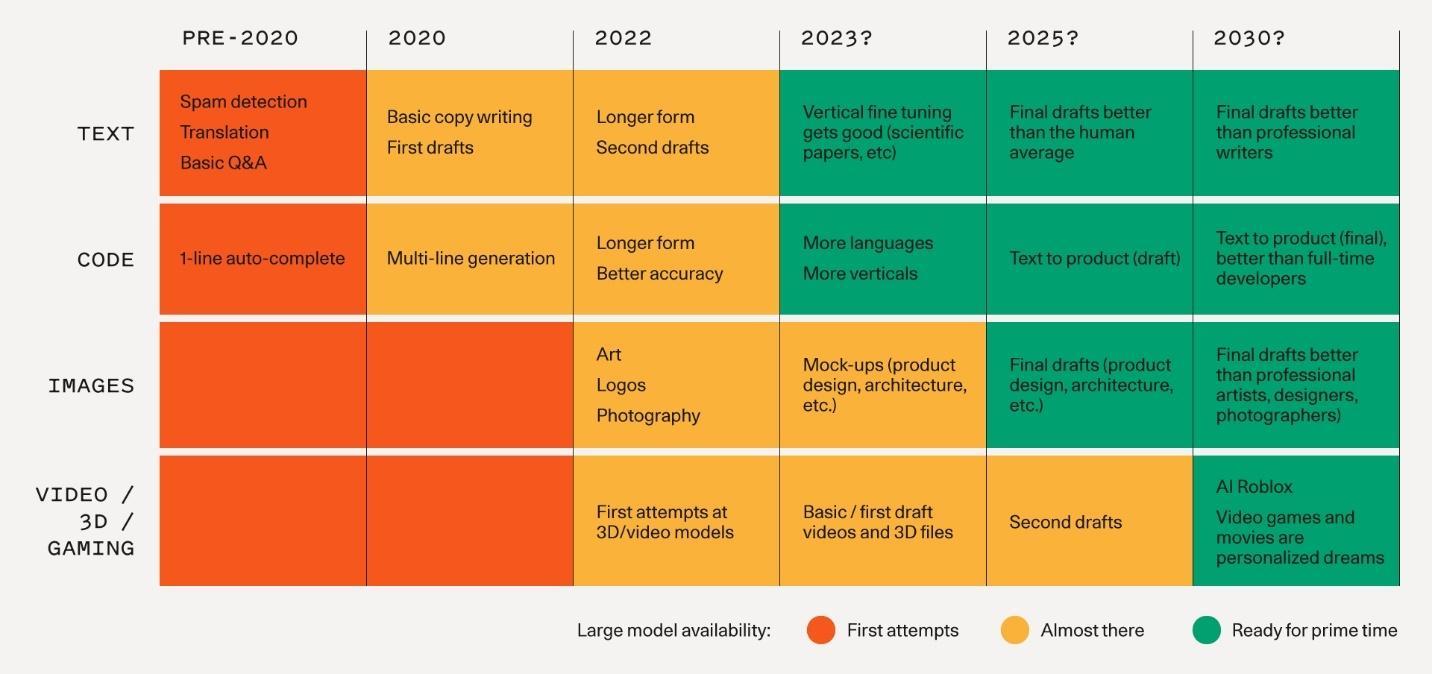
Timeline of AI development in text, code, images, and video categories
Timeline guesstimates of when AI will be ready for prime time. (Source: Sequoia Capital) (Large preview)

The assumption that AI will replace people is based on the premise that both have the same qualities, abilities, and skills. But that’s just not true. Artificial intelligence is simply technology that is taught to mimic human intelligence to perform tasks. It is trained on large amounts of data — by some estimates, the equivalent of a quarter of the Library of Congress, the world’s largest library.

AI is better than humans in certain tasks that involve processing and analyzing large amounts of data quickly, accurately, rationally, and consistently. Artificial Intelligence may create, but it can’t be creative. It cannot match humans in areas that rely on skills and behaviors that are distinctly human, like intuition, emotional intelligence, cultural context, and changing situations.

Humans are conscious beings with a subconscious mind that can influence decisions and change those decisions based on experience, context, environment, wisdom, and understanding. This takes us years, decades, and even a lifetime to learn and apply, and it cannot be programmed in machines, no matter how sentient they may appear to be. Not for the foreseeable future.

Being designerly takes thinking, feeling, and acting like a designer. I’ve been thinking about and observing what it means to be designerly, and by using six such skills and behaviors, I will discuss how humans have an advantage over AI. I used the head, heart, and hands approach for transformative sustainability learning (Orr, Sipos, et al.) to organize these designerly skills related to thinking (head), feeling (heart), and doing (hands), and offer ways to practice them.

Using our head, heart, and hands together to make a transformative difference is what distinguishes us from AI and makes us human, creative, and innovative.

A picture of a wooden Lego man with designerly skills written next to him grouped and organized by the head, heart, and hands
Designerly skills organized by the Head (thinking skills), Heart (feeling skills), and Hands (doing skills). (Source: BeingDesignerly) (Large preview)
More after jump! Continue reading below ↓

The skills, behaviors, and habits to help you think like a designer and create a designerly mindset include curiosity and observation.

Cultivate Curiosity #

Curiosity is the desire to know. It is a pleasure to ask, explore, experiment, discover, learn, and understand. We see this relentless curiosity in small children, who explore everything novel around them. As they grow up, that curiosity starts getting stifled in many, partly because they are taught to look for an answer instead of exploring questions.

This curiosity stifler of focusing on the answer is what AI is programmed to do. AI is also limited by its knowledge and understanding of the world, unable to explore beyond those boundaries. Also, without physical senses, AI cannot experience the world and be curious about things we see, hear, touch, taste, and smell around us.

This gives us a leg up on AI if we can overcome other curiosity-stiflers like self-consciousness, the shame of not knowing, and the fear of ridicule.

Let’s deconstruct curiosity to understand different types of curiosity we can nurture and build in ways AI cannot. In the 1950s, British-Canadian psychologist Daniel Berlyne presented a model distinguishing between two types of curiosity: perceptual, based on stimulation, and epistemic, driven by a genuine desire for knowledge. He also distinguished between two types of behaviors to address that curiosity: diversive exploration, motivated by a need for novel stimulation or a desire to explore, and specific exploration, motivated by curiosity and a search for new information.

Two lines crossing each other in the form of a cross which represents dimensions of curiosity, such as perceptual, epistemic, diversive, and specific based on Daniel Berlyne’s Theory of Human Curiosity
Dimensions of curiosity based on Daniel Berlyne’s Theory of Human Curiosity. (Large preview)

This gives us four dimensions of curiosity, which have their time and place, but the quadrant we are discussing lies at the intersection of the desire to explore and the desire for knowledge. Diversive-Epistemic curiosity is where people use the desire to explore and apply it to learning new things. TED Talks are an example of knowledge exploration, where people can learn about just about any topic they care to explore.

You can cultivate curiosity by being intentional in developing the joy of exploration. Set some time aside every day to learn something new, and pick topics that interest you. Start small and gradually increase the time you spend learning something daily as well as for expanding the topics. I would suggest starting with just 10–20 minutes a day. That’s enough time to watch a TED talk, read a book summary, or start learning a new skill. Reading multiple book summaries on a topic is an easy way to identify the next book you should read cover to cover over a few days or weeks.

Curious exploration broadens the mind to new ideas, perspectives, and approaches, lays the foundation for the cross-pollination of ideas, and leads to creative and innovative solutions.

Advantage: People

Notice & Observe #

While often used as synonyms, noticing is seeing something for the first time, while observing is paying close attention to something or someone. Being creative begins with noticing what others have overlooked, followed by closer, intentional observation when warranted.

In traditional ethnography, researchers observe people and cultures in an immersive manner. Design ethnography or digital ethnography is not as extreme; researchers and designers only spend days or weeks observing users, instead of years. The operative word is observing — watching and listening. The payoff is that ethnography can inform and improve design decisions. You don’t need to wait for your next project to observe people. Instead, make it an everyday habit, and you will not only hone your powers of observation, but it will also gradually become second nature.

AI cannot do this because it relies on the limited data it is trained with, unlike people who have an unlimited ability to notice and observe new things all the time. Even if it could overcome that hurdle, without emotions and context, AI would not be able to understand the feelings and emotions involved in the people or situation being observed. We can observe a situation and understand the context and meaning behind it as we process what we are noticing and observing.

We can build our power of observation by taking the time to pay attention to people and their behavior. You can do this anytime — while you are in a coffee shop or waiting in the grocery checkout line. Get your nose out of that glowing rectangle, remove your headphones, and look around. While you may end up seeing others captivated by their own glowing rectangles, start observing the details:

  • What type of phones are they using?
  • Are they passively consuming content or actively interacting with a game or person?
  • What emotions do you notice?

When you start paying attention, you will be surprised by things you may have seen but not noticed or observed in the past. And the more you practice, the more natural it will become. Noticing and observing the world around you in new and different ways provides inspiration and helps reveal issues and patterns, leading to better ideas and solutions.

Advantage: People

Heart #

The skills, behaviors, and habits to help you feel like a designer and create a designerly attitude include empathy and advocacy.

Be Empathetic #

My favorite definition of empathy is by Roman Krznaric in his book, Empathy: Why It Matters, and How to Get It:

Empathy is the art of stepping imaginatively into the shoes of another person, understanding their feelings and perspectives, and using that understating to guide your actions.
— Roman Krznaric

There are three types of empathy, according to psychologists Daniel Goleman and Paul Ekman:

  1. Cognitive,
  2. Emotional,
  3. Compassionate.

The empathy that results in thinking, feeling, and doing are all important and have their place in our lives, but the empathy that results in doing, compassionate empathy, goes beyond understanding others and sharing their feelings by driving us to do what we can to help them. This helps us make a difference in people’s lives. I am talking about genuinely employing empathy, not doing it as lip service or checking a box off in the process.

Successful designers routinely use empathy in human-centered design. They start with an understanding of the people they are designing for by observing them and immersing themselves in their users’ environments. Designers then apply that deep understanding to design products and experiences that work for those users.

While AI can measure people’s emotions from their expressions and is being trained to mimic human emotions, AI machines and tools don’t have consciousness and cannot understand or experience emotions. AI also lacks personal, shared experiences that allow us to show empathy to varying degrees.

Even if you are not empathetic by nature, try building it over the coming days with one or more interactions with others:

  • Suspend judgment.
    It is difficult to be empathetic if you are mentally judging the other person. If you voice that judgment, you will not be able to be empathetic, and the other person may stop sharing with you.
  • Listen attentively with your eyes and ears.
    Engage more than one sense to listen actively so that you can respond deeply. Pay attention to what the other person is saying, not how you need to respond. Be completely present with the other person, putting aside our modern distractions.

Being empathetic takes practice for most of us. Be empathetic.

Advantage: People

Advocate For Others #

User advocacy is at the heart of designerly skills and behaviors. The skills and behaviors of curiosity, observance, and empathy create a deep understanding of users and their needs, but that is only the beginning. User advocacy brings all of the above to life and turns that respect for the user into action to address their needs. It also shares that understanding with others involved so they, too, can identify with users.

Being a user advocate means representing the interests of users in an ocean of competing interests. A user advocate represents the user throughout the design process, giving the user a voice, bringing them to life, and making the impersonal user personal.

Without curiosity, observation, and empathy, AI is unable to use those skills and behaviors to be an advocate. AI also lacks the creativity to come up with solutions to address the needs of others. AI can be programmed to follow rules and guidelines to protect people, an increasingly important area of ethical AI. If you’ve been following the news, this has led to mixed results, sometimes going off the deep end in some instances. No points for guessing that AI cannot make ethical judgment calls on its own.

However, people can do that. And we can manifest it in design by doing what’s right for users. I previously wrote about principles for designers; two of them summarized below:

  • Do no harm.
    Your decisions may affect the minds, behavior, and lives of your users and others around them, so be alert and guard against misusing the influence of your designs. Ask yourself: Would you be comfortable with someone else using your design on you, your parents, or your child?
  • Be aware of your responsibility to your intended users, unintended users, and society at large.
    Accept appropriate responsibility for the outcomes of your design. During design, follow up answers to “How might we…?” with “At what cost?”

Remind yourself that you are not the user and use your knowledge of the user to represent the user when they are absent. Advocate for them.

Advantage: People

Hands #

The skills, behaviors, and habits to help you act like a designer are brought to life through visual communication and collaboration.

Communicate Visually #

Storytelling is an important skill that vividly paints a picture in people’s minds, driving them to action. It converts words to a visual that people will remember, but even then, different people may all visualize the same thing differently. This happens whether you’re listening to your favorite inspirational speaker or reading your favorite fiction author. No matter how painstakingly a speaker or author describes a character or a situation, chances are high that two people sitting right next to each other both have different images in their minds. However, when there is an accompanying image or visual, people are literally on the same page (or slide, graph), which slashes the risk of them imagining different things. That’s the power of thinking and communicating visually.

Not all designers are artistic, but you don’t have to be artistic to be a visual thinker or communicator. Even a rough sketch on a whiteboard or a notepad can often communicate information faster than the written or verbal form. The aim is to make ideas tangible quickly, to get to the right idea faster. User researchers and designers commonly use visualizations to help them make sense of data and come up with new ideas.

Without physical senses, AI cannot think or communicate visually. Without emotions, the ability to understand context, and creativity, AI cannot ‘read the room’ or come up with ideas outside its dataset and communicate outside its current language abilities, making visual communication impossible. However, people can use AI as a tool to communicate visually, especially with tools that convert text prompts to images.

Next time you describe something, instead of writing a page of instructions or talking it out, use a quick sketch. Describing a process? Boxes and arrows are very powerful. Talking about a screen or two? A rough layout, highlighting the important parts, along with an arrow showing how you get from one to another, is more powerful. Or a quick screen recording. Sketching not your thing? Use images. I’ve been known to use LEGO photography in my articles and presentations. You can also mock up something without advanced design tools. For instance, I had a non-designer boss who communicated visually using PowerPoint. And if you are in the mood to explore and experiment, try one of the many AI text-to-image generators.

Show. Don’t only tell.

Advantage: People

Collaborate #

We can achieve much more, much faster, working together. It is uncommon for a single person to come up with the best solution by themselves. Gone are the days of the lone designer working on a solution by themselves. No single person or discipline has the answer to all problems, design or otherwise. It usually takes a team from different disciplines and backgrounds to solve big problems.

A multi-disciplinary team working together toward a common goal is an example of collaboration. This brings different perspectives into the creation process, from idea generation to providing feedback and validation during the creation process.

Collaboration relies on understanding and navigating social dynamics. While some people struggle with that, AI fails. Ditto for the ability to negotiate or compromise. Some people struggle with that too, but AI cannot unless specifically programmed to. Collaboration also requires the ability to adapt based on live inputs, feedback, or the situation, which traditional AI has limited capability to do beyond its training phase.

That said, AI can support collaboration if you think about people collaborating with AI tools. We’ve seen how AI tools can generate designs, logos, layouts, code, write content, do homework, and generate legal documents. But there are enough examples of it being plain wrong, which is why we should use them as assistants in our workflow.

AI tools can support the efforts of designers and researchers by reducing manual human effort (e.g., transcribing), making people more efficient and saving time (e.g., text-based video editing), providing machine learning-based insight (e.g., attention prediction), and augmenting human effort (e.g., AI evaluation). Just remember that AI is not perfect, and there are plenty of mistakes and errors, as shown below (I’m not India-based, did not write The UX Book, and never taught at the schools mentioned).

ChatGPT output on Lyndon Cerejo
ChatGPT output (vanity or otherwise) is not always correct or accurate. (Large preview)

Next time you are working on a project, get others involved. These could be different departments, different specialties, different backgrounds, and, where appropriate, even customers — maybe even AI.

Advantage: People

Conclusion #

I’ll use an analogy from the restaurant industry of chefs and cooks to draw parallels between humans and AI. Chefs can cook meals by themselves, but they are more effective when they focus on the strategic work of planning the menu, overseeing the cooks who tactically follow recipes, sometimes improvising, and applying the finishing touches before the meal is served to customers. Robots have replaced parts of what cooks do and technology that may suggest recipes and meals, but it still needs the chef to make the final decisions.

Playground AI image generation
Playground AI image generation based on prompts of creatives using AI in their workflow. (Large preview)

Artificial Intelligence is changing the way we work and live, making us more efficient. As designers, we can use AI to support ideation, analyze data, generate variations, and predict behavior based on patterns. This will free us up to focus on more strategic aspects of design, using the designerly skills above which are impossible to duplicate, and for which people have the advantage over AI. We can use AI to make us more efficient and allow us to do what we do best — understand our users, stakeholders, and real-world constraints and then collaborate with others to design successful solutions. What we do won’t change as much as how we do it, with AI augmenting, instead of replacing us.

Advantage: People

AI cannot be trained to mimic these designerly skills the way we can practice and develop them because it is not conscious, cannot adapt, and does not have the experiences, emotions, or intuition that we have. AI can artificially mimic some but cannot match human abilities in these areas. Skills like curiosity, observation, empathy, advocacy, visual communication, and collaboration are key non-technical skills to help us use the head, heart, and hands together to be more designerly and thrive in a world of AI.

Resources: #

Books #

Thursday, March 30, 2023

How AI Technology Will Transform Design

 The rise of AI-generated art makes design practitioners wonder if AI will replace designers. In this article, Nick and Gleb shed light on the current state of design, answer common questions designers have about AI tools, and share practical tips on how designers can make the most of using AI tools.

AI-generated art is everywhere on the web. If you are an active Instagram, Twitter, or Pinterest user, you likely saw interesting artworks created using text-based tools like DALLE, Midjourney, or Stable Diffusion. The magic of these tools is that to generate images, all you need to do is to provide a string of text that describes what the image is all about. Many AI-generated works look stunning, but it’s only the beginning. In the foreseeable future, AI tools will be so intuitive that everyone can express their ideas. The rise of tools that have AI at their core makes design practitioners wonder if AI will replace designers.

In this article, we will overview the current state of design, answer common questions designers have about AI tools and share practical tips on how designers can make the most of using AI tools.

Design Tools Learning Curve And Creativity #

Mastering any skill takes time, and design is no exception. Designers have a lot of great tools in their arsenal, but the process of honing design talent takes years. You need to invest years of your life to get to the point when you can create decent artwork.

Human-made design: glass reflection CGI
Human-made design: glass reflection CGI. A few seconds of rendering was 87 hours on 5 RTX. (Image by Gleb Kuznetsov)

No matter how creative you are, you must spend time creating something using your hand. Most of the time, it’s impossible to go from idea to solution in a few minutes. As a result, sometimes it feels like design is 95% craft and only 5% art.

Much energy goes into the visualization of ideas, and it can be very frustrating to learn that your idea doesn’t resonate with the audience. Once you publish your work, you might learn that it’s not something your audience wants. An unsuccessful design pitch leads to a situation when your work goes straight to the garbage bin.

But in the near future, you will be able to use shortcuts and go from your idea to the final work in a minute rather than hours or days. You will be able to avoid the tedious process of physically making art and instead become a visioner who tells the computer what you want to build and lets the computer do the work for you. And you can experience the power of AI tools even today. Use Dalle.2 by OpenAI, Midjourney, or Stable Diffusion.

Let’s answer a few popular questions that designers have regarding AI.

Can I Take Credit For Artworks Created By AI? #

The answer is yes, you can, but you shouldn’t. Many AI artwork generation tools available on the market don’t give designers much freedom to control the process of artwork creation. As a designer, you explain your intention to the AI system through plain words and let the tool do its magic. You have limited or no information on how the tool works.

Because modern AI tools don’t give you much freedom to impact the design direction, the final result misses the human touch. Right now, you cannot convey a lot of personality in works generated by AI tools. At the same time, it doesn’t mean this will be true in the future. We will likely see the tools that give designers more control over the process of creating visual assets.

AI-generated design: 3D sphere with sea wave
AI-generated design: 3D sphere with sea wave. Image by Gleb Kuznetsov created using Midjourney. (Large preview)
More after jump! Continue reading below ↓

Will AI Take My Job? #

Many professional artists panic because they see how good artificial intelligence has become at creating artwork. AI-generated art fills the market and takes potential clients. Instead of hiring a human digital artist, many companies ‘hire’ AI to do the job because it can do design work for a fraction of the cost. This trend not only takes jobs but also lowers the market value of the art — the artworks become less valuable because people see how easy it is to generate artwork using AI.

AI-generated design: Illustrations of airplanes
AI-generated design: Illustrations of airplanes. Image by Nick Babich created using Stable Diffusion 2.1. (Large preview)

What happens right now is a predictable situation. It’s just how business works. If a business can save money by following a more effective approach, it will do it. During the industrial revolution of the 19th century, some English textile workers intentionally destroyed textile machines because they were afraid that machines would replace them. Of course, machines replaced some of the roles (typically, roles where heavy lifting or monotonous work was required), but they didn’t replace humans. The same is true for AI tools. AI won’t completely replace human ingenuity; it will complement human potential.

The true power of AI is not about replacing humans but instead giving them a massive boost in productivity.

If you think about the primary reason why people invented new tools in the first place, it becomes evident that work efficiency was the number one reason — the same works for AI. AI will help us work more efficiently.

The quality of your ideas and your ability to understand user problems and create solutions that help people is critically important at any age of product design, including the age of AI design.

Will AI Tools Lead Us To Generic Design? #

When designers use the same tools and data inputs, they could easily end up making a homogenized design that looks generic.

Three houses created by AI that look generic
Even though these images were created by different authors using different prompts, they look very similar because they use the same model, Lexica Aperture v2. (Image by Lexica.art) (Large preview)

But the problem of homogenized design is not new. Dribbblisation of design was a massive topic in the design field for a few years. Many people in the industry worry about the situation when a vast majority of the product design work on Dribbble looks the same (the same styles are applied).

Will the problem become worse when AI tools are popularized? The answer is no. If you look closer at the artists who publish their work at Dribbble, you will notice that there aren’t many artists who set trends. Once a new trend emerges and it resonates with the audience, many designers start to follow it and designs that look trendy.

“Out in the sun, some painters are lined up. The first is copying nature; the second is copying the first; the third is copying the second.”
— Paul Gauguin

AI tools won’t replace all designers anytime soon because imagination and creativity will still be the powerful properties of the artist’s mind. Until AI technology becomes sophisticated enough to do creative thinking, we don’t have to worry about creating AI trends. The point is, soon, it will be possible to curate the data you will provide as an input to the system, and the AI system will learn from you, so the results will include a lot of your personality.

Early in 2023, a group of artists filed a class-action lawsuit against Midjourney and Stability AI, claiming copyright infringement. Both Midjourney and Stability AI were trained using billions of internet images, and this suit alleges that the companies behind those tools “violated the rights of millions of artists” who created the original images. Whether or not AI art tools violate copyright law can be challenging to determine because the database used for training is massing (billions of images). But one thing is for sure — the AI tools create new images based on the knowledge they learned due to the training.

Can designers face legal troubles using AI tools in the future? So far, there is no single correct answer to this question, but the world is quickly embracing AI art (i.e., stock photo banks will start selling AI-generated stock imagery), and we will likely have more clear rules on how to use AI-generated images in the future.

The New Chapter In Design: Co-creation With AI #

When Steve Jobs explained the power of computers, he said,

“What a computer is to me is it's the most remarkable tool that we've ever come up with, and it's the equivalent of a bicycle for our minds.”
— Steve Jobs

It’s possible to rephrase this quote in the context of AI, saying that AI is a bicycle for our creativity — our ability to create something new. Creativity is based on life experiences and ideas that creators have. AI cannot replace humans because it uses the work that humans create as an input to produce new designs. But AI can boost creativity greatly because it becomes a sort of ‘second brain’ that works with a creator and provides new inputs.

Of course, modern AI tools don’t give us much freedom to tweak the AI engine, but they still give us a lot of power. They can provide us with ideas we didn’t think of. It makes AI an excellent tool for discovery and exploration.

Here are just a few directions of how humans and machines can work together in the future:

Conduct Visual Exploration #

AI tools capture the collective experience of millions of images from photo banks and give creators a unique opportunity to quickly explore the desired direction without spending too much energy. AI becomes your creative assistant during the process of visual exploration. You prompt the system with various directions you want to pursue and let the system generate various outcomes for you. You evaluate each direction and choose the best to pursue. The process of co-creation can be iterative. For example, once you see a particular design direction, you can tell the system to dive into it to explore it.

AI-generated design: A glance at mountain peaks
AI-generated design: A glance at mountain peaks. Image by Gleb Kuznetsov created using Midjourney. (Large preview)

There are two ways you can approach visual exploration, either by following text-to-image or image-to-image scenarios.

In an image-to-text scenario, you provide a prompt and tweak some settings to produce an image. Let’s discuss the most important properties of this scenario:

  • Prompt
    A prompt is a text string that we submit to the system so that it can create an image for you. Generally, the more specific details you provide, the better results the system will generate for you. You can use resources like Lexica to find a relevant prompt.
  • Steps
    Think of steps as iterations of the image creation process. During the first steps, the image looks very noisy, and many elements in the image are blurry. The system refines it with every iteration by altering the visual details of the image. If you use Stable Diffusion, set steps to 60 or more.
Sampling steps in Stable Diffusion
Sampling steps in Stable Diffusion. (Image by Stability AI) (Large preview)
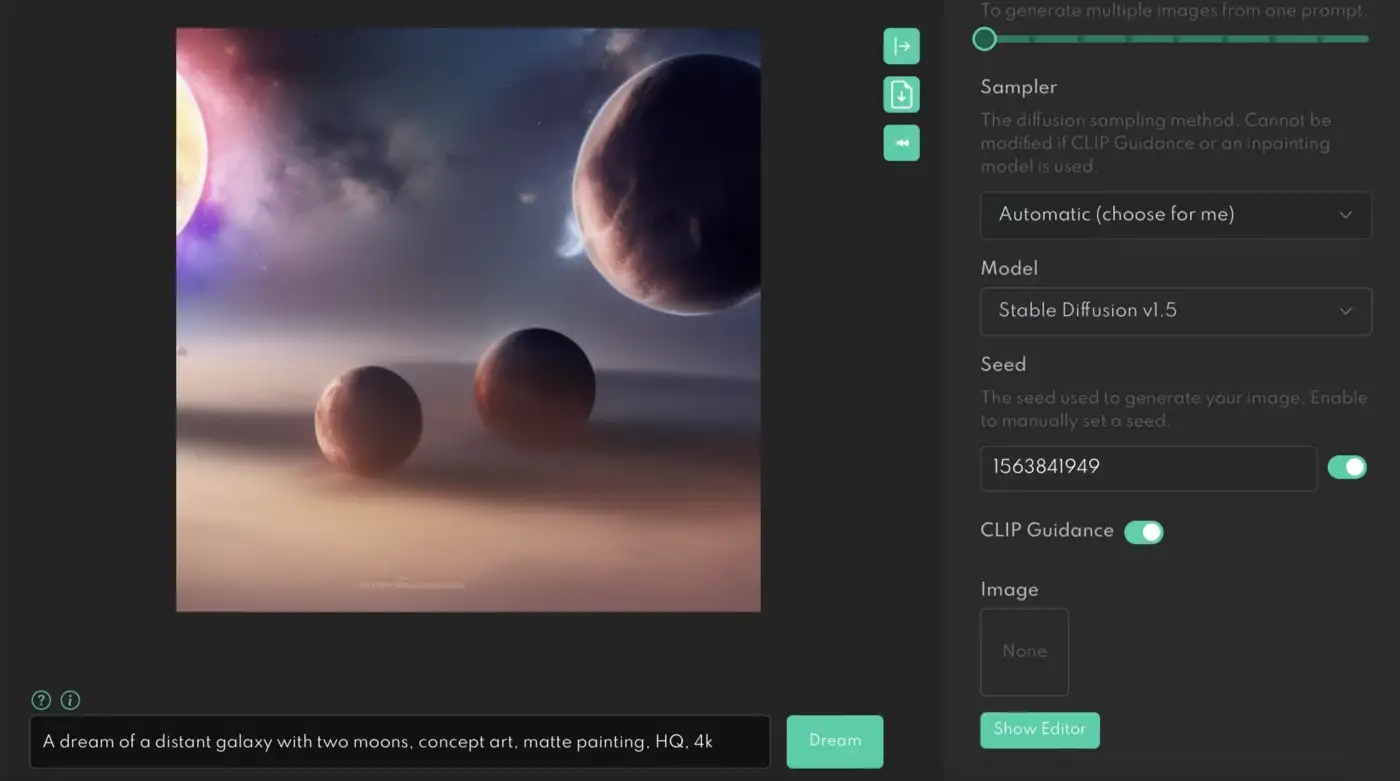
  • Seed
    You can use the Seed number to create a close copy of a specific picture. For example, if you want to generate a copy of the image you saw on Lexica, you need to specify the prompt and seed number of this image.
Settings to specify the seed number
Specifying the seed number to generate a close copy of the original image. (Large preview)

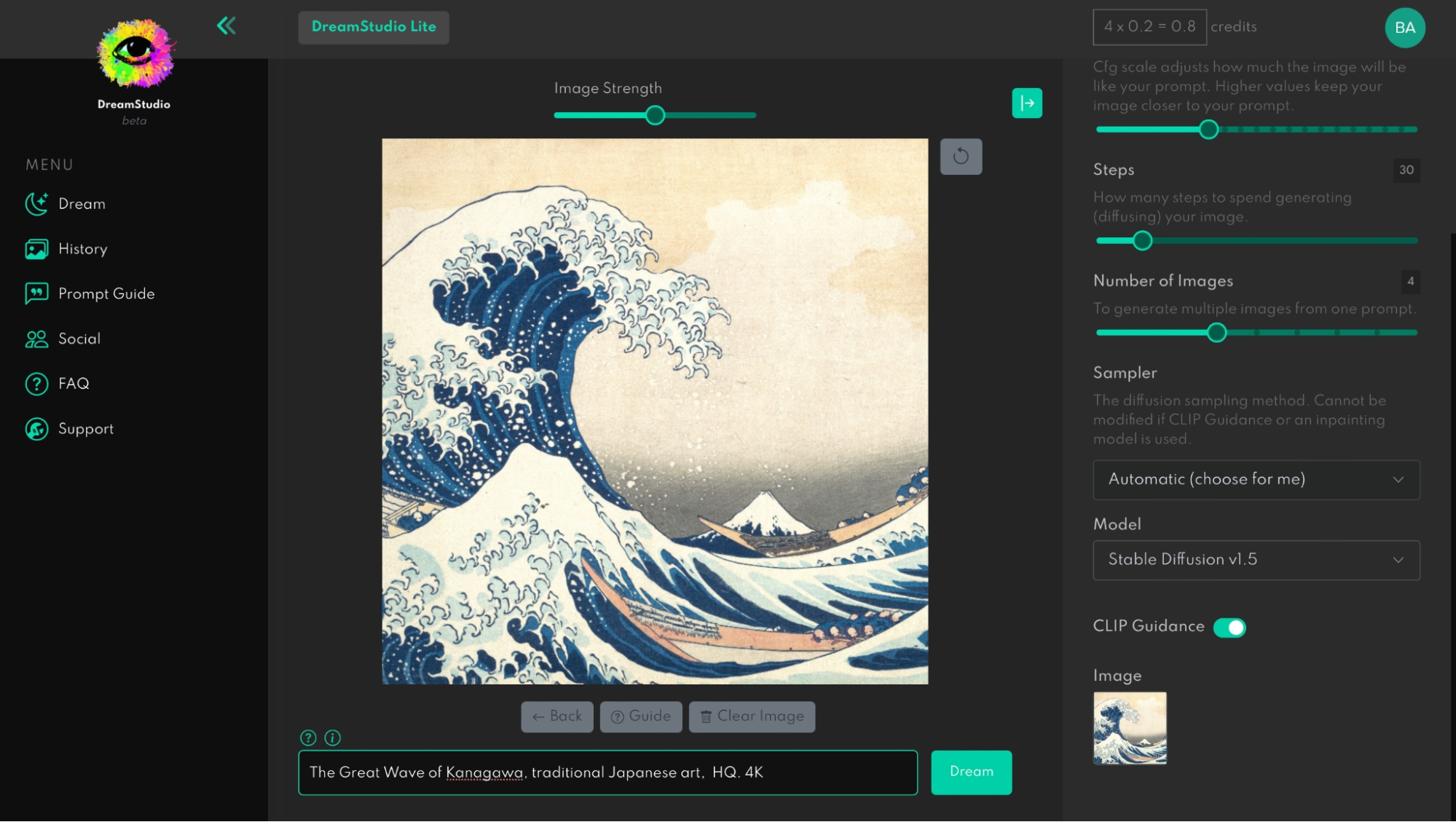
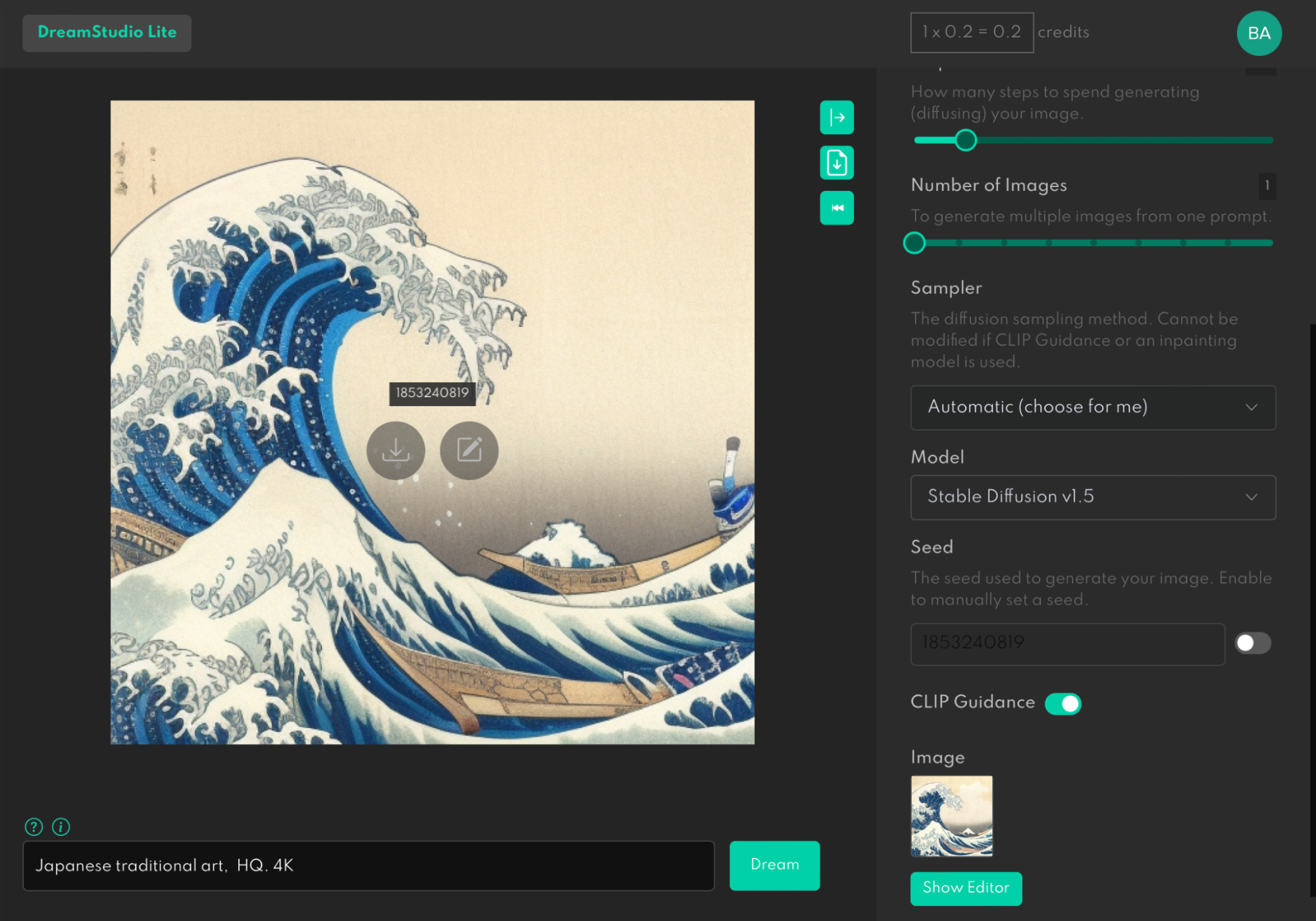
In the image-to-image (img2img) scenario, AI will use your image as a source and produce variations of the image based on it. For example, here is how we can use a famous painting, Under the Wave off Kanagawa, as a source for Stable Diffusion.

Painting ‘Under the Wave off Kanagawa’ as a source for Stable Diffusion
Using image-to-image AI generation in Stable Diffusion. (Large preview)

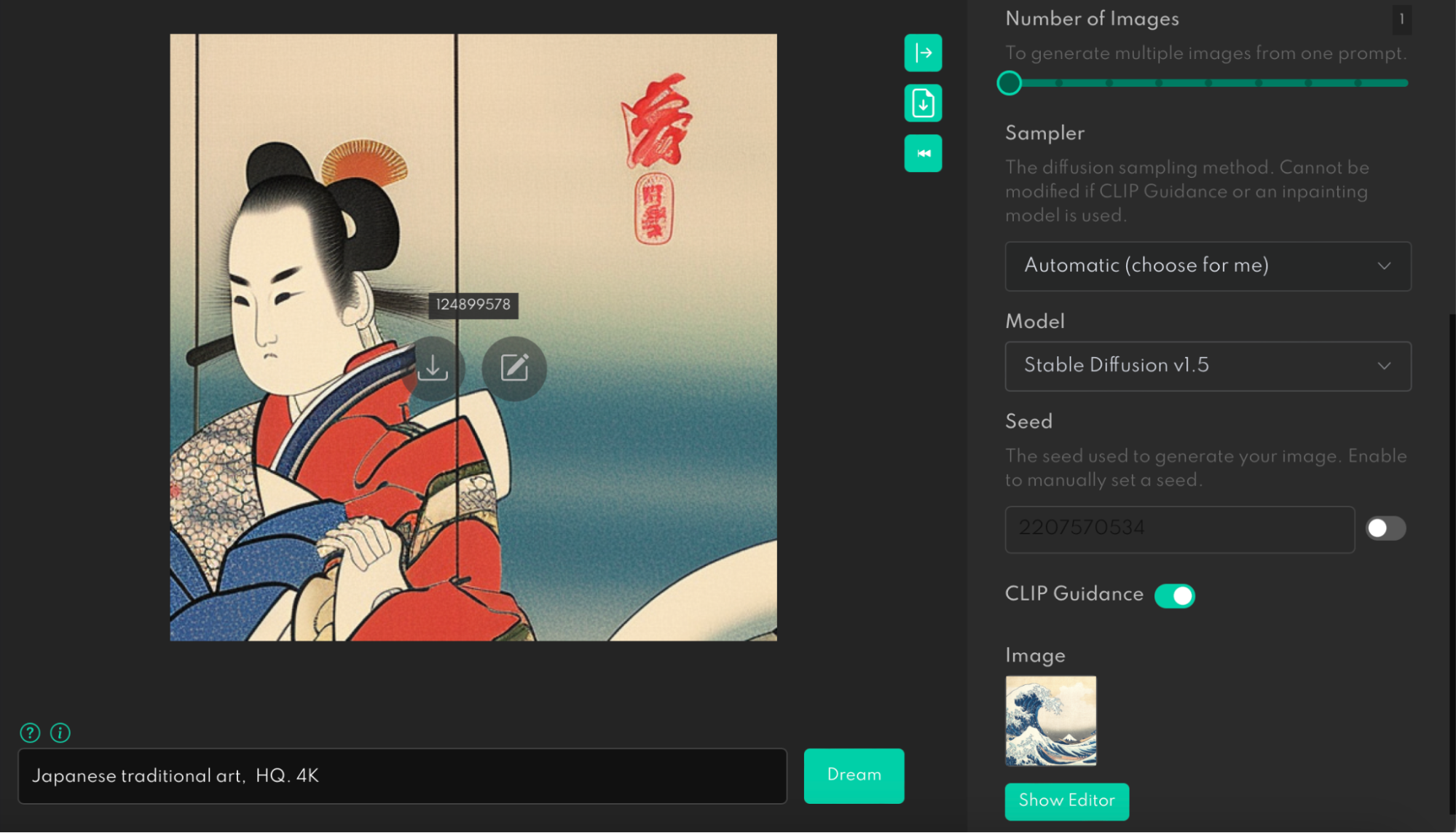
We can play with Image Strength by setting it close to 0 so that AI can have more freedom in the way it can interpret the image. As you can see below, the image that the system generated for us has only a few visual attributes of the original image.

Stable Diffusion with Image Strength set to 5% resulted in an image of a Japanese woman in a traditional costume
Running Stable Diffusion with Image Strength set to 5%. (Large preview)

Or set Image Strength up to 95% so that AI can only create a slightly different version of the original image.

Stable Diffusion with Image Strength set to 95% resulted in a very similar image to the painting ‘Under the Wave off Kanagawa’
Running Stable Diffusion with Image Strength set to 95%. (Large preview)

Our experiment clearly proves that AI tools have an opportunity to replace mood boards. You no longer need to create mood boards (at least do it manually using tools like Pinterest) but rather tell the system to find ideas you want to explore.

Create A Complete Design For Your Product #

AI can be an excellent tool to implement ideas quickly. Today we have a long and painful product design process. Going from idea to implementation takes weeks. But with AI, it can take minutes. You can create a storyboard with your product, specify the context of use for your future product, and let AI design a product.

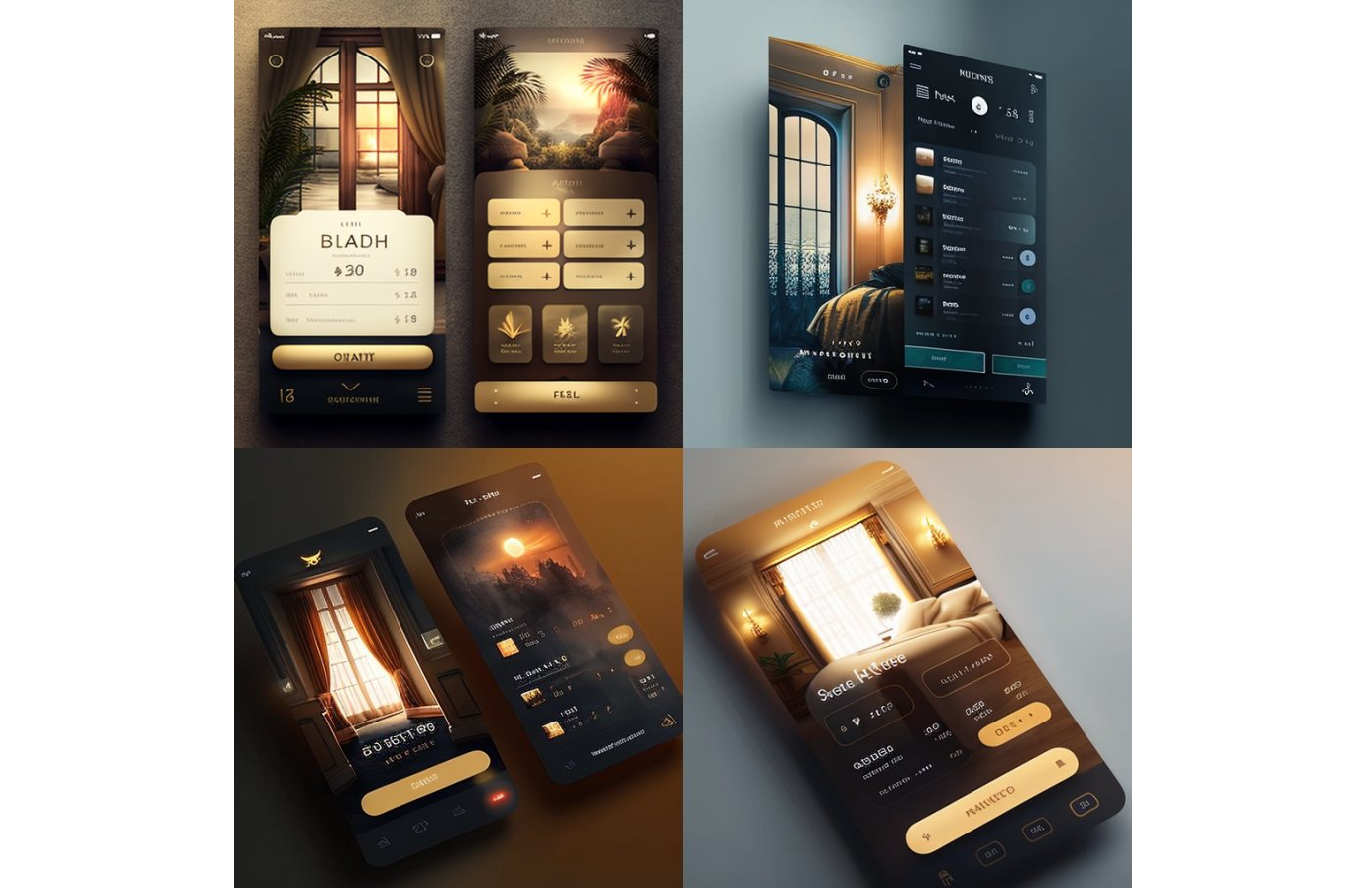
Providing these details is important because AI should understand the nature of the problem you’re trying to solve with this design. For example, below are the visuals that you can create right now using a tool called Midjourney. All you need to do is to specify the text prompt “mobile app UI design, hotel booking, Dribbble, Behance –v 4 –q 2”.

Midjourney tool with the text prompt ‘mobile app UI design, hotel booking, Dribbble, Behance --v 4 --q 2’
Midjourney is a text-to-image tool currently available as chat in Discord. (Large preview)

I think that part “mobile app UI design, hotel booking, Dribbble, Behance” is self-explanatory. But you might wonder what –v and –q means.

  • –v means a version of the Midjourney.
    On November 10, 2022, the alpha iteration of version 4 was released to users.
  • –q means quality.
    This setting specifies how much rendering quality time you want to spend. The default number is 1. Creating the image in higher values takes more time and costs more.
AI-generated design: A concept of a hotel booking app created by Midjourney
AI-generated design: A concept of a hotel booking app created by Midjourney. Image by Nick Babich. (Large preview)

It’s important to mention a couple of common issues that images generated by Midjourney have:

  • Gibberish texts
    You likely noticed that the text on mobile app screens in the above example is not English.
  • Extra fingers
    If you generate an image of a person, you will likely see extra fingers on their hands and legs.
AI-generated design: two people shake hands with extra fingers on them
AI-generated design: two people shake hands. Image by Nick Babich. (Large preview)

In the foreseeable future, a design created by AI will automatically inherit all industry best practices, freeing designers from time-consuming activities like UI design audits. AI tools will significantly speed up the user research and design exploration phase because the tools analyze massive amounts of data and can easily provide relevant details for a particular product (i.e., create a user persona, draft a user journey, and so on). As a result, it will be possible to develop new products right during brainstorming sessions, so designers are no longer limited to low-fidelity wireframes or paper sketches. The product team members will be able to see how the product will look and work right during the session.

Create Virtual Worlds And Virtual People In It #

No doubt that the metaverse will be the next big thing. It will be the most sophisticated digital platform humans have ever created, and content production will be an integral part of the platform design. Designers will have to find ways to speed up the creation of virtual environments and activities in them. At first, designers will likely try to recreate real-world places in the virtual world, but after that, they will rely on AI to do the rest. The role of designers in the metaverse will be more like a director (a person who will tailor the results) rather than a craftsman who does it with their hand. Imagine that you can create large virtual areas such as cities and get a sense of the scale of the city by experiencing it.

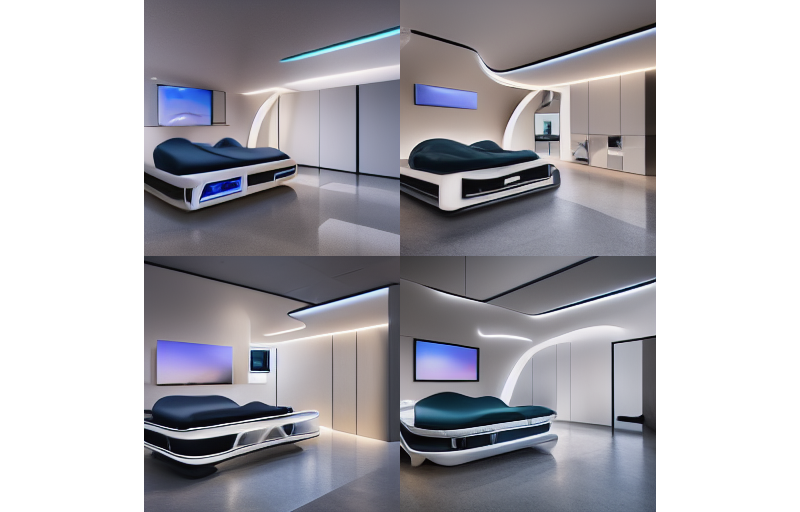
AI-generated design: High-tech patient room space
AI-generated design: High-tech patient room space. Image by Gleb Kuznetsov created using Midjourney. (Large preview)

It’s Time To Open A New Chapter In Design #

AI-powered design solutions have an opportunity to become much more than just tools designers use to create assets. They have the chance to become a natural extension of the team. I believe that the true power of AI tools will shine when tools will learn from a creator and will be able to reflect the creator’s personality in the final design. Next-gen AI will learn both about you and from you and create works that functionality and aesthetics meet your needs and taste. As a result, the output the tools will produce will have a more authentic human fingerprint.

The future of design is bright because technology will allow more people to express their creativity and make our world more interesting and richer.