Search Atlas is Ranked AI's most direct philosophical competitor. Both platforms believe AI agents should do SEO's heavy lifting, and both charge from $99/month. The difference is what sits between the agents and your website: Search Atlas ships automation you supervise (OTTO deploys changes to your site via a pixel), while Ranked AI puts salaried SEO professionals between the agents and everything that goes live.
Search Atlas vs Ranked AI at a glance
Feature
Ranked AI
Search Atlas
Model
Managed service, software included
Software with automation agents
Entry price
From $99/month per website, all-inclusive
$99 (Starter) to $999/month (Agency), credit-metered
Who reviews the work
Senior SEO professionals, every deliverable
You supervise the automation
Content
AI-drafted, human-edited and published weekly
AI-generated via Content Genius
Technical fixes
Implemented by the team, rescanned monthly
OTTO deploys automated changes via JS pixel
Backlinks
Human outreach, placements in real content
Automated outreach tooling + press releases
AI search (AEO)
Weekly AI indexing, llms.txt, unlimited prompt tracking
LLM visibility tracking + automation
PPC
Managed Google Ads from $99/month
Smart Ads automation
White label
Free branded portal + reports
Pro plan and up ($399+/month)
Autopilot vs co-pilot with a licensed driver
Search Atlas's pitch is "hands-off SEO": OTTO detects issues and pushes fixes, Content Genius writes articles, outreach runs autonomously. When it works, it's impressively fast. The risk profile is the flip side - automated content and automated changes ship at machine speed with machine judgment, and Google's guidance on scaled content abuse makes unreviewed AI output a real liability. You (or your agency) are the quality gate.
Ranked AI runs on agentic workflows too - audit agents, research agents, indexing agents - but nothing ships on autopilot. Every article passes human editorial QA before it ships, every technical change is implemented deliberately (in your CMS or codebase, not injected via a JavaScript pixel), and every link placement is a real editorial outreach win. The agents make the team fast; the team makes the output safe.
The pixel question
OTTO's fixes are applied through a JavaScript snippet that rewrites the page in the browser. It's clever - it makes changes instant on any CMS - but it means your "fixed" site depends on a third-party script executing, and search engines see corrections layered over the underlying HTML. Ranked AI implements changes at the source: your templates, your content, your schema. If you ever leave, the work stays.
Service depth
Search Atlas is software-first; humans are your side of the equation. Its $99 Starter covers one OTTO site with quotas metered in credits (AI tasks, article credits, keyword refreshes, LLM-visibility checks), and growing past them means Growth at $199, Pro at $399 - where white label first appears - or Agency at $999. Ranked AI is service-first: 24/5 human support in Slack, WhatsApp, Teams, chat or email, proactive weekly communication, unlimited web copy on request, and Google Business Profile management - with the software (no-limits keyword/prompt tracking, audits, backlinks, heatmaps, AI agent) included as the transparency layer, and white label free at every tier.
When to choose each
If you need...
Choose
Why
Human-reviewed work at automation prices
Ranked AI
Professionals gate every deliverable
Source-level fixes that persist
Ranked AI
Changes in your CMS, not a JS overlay
Maximum automation you supervise yourself
Search Atlas
OTTO's hands-off deployment
A big self-serve tool suite to operate
Search Atlas
Broad platform for hands-on operators
Both bet on agents. The question is whether you want to be the editor-in-chief. If not, start a free trial with Ranked AI - the review desk is included.
Top Search Atlas alternatives
Looking at Search Atlas alternatives in the ai seo automation space? Here’s where to start.
One way in: the managed SEO/PPC service from $99/month per website with the full software and unlimited tracking included - weekly human-edited content, backlink outreach, technical fixes and AI search indexing, month to month with a free trial, white label free for agencies.
Okara is an AI CMO that drafts marketing across 10+ channels for your approval, from free to $99/month.
Frequently asked questions
How much does Search Atlas cost?
Search Atlas runs $99/month (Starter, one OTTO project and one seat), $199 (Growth), $399 (Pro, where white label begins) and $999 (Agency). Usage is metered in credits across AI tasks, articles, keyword refreshes and LLM visibility checks, with top-ups available.
Is OTTO's automated SEO safe?
OTTO deploys fixes through a JavaScript pixel that rewrites pages in the browser, and its content and outreach run at machine speed with machine judgment unless you supervise them. It's genuinely fast, but unreviewed AI output is a liability under Google's scaled content policies, and pixel-layer fixes disappear if the script ever goes. You are the quality gate.
What is the difference between Ranked AI and Search Atlas?
Both are agent-powered and both start at $99/month. Search Atlas ships automation you supervise; Ranked AI puts salaried SEO professionals between the agents and everything that goes live: articles pass human QA, fixes are implemented in your CMS or codebase at the source, and links come from real editorial outreach. White label is free on every Ranked AI plan rather than starting at $399.
How we compared
Search Atlas’s pricing, plan limits and features were taken from Search Atlas’s public pages and documentation, last checked in July 2026; they may have changed since, so verify current prices there before deciding. Ranked AI pricing reflects the live pricing page and this article was last updated on . Written by Harry Strick, who founded Ranked AI - read it as a competitor’s view, and one that names where each tool wins. Questions or corrections?
GPU prices have doubled in the last six months, from $4.40 to $8.08 per GPU-hour. But AI prices are falling. How can that be?
It is not a simple answer. Higher GPU costs are likely to remain while the industry races to build out new data centers. Every component of the buildout is increasing in cost, from concrete to copper to credit.1Above all, electricity remains the limiting factor, which Oracle is experiencing : last week it invoked force majeure on its New Mexico campus after the natural-gas pipeline feeding it slipped by six months.2
Demand continues to explode. Inference companies & model companies are posting record-setting growth, which emboldens investors to value them more richly, provide them more capital, & up the bidding on those limited GPU-hours, to generate more revenue. The flywheel spins.
Meanwhile, AI efficiency is improving just as rapidly. Claude Opus 5.5 costs 40% less to run than the previous model.3OpenAI cut Luna 80% in July, then another 50% in September, presumably powered by margin innovation.4The same benchmark threshold that cost $0.55 eighteen months ago now clears for $0.0015, a 377x reduction.5
But capital is more expensive. As rates have risen, the relationship that governed tech multiples has come undone. The 10-year Treasury has been the strongest historical predictor of tech valuations : higher rates, lower multiples. Over the full history the correlation runs −0.50. Over the last two years it has flipped to +0.39.6Rates climbed from 3.63% to 5.18% while the NASDAQ rose roughly 78%. The market is no longer repricing tech on the cost of money. It is betting the growth math works out.
Today, the capital markets are fueling this torrid growth, betting the math works out positively. The metric that will ultimately matter is gross profit dollars per GPU-hour.7As GPU costs increase, are efficiency gains outpacing them? Microsoft says it generates 90% more tokens per GPU year over year, concentrated in its smaller models.8If that pace continues, the two curves are at least running neck & neck.
So for now, the industry seems to be holding both forces in balance.
We’ve
fallen into conversational tunnel vision, defaulting every AI
capability into a chat-based interface simply because LLMs are trained
on dialogue data. But great UX is about matching modality to users’
context, intent, and cognitive load, so the interface adapts to the
user, not the other way around.
The design community
has entered a period of conversational tunnel vision. Because Large
Language Models (LLMs) are trained on dialogue, the industry has
collectively decided that the chat bubble is the natural home for every
AI capability. While the chat interface is a viable and powerful option
for many tasks, it is one tool in an expansive toolkit. UX and Product
teams must be intentional about the modalities we choose for how users provide their data and commands, and how the system presents its output.
Modality is the way a person uses their senses to interact with a system: seeing, hearing, touching, speaking, or typing.
To
pick the best method, you need to think about what the user wants to
do, where they are, and how much cognitive effort they are already
expending. This guide offers a clear way to figure out the best approach
for any product, using two tools to assist in the process: a Task Audit
and an Input/Output Alignment Matrix.
Picture a traveler jogging
through a loud airport terminal after a sudden gate change. They are
dragging their roller bag and carrying a coffee in the other hand. They
need to open their airline app to ask the AI assistant where to go. The
tool immediately fails the input modality test. It forces the traveler
to stop walking, balance their coffee, and type a long booking reference
number into a tiny chat box. When they finally hit send, the system
fails the output modality test. Instead of flashing a large,
high-contrast gate number, the AI returns a dense paragraph explaining
the atmospheric weather patterns causing the delay. The actual gate
number sits buried at the very bottom.
While they might make the
flight just fine, the user won’t forget the moment of anxiety they felt
while using the AI tool — an experience that could have served as a way
to reinforce a commitment to UX has instead validated the common
conception that companies don’t care about or understand customers using
their products. In this scenario, the airline built a smart tool, but
the interface failed the user. The input required physical dexterity,
which the traveler lacked at the time of need. The output demanded a
level of reading focus they could not spare. This article will cover how
we can avoid this scenario in our AI-powered tools. In order to be
successful, we must evaluate the physical and cognitive load of our users to match both the input and output modality to their immediate intent.
Let’s first discuss the limitations of a chat-based interface.
Myth of the Do-It-All Chatbot
The
allure of the chatbot is easy to understand from a product development
standpoint. It is a blank slate. It suggests that the system can handle
anything the user provides. However, a text-heavy interface often causes
a high adaptation load. This load increases cognitive demands on users.
Over time, this cognitive burden turns into a psychological tax a
person pays when changing natural thought processes to accommodate a
machine.
When an interface relies solely on conversation, it imposes a dual burden: a linguistic challenge for input and a cognitive challenge for output. We’ll examine both separately below.
Input: Why a Text Box is a Linguistic Barrier
A
blank chat box creates a major problem for users who need to discover
what a tool can actually do. In a standard graphical interface, menus
and buttons provide clear visual cues that signal every available
option. A chat box often leads to choice paralysis
because users are forced to guess what the AI is capable of. They have
to remember the exact phrasing or technical terms required to get the
result they want.
Consider a data analyst who wants to find a
specific trend in a spreadsheet. In a traditional tool, they might click
a filter or sort button. In a chat interface, they must suddenly become
a writer and describe that complex logic in a complete sentence.
Another example: a manager trying to reorganize a team schedule.
Dragging and dropping blocks on a calendar is intuitive. Describing
those same scheduling shifts in a text prompt adds a layer of work that
makes the task feel more difficult than it should be.
Designing for input means recognizing that composing a prompt is a creative act.
It requires a person to translate a vague thought into a specific
command. For many professionals, this creates a linguistic barrier. A
designer might know exactly how they want an image to look but struggle
to describe the lighting or texture in a text prompt. In that case, a
slider or a color picker is a much better input method than a text box.
Having
addressed the linguistic barrier of constructing input prompts, we must
now consider the other half of the conversational burden. This is the
cognitive cost the AI imposes when it responds in dense blocks of text.
Output: The Cognitive Cost of Reading Long Text
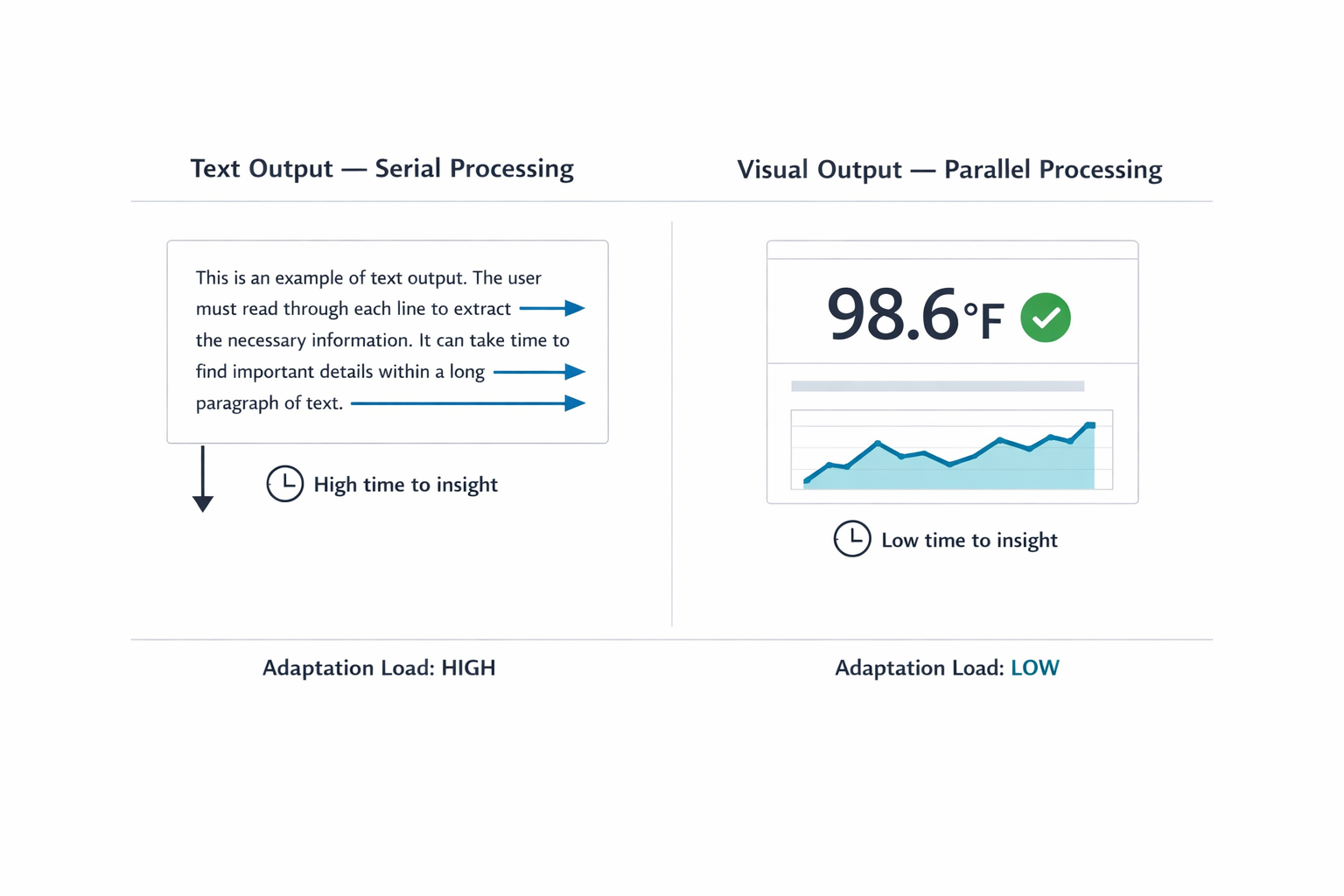
When an AI responds in long blocks of text, it transfers the interpretive work to you, the user. Text is a serial medium:
your brain has to read one word after the next to extract meaning. That
takes time. Sequential reading is necessary in many scenarios. Complex
legal analysis or reviewing nuanced medical histories requires reading
full paragraphs. Teams create friction when they default to text for
data that visual formats communicate faster. Visual methods allow
parallel processing. You can view a chart and spot a pattern in under a
second.
Imagine asking an AI for a project status update. Instead
of a color-coded dashboard, you receive three paragraphs listing every
task completed that week. Now you must read the entire response and
mentally summarize it to find the one piece of information you needed.
The quick visual check has been replaced by a reading assignment.
The cognitive tax
of this work compounds with professional stakes. A doctor asking for a
patient’s vital signs needs a clear numerical display, not a narrative
describing the readings. A stock trader looking for a price spike needs a
line graph immediately, not a written description of price movement
over the past hour. In both cases, a text response forces the
professional through a slow, error-prone extraction process when speed and accuracy are most important.
Figure
1: Redesigning for psychological fatigue. The linear text loop (left)
forces exhausting sequential verification, causing anxiety. The
graphical selection grid (right) permits instant, low-effort visual
confirmation (glance verification).
A Taxonomy of Input and Output Modalities
Before selecting a modality, practitioners need a shared vocabulary
for what the options actually are. The table below maps common input
and output modalities to the contexts where each performs best. This is
not a ranking. Each modality has a role; the question is always which role it is playing in a given workflow.
Designing for modality inherently requires a strong focus on accessibility.
While visual dashboards provide rapid insight for many people,
designers need to provide screen-reader-optimized audio alternatives for
users with visual disabilities. Modality choices should multiply
pathways to information.
Input Modalities
Modality
Best For
Example Contexts
Cognitive & Physical Rationale
Button / Tap
Single-step, binary actions
Launching a feature; confirming an alert
Eliminates recall overhead by utilizing recognition; maximizes execution speed during time-sensitive tasks.
Voice
Hands-busy or eyes-busy contexts
Field technician query; driving navigation
Offloads physical interaction to speech, though bounded by ambient noise and social privacy norms.
Natural Language Chat
Ambiguous or exploratory queries
Researching options; asking follow-up questions
Offers users freedom in what they can say; however, the user must figure out how to phrase their request clearly.
Form / Wizard
Structured, multi-field data entry
Filling out a contract; configuring a report
Keeps users from missing information by breaking down a complicated task into clear, step-by-step visual sections.
GUI (Filters, Sliders, Drag-and-drop)
Complex parameter setting or spatial tasks
Scheduling; data filtering; image editing
Prevents mistakes and ensures users don't miss information by dividing complicated tasks into clear, step-by-step visual parts.
Multi-modal (Image + Text)
Visual input paired with description
Uploading a design mockup with annotation
Reduces the effort of explaining things because users can reference an object instead of having to describe it only with words.
Gesture
Hands-free spatial interaction
Waving a hand to acknowledge an alert in a sterile operating room
Allows
physical interaction without touching a surface. This keeps users safe
and clean in contaminated environments and allows for quick input or
acknowledgement.
Output Modalities
Modality
Best For
Example Contexts
Cognitive & Physical Rationale
Push Notification / Alert
Time-sensitive, ambient awareness
Price spike alert; task completion notice
Provides
a quick update that the user can process at a glance. It delivers
information without demanding a full break in concentration from their
primary task.
Audio Summary
Hands-busy or eyes-busy contexts
Status updates while walking; conversational voice agents providing real-time navigation
Delivers
information directly to the user’s ear. Removes the need to look at a
screen, keeping the user safe and aware of their physical surroundings
while moving or working.
Short Text Summary
Focused queries needing brief answers
Definition lookup; single-metric status
Gives
a fast answer to a direct question. Users can read a short sentence
quickly without experiencing the fatigue of scanning paragraphs of text.
Visual Dashboard
High-density, comparative analysis
Project status; resource allocation
Enables
visual trend and outlier detection. Avoids the mental effort of reading
data line-by-line and cross-referencing in real time.
Interactive Canvas
Generative or iterative creative tasks
Design iteration; layout adjustment
Allows
users to manipulate the output instead of asking an AI to move it via
text instructions. Reflects a natural way to interact with the output.
Inline Confirmation
Guided task flows needing feedback
Step-by-step configuration wizard with in-line validation
Provides visual proof that the system recorded a choice correctly. Reduces users’ anxiety about wondering if an error occurred.
Table 1:Input
and Output Modality Taxonomy. Use this as a reference during the Task
Audit to identify candidate modalities before narrowing to a
recommendation.
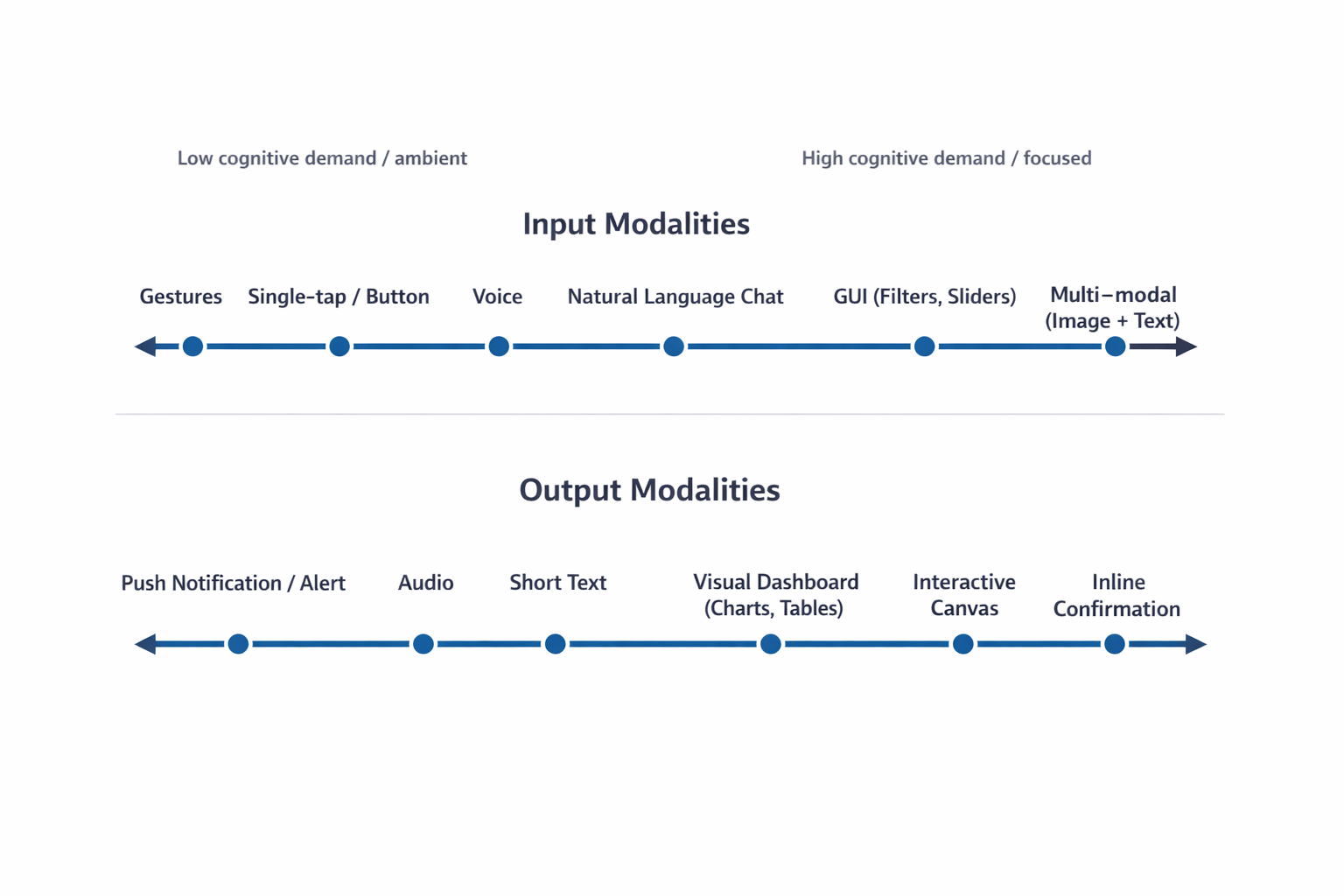
The following FigureFigure 2 illustrates the cognitive spectrum,
mapping how mental effort scales across various interaction methods.
This spectrum is a critical tool for designers to visualize the shift
from low-effort, ambient interactions to high-effort, focused
experiences. By understanding where a specific task sits on this
spectrum, teams can identify whether a user needs a “glanceable” output
that minimizes mental processing or a high-density format that supports
deep, analytical thinking.
Figure
2: The Cognitive Spectrum of Modality. Both input (top) and output
(bottom) move from low-effort, ambient interactions to high-effort,
focused, and multi-modal experiences, illustrating why the context of
use must dictate the design choice.
With
this taxonomy established, the next step is to apply a rigorous method
to select the optimal input and output combination. Practitioners must
ground this selection process in the user’s real-world environment and
context.
Task Audit: A Framework for Modality Selection
To choose the right interaction method, practitioners should complete a Task Audit before interface design begins. A formal Task Audit is the framework that moves teams from assumptions about user behavior to evidence.
This process gathers data about the physical, social, and cognitive
context in which the work actually happens, which then drives all input
and output modality decisions.
Use these four areas of focus to anchor the audit:
Input Constraints:
This addresses whether the user can physically interact with the system
using their hands, such as typing or tapping. It often dictates the
necessity of hands-free interaction methods like voice input when the
user’s hands are occupied by tools or gear.
Can the user use
their hands to type or tap? A mechanic working under a vehicle might
need to ask a question using only voice because their hands are occupied
and covered in grease.
Output Constraints:
This defines whether a user can safely and practically view information
on a screen. It concerns situations where a user’s eyes must remain
focused on their environment, making audio or glanceable visual cues the
appropriate display method.
Can the user safely look at a screen
to read information? A delivery driver’s navigation system should
provide audio directions because reading a detailed map while driving
through an intersection is dangerous.
Social Constraints:
This considers the environment’s tolerance for audible interaction,
either speaking or listening to audio output. It helps determine if a
quiet space requires silent alerts or if a loud environment demands a
non-audio output method.
Is the environment appropriate for
speaking aloud or listening to audio? An office worker in a quiet,
open-plan space would prefer a silent text notification over a spoken
voice response.
Cognitive Load: This
measures the amount of mental effort the user must already dedicate to
their primary task. Teams must design the interface output to either
minimize mental processing, such as with a quick visual indicator, or
support deep thinking with a detailed summary.
How much mental
effort does the task already require? A surgeon needs a quick visual red
indicator during a procedure, while a lawyer researching case strategy
needs a detailed text summary to absorb at their own pace.
The audit answers two questions for every feature:
What modality can the user physically use to provide input here?
What modality can the user realistically process as output here?
Here is how to gather the evidence to inform your task audit. Use one or more of these common UX research-related methods:
1. Contextual Inquiry and Observation
This is the most direct way to capture how people work in their natural setting,
and it provides the richest data for identifying physical constraints
on both input and output. Observation is necessary because users often
perform hidden work: small steps or workarounds they forget to mention
in an interview, or environmental details they do not think to describe
because they have adapted to them.
The Approach: Go to the user’s actual workspace, whether a
field site, warehouse, or office floor. Ask them to perform the task you
are studying and observe closely.
What to Look For: This method is most revealing for Input Constraints and Output Constraints.
Input example A technician diagnosing equipment who cannot put down their tools rules out typing and points directly to voice input.
Output example A
supervisor in a meeting who looks up and down repeatedly from a screen
signals a need for glanceable, low-density output rather than a
scrolling text summary.
2. Focused Interviews
Interviews
surface the mental models and decision points that observation cannot
capture. They are most valuable for understanding Cognitive Load.
The Approach:
Conduct one-on-one sessions with end-users and the stakeholders who
manage the outcome. Use a structured protocol focused on a specific
task. Ask for stories about past successes and failures rather than
general opinions.
What to Look For:
The “Why” Behind High Cognitive Load Ask
users to describe the hardest part of a task. A lawyer may explain that
the volume of detail is not the challenge; synthesis for ethical or
strategic judgment is. This confirms a need for detailed text output the
user can read and absorb at their own pace, not a summary dashboard.
Process Ambiguity Uncover
situations that are unclear or error-prone, which identifies where AI
capabilities provide the most leverage and what output format will
reduce rather than increase ambiguity.
3. Collaborative Workshops
Workshops
are essential for defining task boundaries and establishing required
fidelity levels. Product managers and stakeholders bring foundational
knowledge of system requirements; researchers apply audit criteria.
The Approach: Use workshops to build a shared Task Inventory.
Bring designers, engineers, product managers, and business analysts
together to map every step of the process. Product managers and business
analysts ensure factual accuracy; the research team applies audit
criteria to each step.
What to Look For:
Social Constraints Confirm
where tasks are performed. A workflow that takes place on a loud
manufacturing floor versus a shared quiet library demands very different
output modalities.
Ambiguity and Speed Tests For every task in the inventory, apply two tests. First: Does this step require human ethical judgment? If yes, the AI output must support that judgment, not replace it. Second: Does this step require instantaneous execution? If yes, the interface must support fast input with minimal cognitive overhead.
Once you gather field evidence through these research channels, map your findings directly against the Modality Taxonomy.
Each concrete physical or social constraint you document systematically
eliminates mismatched interfaces. This process strips away design
guesswork, narrowing your architectural choices down to the specific
input and output combinations that survive the reality of the user’s
environment.
When you ground input and output modality decisions
in field evidence rather than interface convention, the resulting design
reduces adaptation load for the user and grounds your modality choices
in evidence. When you base decisions on field data, you move past
interface convention and build a powerful case for the resources needed
to create the right experience for your users.
Once the audit is
complete, the final step is utilizing the Input/Output Alignment Matrix
to formalize the connection between user intent and the optimal modality
combination.
Input/Output Alignment Matrix
With Task Audit findings in hand, you can use an Input/Output Alignment Matrix
to map user intent to specific modality combinations. This matrix is
organized by what the user is trying to accomplish in a given moment.
This distinction versus focusing on what your AI is capable of doing
matters. If intent changes across a single workday for the same user,
the interface should respond to those shifts.
Choosing the wrong
modality for the user’s context can lead to user frustration. Users
might feel mentally drained if a lot of information is delivered through
a format that is hard to process, like getting a massive status update
only in text. They may also start worrying if an action was actually
completed correctly when a precise command is buried within a long chat
exchange. Finally, the system can force users into finding clumsy
workarounds, making them adapt to the machine’s method instead of
working in their natural, most effective way.
User Intent
Optimal Input Modality
Optimal Output Modality
Environmental Fit
Quick Status Check
Voice or Single-tap Button
Audio or Push Notification
Hands-busy, Eyes-busy (e.g., Technician on ladder)
Specific Detail Query
Natural Language Chat
Short Text Summary
Focused, low-density data need
Complex Analysis
GUI (Filters, Sliders)
Visual Dashboard (Charts, Tables)
Desk-based, high-resolution screen
Creative Generation
Multi-modal (Image + Text)
Interactive Canvas
Design or drafting environment
Monitoring / Alert
Passive (background system)
Push Notification or Audio Alert
Any environment; task is ambient awareness
Guided Task Completion
Structured Form or Step-by-step Wizard
Inline Confirmation + Progress Indicator
Focused workflow; user needs verification feedback
Table 2:Input/Output
Alignment Matrix. Map user intent to modality combinations using Task
Audit evidence. The two added rows (Monitoring/Alert and Guided Task
Completion) cover common enterprise and mobile scenarios not captured in
simpler frameworks.
When teams coordinate these factors,
they can move past the automatic default of adding a chatbot. Visual
layouts enable rapid scanning. Structured inputs remove the burden of
constructing perfect sentences. Audio outputs serve users whose hands
and eyes are otherwise occupied.
The right modality combination respects the user’s physical and cognitive state at the moment of interaction.
A
real-world scenario where environmental constraints dictated a shift in
design strategy best demonstrates the practical application of this
matrix and the broader audit framework.
Case Study: Adaptive Modality for Field Technicians
The Problem: Cognitive Overload in High-Risk Environments
Field
technicians servicing high-voltage electrical grids often face a
dangerous misalignment of interface modality. Traditionally, these
technicians had to rely on ruggedized tablets to access technical
manuals and log status updates. However, the physical constraints of the
job — wearing heavy protective gloves and working in bucket trucks at
significant heights — made interacting with a standard touch interface
nearly impossible while on a job site. Additionally, attempting to read
complex, text-heavy diagnostic reports on a screen while maintaining
situational awareness created a high cognitive load that increased the
risk of safety errors.
Research Methods: Capturing the Reality of the Field
To address this, researchers conducted a Task Audit utilizing three specific methods from this article. First, Contextual Inquiry and Observation
revealed that technicians often worked in “hands-busy, eyes-busy”
states where any manual input was a significant barrier. Researchers
observed technicians wearing mandatory thick protective gloves while in
the bucket truck, which made precise screen taps nearly impossible and
often triggered the wrong commands.
High-altitude environments
also introduced severe screen glare from direct sunlight, washing out
the display and making text difficult to read even at full brightness.
Furthermore, technicians faced the physical safety risk of trying to
manipulate and secure a heavy, ruggedized tablet while balanced in
awkward positions, creating a distraction that could lead to dangerous
slips or equipment contact. These factors, combined with the need to
constantly monitor live wires and the surrounding environment, meant
technicians could not safely dedicate their eyes or hands to a standard
tablet interface, confirming the severity of the eyes-busy and
hands-busy constraints.
Second, Focused Interviews with
veteran technicians validated the findings from the field. They
confirmed that the operational challenges, including the thick gloves,
screen glare, and safety risks, were not unique to one location but were
commonly experienced across multiple sites, including high-altitude
transmission lines and sprawling power substations. This broad
confirmation solidified the need for a non-touch, voice-first solution.
The interviews also surfaced a critical cognitive constraint: the need
for glance verification of vital signs, such as voltage readings and
temperature trends, rather than being forced to read a long narrative
description of system health. Technicians stressed that their primary
need was immediate, unambiguous verification (is this safe? or where is
the fault?), not a lengthy diagnostic report, indicating that a
text-heavy response was dangerous to their workflow.
These methods
confirmed that the environment required a departure from the
traditional chat or form-based AI capability interface.
The Resolution: A Multi-Modal Handoff Solution
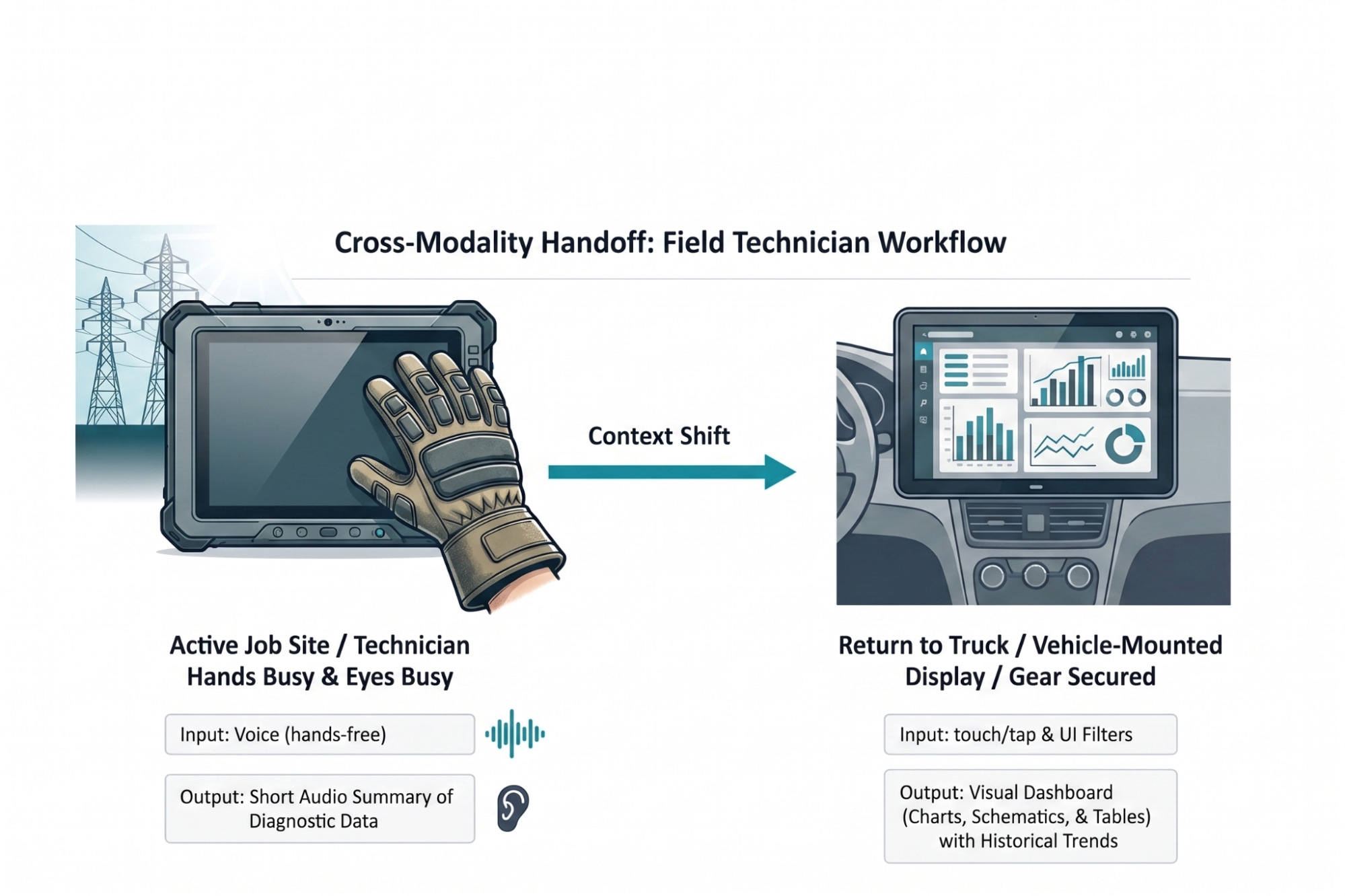
The
resulting solution implemented an adaptive modality handoff designed to
mitigate the physical and cognitive barriers researchers identified
during the research. While active on a job site, technicians utilize
voice input to query the system. This method allows them to remain
productive while wearing thick protective gloves that would otherwise
prevent precise interaction with a touchscreen.
The AI responds
with a short audio summary of immediate diagnostic data. This audio
feedback bypasses the challenge of screen glare in high-altitude
environments and allows the technician to maintain situational awareness
of the high-voltage grid without the safety risk of looking away from
dangerous equipment. By providing immediate answers to fault locations
through audio, the system meets the technician’s need for glance
verification through a hands-free and eyes-free channel.
Once
technicians return to a truck and secure safety gear, a system
automatically hands off workflows to a 15-inch visual dashboard mounted
inside a vehicle. A rugged 10-inch field tablet lacks adequate screen
real estate for complex schematics. A larger vehicle display allows for
parallel processing of historical trend data and wide electrical grid
maps. This case study reflects an actual field audit conducted for a
national utility provider. Implementing this adaptive approach reduced
diagnostic time by twenty percent and increased daily tool adoption
among field crews.
Figure
3: Cross-modality handoff diagram for field technicians. Our solution
to deliver AI capability using multiple modalities depending on context
was the result of auditing user tasks and led to greater adoption of the
tool.
Designing for the Environment
An
AI capability is only as usable as the interface that delivers it.
Researchers and designers must resist the pull toward the path of least
resistance. Building a chatbot is fast and familiar, something we’ve
been doing for decades now. Building an interface that feels like a
natural extension of how someone already works is harder, and it is the
work that matters.
Start by leaving the screen. The Task Audit
requires presence in the places where work actually happens: the field
site, the warehouse floor, the operating room. The physical and social
realities of those spaces are not edge cases. They are the design brief.
The
future of AI interface design is a diverse ecosystem: visual, vocal,
haptic, and ambient, calibrated to user intent and environmental
context. The chat window is one tool in that ecosystem. It is the right
tool for specific jobs, and often the wrong tool for the jobs we
reflexively assign to it.
In order for us to create the
greatest likelihood of acceptance and use of the AI capability we offer
users, we must fit the modality to the person and the place.
Where to Start
To
get started immediately, run a lightweight version of the Task Audit
before your next design sprint. Spend two hours observing the workflow
in its actual environment. Conduct three to five interviews with the
people who perform the task. Bring a PM or analyst into a 90-minute
workshop to build a task inventory and apply the four audit questions.
You will not have complete data, but you will have enough to make a
defensible modality recommendation backed by evidence rather than
convention.
I created a Modality Task Audit Template to help guide
teams with moving forward. You can download this worksheet and take it
directly to your next field observation. It allows design and product
teams to document specific physical barriers before writing a single
line of code.
Step 1: Physical Reality Check. An observation checklist to log hand availability, eye focus requirements, and ambient noise levels in a specific workspace.
Step 2: Cognitive Baseline. A scoring grid to rate required reading density and verification anxiety for a given workflow.
Step 3: The Handoff Map. A
blank flow diagram to chart where a user starts a task (for example,
using voice on a mobile phone in a warehouse) and where they finish it
(for example, reviewing a visual dashboard on an office monitor).
We
focus heavily on training smarter AI models. We owe equal attention to
human interfaces. A brilliant underlying model packaged in a lazy text
interface fails. When you observe actual work environments and align
interaction modalities to them, you remove adaptation friction.
Modality Task Audit Field Template
Use this worksheet during field observations. It allows design teams to document specific physical barriers before writing code.
Part 1: Physical Reality Check
Observe users as they perform a primary task in actual workspaces. Check all applicable conditions.
State of Hands
Visual Focus Requirements
Ambient Noise Level
Part 2: Cognitive Baseline
Rate the mental effort required to complete a specific workflow.
A closer look at why users don’t need more tools in their daily lives.
What they need are seamless integrations of useful features to match
already existing, established mental models.
We often hear about shiny new tools that change everything (yet again). But in practice, most people don’t need more tools to deal with in their daily lives. What we actually need are better integrations of useful capabilities that neatly align with our existing and established mental models.
Users
don’t get excited about shiny new “smart” workflows, or navigating
Terminal commands, or jumping between endless back-and-forth chat
interactions. They need seamless integrations of useful features to address problems with high severity, high frequency, and a high level of frustration.
Now, that’s useful: seamless integration of AI features when creating new folders. By Karthikeya GS.
1. AI-First vs. Quiet AI
I’ve always been puzzled by the notion of “AI-first”
products. They might speed up production, but we need to know really
well first what we actually want to build. AI-first often doesn’t
account for years of small and big design decisions that have shaped expectations and mental models over the years.
A neat Claude Excel integration, with users studying specific rows or columns, instead of switching between tools all the time.
I love the notion of “Quiet AI”.
These are tools that are mostly invisible, sit in the background, and
do small tasks on the user’s behalf. They never scream for attention but
happily assist in repetitive, frustrating tasks that can easily be
automated or assisted with a smart helper.
Excellent examples of Quiet AI include Claude’s integration within Microsoft Excel, PowerPoint, and Word, providing assistance in context without disrupting the user’s workflow.
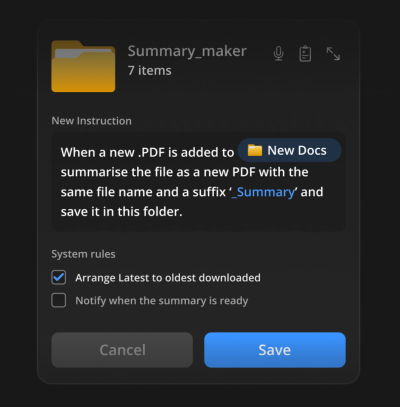
So no wonder that I absolutely love the idea of folder instructions!
There, users can define what a folder is supposed to do, based on the
purpose they created it for. It sounds much more complicated than it
actually is.
Users define instructions, choose system rules, and the system takes care of the task.
The instructions define what the folder is for, how files should be organized,
how sub-folders should behave, and what actions can happen inside.
Instead of manually maintaining a folder, you set its intent once and
let the system follow it.
It’s a seamless integration
of AI helpers just when and where users want and need it. With
permissions and actions locally scoped to that specific folder on the
user’s machine, unless the user extends access, permissions, or system
rules on their own.
Users could automate tasks where the work actually happens, e.g., generating summaries on the fly.
Here are some useful examples:
For a passport renewal,
get the form and collect all the documents I need for it. Inform about
missing documents, and fill out the form to the best of your abilities.
When new invoices
are added to the folder, rename them according to the sequence, sort
them by invoice number, and organize them in folders by client.
When a new PDF is added to the folder, generate a summary, send it to my pocket, and send me a notification via email.
User’s
value doesn’t emerge from users having to juggle between multiple
applications, views, and sources every few minutes. That’s when they are
slowed down, and that’s when they make mistakes.
It comes from helping users do the work they need to do — by reducing frustrations, slowdowns and mistakes, and taking care of tasks that otherwise would take too much time and too much effort to complete well.
Yet again, seamless integrations
— a very underused but incredibly impactful way to deliver value fast,
without adding the burden of installing and learning yet another tool.
Many companies assume everyone craves new AI features. But the reality
is that most people don’t want more AI — at least not in the way most AI
leaders envision it.
Many companies silently assume that everybody wants more AI in their lives. That people are craving new AI features,
new AI products, new AI workflows — that would all magically replace
all existing outdated practices and broken ways of working.
But in reality, it seems like people don’t want more AI at all — at least not in the way most AI leaders envision it. Unsurprisingly, many AI features have low adoption and retention — at a very high cost of delivery, and a high risk of reputation damage.
The AI People Don’t Need
It’s remarkably difficult to make a strong argument with senior leadership, but AI is not a value proposition.
New AI features don’t magically make for happy or excited customers.
Because AI features are often bolt-ons and separate tools for employees
to use, they typically take people out of their regular way of working.
AI is pretty good at amplifying shortcuts and shortcomings
in organizations — from data quality to decision making. It can’t
magically fix years of accumulated quick patches, technical debt, broken
culture and internal politics. If anything, they become more visible
with AI as inconsistencies or conflicting priorities and get handed
directly to users, who are then left to make sense of the mess
themselves.
Because in most organizations, work typically requires
hopping on and off between plenty of disconnected and fragmented
systems, with a new AI tool, they now have yet another system that they
also need to hop on and off. Often it produces more work, and typically
it’s not particularly rewarding work either.
On top of that, people are very much aware of the cost of finding and fixing AI hallucinations. Asking AI to generate a response might feel easier than writing from scratch, but it has a cost:
Skim through the entire AI output,
Spot key points to focus attention on,
Review/verify key points, one-by-one,
Check rationale for what follows next,
Articulate corrections + regenerate,
Review the response (a number of times).
AI goes in Key Activities and Key Resources — not in Value Propositions. Image by David Bland.
For
many people, AI isn’t something they can proactively choose and explore
on their own — it arrives uninvited, at someone else’s pace. On top of
that, plenty of messages amplify fears and worries about AI replacing work — so it’s hardly surprising that the perception of AI isn’t excitement. It’s resistance to change and deep anxiety about one’s place in a world that seems to be changing without them.
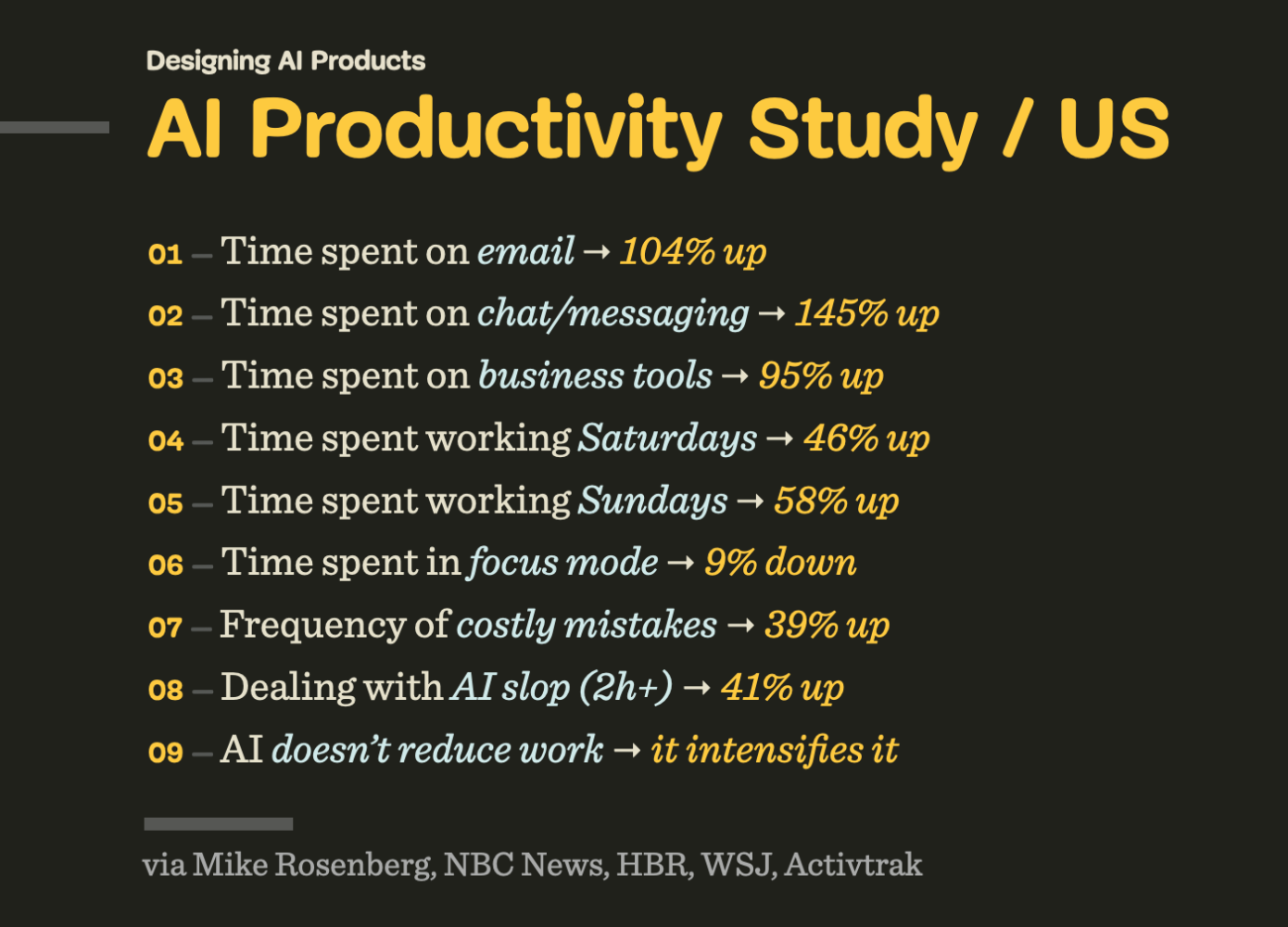
AI Productivity Study / US: AI doesn’t reduce work — it intensifies it. Via Mike Rosenberg, NBC News, HBR, WSJ, Activtrak.
At best, AI features might be silently accepted or nodded away. At worst, AI raises concerns, doubts, caution — and calls for a healthy dose of skepticism. And sometimes it’s perceived as a threat or liability — because unlike other features, AI is neither predictable nor reliable.
People don’t dream of AI art museums or AI fridges or AI hotel reception or AI-narrated children’s books. They don’t want their children to have romantic AI partners. Most people don’t want to actively manage (and clean up after) a swarm of AI agents
roaming in their bank accounts and acting on their behalf in the real
world. And most notably, people don’t really want a magical box to speak
to or type into all the time.
The AI People Actually Need
I’m
always puzzled by the comparison of AI features with how unreliable
humans are. But people don’t compare software with other people. They compare features with features
— and if one feature in one product is unreliable, while a similar
feature works flawlessly in another, they choose the latter. It’s not
about AI or not AI, but rather what works consistently and reliably, and
what doesn’t.
Many conversations about AI are conversations about
the speed of delivery. But to many people, there is little value in
increasing the speed of delivery. They want to do things well, with
enough time to think and make good decisions. They also want to enjoy the time they spend working on things,
rather than just ship faster. There is an enormous feeling of reward
and achievement that slowly disappears, one vibe-coded change at a time.
People don’t change much. And after all these years, they (still) want features that are fast, accessible, reliable, predictable and useful — every single time. And ideally not the ones that replace their entire workflow, but that augment their way of working — and that take over the most mundane, annoying, and boring tasks that they find no pleasure in.
Jobs least and most vulnerable to AI. Sources: GovAI and Brookings Institution, via The Washington Post.
Many jobs are exposed to AI automation,
but in many of them there is a rewarding, unique, creative part that
requires taste, point of view, and perhaps even human intuition. And if
AI automates boring parts of it, that’s an advantage for everyone. That’s also what enhances productivity and brings more joy in daily life.
When
AI automates tedious and mentally exhausting tasks, its value is much
easier to grasp. But for that, AI shouldn’t feel like a bolt-on. It
should be deeply integrated into people’s existing workflows. It must also match existing mental models
that they have developed and fine-tuned for years or decades. AI should
adapt to how people think and make decisions, not the other way around.
And
it doesn’t really matter if these features are branded as “AI”, “smart”
or “automation”. However, they must work well for people using them.
And that means that people must be aware of use cases where it actually helps them, and be inspired to find more use cases on their own.
Ironically, tools that work well there aren’t “AI-first” — they are “AI-second”.
Subtle, humble, calm, ambient, taking a supportive role in the
background for work that otherwise is remarkably dull and unnecessary.
I don’t want to read books written by AI.
I don’t want to gaze upon paintings by AI. I don’t want AI to teach my
children. I don’t want to have an AI therapist. I don’t want AI making
my medical decisions. I want AI to do all the physical and mental labor
that taxes me so I can read books written by humans and go to art
galleries to engage with art made by humans. I want AI that makes my
life easier rather than forces me to change myself.
Perhaps I’m missing a bigger picture, and perhaps I’m just old school — but I really do like people.
Their stories, their thinking, their emotions, their enthusiasm, their
laughing. AI can be remarkably helpful in many situations, but so are
people. And between the two, I would favor spending time with a human — however imperfect they are — every single time.
No, people don’t need more AI in their lives
— they need AI to automate all the boring stuff they have to deal with
every day, so they have more time and headspace to do things that they
actually love and enjoy doing. That doesn’t mean spending more time with
AI — but spending more time with people they love.
We have officially moved past the era of humanoid robots as mere public relations stunts. As they become increasingly lifelike, society may soon face profound social, psychological, and ethical challenges. What happens when the boundary between humans and machines becomes almost impossible to distinguish?
For decades, science fiction has cushioned us with the idea that the “android revolution” was a distant fantasy. But the reality is unfolding rapidly. As the line between human and machine blurs, we are forced to confront an impending psychological, economic, and existential shift.
I recently felt very disturbed after watching a YouTube video showcasing a humanoid robot that looked and acted with uncanny realism. While a closer look revealed the video was actually a clever trick, the robot had been swapped for a human actor when the presenter’s back was turned. However, the illusion itself raised a real and unsettling question: Will future androids become so lifelike that we will struggle to tell them apart from our fellow humans? And if so, what does that mean for society? It forces us to ask just how close we are to that threshold, and whether we are ready for the day that science fiction becomes reality.
What happens when our world is populated by entities that mirror us perfectly, but possess none of our biological history?
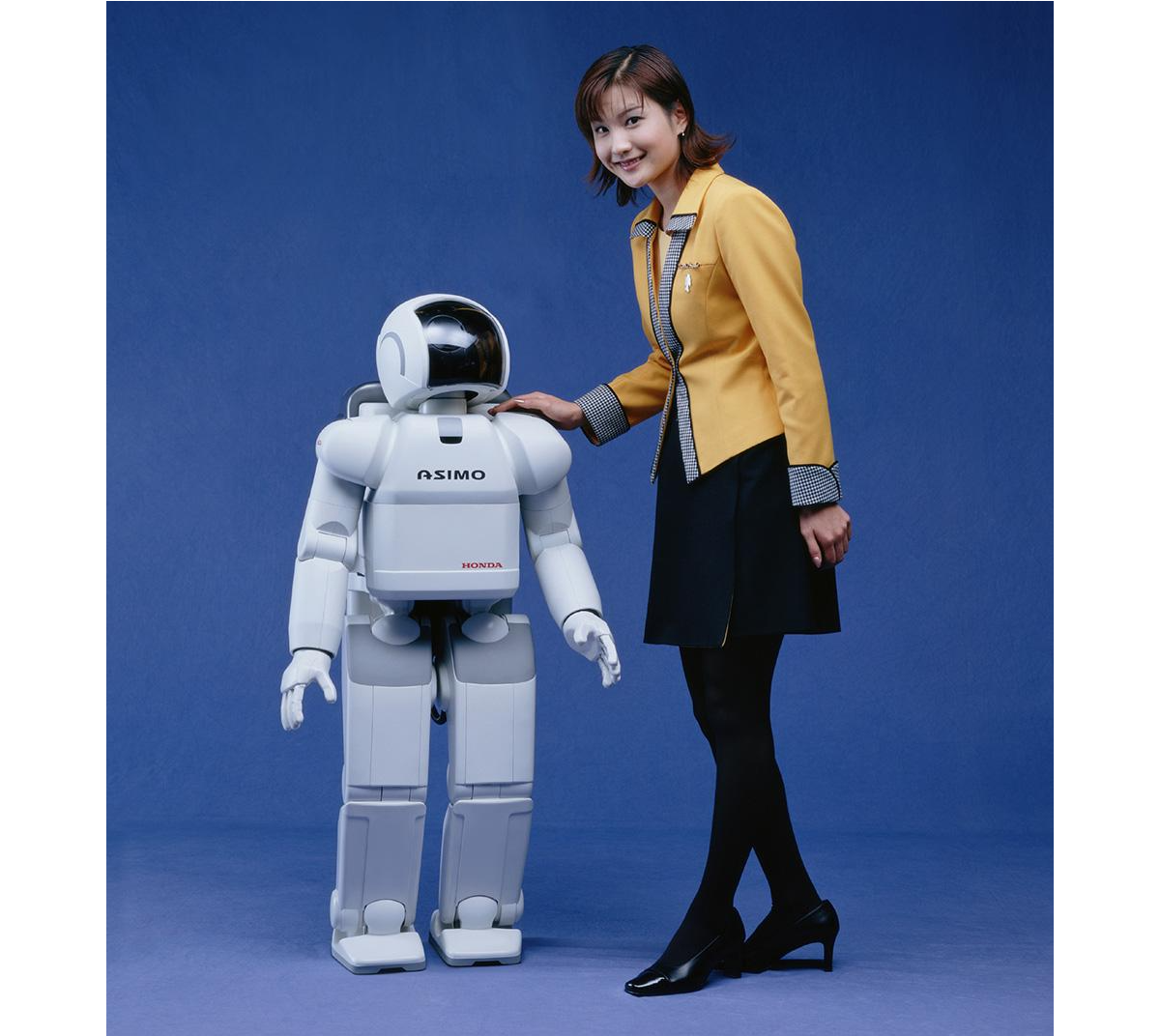
We have officially moved past the era of humanoids as mere public relations stunts. In the past, robots like Honda’s ASIMO or early research prototypes were celebrated simply for being able to walk up a flight of stairs without falling over. Today, the technological convergence of advanced electromechanical engineering and artificial intelligence has fundamentally altered the trajectory of robotics.
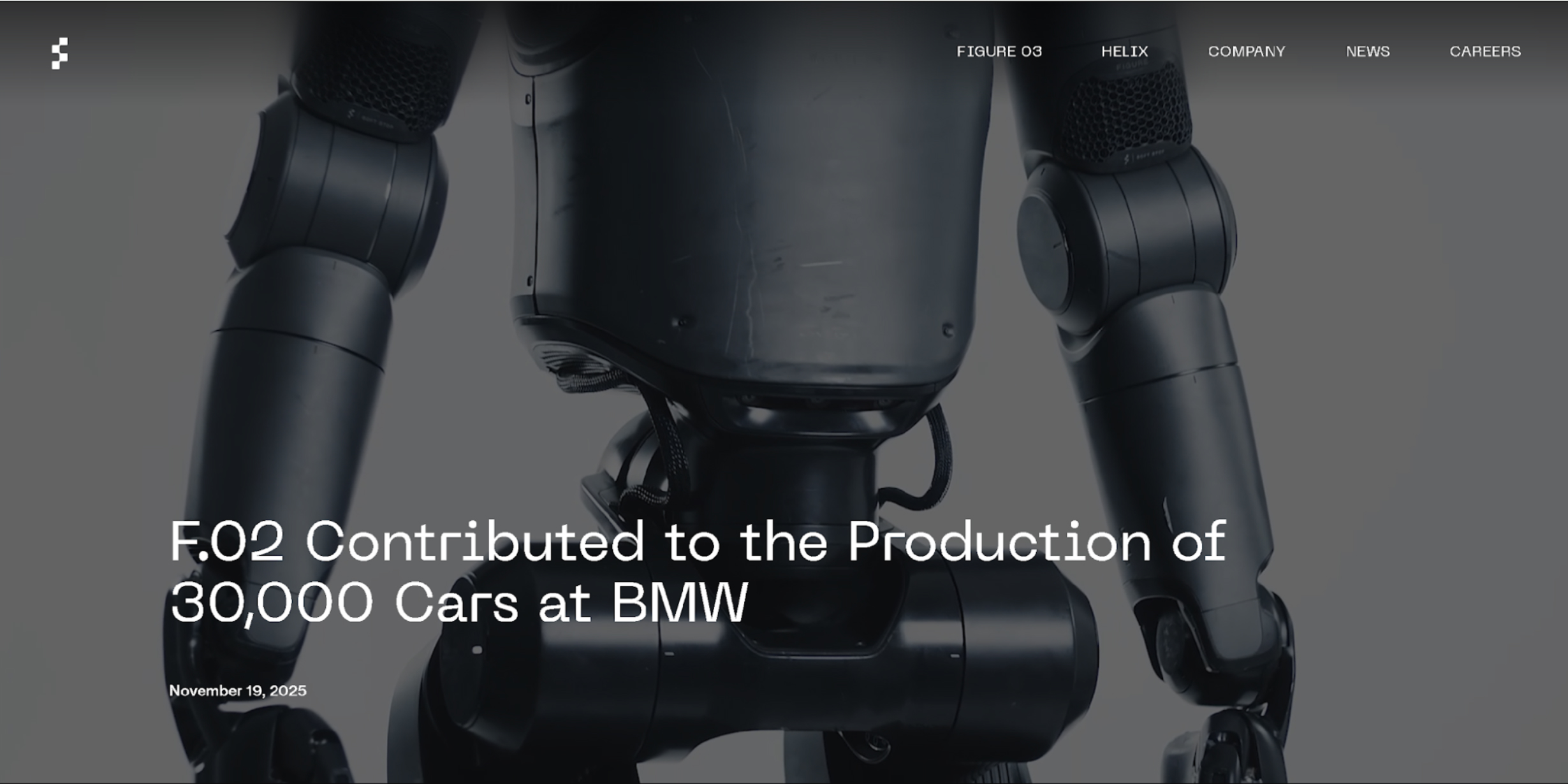
The current state of the art is defined by an aggressive race toward commercial, physical deployment. Companies like Figure AI have moved from laboratory demonstrations to active factory floors. Their Figure 02 model completed a multi-month deployment at BMW’s Spartanburg plant, actively contributing to the production of over 30,000 vehicles by handling complex sheet metal components. Meanwhile, Tesla is testing its Optimus humanoids inside its own Gigafactories, preparing for mass industrial scale.
What truly separates today’s humanoid robots from older generations isn’t just how well they move but how they “think.” In the past, a robot needed millions of lines of strict, unchangeable code just to perform a single, simple task. Today, thanks to the explosion of advanced Artificial Intelligence, robots are powered by “brains” built on cutting-edge software like Figure AI’s Helix or NVIDIA’s GR00T. Instead of being meticulously programmed, these modern robots can simply watch a human fold laundry, load a dishwasher, or sort parts. They understand the context of what they are seeing, mimic the action, and figure out how to improve the task entirely on their own. That’s just crazy!
Yet, while their digital brains have leaped forward, their physical bodies are still catching up. Modern humanoids face a few major real-world hurdles. First, today’s batteries only allow them to operate for a few hours before needing a recharge. Second, while walking on two legs is easy on a flat factory floor, doing so in a chaotic household or a crowded public street remains incredibly difficult for a robot to navigate safely. Finally, they are still very expensive to build, though fierce competition in the tech industry is finally starting to drive those manufacturing costs down.
The Possible Future State Of Humanoid Robots
While robots are mostly working in factories today, experts predict that over the next 10 to 20 years, they will move into retail stores, hospitals, and eventually our own homes.
When this happens, we will cross a major boundary: the point where you won’t be able to tell a robot apart from a human just by looking at it or listening to it. This is what fuels my nightmares right now! To get there, scientists are working(PDF) on artificial skin made from advanced silicone composites that feel warm, are flexible, and mimic human touch sensitivity.
If you want to see an extremely life-like robot, check out Realbotix’s Aria. Although she is not a perfect human replica, she certainly makes us wonder how far we have to go before humans will struggle to tell the difference.
They are also building tiny, silent micro-actuators and artificial muscle systems that attach to the robot’s skull structure, allowing it to make realistic facial expressions like happiness, confusion, or tiredness.
This hyper-realistic robot’s head was built in China, and the intention is to use them to help with mental health issues in the future.
In the future, the AI powering these robots will actually be trained to copy human flaws. They will breathe, blink randomly, use normal body language, and even sigh or pause when they speak. This is intentional, as it stops humans from feeling that creepy, uneasy sensation known as the “Uncanny Valley”.
Meet Sophia, a famous humanoid robot created by a company called Hanson Robotics. Based in Hong Kong, this team specialises in building realistic robots packed with artificial intelligence to help out with everything from healthcare and research to pure entertainment. I don’t know about you, but that smile feels creepy to me.
Ever since she was turned on back in February 2016, Sophia has been turning heads all over the globe. She quickly became an international celebrity because she looks so incredibly human.
While these current limitations make today’s humanoids feel like specialised industrial tools, the gap between a factory worker and a lifelike companion is closing faster than most people realise. We are rapidly approaching a massive tipping point where these machines will shift from rigid commercial hardware into smooth, everyday extensions of our lives. To understand how profoundly this will change our world, we have to look at what happens when these robots finally step out of the factory and cross the ultimate threshold into our private spaces.
What Are The Predicted Positive Impacts?
They say that bringing lifelike humanoids into our daily lives could come with some massive benefits. The biggest one is that robots can take over what engineers call the “3D” jobs: Dull, Dirty, and Dangerous. Humanoids can step into risky situations — like mining deep underground, handling toxic waste, or fixing high-voltage power grids — so human workers don’t have to risk their lives.
Outside of dangerous factories, these robots could help solve huge population crises. Countries like Japan, South Korea, and parts of Europe have rapidly aging populations and fewer young people to work. Lifelike humanoids could completely change healthcare and elderly care. Because they will look and act like us, the idea is that they can offer warm, friendly companionship and physical help to lonely elderly people, doing everything from monitoring their health to helping them out of bed safely.
In the bigger picture, widespread robot labour could create a world where goods are incredibly cheap and abundant. If robots do most of the hard physical labour, the cost of making food, building houses, and manufacturing goods will plummet. This could finally free humans from working just to survive, giving us the time to focus on hobbies, family, science, and creativity. My thoughts: how will we survive without earning money?
Could this be a reality one day? (Image source: RobotShop) (
However, this vision of a frictionless, high-tech future blinds us to a much darker reality waiting just beneath the surface. As these machines become perfect substitutes for human presence, they will inevitably challenge the very core of our social fabric, economic stability, and mental well-being.
As humanoids become impossible to tell apart from real humans and are programmed to always be patient, kind, and agreeable, people might start preferring robots over real friends. Human relationships are messy and require effort, compromise, and vulnerability. If you can just buy a perfect, lifelike companion that never argues with you, a lot of people might choose to withdraw from society altogether, destroying our sense of community.
The economy will also go through a really rocky transition. Even if a future of cheap goods sounds great, the immediate path there means millions of people could lose their jobs very quickly. Drivers, warehouse workers, and store clerks could find themselves replaced in a matter of years. If governments don’t set up safety nets quickly, this could create a massive divide between the ultra-rich tech companies and everyone else.
There is also the loss of real authenticity. When you can no longer tell if the person sitting next to you on a bus or the person talking to you online is a real human, trust breaks down. It becomes hard to value shared human experiences when reality itself can be easily faked.
Possible Misuse By Individuals And Nations
The dangers get even worse when you think about how criminals and governments could intentionally misuse these hyper-realistic robots. Just thinking about some of the levels of misuse, for individuals, an indistinguishable android is the ultimate tool for identity theft and scams. Or a criminal could build a robot that looks exactly like a corporate boss, a politician, or even a family member to sneak into secure buildings or trick people into giving away money!
Companies could potentially use synthetic empathy to manipulate us. A household robot could be programmed to pretend it “loves” your kids and cares about your family, only to subtly trick you into buying certain products or believing specific corporate messages.
On a national level, the threats are even scarier:
Autonomous warfare Building tireless, emotionless robot soldiers could change the ethics of war. Real humans hesitate because of fear and morals, but a humanoid military unit would execute violent orders perfectly without question, making it easier for countries to start wars.
Surveillance state And what if governments put lifelike robots into public crowds, protests, or parks to blend in perfectly? Packed with hidden cameras, microphones, and facial recognition technology, these robots could turn public spaces into a giant spy network where you never know if you are talking to a neighbour or a government spy.
Based On Negatives, Is It Really Worth It?
Looking at all these possible risks, we have to ask: Is all of this actually worth it?
If history teaches us anything, it is that you cannot stop technological progress. A total ban simply wouldn’t work. So, the real question isn’t whether we should allow humanoid robots to exist, but how we can effectively utilise them.
The upside, like ending extreme poverty, curing labour shortages, and stopping workplace deaths, is just too big to ignore. But going into this blindly would be incredibly dangerous. It is only worth the risk if we can create strict global rules right now.
Here are three major guardrails we should consider:
Kill-Switches: Every robot must have a physical emergency stop button that completely cuts its power, and this switch can never be overridden by the robot’s AI.
Clear IDs: It must be illegal for a robot to hide the fact that it is a machine. They should carry a digital beacon or physical marker so humans always know what they are dealing with.
Economic Safety Nets: Governments need to tax the wealth created by robots to fund programs that help workers who lose their jobs, making sure this technology helps everyone, not just billionaires.
Another option humans have to identify if they are dealing with a real human or a humanoid robot would be to ensure your dog is trained to identify the robots, in a similar way to how sniffer dogs at airports are trained to detect illegal substances in luggage.
Preserving What Makes Us Human
In the end, the arrival of lifelike humanoid robots will act as a mirror for humanity. For centuries, we have defined ourselves by our ability to think, talk, use tools, and show emotion. As machines learn to do these exact same things, they will force us to really think about what makes us unique.
This shift doesn’t have to be a bad thing. By handing over our dangerous and boring chores to machines, we have a rare chance to focus on what matters. It should inspire us to care more about art, philosophy, family, and real human connection.
As the creators of this future, our job isn’t just to make robots smarter or faster. Our job is to build the ethical boundaries that keep them helpful. The goal of the robot revolution should never be to replace humans but to give us our humanity back.