Let’s be honest: the way we create for the web is evolving at a pace that many people are reluctant to acknowledge.
What was once considered “nice to have” just a year ago is quickly
turning into a “must-have” today. If you’re not keeping an eye on these
changes, you’ll definitely notice the impact soon.
Here are the frontend skills I believe are shifting from “maybe later” to “learn now” over the next 2–3 years:
1. AI-Powered Coding Tools:
Tools like Copilot and Codeium are more than just a novelty. They’re
rapidly becoming essential parts of our daily workflow. If you can
effectively guide, review, and enhance the suggestions that AI provides,
you’ll be able to deliver your projects faster and with greater
intelligence.
2. Real Accessibility & Inclusive Design:These
days, accessibility is something we expect rather than just admire.
Creating experiences that cater to all users right from the beginning
will really make you stand out. Very soon, it will become essential for
every project.
3. Building for Every Device :These days, it’s
not just about web and mobile anymore. Your creations need to look
fantastic on every screen - whether it’s a smart TV or whatever new tech
comes our way. Responsive and resilient user interfaces are now the
standard we should all aim for.
4. Performance Matters :Let’s
face it, nobody wants to deal with sluggish apps. Taking the time to
profile, optimize, and genuinely care about the user experience is what
sets the good apart from the truly great.
5. Privacy-First Frontends;Trust
is everything. Make privacy clear, easy to understand, and simple to
control in your user interface. For many users - and regulators - this
is already a deal-breaker.
6. Strong Fundamentals, Flexible Stack:Frameworks
may evolve, but the top developers really grasp the essential concepts
and can easily switch between different tools. Stay curious. Keep
learning. Don’t limit yourself to just one stack.
What’s Next?
Get ready for more AI in your development tools. The demand for
user-friendly and privacy-conscious interfaces is only going to rise.
Expect lightning-fast, resilient apps to become standard on every
device.
By mastering these skills, you won’t just be securing your future
career; you’ll also unlock opportunities for roles and projects that you
might not even be aware of yet. If you’re aiming for bigger chances—and
want the confidence to embrace them—now’s the time to start.
Feel free to drop a comment if you’d like an invite, or send me a
DM if you think there’s a skill that should be added to the list.
What are you currently learning to stay ahead? Let’s chat about it in the comments!
There
are a few different reasons your app might need data access management:
security and privacy, industry standards compliance, or data access
control. Multi-tenant user is a commonly used architecture, and
therefore, you need a reliable way to manage access. Let’s have a look
at what Row-Level Security means!
Many apps have some
kind of user-specific information or data that is supposed to be
accessed by a certain group of users and not by others. With these sorts
of requirements comes a demand for fine-grained access handling.
Whether for security or privacy reasons, dealing with sensitive data is
an important topic for any app. Big or small, nobody wants to be on the
wrong side of a data leakage scandal. So let’s dive in on what it means
to handle sensitive or confidential information in our apps.
Regardless
if you’re requesting access on Twitter, a bank, or your local library,
identifying yourself is a crucial first step. Any sort of gateway needs a reliable way to verify if an access request is legitimate.
On the web, we encapsulate the process for identifying a user and granting them access as Auth, which stands for two related but distinct actions:
Authentication: the act of confirming a user’s identity.
Authorization: granting an authenticated user access to a resource.
It
is possible to have authentication without authorization, but not the
other way around. The strategy to implement authorization at a data
management level can be loosely referred to as Row-Level Security (RLS),
but RLS is actually a bit more than this. In this article, we will take
a step deeper into managing sensitive user data and defining access
roles to a user base.
A ‘row’, in this case, refers to an entry in a database table. For example, in a posts table, a row would be a single article, check this json representation:
{"posts":[{"id":"article_23495044","title":"User Data Management","content":"<huge blob of text>","publishedAt":"2023-03-28","author":"author_2929292"},// ...]}
To understand RLS, each object inside posts is a ‘row’.
The
above data is enough for creating a filter algorithm to effectively
enforce row-level security. Nonetheless, it’s crucial for scalability
and data handling that such relationship is defined on
your data layer. This way, any service that connects to your database
will have all the required information to implement its own
access-control logic as required. So for the above example, the schema for the posts table would roughly look like the following:
{"posts":{"columns":[{"name":"id","type":"string"},// ... other primitive types// establish relationship with "authors"{"name":"author","type":"link","link":"authors"}]}}
In the above example, we define the type of each value in our posts database and establish a relationship to the authors table. So each post will receive the id of one author. This is a one-to-many relationship: one author can have many posts.
Of
course, there are patterns to define many-to-many relationships as
well. Take, for example, a team’s backlog. You may want only members of a
certain team to have access. In such case, you can create a list of
users with access to a specific resource (and thus being very granular
about it), or you can define a table for team, and thus connecting a team to multiple tasks, and a team to multiple users: this pattern is called a junction table and is great for defining scoped access within your data layer.
Now we understand what authorization
is and looks like in a few cases. This should be enough to design a
mental model for defining access to our data. We understand that in
order to use the granular access to our data effectively, our app must
be aware of which user is using that particular instance of the app (aka who’s behind the mouse).
It is time to set up a reliable and cost-effective authentication.
Cost-effective because it is counter-productive to re-authenticate the
user on every request. And it increases the risk factor of attacks, so
let’s keep auth requests to a minimum. The way our app stores the user
credentials to re-use in a defined lifecycle is called a session.
There are multiple ways of authenticating users and handling sessions. I invite you to check Eric Burel’s article on “Authentication in Websites: A Banking Analogy”. It’s a great and thorough explanation of how authentication works.
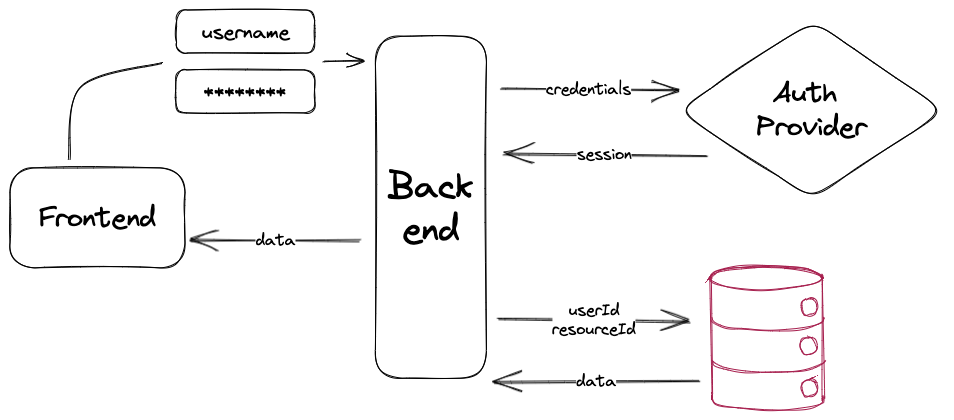
From
this moment on, let’s assume we did our due diligence: username and
password are securely stored, an authentication provider is able to
reliably verify our user’s identity and returns a session, which is an object carrying a userId matching our user’s row in the database.
With
the above mental model defined, it is possible to any sort of
implementation and properly design your queries. For example, on our
first defined schema (posts and authors), we can use filters on our
fetching service to only provide access to the results a user should
have:
Hopefully,
these concepts have offered extra clarity on defining access management
to private and/or sensitive data. It’s important to note that there are
security concerns before and around storing such kind of data which
were beyond the scope of this article. As a general rule: store as little as you need and provide only the necessary amount of access to data.
The least sensible data going over the wire or being stored by your
app, the lesser the chance your app is a target or victim of attacks or
leaks.