Learn how to optimize for featured snippets with structured content, query matching, and semantic formatting to boost visibility, authority, and zero-click reach.
Featured snippets give your page the top answer box in Google’s results, and they’re one of the fastest ways to increase how often people see and interact with your content.

In 2022, they captured 35.1% of all clicks, showing how powerful this placement could be when your page earns it.
Today, AI Overviews (AIOs) are becoming more dominant, often replacing or integrating featured snippets for many queries. While featured snippets still appear for simpler questions, AIOs handle more complex, multi-source queries, taking significant SERP real estate and shifting SEO focus towards Generative Engine Optimization (GEO).
In this guide, you’ll learn how to:
- Identify strong snippet opportunities
- Structure your content so Google can extract it cleanly
- Avoid zero-click traps
- Track snippet volatility
- Strengthen your overall search performance in an AI-driven environment
What featured snippets actually are (and aren’t)
Featured snippets are short answer boxes that Google displays above the regular search results. Google pulls a specific part of a webpage, usually one clear paragraph, a list, or a small table, and shows it at the top so users can get a quick answer without scrolling.
Types of featured snippets
They may appear in several formats:
Paragraph snippet
A paragraph snippet is a short block of text that answers a direct question like this:

List snippet
List snippets show numbered or bulleted steps, tips, or items like this:

Table snippet
Table snippets are small, structured tables with comparisons or key data like this:

Video snippet
Video snippets contain a video with a timestamp that jumps to the exact moment covering the answer, like this:

Hybrid snippet
Hybrid snippets contain a mix of text, images, and lists pulled from the same page, like this:

A few misconceptions about featured snippets
Are featured snippets considered position zero?
Google’s featured snippets are often described as being in “position zero” because they generally show above the main organic search results. However, according to Google’s Search Console Help page, featured snippets are reported as position one. “For example, a featured snippet has a link to the source property, and so it (typically) occupies position 1.”
It is also not a guaranteed traffic booster. Sometimes users read the answer and don’t click through, especially for simple queries. This means you still gain visibility, but the click-through rate (CTR) can go up or down depending on the topic and the intent.
Featured snippets are not the same as People Also Ask (PAA) and AI Overviews
Although PAA and AIOs provide quick answers, they’re not featured snippets:
- PAA boxes are not highlighted or positioned as prominently as a snippet. Instead, they are expandable questions. When you click one, Google reveals a short answer pulled from a page like this:

- AIOs are also pulled from multiple sources rather than one single source, and they generate more extended summaries like this:

Featured snippets, by contrast, always come from a single page and a single extracted section.
Other SERP features, such as knowledge panels, Top Stories, and image packs, also serve different purposes and rely on various signals. But featured snippets are focused on one thing: extracting an answer from a page that matches the question a user typed.
Are featured snippets being phased out?
Featured snippets are not disappearing, but their visibility is declining as Google increasingly prioritizes AI Overviews. Featured snippets still appear for specific, factual queries, while AI handles more complex searches.
Why featured snippets still matter
58% of Google searches end without a click because searchers get the answer directly on Google’s search results page through featured snippets and AI Overviews (zero-click and AI-generated behavior).
But featured snippets still matter. Here’s why:
1. They help your brand stay visible in zero-click results
When Google uses your explanation in the snippet box, people see your brand as the source of the answer. That visibility shapes how they understand the topic and who they trust, even if no click happens.
2. They support brand authority
If your content is featured as a snippet, this means Google considers your answer clear, accurate, and reliable. Because of this, people view your brand as an authority, which builds stronger trust.
3. They influence decisions later in the journey
Users may not click your snippet immediately, but repeated exposure makes them more likely to return when they need deeper information or are ready to compare options.
4. They align with how AI systems extract and reuse answers
AI Overviews and other generative features rely on short, structured explanations just like featured snippets. So if you optimize your content for featured snippets, it increases your chances of appearing across multiple SERP features rather than one snippet box.
How Google selects featured snippets
Google chooses featured snippets by looking for quality content that gives a clean and direct answer to the query.
For example, if the query is “what is a canonical tag,” a good answer would be a single sentence that defines it without extra context, such as: “A canonical tag is an HTML element that tells search engines which version of a page is the main one.”
Query interpretation
Google evaluates both what the page says and how that information is structured.
It starts with query interpretation:
- Google checks what the user is really trying to find out
- They assign an internal “answerability” score
This score reflects how easy it is to provide a short, confident answer. Simple questions like “what is X,” “how to do Y,” or “steps for Z” tend to score high because they have predictable answer patterns.
Structure analysis
Once Google identifies that a query can be answered briefly, it looks for pages that match the expected structure.
Pages with clear headings, short summaries, and direct definitions rise to the top because these elements make it easier for Google to locate a passage that fits the snippet format.
It then evaluates each potential answer block by looking for three things:
- Clarity: The passage must be easy to understand on its own
- Concision: The answer needs to be short enough to display cleanly
- Citation-worthiness: The content should sound reliable and accurate. Pages with strong topical expertise often perform better here.
Entity signals
Entity signals (clues Google uses to understand what your website is known for) play a role as well.
When a website consistently covers a topic in depth, Google forms stronger associations between the brand and the subject. This “topical authority” helps Google trust the page as a reliable source for snippet extraction.
Understanding and delivering what Google wants to show in a featured snippet
Google shows featured snippets for searches that follow specific patterns:
- Queries that ask a direct question, such as “what is a 302 redirect” or “how to clear cache in Chrome.” These expect one clear explanation.
- Searches that imply a definition, like “crawl budget” or “canonical tag.” Users want a short, factual description.
- Queries that compare two things, such as “SEO vs PPC” or “dedicated IP vs shared IP.” These work well for short bullets or tables.
- Searches that request simple steps, like “compress a PDF” or “change DNS settings.” These are ideal for numbered lists.
How you can detect featured snippet formats
Now that you know which query patterns trigger snippets, check the existing snippet on the search engine results pages. The format Google uses shows you exactly how it wants the answer to be structured.
For example, it shows a:
- Short paragraph when the query asks for a definition
- Numbered list when the query requires clear steps
- Bulleted list when the query involves grouped tips or related items
- Table when the query compares data or highlights differences
This structure tells you how to format your own answer so Google can extract it cleanly.
Using NLP tools
NLP tools help you see the exact words, entities, and structures that top-ranking pages repeat in their snippet answers. When several pages use the same phrasing or highlight the same terms, it’s a strong signal that Google prefers that style for this query.
You can analyze snippet patterns using tools like NER Demo or Google’s Natural Language Processing tools. But let’s see how to do this with NER:
- Search a couple of queries related to your target keyword on Google
- Copy two to three featured snippets
- Paste each answer into the tool and click “Recognize”. The tool will highlight entities, nouns, verbs, and repeated language patterns:

- Look for terms that appear across all samples, such as:
- Recurring nouns (e.g., “SEO,” “content,” “visibility”)
- Repeated verbs (e.g., “optimize,” “improve,” “identify”)
- Consistent formatting (short statements, concise steps)
- Compare the outputs side-by-side
If the same entities or terms appear in every answer, that usually reflects the format and language Google trusts most for that topic.
Using clustering method for related queries
Clustering simply means grouping similar searches together so you can see the patterns they share. So, when you group related keywords, notice what kind of snippet Google likes to show for that group.
Here’s the idea:
- Some searches behave the same way.
- When you put them into groups, the pattern becomes obvious.
- Those patterns help you predict which snippet format Google prefers.
For example:
- Group of definition searches (like “crawl budget,” “indexing,” “canonical tag”) > Google usually shows a short paragraph snippet
- Group of “how to” or task searches (like “how to compress a PDF,” “how to change DNS”) > Google usually shows a numbered list snippet
- Group of comparison searches (like “dedicated IP vs shared IP,” “SEO vs. PPC”) > Google often shows a table snippet or bulleted differences
So, once you group them, you can easily predict the:
- Format Google wants
- Structure you should use on your page
- Type of answer block to create
This helps you create quality content that meets Google’s expectations before you even write it, which gives your page a better chance of being selected as the featured snippet.
How to find featured snippet opportunities
Let’s now look at a few ways to uncover featured snippet opportunities:
Use SERP feature filters to spot existing snippets
Here’s how to find keywords that currently show a featured snippet using the Semrush Keyword Magic Tool:
- Go to “SEO” > “Keyword Research” > “Keyword Magic Tool”
- Type in a broad seed keyword related to your topic
- Click “Search”. The tool will load a list of related keyword ideas, with metrics such as search volume, search intent, and keyword difficulty.

- Open the “Advanced filters” panel
- You’ll see a section labeled “SERP features” inside the filter menu
- Set the SERP feature filter to “Featured snippet”
- Click the dropdown under “SERP features”
- Choose “Featured snippet”
- Click “Apply”

- Now, review the filtered list, as every keyword in it currently triggers a featured snippet on Google, making these strong opportunities
- Click the “Open SERP” icon next to any keyword. This shows you:
- What the snippet looks like
- Which competitor holds it
- What format Google uses (paragraph, list, video)

You can use the list as a starting point for identifying pages you can outrank.
Look for “weak snippet” opportunities
Some featured snippets may come from pages that give incomplete or poorly structured answers. Such pages could have any of the following signs:
- Outdated answers that no longer match the current process or terminology
- Definitions that are vague or fail to explain the core idea
- Paragraphs that are too long, making extraction harder for Google
- Paragraphs that are too short, leaving out essential details
- Steps that are missing, out of order, or unclear
- Lists that aren’t formatted as real lists (just long text blocks)
- Tables with inconsistent structure or missing comparison points
- Pages cluttered with ads or UI elements that make the answer hard to identify
- Passages that don’t make sense on their own when removed from the page
These gaps result in weak snippets (if by chance they’re featured), so they are easier to replace because Google is always looking for clearer explanations.
So, when you review the snippet holder, look at the answer the same way Google does: Ask whether that passage is the cleanest possible extract.
If it feels incomplete or you notice any of the signs mentioned above, that’s an opportunity for your brand.
Pull People Also Ask clusters
PAA boxes are one of the easiest places to find new snippet opportunities.
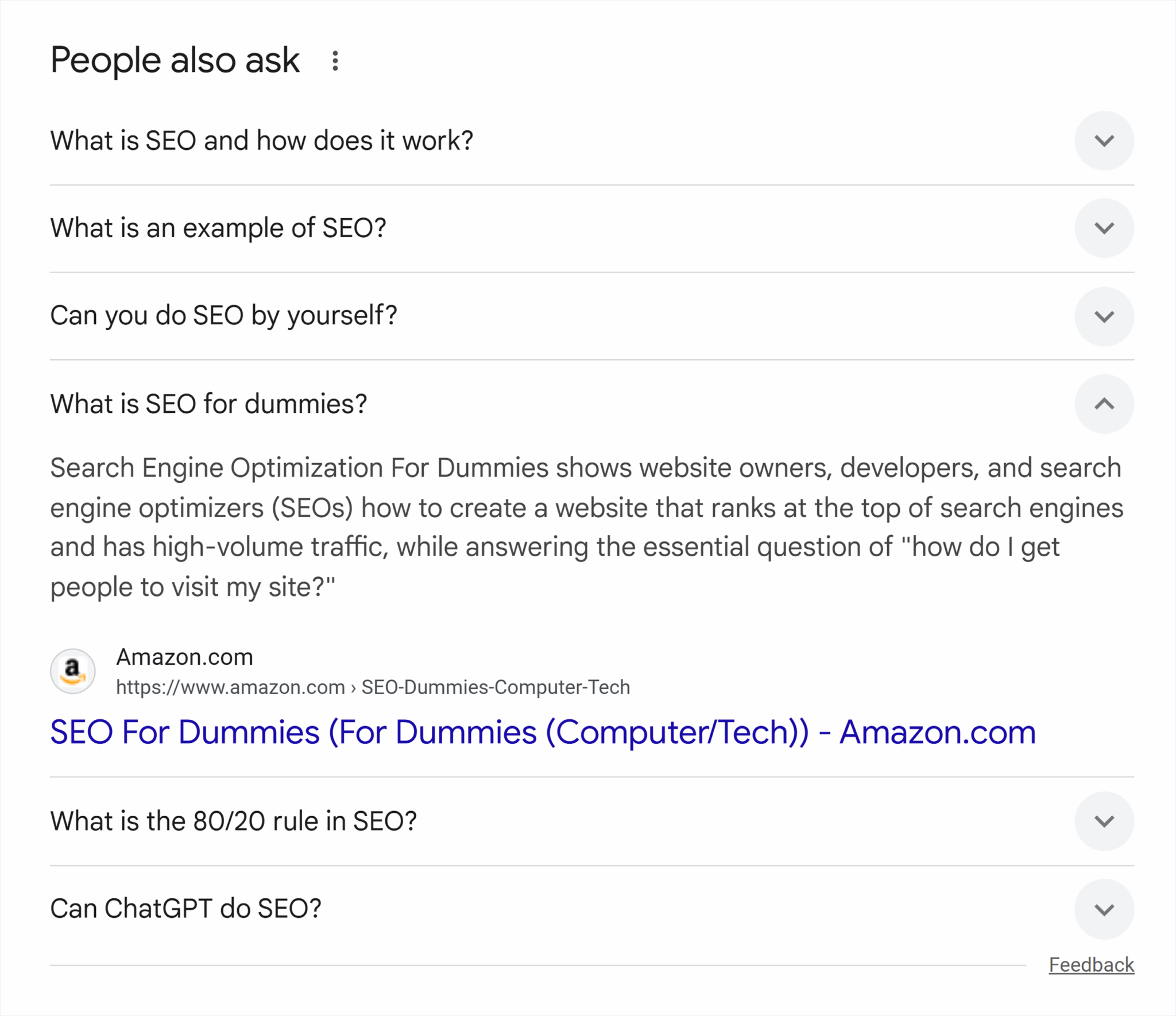
Each question inside the PAA box represents related questions that Google considers important, and many of these questions trigger featured snippets on their own.
Your primary keyword may not show a snippet, but the individual PAA questions may. This makes them valuable sources of additional snippet-ready topics you can target.
So, here’s how to pull PAA questions and spot opportunities:
- Search your primary keyword on Google.
- Scroll to the People Also Ask box.
- Expand seven to 10 questions to load more related queries. (Google reveals additional questions each time you click one.)
- Identify questions that have direct intent:
- Definitions
- Quick explanations
- Short step-by-step tasks
- Small comparisons
- Collect these questions in your keyword list or content outline.
These questions give you a larger set of related terms that may trigger snippets even if the main keyword doesn’t.
Review competitor snippet coverage
You can also monitor your competitor snippets to see which questions they already dominate and where your own content is lacking. This gives you a clear list of topics you need to cover or improve to compete for snippets in your niche.
So, here’s how to review competitor snippet coverage:
- Search your main keyword on Google.
- Look at which competitor holds the featured snippet for that query (if any).
- Open the snippet source page to check how they structure the specific answer Google extracted.
- Scan their page for other snippet-style sections, such as:
- Short definitions
- Numbered steps
- Bulleted lists
- Comparison tables
- Note any questions they answer that you don’t.
- Repeat this process for three to five competitors in your space.
- Look for patterns in the topics or formats they consistently cover.
- List the recurring themes or missing explanations.
This way, you would have a focused set of opportunities where your content can realistically overtake the current snippet holder.
Mine internal website search and support logs
Anytime a visitor types something into your website’s search box like “refund policy,” “how to upload images,” or “what is domain authority,” you can track that in your analytics tool of choice.
These searches are internal search data.
They show you what people are trying to find but can’t locate easily on your website. They show you the words your audience uses, and those questions often make strong snippet candidates.
But you also have support logs, which come from your customer support system.
This includes:
- Emails customers send to ask for help
- Questions people submit through your contact form
- Live chat messages
- Help desk tickets (Zendesk, Freshdesk, Intercom, etc.)
Here’s how you can find featured snippet opportunities in internal search data and support logs:
- Collect your internal search queries from Google Analytics, your CMS, or your site’s search plugin.
- Pull common questions from your help desk, email inbox, or live chat history and export your data.
- Look specifically for the “what,” “how,” and troubleshooting questions.
- Search them on Google and see if a snippet exists.
Use Google Search Console for hidden opportunities
Search Console often shows queries where you already rank on page one but don’t yet own the snippet. These are strong opportunities because Google already trusts your page.
Here’s how you can find such opportunities:
- Open Search Console > “Performance” > “Search Results”
- Click “+Add filter” and select “Query”
- A new “Query” pop-up will appear. Here, add keywords like “what,” “how,” “why,” “when,” “can,” “does”
- Click “Apply”
- Sort by impressions.

How to optimize for featured snippets
Once you’ve found the opportunities, it’s time to optimize for them.
The goal here is simple: Give Google the exact answer format it’s already showing on the SERP, but do it in a cleaner, more direct way. So let’s see how to do that.
Content structuring
Google looks for passages that answer the query quickly and cleanly. So, to structure your content to match Google’s preferred snippet format, do the following:
1. Use answer-first paragraphs
A strong answer-first block should:
- Say the most important information in the first sentence
- Stand on its own when copied out of context
- Avoid filler, examples, or commentary until after the core answer
So, start each section with a short, direct answer to the query — aim for 40–50 words.
2. Use clear, semantic subheadings
Your headings should mirror the query as closely as possible. This helps Google understand which part of your page answers which question.
Good subheadings start with:
- “What is…”
- “How to…”
- “Steps to…”
- “Difference between…”
These headings act as anchors that help Google identify extractable sections.
3. Format steps, lists, and comparisons cleanly
Format your sections the way they deserve:
- If the query needs steps, use a numbered list
- If it needs grouped items, use bullets
- If it needs a comparison, use a simple table
This is quite important because Google favors formats that are easy to scan, consistent, and free of unnecessary styling or distractions.
Technical and on-page signals
Technical and on-page elements, such as HTML, schema markup, headings, and internal links help Google understand your content and identify the exact passages that can be used as a featured snippet.
When these elements are clean and well-structured, Google can find your answers faster and extract them without confusion.
Let’s see how you can optimize these elements to secure featured snippets:
1. Add a supportive schema when it matches the intent
Schema doesn’t force Google to create a snippet, but it clarifies the structure of your content. Some of the most common types of schemas include:
- FAQ schema: For short, direct Q&A sections
- HowTo schema: For clear step-by-step instructions
- Organization schema: For reinforcing who the publisher is
There are multiple ways to add a schema. You could do it manually, use Google Tag Manager, or a plugin like RankMath or Yoast SEO if you use WordPress.
2. Strengthen internal linking around the answer
Google relies on internal links to understand which pages and sections are most important. So, when you link to your answer sections from related pages, you reinforce their importance.
This builds topical relevance and helps Google treat your answer as the primary explanation on your website.
3. Keep code clean and avoid layout noise
Google extracts snippets based on HTML structure. If your answer block is buried under ads, pop-ups, or heavy design elements, Google may skip it entirely.
To keep your answer extractable:
- Place the answer near the top of the page
- Avoid unnecessary banners or widgets around the answer
- Use simple HTML tags (p, ul, ol, table)
- Keep spacing consistent
Competitive differentiation
When a featured snippet already exists, you’re competing directly against the snippet holder. To win that spot, you need to give Google a clearer, more complete version of the answer than what’s currently ranking.
That’s what competitive differentiation is — you show Google that your passage is the better candidate to extract.
Here’s how to do that:
1. Study how the current snippet is structured
Look at how the snippet holder formats their answer. This gives you a baseline for what Google finds acceptable for that query. To understand this, pay attention to:
- The length of the paragraph
- How the steps are ordered
- Whether they use bullets or a table
- How clear the wording is
2. Rewrite the answer more clearly
To create a stronger passage than the current snippet, make sure your content is:
- More precise
- Less repetitive
- Free of filler words
3. Add missing details the snippet holder leaves out
It’s possible that your competitor, who’s secured a featured snippet, might have skipped some important context, but is ranking because there’s nothing better out there for Google to rank.
So make sure you add anything the current snippet lacks, such as:
- Key definitions
- Essential steps
- Important comparisons
- Extra clarity on confusing terms
Your answer should feel complete even without requiring readers to visit your website.
4. Match the expected format exactly
If the query calls for a:
- Definition, write a tight paragraph
- Process, use a clean numbered list
- Comparison, use a simple table
Google needs to see the structure clearly on your page so it can extract it.
5. Strengthen the surrounding context
Google evaluates the passage along with the surrounding content. So make sure the section is supported by:
- A clear, matching H2 or H3
- A short intro sentence
- Internal links pointing to the topic
- Consistent terminology used throughout the page
Managing the risks: Zero-click & CTR loss
Featured snippets may increase visibility, but they can also reduce clicks for specific queries. Why? Because sometimes users get the full answer directly in the snippet, so they never visit the page. This is known as zero-click behavior.
But you don’t want that. Right?
Your goal is to win the snippet without giving away everything the user needs upfront so they can visit your website.
Here’s the right way to approach this:
1. Understand when snippets reduce clicks
Some queries are naturally “answer-only” and rarely lead to clicks, like:
- Simple definitions (“What is bounce rate”)
- Quick facts (“Current VAT rate”)
- Basic steps (“How to clear Chrome cache”)
For these keywords, the snippet may satisfy the user completely, but they may not bring the reader to your page. Once you understand this, it’s easier to decide which snippets are worth chasing and which may not deliver meaningful organic traffic.
2. Write answers that encourage deeper reading
To avoid zero-click losses, write a clear answer but leave room for exploration. Here’s how you can do it:
- Give the direct answer in one to two sentences
- Follow it with benefits, risks, or additional steps that require a click
- Add a short preview of what the user will learn next
- Introduce supporting details beneath the snippet block
- Include your brand name where relevant, like “Here’s how you can do X with Y…” to encourage clicks for more details
This structure gives Google the clean snippet it needs while providing users a reason to click through.
3. Add value sections immediately after your snippet block
Place high-value content right under the answer so users who click get rewarded quickly. For example, you could include:
- Examples
- Statistics
- Visual explanation
- Comparisons
- Case scenarios
- Optional variations or advanced tips
This reduces bounce rates and increases engagement from snippet-driven organic traffic.
Measurement and monitoring
Once you’ve optimized your content for featured snippets, you should track their performance to see whether your updates are driving any changes.
Let’s see how to do this.
1. Track snippet wins and losses
By monitoring snippet performance, you can identify keywords you currently own, have newly acquired, or recently lost featured snippets for. Since snippet ownership changes often, if you don’t monitor it, you won’t notice when a competitor takes your spot.
You can track this using tools like Semrush Position Tracking, Ahrefs Rank Tracker, or Moz Pro. Here’s how to do it using Semrush:
- Go to “SEO” > ” Keyword Research” > ”Position Tracking”
- Click “Create SEO project” and enter the domain and name for your project. Or choose the project for your site if you’ve already created multiple projects
- Click the “Featured Snippets” tab in the left sidebar. In this tab, you’ll see the following:
- Opportunities: Keywords that trigger snippets but are not owned by you yet
- Already featured: Keywords where your pages currently appear in featured snippets
- New: Snippets you acquired recently
- Lost (if available in your view): Snippets you previously held but no longer own

This process gives you a live view of which snippets you own, which ones slipped away, and which ones you’ve recently gained, so you can prioritize page updates based on real data instead of guessing.
2. Monitor answer volatility
Answer volatility means how often Google changes the featured snippet for a specific query. Some keywords switch snippet holders several times a week because Google keeps testing different passages to see which one works best.
These volatile queries usually fall into categories like:
- Definitions that can be worded in multiple correct ways
- Broad topics with many pages offering similar answers
If a snippet keeps changing, it usually means none of the current answers are strong enough. In these cases, improving your answer block by making it clearer, shorter, or better structured can help you reclaim or stabilize your position.
3. Connect snippet performance to page-level KPIs
Featured snippets don’t always lead to more clicks, so you should evaluate their impact through broader metrics.
Why?
Because when you look at organic visibility, CTR, and conversions you get a clearer picture of whether the snippet is helping your website or simply creating more impressions without meaningful results.
Further reading: See how to measure visibility, CTR, and conversions.
Each of these metrics highlights a different part of snippet performance:
- Visibility: Shows whether the snippet increases how often people see your content
- CTR: Shows whether people click through from the snippet to your site
- Conversions: Shows whether users who click from snippets take valuable actions
The future of featured snippets in an AI-search world
AI-driven search is changing how people discover and consume information, but featured snippets still play an important role.
Because generative engines rely on clean, structured content, featured snippet-style answers fit this format perfectly. As a result, snippets are becoming even more influential.
Let’s see how.
Featured snippets feed LLMs and influence generative answers
Large language models pull information from many sources, but they rely heavily on content that is easy to extract and interpret. Featured snippets already follow that structure: short, direct, well-labeled answers.
Because of this:
- LLMs may mirror definitions or steps that look similar to snippet-ready content
- AI Overviews reuse the same patterns that snippet answers use
- Clear, factual passages are more likely to appear in AI-generated summaries
When your page wins a snippet, you might increase the chance that AI systems use your explanation when generating their own answers.
The rise of “citation-worthiness” across AI surfaces
As AI search evolves, generative systems need to decide which sources they trust enough to reference or cite. This creates a new layer of competition: citation-worthiness.
Citation-worthy is any content that:
- Gives factually accurate and reliable information
- Uses clear structure (definitions, steps, comparisons)
- Can stand alone when extracted
- Matches how humans expect the answer to be framed
- Covers related subtopics thoroughly to provide comprehensive answers
- Comes from websites that are trustworthy and have gained authority over time
These traits overlap heavily with what already wins featured snippets. The clearer and more reliable your snippet-style content is, the more likely AI systems are to treat it as a dependable source.
Why structured, concise, semantic answers will matter more than ever
As Google moves toward AI-first results, short, semantic passages will become easier for both search algorithms and LLMs to interpret.
This means:
- Clean step-by-step instructions will be featured across AI surfaces
- Well-structured tables and lists will also play a larger role
- Pages that create extractable “answer blocks” will continue to outperform messy, unstructured content
Ready to secure featured snippets?
Start with the pages where you already rank on page one, as these are the easiest wins. Rework the content (possible featured snippet answer blocks) on those pages so they follow the formats Google already uses:
- Short definitions
- Clean lists
- Simple tables
A few small changes may help you take over the snippet without rewriting the entire page.


No comments:
Post a Comment