Most
of us install a dependency once and never look at it again. It does its
job, the tests pass, and we move on. But the web platform keeps moving
too, and a surprising number of the libraries sitting in your package.json today are now built into the browser.
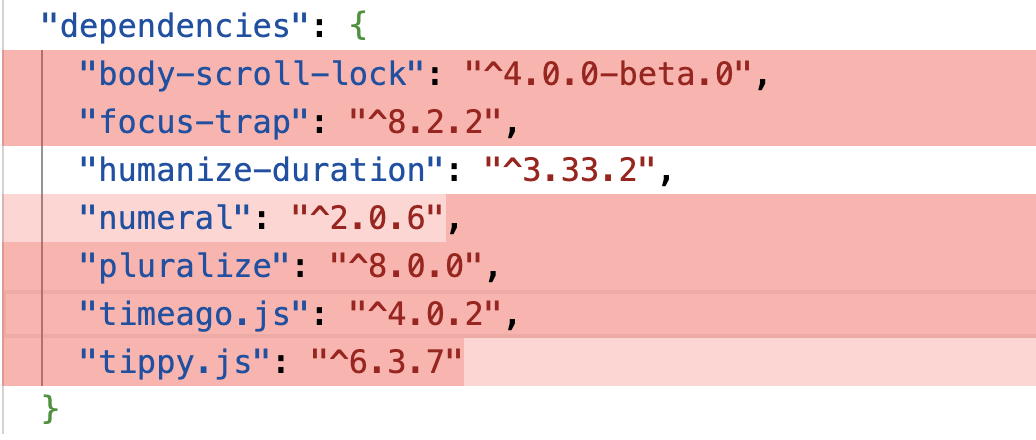
In a typical mid-sized JavaScript app, you can often find somewhere between 60KB and 90KB (minified and gzipped) of dependencies that the platform can now handle on its own. Date and number formatting, HTTP requests, modals, tooltips, deep cloning, grouping arrays: these were all real gaps a few years ago. A lot of them aren’t gaps anymore.
The
reason those libraries stick around isn’t laziness. It’s that most
teams don’t re-audit their dependencies on a Baseline cadence, or are
simply not aware of how fast browsers are shipping these days. You check
npm audit for security, but is this library still doing something the browser can’t? is a question that rarely gets asked. So the libraries stay.
In
this article, we’ll run that audit together. Instead of going through
dependencies one by one, we’ll work in clusters, because the wins tend
to come in groups. We’ll do the bundle math, build a small decision
framework you can reuse, and stay honest about the cases where the
platform still falls short. By the end, you’ll have a repeatable process
you can run on your own package.json.
What “Baseline” Actually Means
Before we start deleting things, let’s quickly recap what Baseline is. Feel free to skip this section if you’re already familiar.
Baseline is a project from the WebDX Community Group that tells you, in plain terms, how safe a web feature is to use across the major browsers (Chrome, Edge, Firefox, and Safari). A feature can be in one of three states:
- Limited availability
The feature hasn’t shipped in all the major engines yet. Not safe to rely on without a fallback. - Baseline Newly available
The feature has just landed in all the major engines. It works for users on up-to-date browsers, but older devices in the wild may not have it yet. - Baseline Widely available
The feature has been in all the major engines for 30 months. At this point, you can reach for it without much thought.
That 30-month gap between “Newly” and “Widely” matters a lot for this audit. A feature that’s Widely available is something you can usually drop a library for today. A feature that’s only Newly available is something you can drop a library for if you check your audience first, or if you’re comfortable with a small feature check. We’ll treat those two cases differently throughout.
You can look any feature up on webstatus.dev, on MDN (every reference page shows a Baseline badge near the top), or programmatically with the web-features npm package. We’ll use all three later when we run the audit on a real project.
A Decision Framework Before You Delete Anything
It’s tempting to read “the browser does this now” and start ripping libraries out. Let’s not do that. A swap that looks free on paper can quietly break things for a chunk of your users, or cost you a feature you were relying on without realizing it.
So before dropping any library, ask three questions. We’ll reuse these in every cluster below.
1. Is the replacement Baseline-safe for my audience?
Not “is it Baseline” in the abstract, but “is it safe for the people who actually use my app.” If the native feature is Widely available, this is usually a yes. If it’s only Newly available, check your analytics or your browserslist
config and see what share of your users would miss out. A B2B dashboard
where everyone’s on the latest browser is a very different situation
from a public-facing site with a long tail of old Android devices.
2. What does the swap actually cost?
Dropping a library isn’t always free. Sometimes the native feature isn’t supported widely enough yet, so you’d reach for a polyfill. If that polyfill is heavier than the library you’re removing, you’ve made your bundle bigger, unless you load it conditionally. We’ll see exactly this with Temporal later.
3. Does the platform feature cover my real use case?
Libraries often do more than the platform feature they resemble. axios isn’t just fetch with automatic JSON parsing; it has interceptors, request cancellation, and retries. If you’re using those, a straight swap to fetch will leave you reimplementing them. Check what you actually use before assuming it’s a drop-in replacement.
Keep these three in mind. Every cluster below is really just these questions applied to a different corner of your dependencies.
Cluster 1: Internationalization (The Biggest Drop Today Win)
This
is the cluster where you’ll usually find the most KBs sitting on top of
features that are already Widely available. The browser ships a whole
family of formatting tools under the Intl namespace, and a lot of small, popular libraries became unnecessary.
Here are the usual suspects and what replaces them:
timeago.js(1 KB gz) →Intl.RelativeTimeFormatpluralize(2.3 KB gz) →Intl.PluralRulesnumeral(3.9 KB gz) →Intl.NumberFormathumanize-duration(6.6 KB gz) →Intl.DurationFormat- list-joining helpers →
Intl.ListFormat
Let’s walk through some of them.
Relative Time
timeago.js exists to turn a timestamp into “3 hours ago”. Intl.RelativeTimeFormat does the same thing, and it’s Baseline Widely available.
The numeric: "auto"
option is the nice touch here: it gives you “yesterday” instead of “1
day ago” where the language has a word for it. You pass a number and a
unit, and you get a localized string back.
You may be wondering about the one thing timeago.js does that this snippet doesn’t: it picks the unit for you. Given a date, timeago.js decides whether to say “seconds” or “days.” Intl.RelativeTimeFormat
expects you to do that part. It’s a few lines of arithmetic (work out
the difference, find the largest unit that fits), and once you’ve
written that helper, you don’t need the library anymore.
Numbers, Currency, And Lists
Intl.NumberFormat covers most of what number-formatting libraries do: thousands separators, currency, percentages, and compact notation.
And Intl.ListFormat,
Widely available, handles the “join an array into a sentence” problem,
including the Oxford comma, which is the kind of thing people write
fiddly helper functions for:
The One Caveat: Durations
humanize-duration turns a number of milliseconds into “1 hour, 30 minutes”. The platform equivalent is Intl.DurationFormat:
One thing to keep in mind is that Intl.DurationFormat is Baseline Newly
available at the time of writing, not Widely available. It landed in
all the major engines in March 2025, and it’s on track to become Widely
available in 2027. So this one fails question 1 for broad-audience apps
unless you check your traffic first or add a fallback. For an internal
tool on modern browsers, it’s fine today. For a public site with old
devices, give it another year or guard it with a feature check.
The Math On This Cluster
If your app uses the full set (humanize-duration, timeago.js, pluralize, numeral), that’s roughly 14 KB gzipped
of dependencies, most of it replaceable right now with Widely available
APIs. The internationalization cluster is usually the easiest win in
the whole audit.
Cluster 2: HTTP Clients
This cluster is more nuanced, so it’s a good one to slow down on.
The browser HTTP libraries people reach for are axios (17 KB gz) and superagent (19 KB gz). For most requests, fetch plus AbortController covers what you need, and both are Widely available.
A basic GET looks like this:
The one extra line (res.json()) is fetch being explicit where axios was implicit. That’s the pattern across this whole cluster: fetch does less for you by default, and you decide whether you want the things it leaves out.
Timeouts #
axios has a timeout option. fetch has AbortSignal.timeout():
Where fetch Doesn’t Replace axios
This is where question 3 does most of the work, so let’s be specific about the gaps:
fetchdoesn’t reject on HTTP errors.
A404or500is a resolved promise, not a rejection. You have to checkres.okyourself.axiosrejects on any non-2xx status.- No interceptors.
If you rely onaxiosinterceptors to attach auth tokens or handle 401s in one place,fetchhas no equivalent. You’d wrapfetchin your own function or class to get the same behavior. - No automatic retries.
axios(with a plugin) can retry failed requests. Withfetch, that’s your code to write. - No upload progress.
fetchstill can’t report upload progress in a first-class way. If you have a file uploader with a progress bar, that’s a real reason to keep a library.
I personally heavily rely on interceptors in my interactive online courses, such as Learn JavaScript, and I have solved that for years using a custom class on top of fetch. I’ve shipped this to millions of users and have seen lots of success with it.
None
of these are hard to rebuild, and most apps only use one or two of
them. But this is exactly the kind of cluster where you shouldn’t do a
blind find-and-replace. Look at how you actually use your HTTP client
first. If it’s plain GETs and POSTs, dropping axios for a thin fetch wrapper saves you about 17 KB gzipped.
Cluster 3: UI Primitives
This cluster has some of the most satisfying swaps, because the platform features don’t just match the libraries, they’re often more accessible than what teams ship by hand.
The libraries here are modal dialogs (something like a11y-dialog, 1.8 KB gz), tooltip and popover libraries (tippy.js, 14 KB gz, which bundles Popper for positioning), focus-trap (6.6 KB gz), and body-scroll-lock (1.3 KB gz). They get replaced by three platform features: the <dialog> element, the Popover API, and CSS anchor positioning.
The <dialog> Element
A huge amount of modal-related code exists to solve accessibility problems: trapping focus inside the modal, closing on Escape, restoring focus to the previous element when the dialog is closed, and rendering above everything else. The <dialog> element, Widely available, does all of that for you.
Calling showModal() does the work that focus-trap was installed for: focus moves into the dialog, the rest of the page becomes inert so you can’t tab out of it, Escape closes it, and focus returns to the element that opened it. The dialog renders in the browser’s Top layer, so you don’t fight z-index. You also get a ::backdrop pseudo-element to style the overlay.
That single element can replace your modal library and focus-trap. The one piece it doesn’t handle on its own is locking the background from scrolling, which is what body-scroll-lock was for. That’s now one line of CSS:
If you’re wondering why we’re using dialog:modal instead of dialog[open], it’s because the open attribute is set as soon as you call show(), but the dialog isn’t actually modal so you don’t want to lock scrolling yet. The :modal pseudo-class is only true when the dialog is actually modal, which is the case when you call showModal().
So three libraries collapse into one element and one CSS rule.
Popover API And Anchor Positioning
For things that aren’t full modals (dropdown menus, tooltips, the small floating panels that tippy.js handles), the Popover API gives you light-dismiss behavior, top-layer rendering, and Escape-to-close with no JavaScript at all:
Clicking the button toggles the popover. Clicking outside it closes it. It’s Baseline Newly available (since January 2025).
The other half of what a tooltip library does is positioning:
keeping the floating element pinned to its trigger and flipping it when
it would overflow the viewport. That’s what Popper (bundled inside tippy.js) handles, and it’s now a CSS feature called anchor positioning. Here it pins the same #menu popover directly under its trigger button:
Anchor positioning is the newest feature in this article. It became Baseline Newly available in January 2026, when Firefox 147 shipped it (Chrome had it since version 125, and Safari since version 26). Because it’s this fresh, it’s squarely a question-1 feature: great for modern audiences, but check your traffic, and note that some of the more advanced parts (like position-try fallbacks) have uneven support across versions. Keep a sensible fallback for older browsers.
Between <dialog>, the Popover API, and anchor positioning, the UI primitives cluster (tooltip library, modal library, focus-trap, body-scroll-lock) adds up to roughly 24 KB gzipped, and you come out the other side with better accessibility defaults than most hand-rolled solutions.
Cluster 4: Lodash Utilities
Lodash is rarely imported whole anymore, but its individual functions show up everywhere, either as the full lodash package (25 KB gz) or as standalone installs like lodash.clonedeep and lodash.groupby. Several of the most common ones now have direct platform equivalents.
Grouping
lodash.groupby reorganizes an array into an object keyed by some property. Object.groupBy does exactly that:
There’s also Map.groupBy for when you want a Map
instead of a plain object (handy if your keys aren’t strings). Both are
Baseline Newly available, since March 2024, and on track to become
Widely available in late 2026.
Deep Cloning
lodash.clonedeep makes a deep copy of an object. structuredClone is the platform version, and it’s Widely available:
structuredClone handles the tricky cases that trip up JSON.parse(JSON.stringify(...)): it clones Date, Map, Set, ArrayBuffer,
and circular references correctly. The limit to know about (question 3
again) is that it can’t clone functions, DOM nodes, or class instances;
it throws on functions and drops the prototype on class instances. For
plain data, which is what most people deep-clone, it’s a clean
replacement.
Set Operations
If you’ve ever pulled in a Lodash helper for union, intersection, or difference, the Set object now has these built in. They’re Baseline Newly available, since June 2024:
The full set of methods is union, intersection, difference, symmetricDifference, isSubsetOf, isSupersetOf, and isDisjointFrom.
What’s Worth Keeping
Not all of Lodash has moved into the platform. debounce and throttle still have no native equivalent, and they’re genuinely useful, so cherry-picking lodash.debounce
is reasonable. The point of this cluster isn’t “delete Lodash,” it’s
“stop shipping the parts the browser already has.” Dropping lodash.clonedeep and lodash.groupby alone is about 8 KB gzipped, and if you were importing the full lodash for a handful of functions, replacing the platform-covered ones can let you drop it entirely.
Cluster 5: Temporal, A Case Study In Not Dropping A Library Yet
Every cluster so far has ended in “go ahead, drop it.” This one is the opposite, and that’s why it’s worth including: it shows the framework telling you to wait.
Temporal is the long-awaited replacement for JavaScript’s Date,
and it’s a genuinely better API: immutable objects, sane time zone
handling, and no more month indexes starting at zero. It reached TC39
Stage 4 in March 2026 and is part of the ES2026 specification. Firefox
shipped it in version 139 (in 2025), and Chrome shipped it in version
144 (January 2026). Safari hasn’t shipped it in a stable release yet;
it’s in Safari Technology Preview, with stable support expected later in
2026.
If Temporal is news to you, check out the Temporal Cheatsheet for a quick overview of the API and a comparison to Date.
However, Temporal is not Baseline. It’s still in limited availability,
because Safari users don’t have it. To use it across all browsers
today, you need a polyfill, and this is where the math turns against
you.
The official @js-temporal/polyfill is about 44 KB gzipped. There’s a smaller polyfill that internally does not depend on BigInt and it weighs 19 KB gzipped. A lightweight date library like dayjs is about 3 KB gzipped. So if you swap dayjs for Temporal plus its polyfill right now, you’re not saving 3 KB, you’re adding roughly 41 KB to your bundle, unless you are able to load the polyfill conditionally.
Run it through the framework:
- Question 1 (audience): Temporal isn’t Baseline. For a broad audience, that’s a lot of people.
- Question 2 (cost): the polyfill is more than ten times the size of the library you’d remove. The swap makes your bundle bigger.
- Question 3 (feature gap): Temporal actually wins here; it does more than
dayjs. But that doesn’t matter while questions 1 and 2 are failing.
The verdict is generally clear: keep dayjs (or date-fns)
for now. The moment to revisit is when Safari ships Temporal in a
stable release and it reaches Baseline. At that point you can use
Temporal natively and conditionally load the polyfill for users on older
browsers. This is a feature to write down and check again in a few
months, not one to act on today.
How To Run This Audit On Your Own package.json
The clusters above are a starting map, but your dependencies are your own. Here’s a repeatable process you can run this quarter.
Step 1: List Your Production Dependencies
Start by listing what actually ships to users:
Step 2: Measure What Each One Costs
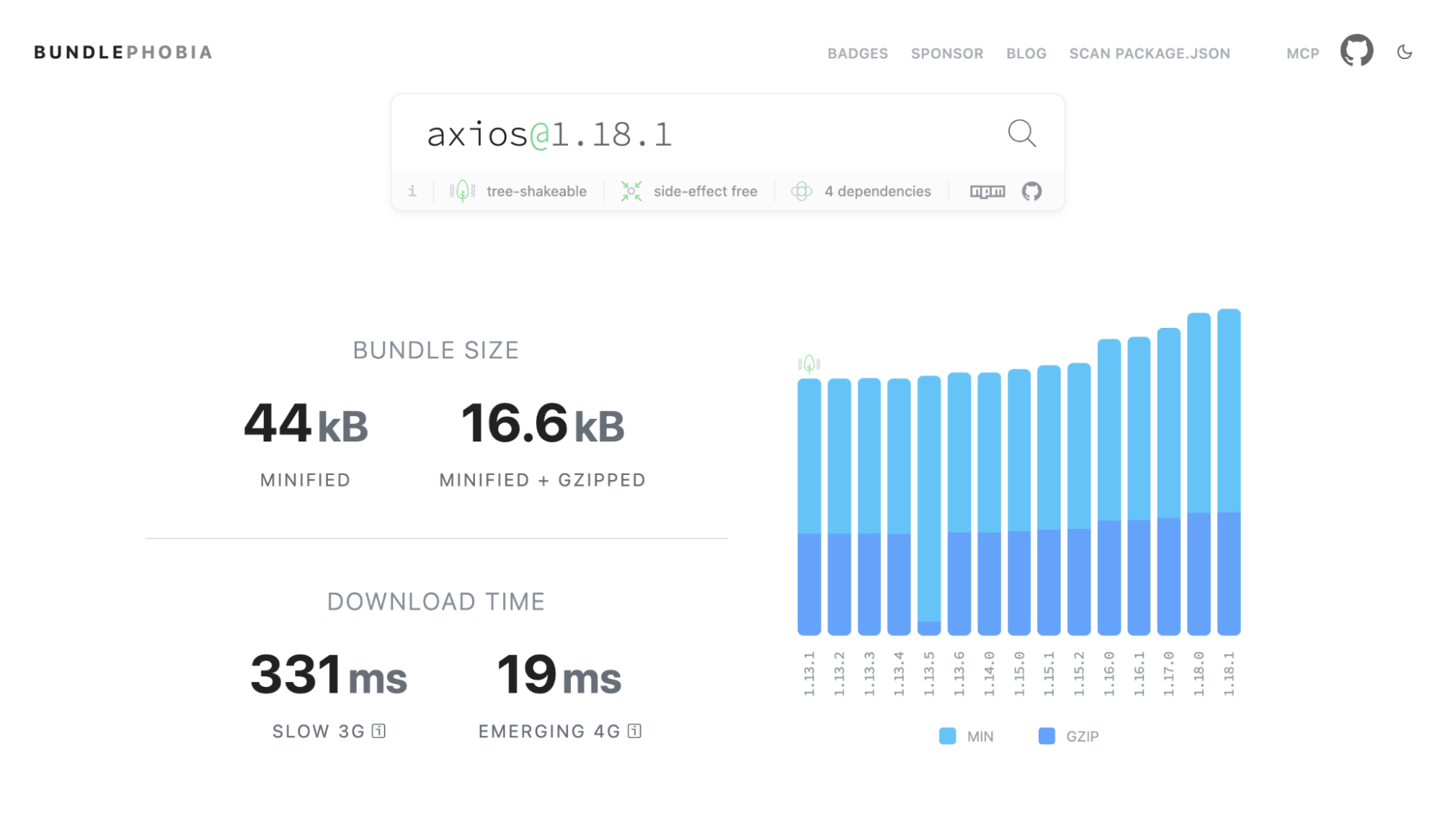
For a quick per-package number, Bundlephobia gives you the minified and gzipped size of any npm package. For the real picture (what each dependency costs in your actual bundle, after tree-shaking and deduplication), run a bundle analyzer against your build. npx source-map-explorer works on most bundles, and npx vite-bundle-visualizer works for Vite projects.
Step 3: Check The Baseline Status Of Each Replacement
For each candidate, find the platform feature that would replace it and check its Baseline status. The quickest way is webstatus.dev or the Baseline badge on the feature’s MDN page.
Step 4: Run The Three Questions
For
each library with a platform replacement, go back to the framework: Is
it Baseline-safe for your audience? What does the swap cost? Does the
feature cover how you actually use the library? Most of your decisions
will fall out of question 1 (check the feature’s status against your browserslist) and question 3 (check your own usage).
Step 5: Swap Behind Progressive Enhancement Where Needed #
For Widely available features, swap and move on. For Newly available ones, either confirm your audience is on modern browsers or guard the new code with a quick feature check and keep a fallback:
That way you ship less code to the users who can run it, without breaking the ones who can’t.
Wrapping Up
Add
the clusters up, and the picture is concrete. The internationalization
cluster is around 14 KB gzipped, HTTP is around 17 KB, the UI primitives
are around 24 KB, and the Lodash utilities are 8 KB or more depending
on how much of the library you were shipping. For a typical mid-sized
app, that’s somewhere between 60 KB and 90 KB gzipped of dependencies
you can hand back to the platform, and more if you were shipping the
full lodash or several of these libraries at once. (The
uncompressed numbers are two to three times larger, which is what you’ll
see in a bundle analyzer before gzip.)
I’ve chosen relatively lean packages for most of these features, but some individual packages could still be heavy. Your dialog package, for instance, could alone weigh as much as 50KB gzipped depending on what you’re using.
A few features are worth keeping an eye on over the next year, because they’ll open up further swaps:
- Temporal going native.
Once Safari ships it in a stable release and it reaches Baseline, you can drop both your date library and the polyfill, turning today’s regression into a real win. - CSS anchor positioning maturing.
It became Baseline Newly available in January 2026. As it ages toward Widely available, dropping tooltip and popover positioning libraries gets safer for broad audiences. Object.groupByand friends crossing into Widely available.
The 2024 batch (array grouping, Set methods) is on track to become Widely available in late 2026, which moves them from “check your audience” to “just use it.”
None of this is a one-time cleanup. The platform ships new features constantly, and the gap between “you need a library for this” and “the browser does this” keeps closing. The habit worth building is small: once a quarter, run the audit. List your dependencies, check what’s now Baseline, and hand back what you can.
Pick one cluster from this article, open your package.json, and see how much of it the browser already does for you.


No comments:
Post a Comment