Want your brand to stand out in search? Learn how the Google Knowledge Panel works, who qualifies, and how to boost your chances of getting one.
Ever Googled yourself and wished for that polished informational box to pop up on the results page?
That’s a Google Knowledge Panel. More than just a helpful box on the search engine results page (SERP), it’s Google’s way of signaling, “We know who you are, and we trust you.”
Knowledge Panels remain one of the strongest visibility and credibility tools in search. And with Google shifting toward entity-based and AI-driven results, securing a Knowledge Panel is becoming one of the most strategic SEO moves you can make today.
What is a Google Knowledge Panel?
A Google Knowledge Panel is the information box you see to the right side of desktop search results (or at the top on mobile). It gives a quick, authoritative snapshot of an entity, such as a person, place, thing, object, or event, that you’ve searched for.
For example, a Google search of “Apple” shows this Knowledge Panel:

Knowledge Panels, introduced in 2012 alongside Google’s Knowledge Graph, are one of the earliest and most foundational SERP features released by Google. Getting a Knowledge Panel is a big deal because it’s one of the clearest ways that Google shows it has a high level of confidence and understanding about your entity.
The core principle behind getting a Knowledge Panel is becoming a “known entity” to Google by building a consistent, authoritative, and interconnected digital footprint.
Let’s dive into exactly how to achieve that.
Google Knowledge Panel vs. Knowledge Graph: What’s the difference?
Google’s Knowledge Panel is a byproduct of the Knowledge Graph, which is a database containing hundreds of millions of facts about people, places, things, and all sorts of other entities.
While the general public doesn’t have direct access to this database, the Knowledge Panel acts as a middleman, delivering answers to our questions in a nice, neat package.
Note: A Google Knowledge Panel is not the same as a Google Business Profile (GBP). They are both boxes of information that appear in search results, but a GBP is created by a business with information it’s submitted to help it appear in Google Search and Maps. Whereas a Knowledge Panel is automatically generated from Google’s collected data to share information about a specific entity.
Examples of entities with a Knowledge Panel
While it’s not a complete list, the most common types of entities that get a Knowledge Panel are people, companies, organizations, events, and creative works (like books or movies).
The type of information shared on a Knowledge Panel can vary by entity type. For example, the Knowledge Panel for a country like Australia focuses on geographical and demographic data, such as its capital, population, and gross domestic product.
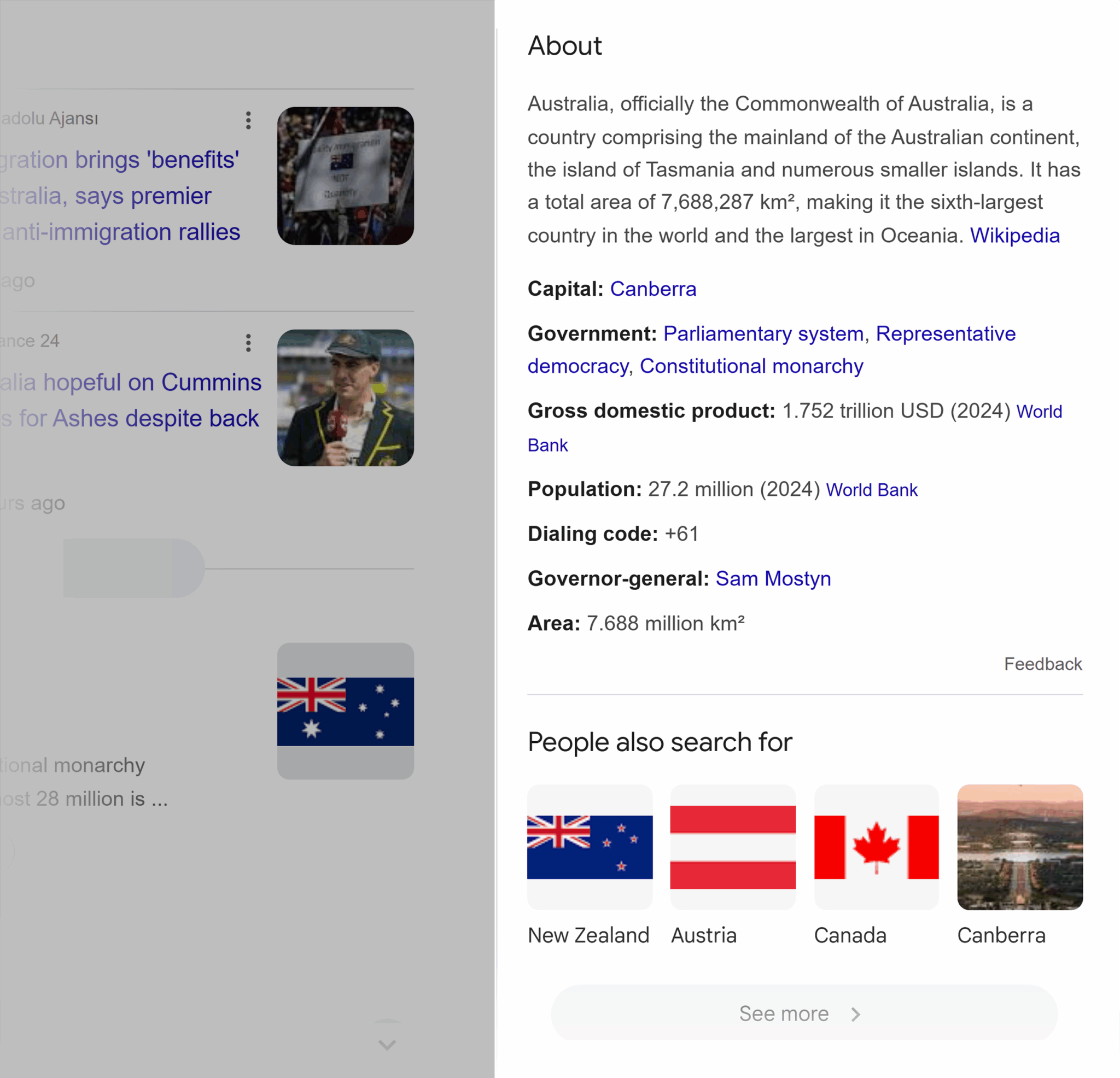
Conversely, the Knowledge Panel for a person like Taylor Swift acts as a real-time summary of her public life, including her various social media links, age, music platforms, and her albums and songs.

Ultimately, a Knowledge Panel’s content is curated to reflect the most relevant and frequently searched information about the specific type of entity.
Which is why it’s possible for a singular person like Taylor Swift to have a Knowledge Panel that is light years more comprehensive and extensive than an entire country’s. A famous person’s career provides a constant stream of new, dynamic data for Google’s algorithm, allowing it to continuously update her panel with richer content, as opposed to the mostly static facts about a country.
But, there are a few elements that essentially all Knowledge Panels possess: A title, a brief “About” section, an image, and an authoritative link to learn more (typically a website link, but sometimes a Wikipedia link, a social media link, or a mix). These core elements provide a consistent, foundational structure across entity types.
Note: Jump to the “Entity eligibility” section to learn more about what qualifies for a Knowledge Panel.
Where do Knowledge Panels appear?
Knowledge panels can appear on various Google-owned platforms (on desktop and on mobile), including Search (the most common), Google Discover, Google Lens, and Google Assistant.
For example, here’s Apple’s Knowledge Panel on mobile:
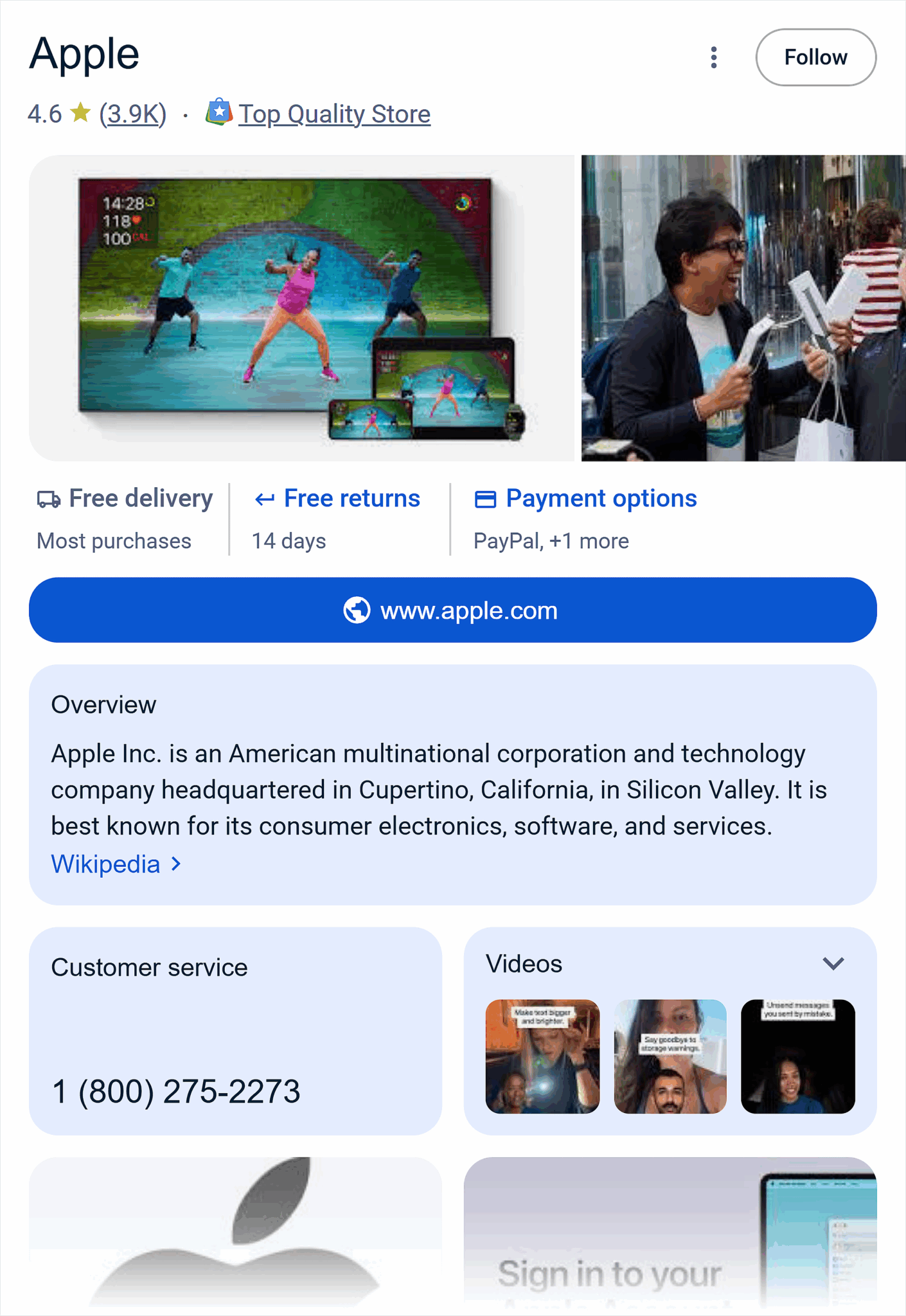
You can’t manually create a Knowledge Panel. It’s a feature that’s triggered by Google’s algorithm when they have gathered enough reliable information about your entity from across the web. And just because it shows up on one platform, it doesn’t necessarily mean it will appear on another. A Knowledge Panel isn’t a static, copy-and-paste object.
For example, a Knowledge Panel for “Apple.com” might appear in Search but not in Discover. Users on Google Search are actively looking for information about Apple, while Discover shows a personalized feed of news and articles, and the Knowledge Panel for a company’s homepage is not typically the type of content it curates.
Why the Knowledge Panel deserves a spot in your SEO strategy
Knowledge Panels offer a huge SEO advantage because they create a separate, authoritative presence on the search engine results page that isn’t dependent on your website’s organic ranking. This provides an unprecedented level of visibility and control.
Other benefits include:
- High authority real estate in the SERPs: A knowledge panel is like an automatic, permanent #1 ranking in the SERPs. It isn’t affected by ranking fluctuations or the same SEO factors that determine the position of organic search results.
- Builds brand trust and credibility: Google only grants Knowledge Panels to the most authoritative, visible entities. Since they’re powered by Google’s Knowledge Graph, they’re like an endorsement of legitimacy from Google.
- Can boost click-through rates: With their eye-catching boxes and top-of-the-page position, Knowledge Panels can drive clicks that an entity’s other lower-ranking results might not. These panels often feature a variety of direct links, such as to an entity’s website, social media profiles, or Wikipedia page, casting a wider net to meet a user’s search needs and boost clicks.
- Controls the right rail: On desktop, the Knowledge Panel claims the entire right-side column of the SERP, potentially preventing competitor ads or organic results from appearing instead. This allows you to maintain more top-of-SERPs real estate and push out competition.
Implementing a Knowledge Panel strategy is a win-win because the tactics needed to earn one (like building high-authority links and getting media mentions) directly strengthen your traditional SEO efforts, even if you don’t get a Knowledge Panel right away.
The new reality: Entity-first search and AI overview visibility
This is becoming increasingly important as search shifts from keyword-based to entity-based. A Knowledge Panel is a sign that Google recognizes your entity as authoritative in its space, helping it stand out. This is a strong signal to AI and conversation-based search platforms that discover your Google Knowledge Panel.
Example
When you search “HubSpot
CRM,” you’ll see a Knowledge Panel with details like its headquarters,
founding date, founders, stock ticker, and official links. That panel
exists because Google has robust, structured entity data on HubSpot
already stored in its Knowledge Graph.

So when someone asks a conversational platform or AI assistant, “what does a CRM do?” or “what’s the best CRM software?” HubSpot has a much greater chance of being featured. Not because it simply ranks for those keywords in organic search, but because its entity data has been validated and connected directly to Google’s AI systems via the Knowledge Graph.
A validated entity takes on an even more critical role when it comes to voice search across Google’s ecosystem, from Google Assistant (which is being phased out and replaced by Gemini) and Google Maps to Android Auto and Google TV.
Voice search as a foundational component
For voice search, a Knowledge Panel is a primary source for direct answers, not just a search result. When a user asks a factual question, the voice assistant doesn’t present a list of links; it queries the Knowledge Graph and provides a single spoken response.
For a large number of direct, factual queries (the type of query a Knowledge Panel is designed to answer), having that validated entity data in the Knowledge Graph is how to get a direct, immediate, no-click, and authoritative spoken response.
If your information is not in the Knowledge Graph, the voice assistant’s response will instead be a summarized web search result. This is a different user experience, and your information is not being used as the primary, authoritative source of truth. The Knowledge Panel is the key that unlocks that specific, valuable type of user interaction.
And as voice search continues to become more integrated into our daily lives, the Knowledge Panel’s role in providing verified facts will become even more essential, serving as a critical source of truth for generative AI.
How Google builds a Knowledge Panel
Google’s algorithm automatically pulls information from its semantic database (the Knowledge Graph) that most closely answers the user’s search query.
According to Google, the Knowledge Graph pulls facts from public sources, licensed data (like sports scores or stock prices), and even directly from users who’ve claimed and suggested edits to their Knowledge Panels.
Here’s a list of the top Knowledge Graph sources:
- Wikipedia / Wikidata
- Google Books, Music, Scholar
- Structured data from your website, such as schema
- Official social profiles (Twitter, Facebook, Instagram, even TikTok)
- Third-party databases (Crunchbase, LinkedIn, Bloomberg, MusicBrainz)
- Government and authoritative organizations
From there, Google selects the Knowledge Panel template that best matches the query, so panels for the same entity may vary based on what the user searches.
For example, when you search “Taylor Swift albums,” the Knowledge Panel leads with the “Listen” element that links to each of her albums. This differs slightly from the standalone “Taylor Swift” search query, which leads with images of the singer and clickable boxes for her age and net worth.

So while the main entity stays the same for each search query, the way the Knowledge Panel results are displayed is tailored to what Google determines is the user’s primary intent.
Then it’s essentially a plug-and-play, where Google uses its database of information to fill in the Knowledge Panel template items based on the template style used.
And boom: The Knowledge Panel is automatically and seamlessly integrated into the search results on the first page.
Entity eligibility: Who or what gets a Knowledge Panel?
While the most common types of entities with Knowledge Panels are people, companies, locations, events, or creative works, any type of entity can qualify for a Knowledge Panel, such as:
- Landmarks and places
- Brands and products
- Sports teams and athletes
- Religious figures and concepts
- Cultural concepts and movements
- Scientific entities
- Fictional characters from media
- (The list goes on)
It’s less about the category an entity falls under and more about its notability and availability of structured data.
Translation: The more accessible and readable an entity’s information is to Google, and the more authoritative exposure it has across the web, the more likely Google is to create a Knowledge Panel for the entity.
Google has never explicitly stated how its algorithm decides entity eligibility for a Knowledge Panel, but it appears to be determined by three key, implied thresholds:
- Search interest: A significant volume of search interest tells Google that an entity is relevant and in demand.
- Citations: A high number of citations from reputable sources indicates that an entity is not only well-known, but also well-respected, which builds credibility and trust.
- Unique identifiers: Unique identifiers from across the web that all point back to a single entity help build a strong digital footprint and reinforce a consistent reputation. These identifiers can include your entity’s NAP (business name, address, phone number), Wikidata ID, ISBN code for a book, CAGE code for a company, or even a social media profile.
Ultimately, whether an entity gets a Knowledge Panel comes down to how clearly, credibly, and consistently it shows up across the web.
How to trigger a Knowledge Panel for your entity
Similar to other SERP features like answer boxes and AI overviews, Knowledge Panels are automatically created when the right mix of signals is involved in a search query. Your job is to help create that mix to trigger a Knowledge Panel for your entity.
But before we walk through this, let’s squash the “Wikipedia is everything” debate.
Wikipedia vs. Wikidata: Do you need entity pages on both?
If you want a Knowledge Panel, a Wikidata page is essential. It feeds Google’s Knowledge Graph in structured, machine-readable language. Conversely, a Wikipedia page is more for demonstrating the notability of your entity, not what it actually is, making it more optional.
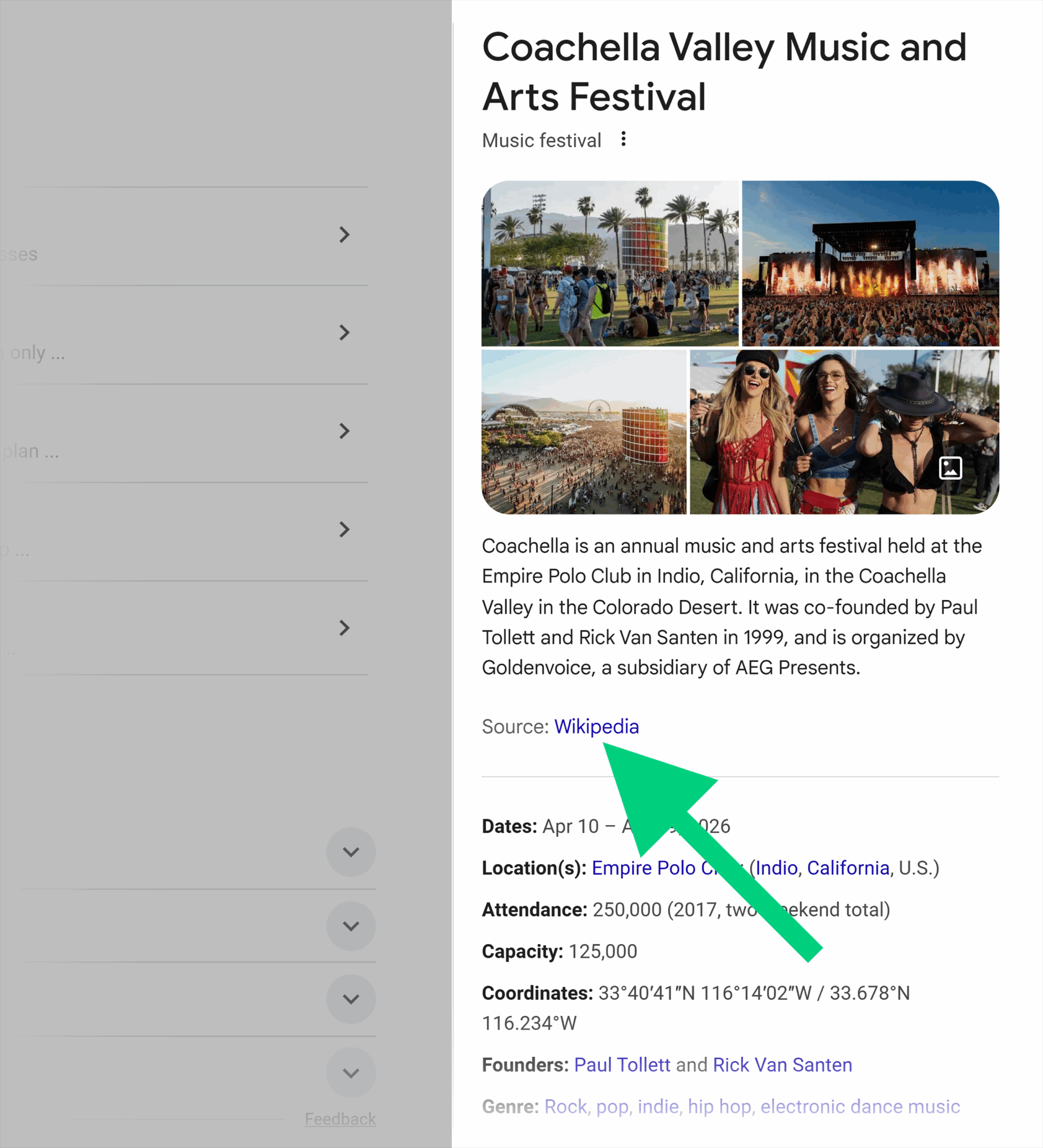
Wikipedia once served as the primary source for Knowledge Panels. But after several algorithm updates, such as the March 2020 core update, Google has shifted to pulling from a wider mix of sources, no longer exclusively relying on Wikipedia.
In short: Wikidata = non-negotiable. Wikipedia = nice to have.
But there’s also a catch-22 with having a Wikipedia page: If the Knowledge Panel uses the Wikipedia page as its main source, you lose full control over the information, since others can suggest edits. While it can be beneficial, it also carries the risk of less ownership and control.
Decide what you’re comfortable with.
Let’s walk through the other key steps to earning a Knowledge Panel.
Establish entity information
- Keep your online information consistent and accurate: This allows search engines to build a verifiable digital footprint for you, increasing your likelihood of being recognized as a “notable entity” and qualifying for a Knowledge Panel.
- Determine your entity page: It’s recommended that your website’s “about us” page serve as the unofficial entity “homepage,” because it’s a fitting place to add facts or answer questions about your entity that will help Google’s Knowledge Graph understand it.
- Keep your brand elements consistent: Your entity’s name, logo, bio, and NAP should be the same across all sources. This consistency signals to Google that all these diverse online mentions are referring to the same, single entity, which strengthens credibility.
- Build high-authority coverage: Get mentions on high-DA news sites, post on credible publications like Medium or Linkedin, and create profiles on review sites like Crunchbase, G2, or Yelp. These types of backlinks and brand mentions serve as corroborating signals that Google can trust, increasing your entity’s notability and its chances of being recognized with a Knowledge Panel.
Leverage structured data
- Optimize your schema markup: The
goal is for your schema markup to perfectly match the copy on your
page, but in Google’s “language” so that it can read and process the
information as efficiently as possible. Use specific schema types like Organization, Person, or LocalBusiness to clearly identify your entity and add key details.
- Go one step further and include more specific properties like description, founder, foundingDate, and any other related attributes that tie back to your Wikipedia page. The more detailed you are, the more data points Google has to work with to create an accurate and comprehensive Knowledge Panel.
- Link your entity to existing known entities: Use the sameAs property to link your entity to its other verified online profiles, such as its official Wikipedia page, social media accounts, review profiles, or publication profiles. By connecting your entity to other entities that Google already “knows” and trusts, you strengthen your own entity’s profile in the Knowledge Graph. It builds that undeniable credibility that your brand is a real and recognized entity.
Here’s a sample sameAs
code snippet that links your social profiles to your entity. Place it
in the <head> section of your site after inserting your brand’s
information:
<script type=”application/ld+json”>
{
 “@context”: “http://schema.org”,
 “@type”: “Organization”,
 “name”: “Brand Name”,
 “url”: “https://www.brandwebsite.com”,
 “sameAs”: [
   “https://www.instagram.com/brand”,
   “https://www.linkedin.com/brand”,
   “https://www.x.com/company/brand”,
 ]
}
</script>
Pro tip: Only link to online profiles that you actively manage and cultivate, thereby showcasing your brand’s authority. Linking to a Facebook page you haven’t posted to in a year won’t strengthen your brand’s credibility.
Ensure information accuracy
- Keep your Wikipedia page up to date: If you have a Wikipedia page, regularly monitor it for any outdated or inaccurate information. The details on your Wikipedia page, such as your entity’s name, founding date, key people, and description, can directly populate a Knowledge Panel. An outdated or incorrect fact here can create a conflict that confuses Google, potentially leading to an inaccurate knowledge panel or no panel at all.
- Maintain updated and accurate business listings: This circles back to the importance of how all entity mentions across the web need to share exactly the same information in order to build credibility with Google. Identical NAP details across sites like Google Business Profile and Yelp signal to Google that your entity is legitimate, which builds a cohesive profile for a Knowledge Panel.
Google may require a minimum of thirty endorsements from trusted third-party sources to consider an entity for a Knowledge Panel, according to a study by Jason Barnard’s company, Kalicube. While it’s not a hard-and-fast rule, it can serve as a loose benchmark for your efforts.
How to claim and manage your Knowledge Panel
Already have a Knowledge Panel for your entity?
Congrats!
Claiming your panel is a proactive step in managing your online reputation. By doing so, you can make sure that your brand’s most important details, from your official website to your social media links, are up to date and correct.
How to claim a Google Knowledge Panel:
- Make sure you have a verified Google account (or create one). You don’t need a Gmail email in order to have a Google account; you can connect an existing non-Gmail account.
- Ensure you have some social profiles to help prove your identity. Facebook, LinkedIn, Twitter, or YouTube profiles are strong candidates. Google may ask you to log in to them to further prove you own these profiles. If you don’t have social profiles, Google may ask for other forms of identification, such as government-issued IDs or business registration documents.
- Use Google’s “Claim this Knowledge Panel” link to claim your panel, which appears at the bottom of the Knowledge Panel if it hasn’t been claimed yet.
You can expect it to take a few days to a week for Google to review and approve your claim.
How to edit a Google Knowledge Panel
You can’t directly edit a Knowledge Panel because it’s automatically generated. But you can suggest edits to elements such as:
- Your logo
- Description
- Social profiles
- Images
- Titles
Google can review and either approve or deny your suggested edits within a few days to a few weeks. The turnaround time often depends on the extent of the suggested edit. A quick update to your social media profile links could happen overnight, whereas information about your entity’s founding and creation could take weeks to review and verify.
Be sure to monitor updates over time.
How to optimize and expand your Knowledge Panel
Now that you’ve earned your Knowledge Panel, you can optimize your online footprint to influence the new expandable features and drop-down information boxes, which maximize your panel’s helpfulness and authority.
Follow these guidelines to increase your chances of expanding your Knowledge Panel:
- Update your site’s structured data: Discrepancies between your schema and on-page content can confuse Google’s algorithms. This confusion may cause Google to ignore your schema entirely, lowering your chances of earning a Knowledge Panel and rich snippets. Always ensure your on-page content and structured data are updated at the same time to avoid these issues.
- Identify your entity’s gaps: Compare your own online presence to the common data points in your competitor’s Knowledge Panels. Do they all have a Wikipedia page and you don’t? Are they all listed on Crunchbase with their founding date and key executives? Are their social media profiles all linked to their structured data? Identify the most common pieces of information they have that your entity is missing and use it to build a plan to help enhance your own digital footprint.
- Link to authoritative sources that mention your entity:
A Knowledge Panel often shares information based on what the most
authoritative sources say about your entity. By linking your site to
these sources, you reinforce the connection, which helps validate your
entity’s existence and importance.
For example, from your site’s “press coverage” page, you could link to an article by a reputable publication that mentions your entity. Or link from your “customer stories” page to a customer’s page that mentions your solution. - Promote consistent, high-quality coverage on third-party sites: Expanding
your Knowledge Panel is heavily dependent on expanding your online
presence. Seek out various reputable third-party sources for features,
interviews, or mentions. These could include:
- Podcast guest interviews or discussion panels
- Press coverage or press releases on prominent news outlets
- Data study contributions (if your entity is cited in an independent study or research paper)
- Use media tools like Source of Sources (SOS), Qwoted, ProfNet, and similar journalist resources to position yourself for these opportunities. Build exposure to your entity by self-publishing articles on large platforms like LinkedIn, Medium, and Muck Rack.
- Expand your presence on relevant Google platforms:
Google will lean on its own platforms to help inform its Knowledge
Panels. Choose the most relevant platforms for your entity and put
meaningful energy into building a presence there. For example:
- For authors or books: A strong presence on Google Books can populate a Knowledge Panel with details like book covers and publication dates.
- For musicians or bands: A presence on YouTube and other streaming platforms can lead to links to music videos or official artist pages.
- For podcasters or show hosts: Go beyond getting your podcast listed on YouTube Music—post episodes to a regular YouTube channel as well. This doubles the content repository that a Knowledge Panel might pull from.
- For businesses or experts: A well-maintained YouTube channel with branded content or a podcast listed on YouTube Music can be linked directly in your knowledge panel, providing users with more ways to engage with your brand. It’s not uncommon for experts to write books to build their credibility—this is another asset you could list on Google Books, which could lead searchers straight to your studies or authored work from the search results page.
- Stay consistently active on social media: Knowledge Panels feature social media links and, in some cases, even recent posts or follower counts. Posting consistently on platforms like X, LinkedIn, or Instagram gives Google fresh, real-time information about your entity. This builds an active, relevant image for your entity, which can complement the information already on your Knowledge Panel.
The goal is to constantly feed new, high-quality content to Google through various methods and platforms so that your digital signals stay relevant and give Google more reasons to showcase your entity in greater detail.
Build the online presence that earns a Knowledge Panel
Earning a Knowledge Panel isn’t about chasing a single tactic; it’s about maintaining a consistent, authoritative, interconnected presence across the web. The more you reinforce your entity’s credibility through trusted sources, fresh content, and clear connections, the more reasons you give Google to highlight you in search.
Pro tip: Use Semrush’s Keyword Magic Tool with the Advanced Filter to spot queries that already trigger Knowledge Panels. These insights show you what Google deems entity-rich searches. By optimizing your own entity’s signals (structured data, authoritative citations, consistent profiles), you improve your chances of triggering or enriching your panel for your branded searches. And in some ambiguous cases, ensuring your entity surfaces where intent overlaps (e.g., “Delta the airline” vs. “Delta the faucet company”).

Treat your Knowledge Panel as a living asset, and it can become one of the most visible, trust-building elements of your brand’s online footprint


No comments:
Post a Comment